تعارف
This manual provides detailed instructions for the installation, operation, and maintenance of your MSI PRO B760-VC WiFi motherboard. Please read this manual thoroughly before beginning the installation process to ensure proper setup and to prevent any damage to the components.
The MSI PRO B760-VC WiFi motherboard supports 12th and 13th Generation Intel Core processors, offering a robust platform for personal computer builds with DDR5 memory, PCIe 4.0, M.2 storage, 2.5Gbps LAN, USB 3.2 Gen2, and Wi-Fi 5 connectivity.
حفاظت جي ڄاڻ
- ڪنهن به جزو کي ڇهڻ کان اڳ هميشه وال آئوٽليٽ کان پاور ڪنڊ کي ڌار ڪريو.
- Wear an electrostatic discharge (ESD) wrist strap or touch a grounded metal object to discharge static electricity before handling components.
- حساس حصن کي ڇهڻ کان بچڻ لاءِ حصن کي انهن جي ڪنارن کان هٿ ڪريو.
- وڌيڪ گرم ٿيڻ کان بچڻ لاءِ پنهنجي پي سي ڪيس اندر مناسب وينٽيليشن کي يقيني بڻايو.
- Refer to the CPU and cooler manufacturer's instructions for proper installation.
پيڪيج مواد
پڪ ڪريو ته هيٺ ڏنل سڀئي شيون توهان جي مدر بورڊ پيڪيج ۾ موجود آهن. جيڪڏهن ڪا به شيءِ خراب يا غائب آهي، ته پنهنجي پرچون ڪندڙ سان رابطو ڪريو.

Image: The MSI PRO B760-VC WiFi motherboard package contents, including the motherboard, manuals, SATA cables, Wi-Fi antenna, M.2 screws, and I/O shield.
- MSI PRO B760-VC WiFi Motherboard
- تڪڙي انسٽاليشن ھدايت
- يورپي يونين ريگيوليٽري نوٽيس
- SATA ڪيبلز
- وائي فائي انٽنا
- M.2 Screw/Standoff Sets
- اي / اي سي جو
مادري بورڊ جي آئيندي
انسٽاليشن کان اڳ مدر بورڊ تي مختلف حصن ۽ ڪنيڪٽرن سان پاڻ کي واقف ڪريو.

تصوير: مٿي کان هيٺ تائين view of the MSI PRO B760-VC WiFi motherboard, showing the CPU socket, DIMM slots, PCIe slots, and various headers.
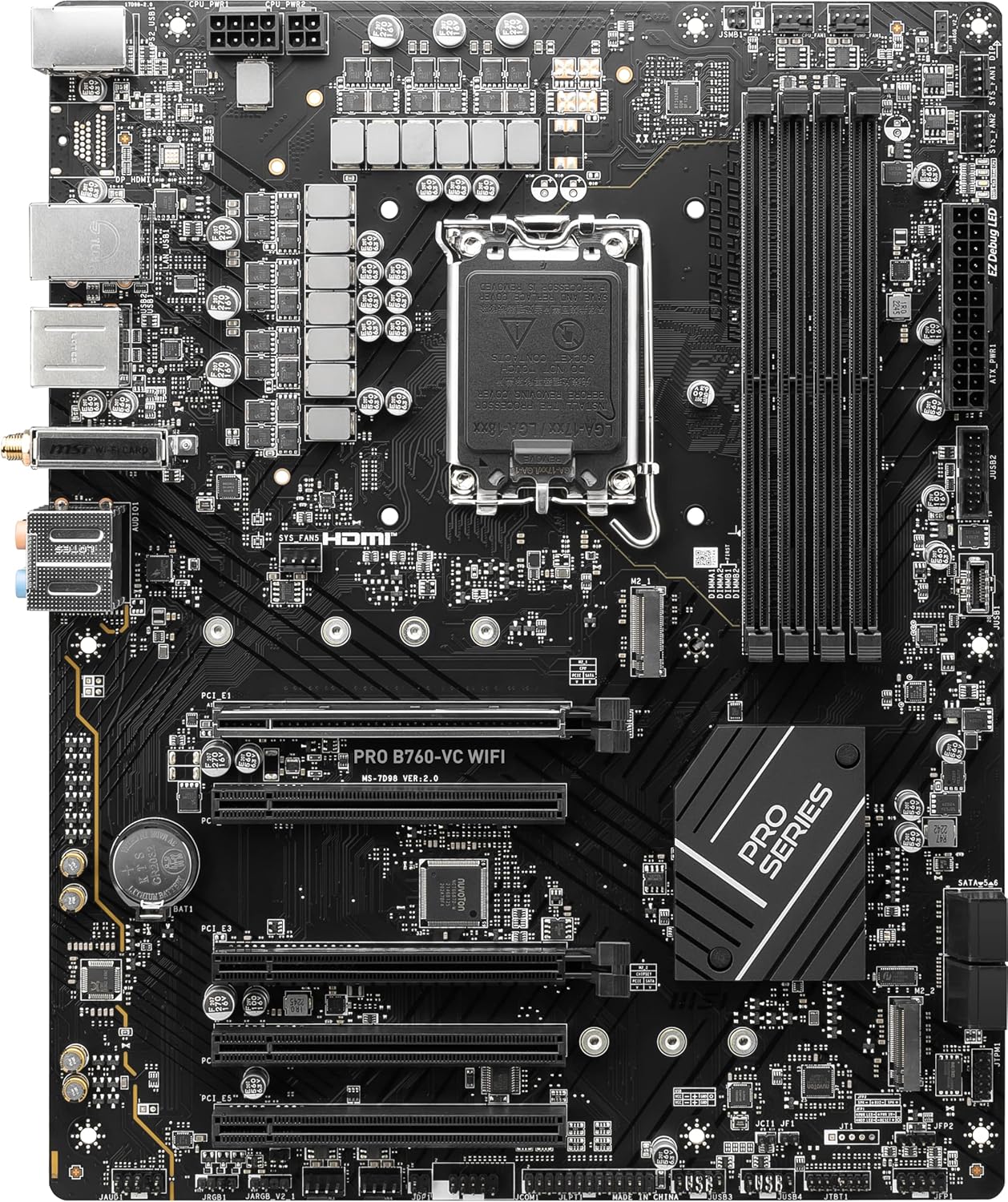
تصوير: زاويه view of the MSI PRO B760-VC WiFi motherboard, highlighting the VRM heatsinks and I/O area.

تصوير: ويجهو تصوير view of the rear I/O panel, showing USB ports, LAN port, Wi-Fi antenna connectors, audio jacks, and video output ports.
اهم اجزاء:
- LGA 1700 سي پي يو ساکٽ: For Intel 12th/13th Gen Processors.
- DDR5 DIMM سلاٽ: For system memory modules.
- PCIe 4.0 x16 Slots: For graphics cards and expansion cards.
- ايم.2 سلاٽ: For NVMe SSDs.
- SATA 6Gb/s Ports: روايتي SATA اسٽوريج ڊوائيسز لاءِ.
- 2.5Gbps LAN پورٽ: For high-speed wired network connectivity.
- USB 3.2 Gen2 پورٽس: تيز رفتار USB ڊوائيسز لاءِ.
- وائي فائي 5 ماڊل: وائرليس نيٽ ورڪ ڪنيڪشن لاءِ.
سيٽ اپ ۽ تنصيب
Follow these steps carefully to install your motherboard and other components.
1. سي پي يو جي انسٽاليشن
- سي پي يو ساکٽ ليور کوليو.
- احتياط سان سي پي يو کي ساڪٽ سان ترتيب ڏيو، پڪ ڪريو ته سي پي يو تي ٽڪنڊي نشان ساڪٽ تي نشان سان ملي ٿو.
- سي پي يو کي زور سان دٻائڻ کان سواءِ ساڪٽ ۾ نرميءَ سان رکو.
- سي پي يو کي محفوظ ڪرڻ لاءِ ساکٽ ليور بند ڪريو.
- سي پي يو ڪولر کي ان جي ٺاهيندڙ جي هدايتن مطابق انسٽال ڪريو.
2. رام (ڊي ڊي آر 5) جي انسٽاليشن
- DIMM سلاٽس جي ٻنهي پاسن تي ڪلپس کوليو.
- Align the notch on the DDR5 memory module with the notch in the DIMM slot.
- ميموري ماڊيول جي ٻنهي پاسن تي مضبوطيءَ سان دٻايو جيستائين ڪلپس پنهنجي جاءِ تي نه اچن.
3. M.2 SSD جي انسٽاليشن
- مدر بورڊ تي M.2 سلاٽ (س) ڳوليو.
- Remove the M.2 standoff screw from the desired slot.
- M.2 SSD کي سلاٽ ۾ هڪ زاويه تي داخل ڪريو.
- Gently push down the M.2 SSD and secure it with the standoff screw.
4. گرافڪس ڪارڊ (PCIe) جي انسٽاليشن
- PCIe x16 سلاٽ تي لچ کوليو.
- Align the graphics card with the slot and press down firmly until it clicks into place.
- گرافڪس ڪارڊ کي پي سي ڪيس سان اسڪرو سان محفوظ ڪريو.
- Connect the necessary PCIe power cables from your power supply to the graphics card.
5. بجلي جي فراهمي جا ڪنيڪشن
- Connect the 24-pin ATX main power connector to the motherboard.
- 8-پن (يا 4+4 پن) سي پي يو پاور ڪنيڪٽر کي مدر بورڊ سان ڳنڍيو.
- Connect SATA power cables to your storage devices.
6. فرنٽ پينل ڪنيڪشن
Connect the front panel headers (power button, reset button, HDD LED, power LED, USB ports, audio jacks) to their corresponding pins on the motherboard. Refer to the motherboard manual for exact pin layouts.
7. Wi-Fi Antenna Installation
Screw the included Wi-Fi antenna onto the connectors on the rear I/O panel for wireless connectivity.
آپريٽنگ هدايتون
1. شروعاتي بوٽ ۽ BIOS/UEFI سيٽ اپ
- پنهنجي پي سي کي گڏ ڪرڻ کان پوءِ، مانيٽر، ڪي بورڊ ۽ مائوس کي ڳنڍيو.
- Power on your system. During startup, repeatedly press the ڊي ايل BIOS/UEFI سيٽ اپ يوٽيلٽي ۾ داخل ٿيڻ لاءِ ڪي.
- In the BIOS/UEFI, you can configure boot order, enable/disable features, and monitor system status.
- تبديليون محفوظ ڪريو ۽ آپريٽنگ سسٽم جي انسٽاليشن جاري رکڻ لاءِ BIOS/UEFI مان نڪرو.
2. آپريٽنگ سسٽم جي انسٽاليشن
Insert your operating system installation media (USB drive or DVD) and follow the on-screen instructions to install your preferred OS (e.g., Windows 10/11).
3. ڊرائيور لڳائڻ
After OS installation, install the necessary drivers for your motherboard components. These can typically be found on the MSI support website for your specific model. Key drivers include:
- چپ سيٽ ڊرائيور
- LAN ڊرائيورز
- وائي فائي ڊرائيورز
- آڊيو ڊرائيور
- گرافڪس ڊرائيور (انٽيگريٽڊ گرافڪس يا ڊسڪريٽ GPU لاءِ)
سار سنڀال
- BIOS/UEFI اپڊيٽس: وقتي طور تي MSI چيڪ ڪريو website for BIOS/UEFI updates. Updates can improve stability, compatibility, and performance. Follow MSI's instructions carefully when updating the BIOS/UEFI.
- صفائي: Regularly clean dust from your PC case and motherboard components using compressed air. Ensure the system is powered off and unplugged before cleaning.
- ڊرائيور اپڊيٽ: بهترين ڪارڪردگي ۽ مطابقت کي يقيني بڻائڻ لاءِ پنهنجن ڊرائيورن کي اپڊيٽ رکو.
مشڪلاتون
جيڪڏهن توهان کي مسئلا درپيش اچن ٿا، ته هيٺ ڏنل عام مسئلا حل ڪرڻ جي قدمن جو حوالو ڏيو:
- طاقت ناهي:
- سڀ پاور ڪنيڪشن چيڪ ڪريو (24-پن ATX، 8-پن سي پي يو، جي پي يو پاور).
- پڪ ڪريو ته پاور سپلائي سوئچ آن پوزيشن ۾ آهي.
- پاور سپلاءِ کي ٻئي سسٽم يا پاور سپلاءِ ٽيسٽر سان ٽيسٽ ڪريو.
- ڪابه ڊسپلي:
- Ensure the monitor is connected to the correct video output (either motherboard or discrete GPU).
- گرافڪس ڪارڊ ۽ رام ماڊلز کي ٻيهر سيٽ ڪريو.
- صرف هڪ RAM اسٽڪ سان بوٽ ڪرڻ جي ڪوشش ڪريو.
- سسٽم جي عدم استحڪام/حادثا:
- سي پي يو ۽ جي پي يو جي گرمي پد چيڪ ڪريو.
- رام جي سالميت کي جانچڻ لاءِ ميموري تشخيصي اوزار هلايو.
- Ensure all drivers are correctly installed and updated.
- بجلي جي فراهمي جي واٽ جي تصديق ڪريوtage سڀني حصن لاءِ ڪافي آهي.
- نيٽ ورڪ ڪنيڪٽيويٽي جا مسئلا:
- For wired LAN, check the Ethernet cable and ensure LAN drivers are installed.
- For Wi-Fi, ensure the antenna is securely attached and Wi-Fi drivers are installed.
- Check router settings and network configuration.
وضاحتون
Below are the key specifications for the MSI PRO B760-VC WiFi Motherboard:
| خاصيت | تفصيل |
|---|---|
| برانڊ | MSI |
| ماڊل نالو | PRO B760-VC WiFi |
| سي پي يو ساکٽ | LGA 1700 |
| مطابقت رکندڙ پروسيسر | Intel 12th Gen, Intel 13th Gen |
| چپ سيٽ جو قسم | Intel B760 |
| رام ميموري ٽيڪنالاجي | ڊي ڊي آر 5 |
| ياداشت جي اسٽوريج جي گنجائش (وڌ ۾ وڌ) | 64 جي بي |
| مکيه پاور ڪنيڪٽر جو قسم | 24-پن |
| پيداوار جي ماپ | 12 x 9.6 x 2.5 انچ (ATX فارم فيڪٽر) |
| شيءِ جو وزن | 2.25 پائونڊ |
| پليٽ فارم | ونڊوز 10 (ونڊوز 11 سان مطابقت رکندڙ) |
وارنٽي ڄاڻ
This product is covered by a manufacturer's warranty. For detailed warranty terms and conditions, please refer to the warranty card included in your product package or visit the official MSI webسائيٽ. وارنٽي دعوائن لاءِ خريداري جو ثبوت رکو.
Note: This specific product is listed as "Renewed." Warranty terms for renewed products may differ from new products. Please consult your retailer or the Amazon Renewed program for specific warranty details regarding renewed items.
حمايت
For further assistance, technical support, driver downloads, or BIOS updates, please visit the official MSI support webسائيٽ:
ايم ايس آءِ جي سرڪاري مدد Webسائيٽ
You can also contact your retailer for product-related inquiries.


