تعارف
This manual provides detailed instructions for the operation and maintenance of your Timex Expedition CAT5 41mm Digital Watch, Model TW4B303009J. Please read this guide thoroughly to ensure proper use and to fully utilize all features of your timepiece. This watch is designed for durability and functionality, featuring a digital display, acrylic lens, and water resistance up to 100 meters.
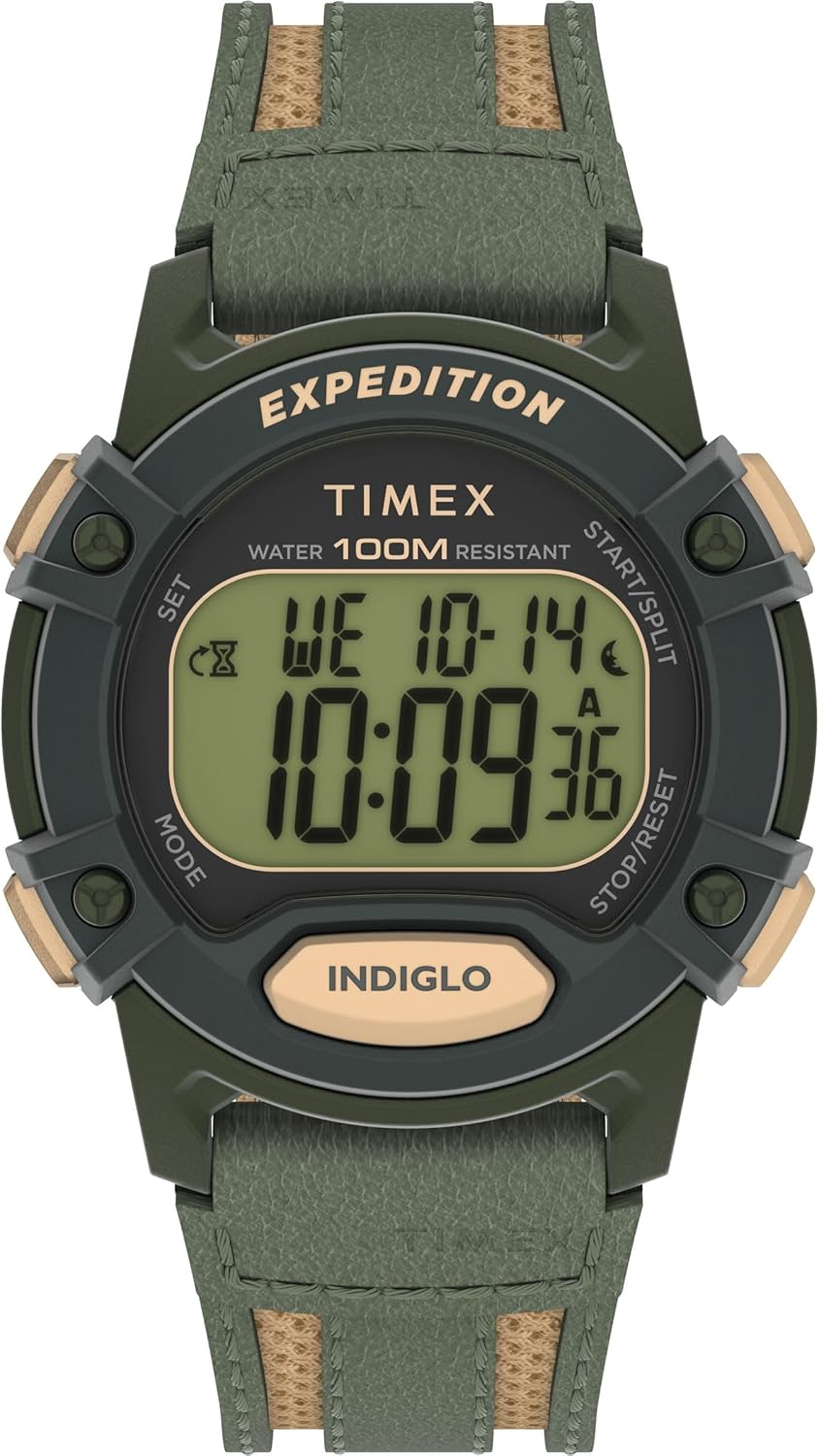
شڪل 1: سامهون view of the Timex Expedition CAT5 41mm Digital Watch.
Setup: Setting Time and Date
Your Timex Expedition watch features two independent time zones (T1 and T2), each with its own time and date settings. This allows for tracking different locations simultaneously.
بٽڻ جو ڪم ختمview:
- SET (Top Left): سيٽنگ موڊ ۾ داخل ٿيڻ ۽ نڪرڻ لاءِ استعمال ٿيندو آهي.
- موڊ (هيٺ کاٻي): Cycles through different watch modes (Chronograph, Timer, Alarms, Timekeeping). Also used to navigate between settings within a mode.
- START/SPLIT (Top Right): Used to increment values in setting modes or start/split functions in Chronograph/Timer.
- STOP/RESET (Bottom Right): Used to decrement values in setting modes or stop/reset functions in Chronograph/Timer.
- INDIGLO (Bottom Center): بيڪ لائيٽ کي چالو ڪري ٿو.
Setting Time (T1 or T2)
- Ensure the watch is in Timekeeping mode. If not, press the موڊ بٽڻ کي بار بار دٻايو جيستائين موجوده وقت ظاهر نه ٿئي.
- کي دٻايو ۽ رکو سيٽ button (Top Left) until "HOLD TO SET" appears, followed by "SET TIME 1" or "SET TIME 2" with a blinking indicator.
- استعمال ڪريو شروع/تقسيم (Top Right) or اسٽاپ/ري سيٽ ڪريو (Bottom Right) buttons to select either "TIME 1" or "TIME 2" for adjustment.
- کي دٻايو موڊ button (Bottom Left) to enter the time setting for the selected time zone. The hour value will begin blinking.
- استعمال ڪريو شروع/تقسيم (Top Right) or اسٽاپ/ري سيٽ ڪريو (Bottom Right) buttons to adjust the hour. Press and hold for faster adjustment.
- کي دٻايو موڊ button to move to the minute setting. Adjust minutes using the شروع/تقسيم or اسٽاپ/ري سيٽ ڪريو بٽڻ
- کي دٻايو موڊ button to move to the seconds setting. Use the شروع/تقسيم or اسٽاپ/ري سيٽ ڪريو buttons to reset seconds to zero.
- هڪ دفعو وقت مقرر ڪيو وڃي، دٻايو سيٽ button (Top Left) to exit the setting mode.
Setting Date (Month, Day, Year, and Format)
- Ensure the watch is in Timekeeping mode.
- کي دٻايو ۽ رکو سيٽ button (Top Left) until "HOLD TO SET" appears, followed by "SET TIME 1" or "SET TIME 2". Select the desired time zone (T1 or T2) for date adjustment.
- کي دٻايو موڊ button repeatedly to cycle through time settings (hours, minutes, seconds) until the month value starts blinking.
- استعمال ڪريو شروع/تقسيم or اسٽاپ/ري سيٽ ڪريو مهيني کي ترتيب ڏيڻ لاءِ بٽڻ.
- کي دٻايو موڊ button to move to the day setting. Adjust the day.
- کي دٻايو موڊ button to move to the year setting. Adjust the year.
- کي دٻايو موڊ button to cycle through time format (12HR/24HR) and date format (MM.DD / DD.MM). Adjust as desired using شروع/تقسيم or اسٽاپ/ري سيٽ ڪريو.
- Once date and formats are set, press the سيٽ نڪرڻ لاءِ بٽڻ.
Switching Main Time Zone Display (T1/T2)
جلدي ڪرڻ view your alternate time zone (T2 if T1 is main, or vice-versa), simply press the شروع/تقسيم button (Top Right) once. The display will briefly show the alternate time zone.
To permanently switch your main displayed time zone:
- From Timekeeping mode, press and hold the شروع/تقسيم button (Top Right) for a few seconds.
- The watch will switch its main display to the other time zone (e.g., from T1 to T2, or T2 to T1).
آپريٽنگ خاصيتون
Hourlيار چيم
ايڇurly chime provides an audible alert at the top of each hour. There is no on-screen indicator for this feature.
- From Timekeeping mode, press and hold the سيٽ button (Top Left) until "HOLD TO SET" appears, then "SET TIME 1" or "SET TIME 2".
- کي دٻايو موڊ button (Bottom Left) nine (9) times. The display will show "CHIME".
- استعمال ڪريو شروع/تقسيم (Top Right) or اسٽاپ/ري سيٽ ڪريو (Bottom Right) buttons to toggle the chime "ON" or "OFF".
- کي دٻايو سيٽ تصديق ڪرڻ ۽ نڪرڻ لاءِ بٽڻ.
Button Tones (Beep)
This feature controls the audible beep sound when buttons are pressed.
- From Timekeeping mode, press and hold the سيٽ button (Top Left) until "HOLD TO SET" appears, then "SET TIME 1" or "SET TIME 2".
- کي دٻايو موڊ button (Bottom Left) ten (10) times. The display will show "BEEP".
- استعمال ڪريو شروع/تقسيم (Top Right) or اسٽاپ/ري سيٽ ڪريو (Bottom Right) buttons to toggle the beep "ON" or "OFF".
- کي دٻايو سيٽ تصديق ڪرڻ ۽ نڪرڻ لاءِ بٽڻ.
Alarms (ALM 1, ALM 2, ALM 3)
The watch has three independent alarms with various repeat options.
- From Timekeeping mode, press the موڊ button (Bottom Left) repeatedly until "ALM 1", "ALM 2", or "ALM 3" is displayed.
- To turn an alarm ON/OFF without adjusting its time, use the شروع/تقسيم (Top Right) or اسٽاپ/ري سيٽ ڪريو (Bottom Right) buttons. The display will show "DAILY", "WEEKDAYS", "WEEKENDS", or "OFF".
- To adjust an alarm's time: While on the desired alarm screen, press the سيٽ button (Top Left). The hour will blink.
- استعمال ڪريو شروع/تقسيم or اسٽاپ/ري سيٽ ڪريو ڪلاڪ کي ترتيب ڏيڻ لاء بٽڻ.
- کي دٻايو موڊ button to move to minutes. Adjust minutes.
- کي دٻايو موڊ button to move to AM/PM indicator. Adjust AM/PM.
- کي دٻايو موڊ button to select the repeat option: "DAILY", "WEEKDAYS", or "WEEKENDS".
- کي دٻايو سيٽ button to confirm and exit. Adjusting an alarm automatically turns it ON.
An alarm icon will appear on the Timekeeping screen when any alarm is active.
ڳڻپ ٽائمر
The countdown timer can be set from 1 second up to 24 hours, with options to stop or repeat.
- From Timekeeping mode, press the موڊ button (Bottom Left) two (2) times to enter Timer mode.
- To start the timer with its current setting, press the شروع/تقسيم button (Top Right).
- To stop the timer, press the اسٽاپ/ري سيٽ ڪريو button (Bottom Right).
- To reset the timer to its default value while stopped, press and hold the اسٽاپ/ري سيٽ ڪريو بٽڻ
- To adjust the timer: While in Timer mode, press the سيٽ button (Top Left). The hour value will blink.
- استعمال ڪريو شروع/تقسيم or اسٽاپ/ري سيٽ ڪريو ڪلاڪ کي ترتيب ڏيڻ لاء بٽڻ.
- کي دٻايو موڊ button to move to minutes. Adjust minutes.
- کي دٻايو موڊ button to move to seconds. Adjust seconds.
- کي دٻايو موڊ button to select the repeat option: "REPEAT" (timer restarts automatically) or "STOP" (timer stops after one cycle).
- کي دٻايو سيٽ تصديق ڪرڻ ۽ نڪرڻ لاءِ بٽڻ.
ڪرنوگراف (اسٽاپ واچ)
The chronograph measures elapsed time, including split/lap times.
- From Timekeeping mode, press the موڊ button (Bottom Left) once to enter Chronograph mode. The display will show "CHRONO" and "00.00.00".
- کي دٻايو شروع/تقسيم button (Top Right) to start the chronograph.
- To record a split/lap time while running, press the شروع/تقسيم button. The display will show the split time for 10 seconds, then resume showing the running total.
- To pause the chronograph, press the اسٽاپ/ري سيٽ ڪريو button (Bottom Right). Press شروع/تقسيم ٻيهر شروع ڪرڻ.
- To stop the chronograph, press the اسٽاپ/ري سيٽ ڪريو بٽڻ
- To reset the chronograph to zero while stopped, press and hold the اسٽاپ/ري سيٽ ڪريو بٽڻ
- To change the display format (Lap/Split vs. Split/Lap): While in Chronograph mode and reset to zero, press the سيٽ button (Top Left). Use شروع/تقسيم or اسٽاپ/ري سيٽ ڪريو to toggle between "LAP SPL" (Lap time on top, Split time on bottom) and "SPL LAP" (Split time on top, Lap time on bottom). Press سيٽ تصديق ڪرڻ.
Indiglo Backlight
The Indiglo backlight illuminates the watch face for easy viewگهٽ روشني واري حالتن ۾.
- کي دٻايو انڊيوگو button (Bottom Center) to activate the backlight. It will stay on for approximately 4 seconds.
- If you continue to press other buttons while the backlight is active, it will remain on for 4 seconds after the last button press.
- There are no adjustable settings for backlight brightness or duration.
سار سنڀال
- پاڻي جي مزاحمت: This watch is water resistant up to 100 meters. It is suitable for showering, swimming, and snorkeling, but not for scuba diving. Do not press buttons underwater.
- بيٽري: The watch uses 1 Lithium Metal battery (included). Battery replacement should be performed by a qualified technician to ensure water resistance is maintained.
- صفائي: Clean the watch with a soft, damp ڪپڙو. سخت ڪيميڪلز يا رگڙيندڙ مواد کان پاسو ڪريو.
- اسٽوريج: گھڙي کي سڌي سج جي روشني ۽ انتهائي گرمي پد کان پري ٿڌي، سڪل جاءِ تي رکو.

Figure 2: Close-up of the watch back, indicating water resistance and battery information.
مشڪلاتون
- ڊم ڊسپلي: If the digital display appears dim, the battery may be low and require replacement.
- غلط وقت/تاريخ: ٻيهر ترتيب ڏيڻ لاءِ "وقت ۽ تاريخ جي ترتيب" سيڪشن جو حوالو ڏيو.
- Watch Not Functioning: Ensure the battery is properly installed and charged. If issues persist, contact Timex customer support.
- پاڻي جي مداخلت: If water appears inside the watch, immediately take it to a qualified watch repair center.
وضاحتون
| خاصيت | تفصيل |
|---|---|
| ماڊل نمبر | ٽي ڊبليو 4 بي 303009 جي |
| ڪيس جي ماپ | 40mm |
| پٽي ڊگھائي | 8 انچ |
| ڊائل جو قسم | ڊجيٽل |
| لينس مواد | اکري |
| پاڻي جي مزاحمت | 100 ميٽر |
| بيٽري جو قسم | 1 ليٿيم ڌاتو (شامل) |
| پيڪيج جي ماپ | 4.41 x 3.03 x 2.56 انچ |
| شيءِ جو وزن | 2.29 اونس |
وارنٽي ۽ سپورٽ
For warranty information, product support, or service inquiries, please refer to the official Timex webسائيٽ تي وڃو يا سڌو سنئون انهن جي ڪسٽمر سروس سان رابطو ڪريو. ڪنهن به وارنٽي دعوائن لاءِ خريداري جو ثبوت رکو.


