تعارف
The ZEBRONICS Z310 NVMe Micro-ATX Motherboard is designed for modern computing needs, supporting Intel 6th, 7th, 8th, and 9th Generation Processors with an LGA 1151 socket. It features DDR4 memory support up to 2666 MHz, an NVMe M.2 slot, 5.1 channel audio, and various connectivity options including USB 3.0, SATA, RJ45 LAN, and HDMI. This manual provides essential information for the proper installation, operation, and maintenance of your motherboard.
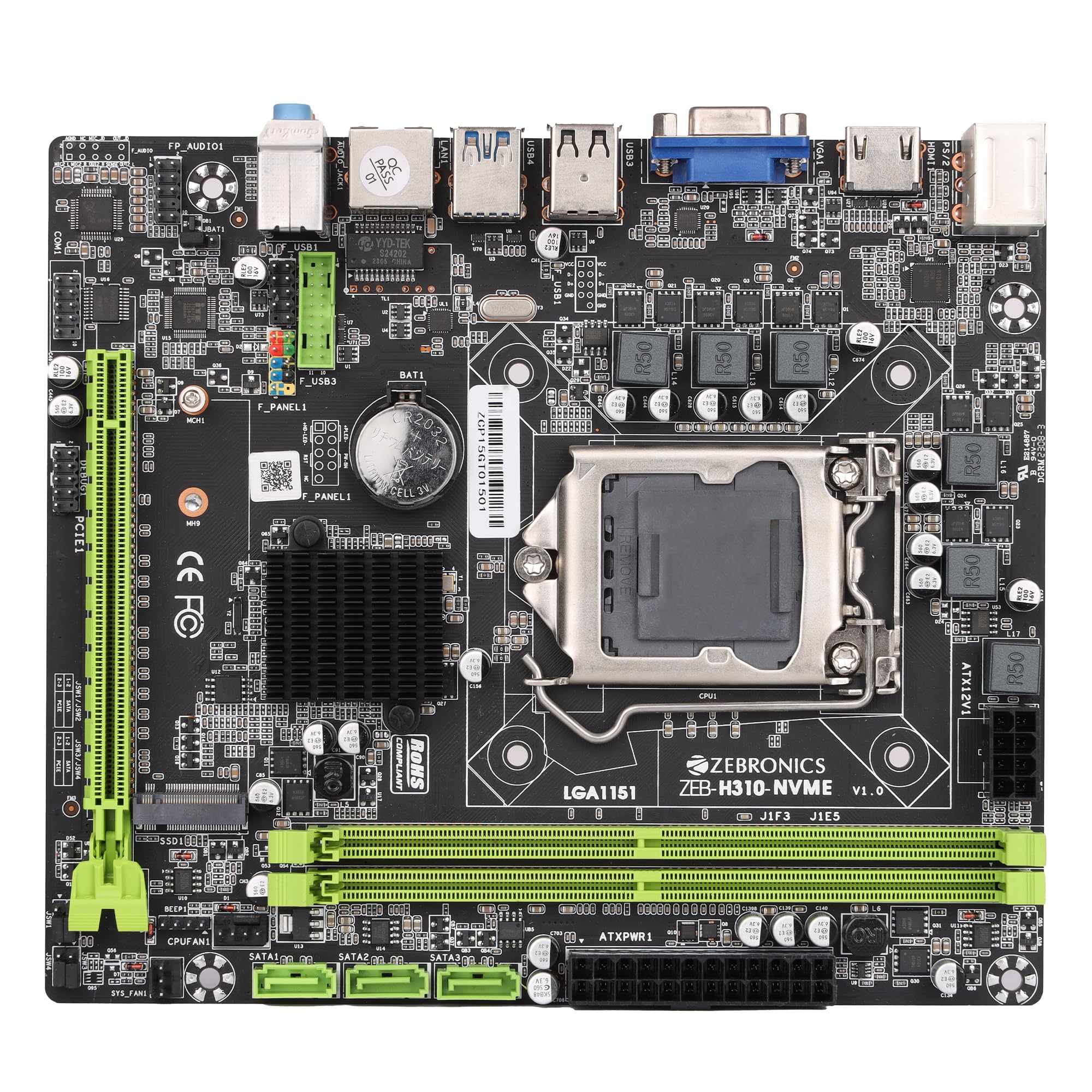
Figure 1: ZEBRONICS Z310 NVMe Micro-ATX Motherboard overview.
اهم خاصيتون
- DDR4 ميموري سپورٽ: Compatible with DDR4 memory modules, supporting speeds from 2133MHz to 2666MHz for optimal system performance.
- LGA 1151 Socket: Designed to support Intel 6th, 7th, 8th, and 9th Generation Processors, ensuring smooth data transfer and increased processing power.
- 5.1 چينل آڊيو: Provides a captivating audio experience with crystal-clear sound.
- LAN ڪنيڪشن: Equipped with 10/100/1000 Mbps LAN support for fast and reliable internet connection.
- PCIe 16 Slot: Facilitates seamless data transfer for graphics cards and other expansion cards.
- اسٽوريج جا اختيار: Includes 3 SATA ports for connecting multiple storage devices (HDDs, SSDs) and a SATA M.2 (NVMe) slot for high-speed M.2 drives.
- USB 3.0 بندرگاهن: Elevates data transfer speeds for external devices.

Figure 2: Visual representation of key features including DDR4, NVMe M.2, LGA 1151, and PCIe X16 support.
سيٽ اپ ۽ تنصيب
انسٽاليشن شروع ڪرڻ کان اڳ، پڪ ڪريو ته توهان جو سسٽم وال آئوٽليٽ کان پاور آف ۽ ان پلگ ٿيل آهي. اجزاء کي اليڪٽرو اسٽيٽڪ ڊسچارج (ESD) نقصان کان بچائڻ لاءِ اينٽي اسٽيٽڪ کلائي پٽي پائڻ.
1. سي پي يو انسٽال ڪرڻ
- مدر بورڊ تي LGA 1151 CPU ساکٽ ڳوليو.
- سي پي يو ساڪٽ ليور کوليو ۽ لوڊ پليٽ کي مٿي ڪريو.
- Carefully align the CPU with the socket, ensuring the gold triangle on the CPU matches the triangle on the socket. Do not force the CPU into place.
- لوڊ پليٽ کي هيٺ ڪريو ۽ ان کي ليور سان محفوظ ڪريو.

شڪل 3: مٿي کان هيٺ view of the motherboard, showing the LGA 1151 CPU socket.
2. RAM انسٽال ڪرڻ (DDR4 ميموري)
- ٻہ DDR4 DIMM سلاٽ ڳوليو.
- DIMM سلاٽ جي ٻنهي پاسن تي ڪلپس کوليو.
- Align the RAM module with the slot, ensuring the notch on the RAM module matches the key in the slot.
- رام ماڊيول جي ٻنهي پاسن تي مضبوطيءَ سان دٻايو جيستائين ڪلپس پنهنجي جاءِ تي نه اچن.
3. اسٽوريج ڊوائيسز جي انسٽاليشن
- SATA ڊرائيوز: Connect SATA data cables from your storage devices (HDDs/SSDs) to the SATA ports on the motherboard. Connect power cables from your power supply to the drives.
- NVMe M.2 Drive: Locate the M.2 slot. Insert the NVMe M.2 drive at an angle and then gently push it down. Secure it with the provided screw.

Figure 4: Labeled diagram of the motherboard highlighting various ports including SATA and M.2 interface.
4. بجلي جي فراهمي کي ڳنڍڻ
- 24-پن ATX پاور ڪنيڪٽر کي پنهنجي پاور سپلائي مان مدر بورڊ تي مين پاور ساڪٽ سان ڳنڍيو.
- Connect the 8-pin (or 4-pin, depending on your PSU) CPU power connector to the ATX12V socket near the CPU. Ensure all 8 pins are connected if your PSU provides an 8-pin connector for stable operation.
5. Connecting Peripherals and Front Panel
- Connect USB devices, keyboard, mouse, and display cables to the rear I/O panel.
- Connect the front panel headers (power button, reset button, HDD LED, power LED, front USB, front audio) to their respective pins on the motherboard. Refer to the motherboard diagram for correct pin alignment.

Figure 5: Rear I/O panel with various ports including PS/2, VGA, USB, LAN, and audio jacks.
آپريٽنگ هدايتون
After completing the hardware installation, you can proceed with the initial boot-up and operating system installation.
- پنهنجو مانيٽر، ڪي بورڊ ۽ مائوس ڳنڍيو.
- توهان جي سسٽم تي طاقت.
- During boot-up, press the designated key (usually DEL or F2) to enter the BIOS/UEFI setup.
- USB ڊرائيو يا آپٽيڪل ڊسڪ مان پنهنجي آپريٽنگ سسٽم کي انسٽال ڪرڻ لاءِ بوٽ آرڊر ترتيب ڏيو.
- Save changes and exit BIOS. The system will restart and begin the OS installation process.
- Install necessary drivers for the motherboard components (chipset, audio, LAN, etc.) from the provided driver CD or the ZEBRONICS webسائيٽ.
سار سنڀال
باقاعده سار سنڀال توهان جي مدر بورڊ جي ڊگهي عمر ۽ مستحڪم ڪارڪردگي کي يقيني بڻائڻ ۾ مدد ڪري ٿي.
- صاف رکو: Periodically clean dust from the motherboard and other components using compressed air. Ensure the system is powered off and unplugged before cleaning.
- ڪنيڪشن چيڪ ڪريو: Ensure all power and data cables are securely connected. Loose connections can cause system instability.
- BIOS اپڊيٽس: Check the official ZEBRONICS website for BIOS/UEFI updates. Update only if necessary and follow the instructions carefully.
- ماحولياتي ڪنٽرول: Operate the motherboard in a well-ventilated area to prevent overheating.
مشڪلاتون
جيڪڏهن توهان کي مسئلا درپيش اچن ٿا، ته هيٺ ڏنل عام مسئلا حل ڪرڻ جي قدمن جو حوالو ڏيو:
- طاقت ناهي:
- Ensure the power supply is connected correctly to both the 24-pin ATX and 8-pin (or 4-pin) CPU power connectors. A common issue is not fully connecting the 8-pin CPU power.
- Verify the power button is correctly connected to the front panel header.
- Check if the power supply unit (PSU) is functional.
- ڪابه ڊسپلي:
- Ensure the monitor is connected to the correct video output (motherboard integrated graphics or dedicated graphics card).
- رام ماڊيولز کي ٻيهر سيٽ ڪريو. غلط سيٽ ٿيل رام ڊسپلي نه هجڻ جو هڪ عام سبب آهي.
- If using a dedicated graphics card, ensure it is properly seated in the PCIe slot and has adequate power.
- سسٽم جي عدم استحڪام/حادثا:
- وڌيڪ گرم ٿيڻ جي جانچ ڪريو. پڪ ڪريو ته سي پي يو ڪولر صحيح طرح سان نصب ٿيل آهي ۽ پنکھا گھمائي رهيا آهن.
- Verify RAM compatibility and stability. Test with one RAM stick at a time.
- پڪ ڪريو ته سڀئي ڊرائيور اپڊيٽ آهن.
- آڊيو مسئلا:
- Ensure audio cables are connected to the correct jacks on the rear I/O panel or front panel.
- Install or update audio drivers.
- Check audio settings in your operating system.
For further assistance, consult the ZEBRONICS support webسائيٽ يا ڪسٽمر سروس سان رابطو ڪريو.
وضاحتون
| خاصيت | تفصيل |
|---|---|
| برانڊ | زيبرون |
| ماڊل نالو | Z310 NVMe |
| سي پي يو ساکٽ | LGA 1151 |
| مطابقت رکندڙ پروسيسر | Intel Core 6th Gen, 7th Gen, 8th Gen, 9th Gen |
| چپ سيٽ جو قسم | Intel Z310 |
| رام ميموري ٽيڪنالاجي | ڊي ڊي آر 4 |
| ياداشت جي گھڙي جي رفتار | 2400 MHz (Supports up to 2666 MHz) |
| ميموري سلاٽ موجود آهن | 2 |
| Drive/Memory Storage Capacity (Max) | 32 جي بي |
| Total SATA Ports | 3 |
| M.2 سلاٽ | 1 (NVMe support) |
| گرافڪس ڪارڊ انٽرفيس | PCI ايڪسپريس |
| Total PCIe Ports | 1 (PCIe 16x) |
| ڪل USB بندرگاهن | 6 (including USB 3.0) |
| USB 2.0 بندرگاهن | 2 |
| ايٿرنيٽ پورٽن جو تعداد | 1 (10/100/1000 ايم بي پي ايس) |
| Total HDMI Port | 1 |
| مکيه پاور ڪنيڪٽر جو قسم | 24-پن |
| شيءِ جو وزن | 800 گرام |
| شيون طول و عرض (L x W x H) | 22.1L x 5.5W x 27.5H سينٽي ميٽر |
وارنٽي ۽ سپورٽ
The ZEBRONICS Z310 NVMe Micro-ATX Motherboard comes with a 1-year carry-in service center warranty. For warranty claims or technical support, please contact ZEBRONICS customer service or visit their official webسائيٽ.
توهان وڌيڪ معلومات ۽ سپورٽ وسيلا ڳولي سگهو ٿا ZEBRONICS Store on Amazon.in.
پراڊڪٽ وڊيو ختمview
وڊيو: هڪ سرڪاري پراڊڪٽ وڊيو شوڪasing the features and overview of the ZEBRONICS Z310 NVMe Micro-ATX Motherboard.


