1. تعارف
خريد ڪرڻ لاءِ مهربانيasing the ODK L-Shaped Gaming Desk. This manual provides detailed instructions for assembly, operation, maintenance, and troubleshooting to ensure safe and efficient use of your new desk. Please read this manual thoroughly before assembly and retain it for future reference.

Image 1.1: The ODK L-Shaped Gaming Desk in a typical gaming environment, showcasinان جي وسيع ڊيزائن ۽ مربوط خاصيتن جي ڪري.
2. حفاظت جي ڄاڻ
- Ensure all components are present and undamaged before beginning assembly. Do not use if any parts are missing or damaged.
- ڊيسڪ کي نرم، صاف مٿاڇري تي گڏ ڪريو ته جيئن ڇڪڻ کان بچي سگهجي.
- مواد کي نقصان پهچائڻ کان بچڻ لاءِ اسيمبلي دوران پيچ کي وڌيڪ تنگ نه ڪريو.
- ننڍن حصن کي ٻارن کان پري رکو ته جيئن ٿڪڻ جي خطرن کي روڪڻ لاء.
- Do not exceed the maximum load capacity of 50 kg for the desktop.
- Ensure all electrical connections (power outlets, USB ports) are properly grounded and used with compatible devices.
- گرم شيون سڌو سنئون ڊيسڪ جي مٿاڇري تي بغير حفاظت جي رکڻ کان پاسو ڪريو.
3. پيڪيج مواد
Verify that all parts listed below are included in your package. A wrench is provided for assembly.
- Desktop panels (L-shaped sections)
- اسٽيل فريم جا حصا
- Adjustable monitor stand components
- Two integrated drawers
- Storage shelves and racks
- Power strip with 2 AC outlets and 2 USB ports (5V-2A)
- RGB LED light strip with controller
- هيڊفون ٿلهو
- Assembly hardware (screws, bolts, adjustable feet)
- اسيمبلي رنچ
- ھدايت وارو دستور
4. اسيمبليءَ جون هدايتون
Assembly is required for this product. Follow the included detailed instruction manual step-by-step. The rack and drawers can be installed on either the left or right side to suit your preference and room layout.
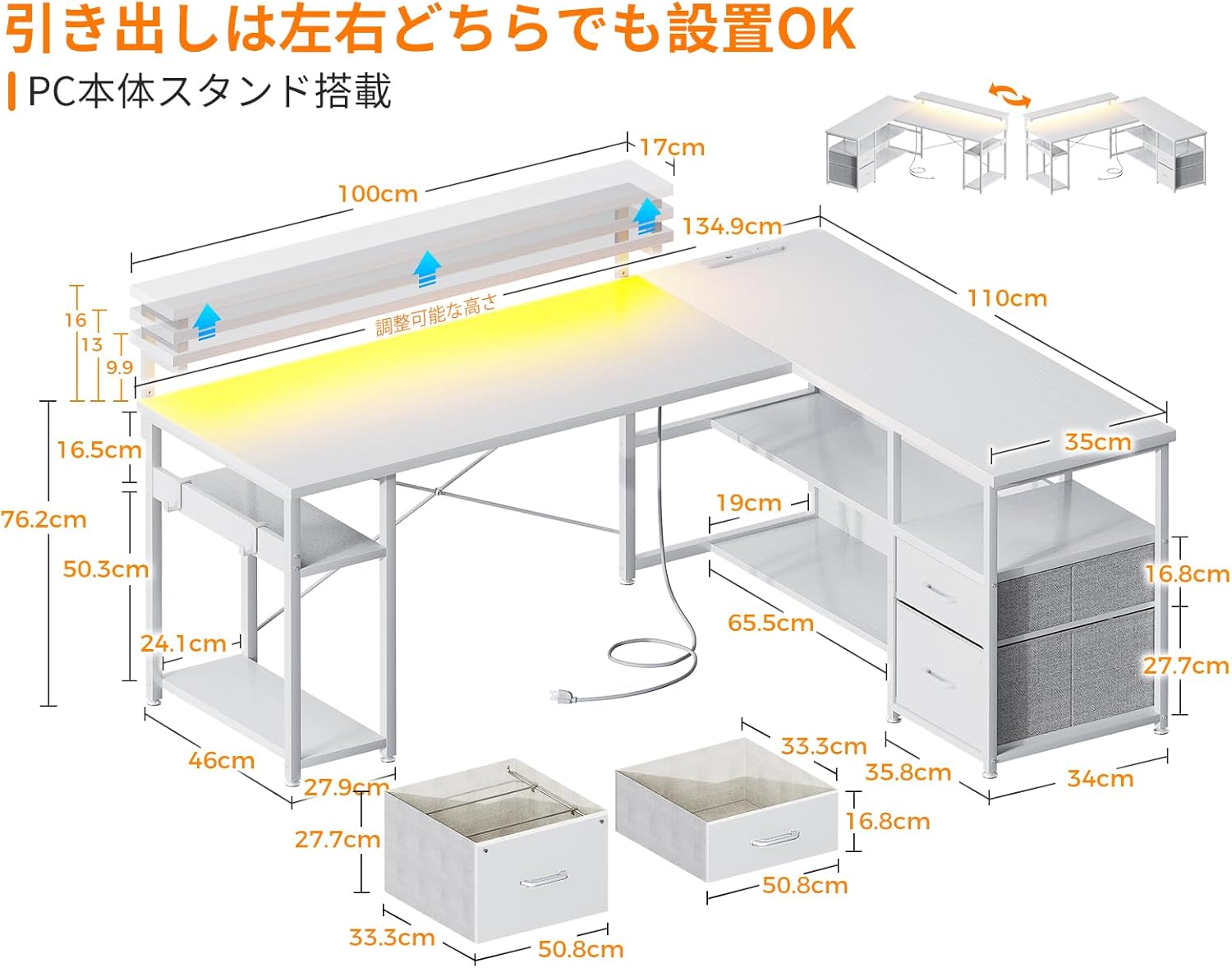
تصوير 4.1: طول و عرضview and reversible design of the desk, illustrating how the storage unit can be positioned on either side.
4.1. جنرل اسيمبلي جون صلاحون
- شروع ڪرڻ کان اڳ سڀني حصن جي سڃاڻپ ڪريو.
- Use the provided wrench for tightening fasteners.
- Do not fully tighten all screws until the entire structure is loosely assembled. This allows for minor adjustments.
- Once the desk is fully assembled, tighten all screws securely.
4.2. Adjustable Feet Installation
The desk is equipped with adjustable feet to ensure stability on uneven surfaces. Install these feet at the bottom of the desk legs. Rotate them clockwise to extend and counter-clockwise to retract until the desk is level and stable.

Image 4.2: Detail of the adjustable feet, which allow for leveling the desk on uneven floors.
5. آپريٽنگ هدايتون
5.1. پاور آئوٽليٽس ۽ USB پورٽس
The desk includes a built-in power strip with two AC outlets (100-240V/15A) and two USB ports (5V-2A). Connect the desk's power cord to a wall outlet. These ports provide convenient charging for your computer, smartphone, and other electronic devices.

Image 5.1: The integrated power strip, showing the AC outlets and USB ports for device charging.
5.2. آر جي بي ايل اي ڊي لائيٽنگ
The desk features an RGB LED light strip to enhance your gaming or work environment. Use the included controller to switch between 10 different lighting modes and adjust colors. The light system includes a memory function that retains the last selected mode when turned off and on again.

Image 5.2: The remote control for the RGB LED lighting, illustrating the various color and mode selections.
5.3. Adjustable Monitor Stand
The monitor stand can be adjusted to three different heights: 9cm, 12cm, and 15cm. Adjust the height according to your preference to improve posture and reduce strain on your neck and shoulders during long periods of use.
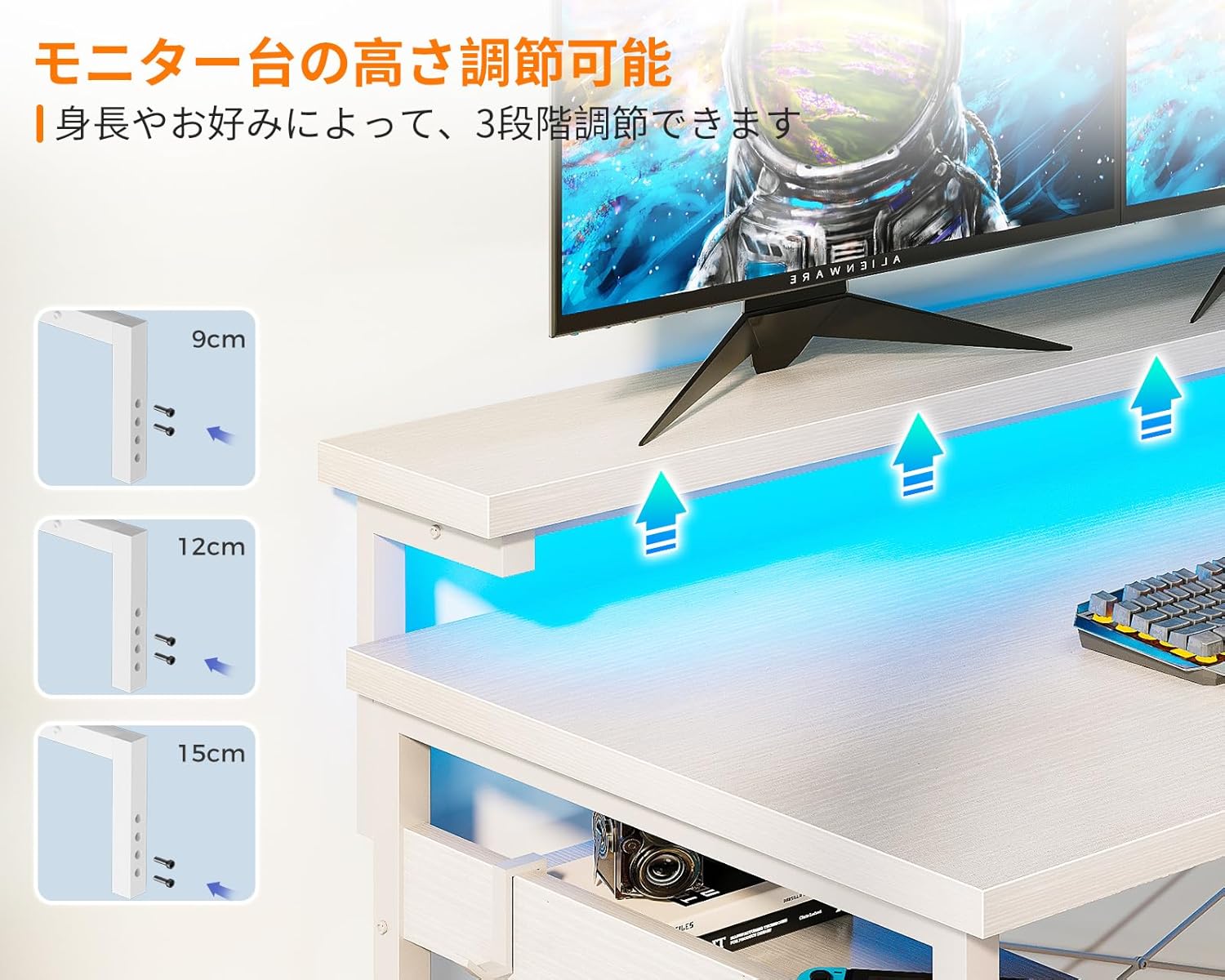
Image 5.3: The adjustable monitor stand, demonstrating the three height options for ergonomic positioning.
5.4. اسٽوريج دراز
The desk includes two integrated drawers for organized storage of books, documents, and other office supplies. These drawers are designed for easy access and contribute to a tidy workspace.

Image 5.4: The integrated drawers, providing convenient storage for various items.
6. سار سنڀال
- صفائي: ڊيسڪ جي مٿاڇري کي نرم سان صاف ڪريو، ڊيamp cloth. Avoid using harsh chemicals or abrasive cleaners, as these can damage the melamine finish.
- illsرندڙ: Immediately wipe up any spills to prevent water damage or staining. The melamine board is resistant to water, but prolonged exposure should be avoided.
- فاسٽنرز: وقت بوقت سڀني اسڪرو ۽ بولٽن کي چيڪ ڪريو ته جيئن پڪ ڪري سگهجي ته اهي تنگ رهن. استحڪام برقرار رکڻ لاءِ جيڪڏهن ضروري هجي ته ٻيهر مضبوط ڪريو.
- برقي اجزاء: Ensure the power cord and connections are free from damage. Do not attempt to repair electrical components yourself.
7. مسئلا حل ڪرڻ
7.1. Desk is Unstable/Wobbly
- Check Adjustable Feet: Ensure all adjustable feet are making firm contact with the floor and are adjusted to level the desk.
- بندن کي مضبوط ڪريو: Verify that all assembly screws and bolts are securely tightened.
- Cross Bracing: Confirm that the cross-bracing hardware is correctly installed and tightened, as this significantly contributes to stability.
7.2. RGB LED Lights Not Working
- پاور ڪنيڪشن: Ensure the LED light strip is properly connected to its power source and the desk's main power.
- ڪنٽرولر بيٽري: If the controller is wireless, check its battery.
- تبديل ڪريو Try unplugging the desk from the wall outlet for a few minutes, then plug it back in to reset the electrical components.
7.3. Power Outlets/USB Ports Not Functioning
- مکيه طاقت: Ensure the desk's main power cord is securely plugged into a working wall outlet.
- ڊوائيس مطابقت: Verify that the devices you are trying to charge are compatible with the provided voltage ۽ ampزمانو
- اوور لوڊ: Avoid overloading the power strip. If too many high-power devices are connected, it may trip a circuit.
8. وضاحتون
| خاصيت | تفصيل |
|---|---|
| برانڊ | او ڊي ڪي |
| ماڊل | B0CWH3746N |
| شڪل | ايل جي شڪل وارو |
| رنگ | اڇو |
| مجموعي طول و عرض | Approx. 135 cm (Width) x 110 cm (Depth) x 76 cm (Height) |
| پيداوار جو وزن | لڳ ڀڳ. 25.2 ڪلو |
| ڊيسڪ ٽاپ لوڊ گنجائش | 50 ڪلو |
| مواد | High-strength Melamine Faced Board, Steel Frame |
| بجلي جا دڪان | 2 x AC (100-240V/15A) |
| USB بندرگاهن | 2 x USB (5V-2A) |
| مانيٽر اسٽينڊ ايڊجسٽمينٽ | 3 levels (9cm, 12cm, 15cm) |
| LED روشني | RGB, 10 lighting modes, memory function |
| اسيمبلي | Customer assembly required (wrench included) |
9. وارنٽي ۽ سپورٽ
ODK provides customer support for product defects. If you encounter any issues or have questions regarding your ODK L-Shaped Gaming Desk, please do not hesitate to contact us. Refer to your purchase documentation for specific warranty terms and contact information.
For assistance, please contact ODK customer service through the platform where you purchased the product or visit the official ODK webسائيٽ.


