1. تعارف
This manual provides comprehensive instructions for the safe and effective operation of the ZOYI ZT303 Digital Multimeter. The ZT303 is a high-precision, auto-ranging measurement tool designed for professionals and enthusiasts, capable of measuring voltage, current, resistance, capacitance, frequency, and duty cycle. Please read this manual thoroughly before use to ensure proper operation and to prevent potential hazards.
2. حفاظت جي ڄاڻ
ميٽر جي محفوظ آپريشن ۽ سروس کي يقيني بڻائڻ لاءِ ، انهن هدايتن تي عمل ڪريو. انهي خبرداري تي عمل نه ڪرڻ سان سخت زخم يا موت واقع ٿي سگهي ٿو.
- Always ensure the meter is in the correct function and range before making measurements.
- جيڪڏهن ميٽر خراب نظر اچي يا ٽيسٽ ليڊز خراب هجن ته ان کي استعمال نه ڪريو.
- درجه بندي واري حجم کان وڌيڪ لاڳو نه ڪريوtage، جيئن ميٽر تي نشان لڳل آهي، ٽرمينل جي وچ ۾ يا ڪنهن ٽرمينل ۽ زمين جي وچ ۾.
- وول سان ڪم ڪرڻ وقت انتهائي احتياط استعمال ڪريوtag30V AC RMS، 42V چوٽي، يا 60V DC کان مٿي. اهي جلدtagاهو هڪ جھٽڪو جو خطرو آهي.
- Disconnect the test leads from the circuit before changing functions.
- بيٽري جو ڍڪ کولڻ کان اڳ ميٽر مان ٽيسٽ ليڊز کي هٽايو.
- Do not operate the meter with the battery cover removed.
- مقامي ۽ قومي حفاظتي ضابطن تي عمل ڪريو.
3. پراڊڪٽ ختمview
The ZOYI ZT303 Digital Multimeter features a clear display, a rotary switch for function selection, and various input jacks for test leads.

شڪل 3.1: سامهون view of the ZOYI ZT303 Digital Multimeter, showing the display, rotary switch, and input terminals.
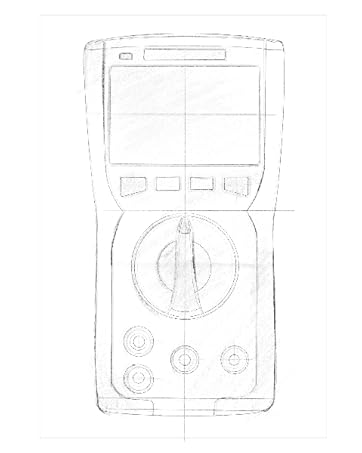
Figure 3.2: Technical drawing illustrating the internal layout or design elements of the ZOYI ZT303 Digital Multimeter.
3.1. جزا
- LCD ڊسپلي: ماپ جي پڙهائي، يونٽ، ۽ فنڪشن اشارا ڏيکاري ٿو.
- فنڪشن بٽڻ: For selecting specific modes (e.g., RANGE, REL, MAX/MIN, Hz, SELECT, HOLD).
- روٽري سوئچ: Used to select the desired measurement function (e.g., V~, V-, A~, A-, Ω, NCV).
- ان پٽ جڪس:
- COM جيڪ: Common terminal for all measurements. Connect the black test lead here.
- VHzΩCAP Diode Jack: ان پٽ لاءِ voltage, frequency, resistance, capacitance, and diode/continuity tests. Connect the red test lead here for these functions.
- mAµA Jack: Input for milliampاڳ ۽ مائڪروampere current measurements. Connect the red test lead here for these functions.
- 10A جڪ: Input for 10 Ampere current measurements. Connect the red test lead here for high current measurements.
4. سيٽ اپ
4.1. بيٽري لڳائڻ
- پڪ ڪريو ته ملٽي ميٽر بند آهي ۽ سڀني ٽيسٽ ليڊز کي ڊسڪنيڪٽ ڪريو.
- يونٽ جي پوئين پاسي بيٽري جي ڪمپارٽمينٽ ڪَوَر کي ڳوليو.
- برقرار رکڻ واري اسڪرو کي کوليو ۽ ڍڪ هٽايو.
- Insert new batteries (e.g., 2 x AAA or 9V, refer to the battery compartment for specific type) observing the correct polarity.
- بيٽري جو ڍڪ تبديل ڪريو ۽ ان کي اسڪرو سان محفوظ ڪريو.
4.2. ٽيسٽ ليڊز کي ڳنڍڻ
هميشه ڪاري ٽيسٽ ليڊ کي COM جيڪ سان ڳنڍيو. ماپ جي فنڪشن جي بنياد تي ڳاڙهي ٽيسٽ ليڊ کي مناسب ان پٽ جيڪ سان ڳنڍيو:
- لاء Voltage, Resistance, Capacitance, Frequency, Diode, and Continuity: Connect the red lead to the VHzΩCAP Diode جيڪ
- For mA/µA Current: Connect the red lead to the mAµA جيڪ
- For 10A Current: Connect the red lead to the 10A جيڪ
5. آپريٽنگ هدايتون
5.1. پاور آن/آف
Turn the rotary switch from the "OFF" position to any desired measurement function to power on the meter. To power off, turn the rotary switch back to the "OFF" position.
5.2. Auto Ranging
The ZT303 features auto-ranging, which automatically selects the appropriate measurement range. For manual range selection, press the RANGE بٽڻ
5.3. DC/AC Voltagاي ماپ (V)
- روٽري سوئچ کي سيٽ ڪريو V~ (اي سي جلدtage) يا V- (DC Voltage) پوزيشن.
- Connect the black test lead to the COM jack and the red test lead to the VHzΩCAP Diode jack.
- Connect the test probes across the circuit or component to be measured.
- جلد پڙهوtagاي قدر LCD ڊسپلي تي.
5.4. DC/AC Current Measurement (A, mA, µA)
احتياط: Never connect the meter in parallel to a voltage source when measuring current. This can damage the meter and the circuit.
- Set the rotary switch to the appropriate current range (A~, A-, mAµA~, mAµA-).
- Connect the black test lead to the COM jack. Connect the red test lead to the mAµA jack for low current or the 10A jack for high current.
- Open the circuit where current is to be measured and connect the meter in series with the load.
- LCD ڊسپلي تي موجوده قدر پڙهو.
5.5. Resistance Measurement (Ω)
احتياط: مزاحمت کي ماپڻ کان اڳ پڪ ڪريو ته سرڪٽ ڊي-انرجائيز ٿيل آهي ۽ سڀئي ڪيپيسٽرز خارج ٿيل آهن.
- روٽري سوئچ کي سيٽ ڪريو اوم پوزيشن.
- Connect the black test lead to the COM jack and the red test lead to the VHzΩCAP Diode jack.
- ماپڻ لاءِ جزو جي وچ ۾ ٽيسٽ پروبس کي ڳنڍيو.
- LCD ڊسپلي تي مزاحمت جي قيمت پڙهو.
5.6. Capacitance Measurement (F)
احتياط: پڪ ڪريو ته ميٽر کي نقصان کان بچڻ لاءِ ماپ کان اڳ ڪيپيسيٽر مڪمل طور تي خارج ٿي ويو آهي.
- روٽري سوئچ کي سيٽ ڪريو ڪيپ position (often shared with Ω or Diode, use SELECT button if needed).
- Connect the black test lead to the COM jack and the red test lead to the VHzΩCAP Diode jack.
- ڪيپيسيٽر ٽرمينلز تي ٽيسٽ پروبس کي ڳنڍيو.
- LCD ڊسپلي تي capacitance قدر پڙهو.
5.7. Frequency/Duty Cycle Measurement (Hz/%)
- روٽري سوئچ کي سيٽ ڪريو هز /٪ position (often shared with voltage or other functions, use SELECT button if needed).
- Connect the black test lead to the COM jack and the red test lead to the VHzΩCAP Diode jack.
- Connect the test probes across the signal source.
- Read the frequency or duty cycle value on the LCD display.
5.8. Diode Test and Continuity Test
- روٽري سوئچ کي سيٽ ڪريو ڊاءِڊ/ تسلسل پوزيشن. استعمال ڪريو چونڊيو button to toggle between diode test and continuity test.
- Connect the black test lead to the COM jack and the red test lead to the VHzΩCAP Diode jack.
- ڊيوڊ ٽيسٽ: Connect the red probe to the anode and the black probe to the cathode of the diode. A forward voltage drop will be displayed. Reverse the probes; an "OL" (Overload) reading indicates a good diode.
- تسلسل ٽيسٽ: Connect the probes across the circuit or component. A continuous beep and a low resistance reading indicate continuity.
5.9. غير رابطي واري جلدtage (NCV) جي چڪاس
- روٽري سوئچ کي سيٽ ڪريو اين سي وي پوزيشن.
- Move the top part of the meter close to the conductor or outlet.
- The meter will emit an audible beep and/or flash an LED indicator when AC voltage جو پتو لڳايو ويو آهي.
5.10. ڊيٽا هولڊ فنڪشن
کي دٻايو رکو ڊسپلي تي موجوده پڙهڻ کي منجمد ڪرڻ لاءِ بٽڻ. هولڊ فنڪشن کي جاري ڪرڻ لاءِ ان کي ٻيهر دٻايو.
5.11. MAX/MIN Function
کي دٻايو MAX/MIN button to enter MAX/MIN recording mode. The meter will display the maximum or minimum reading detected since the mode was activated. Press again to cycle between MAX, MIN, and current reading. Hold to exit.
5.12. Relative Measurement (REL)
کي دٻايو REL button to store the current reading as a reference value. Subsequent measurements will be displayed as the difference from this reference value. Press again to exit relative mode.
6. سار سنڀال
6.1. صفائي
اشتهار سان ڪيس صاف ڪريوamp ڪپڙو ۽ هلڪو صابڻ. رگڙيندڙ يا محلول استعمال نه ڪريو. استعمال کان اڳ پڪ ڪريو ته ميٽر مڪمل طور تي سڪي ويو آهي.
6.2. بيٽري مٽائڻ
When the low battery indicator appears on the display, replace the batteries as described in Section 4.1. Prompt replacement ensures accurate readings and proper operation.
6.3. فيوز مٽائڻ
If the current measurement function fails, the fuse may need replacement. Refer to the specific fuse ratings printed near the input jacks or inside the battery compartment. Fuse replacement typically involves opening the back case (after removing batteries) and carefully replacing the blown fuse with one of the identical type and rating. If unsure, consult a qualified technician.
7. مسئلا حل ڪرڻ
| مسئلو | ممڪن سبب | حل |
|---|---|---|
| ڪابه ڊسپلي يا مدھم ڊسپلي ناهي | گھٽ يا مرده بيٽري | بيٽريون تبديل ڪريو (سيڪشن 4.1) |
| "OL" (اوورلوڊ) ڏيکاريل آهي | ماپ چونڊيل حد يا ميٽر جي وڌ ۾ وڌ گنجائش کان وڌيڪ آهي. | Select a higher range (if in manual range) or ensure measurement is within meter's limits. |
| غلط پڙھڻ | Incorrect function selected, poor test lead connection, or damaged test leads | Verify function, check lead connections, inspect and replace damaged leads. |
| موجوده ماپ ڪم نه ڪري رهي آهي | ڦاٽل فيوز | فيوز تبديل ڪريو (سيڪشن 6.3) |
8. وضاحتون
| خاصيت | تفصيل |
|---|---|
| برانڊ | زوئي |
| ماڊل نمبر | ZT303 |
| پيداوار جي ماپ | 4.53 x 1.97 x 7.68 انچ |
| شيءِ جو وزن | 14.11 آونس (399.98 گرام) |
| طاقت جو ذريعو | بيٽري سان هلندڙ |
| رنگ | نيرو |
| ڏيکاريو | Digital LCD, 19999 Counts (typical for ZT303 series) |
| رينگنگ | خودڪار / دستي رينج |
| خاص خاصيتون | True RMS, NCV, Data Hold, Backlight, MAX/MIN, REL |
Note: Detailed electrical specifications (e.g., voltage/current ranges, accuracy) are typically printed on the device or included in a separate specification sheet.
9. وارنٽي ۽ سپورٽ
Warranty information for the ZOYI ZT303 Digital Multimeter is typically provided at the point of purchase or within the product packaging. For specific warranty terms, technical support, or service inquiries, please refer to the official ZOYI webسائيٽ تي وڃو يا پنهنجي مجاز ڊيلر سان رابطو ڪريو.
وڌيڪ مدد لاءِ، دورو ڪريو: ZOYI Official Flagship Store on Amazon


