تعارف
Thank you for choosing the AOC 27B3HA2 27-inch Full HD LED Monitor. This manual provides essential information for the safe and efficient use of your new monitor. Please read it thoroughly before installation and operation, and keep it for future reference.
The AOC 27B3HA2 features a 27-inch Full HD (1920 x 1080) IPS panel, offering wide viewing angles and vibrant colors. It includes a 100Hz refresh rate and 1ms MPRT response time for smooth visuals, Adaptive Sync technology, and eye-care features like Flicker-Free and Low Blue Light modes to enhance user comfort during extended use.

شڪل 1: سامهون view of the AOC 27B3HA2 monitor highlighting its 27-inch size, 100Hz refresh rate, Full HD resolution, Adaptive Sync, IPS panel, and 1ms MPRT response time.
حفاظت جي ڄاڻ
- طاقت جو ذريعو: صرف مانيٽر سان گڏ فراهم ڪيل پاور اڊاپٽر استعمال ڪريو. پڪ ڪريو ته پاور آئوٽليٽ صحيح طرح سان گرائونڊ ٿيل آهي.
- لڳائڻ: Place the monitor on a stable, flat surface. Avoid direct sunlight, heat sources, or excessive dust. Ensure adequate ventilation around the monitor.
- نمي: مانيٽر کي مينهن يا نمي جي سامهون نه رکو. مانيٽر تي مائع سان ڀريل شيون نه رکو.
- صفائي: صفائي ڪرڻ کان اڳ بجلي جي تار کي ڌار ڪريو. نرم، سڪل ڪپڙو استعمال ڪريو. مائع ڪلينر يا ايروسول ڪلينر استعمال نه ڪريو.
- وينٽيليشن: وينٽيليشن جي افتتاح کي نه روڪيو.
- خدمت ڪرڻ: پاڻ مانيٽر جي سروس ڪرڻ جي ڪوشش نه ڪريو. سڀني سروسنگ کي قابل سروس اهلڪارن جي حوالي ڪريو.
پيڪيج مواد
پڪ ڪريو ته سڀئي شيون توهان جي پيڪيج ۾ موجود آهن. جيڪڏهن ڪا به شيءِ غائب يا خراب آهي، ته پنهنجي پرچون ڪندڙ سان رابطو ڪريو.
- AOC 27B3HA2 Monitor
- مانيٽر اسٽينڊ (بنياد ۽ گردن)
- پاور ڪيبل
- HDMI ڪيبل
- جلدي سيٽ اپ گائيٽ
- وارنٽي ڪارڊ
سيٽ اپ ڪريو
1. مانيٽر اسٽينڊ کي گڏ ڪرڻ
- ڇڪڻ کان بچڻ لاءِ مانيٽر جو منهن نرم، صاف مٿاڇري تي احتياط سان رکو.
- اسٽينڊ نيڪ کي مانيٽر جي پوئين پاسي سان ڳنڍيو، ٽيب کي ترتيب ڏيو ۽ دٻايو جيستائين اهو جاءِ تي ڪلڪ نه ڪري.
- اسٽينڊ بيس کي اسٽينڊ جي گردن سان ڳنڍيو. ان کي بيس جي هيٺئين پاسي موجود ڪيپٽيو اسڪرو سان محفوظ ڪريو.

شڪل 2: پوئتي view مانيٽر جو اسٽينڊ اٽيچمينٽ پوائنٽ ڏيکاريندي.
2. ڪيبل ڳنڍڻ
پڪ ڪريو ته ڪو به ڪنيڪشن ڪرڻ کان اڳ مانيٽر ۽ توهان جو ڪمپيوٽر بند ٿيل آهن.
- پاور ڪنيڪشن: پاور ڪيبل کي مانيٽر جي پاور ان پٽ سان ڳنڍيو ۽ پوءِ گرائونڊ ٿيل اليڪٽريڪل آئوٽليٽ سان ڳنڍيو.
- وڊيو ڪنيڪشن (HDMI): Connect one end of the HDMI cable to the HDMI port on your computer's graphics card and the other end to the HDMI 1.4 port on the monitor.
- وڊيو ڪنيڪشن (VGA): متبادل طور تي، VGA ڪيبل جي هڪ ڇيڙي کي پنهنجي ڪمپيوٽر تي VGA پورٽ سان ۽ ٻئي ڇيڙي کي مانيٽر تي VGA پورٽ سان ڳنڍيو.
- آڊيو ان پٽ: If using VGA for video and you want audio through the monitor's speakers, connect an audio cable from your computer's audio output to the Audio In port on the monitor.
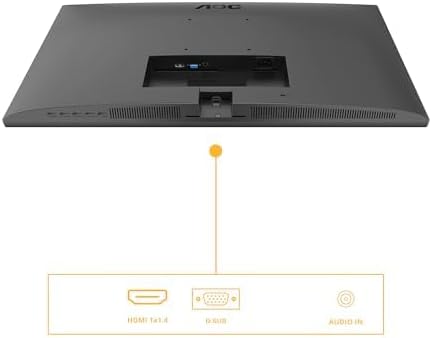
Figure 3: Diagram illustrating the available input ports on the monitor: HDMI 1.4, VGA (D-SUB), and Audio In.
3. پاورنگ آن
- پنھنجي ڪمپيوٽر کي آن ڪريو.
- مانيٽر تي پاور بٽڻ دٻايو. پاور انڊيڪيٽر لائيٽ روشن ٿيڻ گهرجي.
- The monitor should automatically detect the active input signal. If not, you may need to manually select the input source using the OSD menu.
مانيٽر هلائڻ
آن-اسڪرين ڊسپلي (OSD) مينيو
The OSD menu allows you to adjust various monitor settings. The control buttons are typically located on the bottom or back of the monitor.
- کي دٻايو مينيو او ايس ڊي مينيو کولڻ لاءِ بٽڻ دٻايو.
- نيويگيشن بٽڻ استعمال ڪريو (مٿي / هيٺ or کاٻي / ساڄي) to browse through menu options.
- کي دٻايو منتخب ڪريو / ٺيڪ ذيلي مينيو ۾ داخل ٿيڻ يا سيٽنگ جي تصديق ڪرڻ لاءِ بٽڻ دٻايو.
- کي دٻايو نڪرڻ button to go back to the previous menu or exit the OSD.
اهم OSD سيٽنگون
- روشني: Adjust brightness, contrast, and gamma settings.
- تصويري سيٽ اپ: Fine-tune image position, clock, and phase (primarily for VGA input).
- Color Setup: Select color temperature, user color, or preset modes.
- او ايس ڊي سيٽ اپ: او ايس ڊي ٻولي، پوزيشن، ۽ شفافيت کي ترتيب ڏيو.
- اضافي: Select input source (HDMI, VGA), reset settings, or view ڄاڻ.
- راند جي جوڙجڪ: Enable or disable Adaptive Sync, adjust response time (Overdrive), and other gaming-related features.
- گھٽ نيري روشني: Activate this mode to reduce blue light emission for eye comfort.
- چمڪندڙ مفت: This technology is always active to minimize screen flickering and reduce eye strain.
سار سنڀال
مانيٽر جي صفائي
- صفائي ڪرڻ کان اڳ هميشه مانيٽر کي پاور آئوٽليٽ مان ڪڍي ڇڏيو.
- نرم، لِنٽ کان خالي ڪپڙو استعمال ڪريو ٿورڙو ڊيampپاڻي يا نرم، غير رگڙيندڙ اسڪرين ڪلينر سان صاف ڪيو وڃي.
- صاف ڪندڙ کي سڌو سنئون اسڪرين تي نه اسپري ڪريو. پهرين ان کي ڪپڙي تي لڳايو.
- مٽي ۽ داغ هٽائڻ لاءِ اسڪرين کي نرميءَ سان صاف ڪريو.
- مانيٽر لاءِ سيasing، نرم، سڪل ڪپڙو استعمال ڪريو. سخت ڪيميڪلز کان پاسو ڪريو.
ذخيرو
If you need to store the monitor for an extended period, disconnect all cables, disassemble the stand if necessary, and pack it in its original packaging or a suitable protective box. Store in a cool, dry place.
مشڪلاتون
| مسئلو | ممڪن حل |
|---|---|
| اسڪرين تي ڪوبه تصوير نه آهي |
|
| "ڪو به سگنل ناهي" پيغام |
|
| تصوير ڌنڌلي يا بگڙيل آهي. |
|
| .الهائيندڙن مان آواز ڪونهي |
|
وضاحتون
| خاصيت | وصف |
|---|---|
| ماڊل نمبر | 27B3HA2 |
| اسڪرين جي ماپ | 27 انچ (68.6 سينٽي) |
| پينل جو قسم | آئي پي ايس |
| قرارداد | 1920 x 1080 (مڪمل HD) |
| اسپيڪٽ ريشو | 16:9 |
| ريفريش جي شرح | 100 هز |
| جوابي وقت | 1ms MPRT |
| روشني | 250 cd/m² |
| وڊيو انپٽس | 1x HDMI 1.4, 1x VGA (D-SUB) |
| آڊيو ان پٽ | ها |
| خاص خاصيتون | Adaptive Sync, Flicker-Free, Low Blue Light |
| پيداوار جا طول و عرض (اسٽينڊ سان) | 9.06 x 24.41 x 18.11 انچ |
| شيءِ جو وزن (اسٽينڊ سان) | 11.66 پائونڊ |
| ٺاهيندڙ | AOC |
| EPREL رجسٽريشن نمبر | 1859411 |
For detailed product information and energy labeling, please refer to the official EPREL database:
 View EPREL پراڊڪٽ انفارميشن شيٽ
Figure 4: EPREL QR code and link for detailed product information.
وارنٽي ۽ سپورٽ
AOC monitors are manufactured to the highest quality standards. For information regarding your product's warranty, please refer to the warranty card included in your package or visit the official AOC webسائيٽ.
For technical support or customer service, please contact AOC directly:
- فراهم ڪندڙ: AOC انٽرنيشنل (يورپ) BV
- ائڊريس: Prins Bernhardplein 200 1097 JB Amsterdam, Netherlands
- ڪسٽمر ڪيئر اي ميل: kevin.yang@tpv-tech.com
- ڪسٽمر ڪيئر فون: +31 (0) 20 504 6962
- سرڪاري Webسائيٽ: https://eu.aoc.com
Please have your monitor's model number (27B3HA2) and serial number ready when contacting support.