پيداوار ختمview
The beyerdynamic MMX 300 PRO is a high-performance wired gaming headset designed for professional studio sound quality and clear communication. It features Stellar.45 drivers for precise audio reproduction and a high-quality condenser microphone for outstanding speech intelligibility. Built for extended gaming sessions, it offers maximum comfort with soft velour earpads and an ergonomic headband. This headset is handmade in Germany, ensuring durability and reliability.

Image: The beyerdynamic MMX 300 PRO Gaming Headset, showcasing ان جي ڪاري ڊيزائن ۽ منسلڪ مائڪروفون.
سيٽ اپ ڪريو
The MMX 300 PRO headset is designed for broad compatibility and easy setup across various gaming platforms. It includes all necessary cables for connection.
شامل اجزاء:
- Wired Gaming Headset MMX 300 PRO
- پي سي ڪيبل
- ڪنسول اڊاپٽر
- Microphone Pop Protection Filter
توهان جي هيڊ سيٽ کي ڳنڍيندي:
The headset connects via a 3.5 mm jack. Use the appropriate cable for your device:
- PC: Use the PC cable which typically splits into separate microphone and headphone jacks. Connect the green plug to your audio output and the pink plug to your microphone input.
- Xbox, PlayStation, Nintendo Switch: Use the console adapter to connect the headset's single 3.5mm jack to your controller or console's audio port.

Image: The MMX 300 PRO headset shown with icons indicating compatibility with PC, Mobile, Xbox, PlayStation (PS4/PS5), and Nintendo Switch.
هيڊ فون هلائڻ
The MMX 300 PRO is engineered for optimal audio performance and user comfort during gaming and communication.
آڊيو ڪارڪردگي
Experience professional studio sound with the integrated Stellar.45 drivers, providing a wide frequency response for immersive gaming audio, from deep bass to clear trebles.

Image: A hand holding the MMX 300 PRO headset against a background of gaming-themed visuals, emphasizing professional sound for gaming.

تصوير: هڪ ڌماڪو ٿيو view of the headset's ear cup, highlighting the Optimized STELLAR.45 driver for competitive gaming moments.
مائڪرو فون استعمال:
The high-quality condenser microphone ensures outstanding speech intelligibility, crucial for clear team communication. The microphone arm is flexible and can be adjusted to your preferred position. An integrated remote control on the cable allows for easy volume adjustment and microphone muting.

Image: A close-up of the headset's microphone, indicating its broadcast quality for best speech intelligibility.
Video: An official beyerdynamic video showcasing the features of the MMX 300 PRO Gaming Headset, including its professional sound, microphone quality, and comfort.
آرام سان پائڻ:
The MMX 300 PRO is designed for maximum comfort during long gaming sessions. It features soft velour ear pads that prevent heat build-up and an ergonomic headband with a snap fastener for a secure yet comfortable fit.

تصوير: هڪ تفصيلي view of the headset highlighting its ergonomic headband and soft velour ear pads, designed for unparalleled wearing comfort.
سار سنڀال
To ensure the longevity and optimal performance of your beyerdynamic MMX 300 PRO headset, regular maintenance is recommended.
صفائي:
- Wipe the surfaces of the earcups and headband with a soft, dry cloth.
- For the velour earpads, a lint roller or a soft brush can be used to remove dust and debris.
- سخت ڪيميڪل يا رگڙيندڙ صاف ڪندڙ استعمال ڪرڻ کان پاسو ڪريو، ڇاڪاڻ ته اهي مواد کي نقصان پهچائي سگهن ٿا.
مٽاسٽا وارا حصا:
The MMX 300 PRO is designed with user-replaceable components to extend its lifespan. Ear pads, the headband, and the cable are available as interchangeable replacement parts. This allows for easy replacement in case of wear or damage, maintaining the headset's comfort and functionality over time.
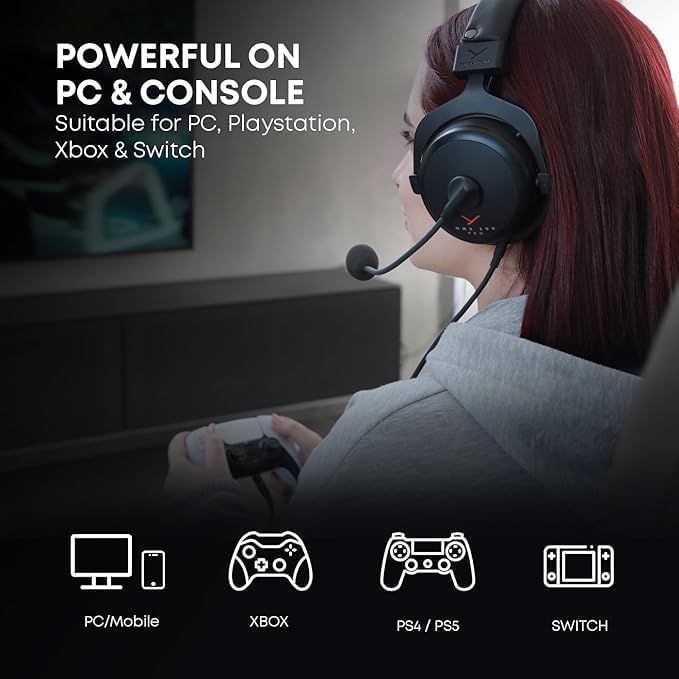
Image: A close-up showing the internal components of the headset, emphasizing its "Handmade in Germany" quality and robust construction.
مشڪلاتون
If you encounter any issues with your MMX 300 PRO headset, please refer to the following common troubleshooting steps:
- آواز ڪونهي/گهٽ آواز:
- Ensure the 3.5mm jack is fully inserted into the audio port of your device.
- Check the volume control on the headset's inline remote and your device's system volume settings.
- پڪ ڪريو ته توهان جي ڪمپيوٽر جي آواز سيٽنگن ۾ صحيح آڊيو آئوٽ پُٽ ڊيوائس چونڊيو ويو آهي.
- Microphone Not Working/Low Volume:
- Ensure the microphone is not muted via the inline remote.
- Check your device's microphone input settings and ensure the MMX 300 PRO microphone is selected as the default input device.
- Adjust microphone levels and boost settings in your operating system's sound control panel.
- Ensure the microphone pop protection filter is correctly attached and not obstructing sound.
- تحريف ٿيل آڊيو:
- Reduce the volume on both the headset and your device.
- پڪ ڪريو ته آڊيو ڪيبل خراب يا ٽٽل نه آهي.
- ڊوائيس جي مخصوص مسئلي کي رد ڪرڻ لاءِ هيڊ سيٽ کي ٻئي ڊوائيس سان آزمايو.
- Physical Noise (e.g., Creaking):
- While the headset is built for durability, minor creaking can sometimes occur with movement. This typically does not affect audio performance.
- Ensure all adjustable parts are clean and free of debris.
If these steps do not resolve your issue, please contact beyerdynamic customer support for further assistance.
وضاحتون
| خاصيت | تفصيل |
|---|---|
| ماڊل نالو | ايم ايم ايڪس 300 پرو |
| رابطي ٽيڪنالاجي | وائرڊ |
| هيڊ فون جيڪ | 3.5 مليڪ جيڪ |
| رڪاوٽ | 48 اوم |
| Frequency Response (Headphone) | 5 - 35,000 هز |
| Frequency Response (Microphone) | 20 - 20,000 Hz (typical for condenser mics) |
| ڪنٽرول قسم | Volume Control (Inline Remote) |
| مطابقت رکندڙ ڊوائيسز | PC, Xbox, PlayStation, Nintendo Switch |
| مواد | Plastic (with metal components) |
| شيءِ جو وزن | 1 پائونڊ (تقريبن 453 گرام) |
| پيداوار جي ماپ | 8.66 x 4.72 x 5.91 انچ |
| ۾ ٺاهيل | جرمني |
وارنٽي ۽ سپورٽ
beyerdynamic products are manufactured to the highest quality standards. For detailed information regarding your product's warranty, please refer to the warranty card included with your purchase or visit the official beyerdynamic webسائيٽ.
For technical support, replacement parts, or further inquiries, please visit the official beyerdynamic store or contact their customer service directly.


