پيداوار ختمview
The MONODEAL MD08 Air Conduction Headphones are designed for comfort and clear communication, featuring an open-ear design, Bluetooth 5.1 connectivity, and a noise-canceling microphone with a mute function. These headphones transmit sound through air conduction, providing an alternative to traditional in-ear or bone conduction devices, aiming to reduce pressure and discomfort during extended use.

Image: MONODEAL MD08 Air Conduction Headphones, showcasing the open-ear design and boom microphone.
دٻي ۾ ڇا آهي
- Air Conduction Headphones (1 unit)
- USB-C چارجنگ ڪيبل (1 يونٽ)
- يوزر مينوئل (1 يونٽ)
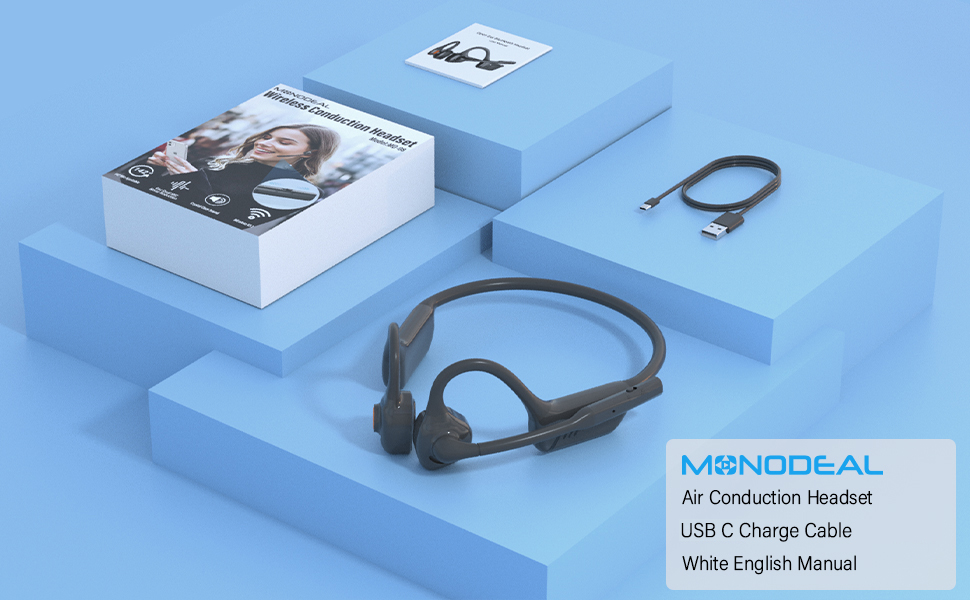
Image: The MONODEAL MD08 headphones, USB-C charging cable, and user manual laid out, representing the package contents.
سيٽ اپ ڪريو
1. هيڊفون چارج ڪرڻ
Before initial use, fully charge the headphones. Connect the provided USB-C charging cable to the charging port on the headphones and plug the other end into a compatible USB power source. A full charge typically takes approximately 2 hours.

Image: Diagram illustrating the charging process and battery life indicators: 8 hours usage, 36 hours standby, 2 hours charging time.
2. بلوٽوٽ جوئر
To connect your MONODEAL MD08 headphones to a device:
- پڪ ڪريو ته هيڊفون بند ٿيل آهن.
- Press and hold the multi-function button until the indicator light flashes red and blue, indicating pairing mode.
- پنهنجي ڊوائيس (اسمارٽ فون، ٽيبليٽ، ڪمپيوٽر) تي، بلوٽوٿ کي فعال ڪريو ۽ موجود ڊوائيسز جي ڳولا ڪريو.
- Select "MD08" from the list of found devices to connect. A voice prompt will confirm successful pairing.
3. Multi-Point Connection (Connecting to Two Devices Simultaneously)
The MD08 headphones support connecting to two Bluetooth devices at the same time. This allows you to seamlessly switch between audio sources, for example, listening to music on your tablet and answering calls on your phone.
- قدم 1: Pair the headphones with the first device (e.g., your phone) as described in the Bluetooth Pairing section.
- قدم 2: Once connected to the first device, turn off Bluetooth on the first device. This will put the headphones back into pairing mode.
- قدم 3: Pair the headphones with the second device (e.g., your tablet).
- قدم 4: Turn Bluetooth back on for the first device. The headphones should automatically reconnect to both devices.
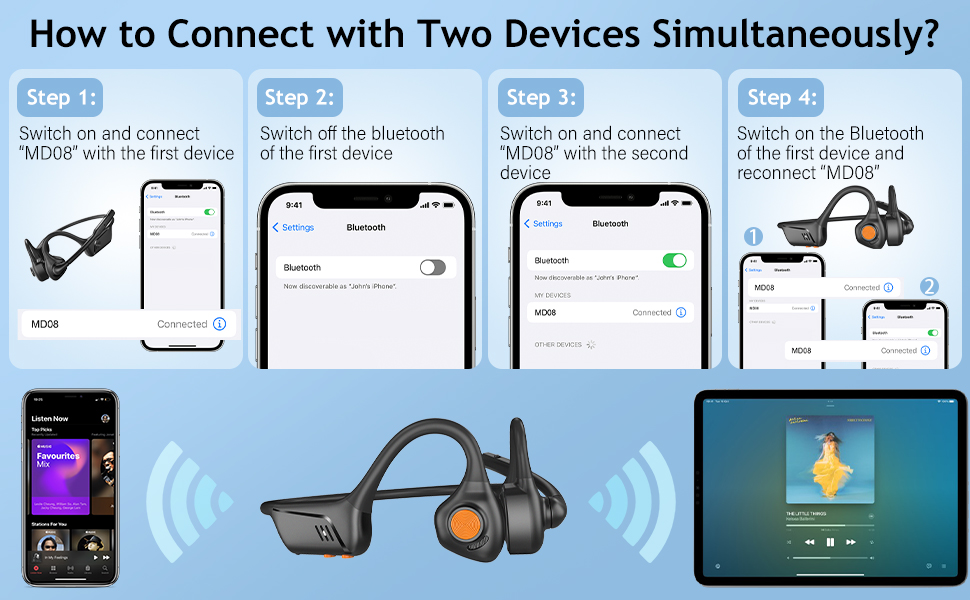
Image: Visual guide demonstrating the four steps to connect the MD08 headphones to two devices simultaneously, showing a phone and a tablet.
آپريٽنگ هدايتون
1. هيڊفون پائڻ
Position the headphones with the speakers resting gently in front of your ears, allowing the sound to be transmitted through air conduction. The flexible band should rest comfortably around the back of your head. The open-ear design ensures you remain aware of your surroundings.

Image: A man wearing the MD08 headphones, illustrating the open-ear design and comfortable fit, emphasizing its lightweight nature (40g) and stable design.
2. بنيادي ڪنٽرول
The headphones feature a multi-functional button and volume controls for easy operation:
- پاور آن / آف: ملٽي فنڪشن بٽڻ کي دٻايو ۽ رکو.
- راند/روڪ: ملٽي فنڪشن بٽڻ کي هڪ ڀيرو دٻايو.
- جواب/آخر ڪال: ايندڙ ڪال يا فعال ڪال دوران ملٽي فنڪشن بٽڻ کي هڪ ڀيرو دٻايو.
- ڪال رد ڪريو: ايندڙ ڪال دوران ملٽي فنڪشن بٽڻ کي دٻايو ۽ رکو.
- حجم مٿي / ھيٺ: وقف ٿيل حجم بٽڻ استعمال ڪريو.
- اڳيون ٽريڪ: ملٽي فنڪشن بٽڻ کي ٻٽي دٻايو.
- پويون ٽريڪ: ملٽي فنڪشن بٽڻ کي ٽي ڀيرا دٻايو.
- وائيس اسسٽنٽ (سري/گوگل اسسٽنٽ) کي چالو ڪريو: 2 سيڪنڊن لاءِ ملٽي فنڪشن بٽڻ کي دايو ۽ رکو.

Image: A user demonstrating the controls of the MD08 headphones, with icons indicating functions like Play/Pause, Skip Track, Control Calls, Volume+/-, and Voice Assistant.
3. Microphone Mute Function
The MD08 headphones feature a dedicated mute button on the microphone boom. During a call, you can easily touch this button to mute or unmute your microphone, providing privacy when needed.

Image: A woman using the MD08 headphones, highlighting the microphone mute function and environmental noise reduction technology, showing 96% noise filtered during calls.
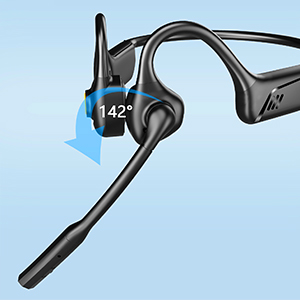
Image: Close-up of the MD08 microphone, showing its 142-degree rotation capability for optimal positioning.
سار سنڀال
- صفائي: هيڊفون صاف ڪرڻ لاءِ نرم، سڪل ڪپڙو استعمال ڪريو. سخت ڪيميڪلز يا رگڙيندڙ مواد استعمال ڪرڻ کان پاسو ڪريو.
- اسٽوريج: هيڊفونز کي سڌي سج جي روشني ۽ انتهائي گرمي پد کان پري ٿڌي، سڪل جاءِ تي رکو.
- چارج ڪرڻ: بيٽري جي زندگي کي وڌائڻ لاءِ، بيٽري کي بار بار مڪمل طور تي چارج ڪرڻ کان پاسو ڪريو. هيڊفونز کي باقاعدي طور تي چارج ڪريو، جيتوڻيڪ گهڻي عرصي تائين استعمال ۾ نه هجي.
- پاڻي جي مزاحمت: While designed for active use, avoid submerging the headphones in water.
مشڪلاتون
| مسئلو | حل |
|---|---|
| هيڊفون آن نه ٿا ٿين. | پڪ ڪريو ته هيڊفون مڪمل طور تي چارج ٿيل آهن. پاور سورس سان ڳنڍيو ۽ ٻيهر ڪوشش ڪريو. |
| ڊوائيس سان جوڙو نه ٿو ٺاهي سگهجي. |
|
| ڪابه آواز يا گهٽ آواز ناهي. |
|
| مائڪروفون ڪم نه ڪري رهيو آهي. |
|
| وقفي وقفي سان ڳنڍڻ. |
|
وضاحتون
| خاصيت | تفصيل |
|---|---|
| ماڊل نالو | ايم ڊي 08 |
| رابطي ٽيڪنالاجي | وائرليس (بلوٽوت) |
| بلوٽوت ورزن | 5.1 |
| بلوٽوٿ رينج | 10 ميٽر (33 فوٽ) تائين |
| آڊيو ڊرائيور جو قسم | Air Conduction Driver |
| بيٽري جي زندگي (موسيقي/ڳالهائڻ جو وقت) | 8 ڪلاڪ تائين |
| اسٽينڊ بائي ٽائيم | 36 ڪلاڪ تائين |
| چارج ڪرڻ وقت | لڳ ڀڳ 2 ڪلاڪ |
| چارجنگ پورٽ | USB-C |
| وزن | 1.41 آونس (تقريبن 40 گرام) |
| ڪن جي جڳهه | کليل ڪن |
| شور ڪنٽرول | فعال شور منسوخي (مائڪروفون لاءِ) |
| خاص خاصيتون | Microphone Included, Multipoint Pairing, Rechargeable Battery, Volume Control, Mute Function |
وارنٽي ۽ سپورٽ
MONODEAL products are designed and manufactured to high-quality standards. For warranty information, technical support, or customer service inquiries, please refer to the contact information provided with your purchase or visit the official MONODEAL webسائيٽ.
Manufacturer: MONODEAL


