1. تعارف
This instruction manual provides essential information for the safe and efficient use of your NIIMBOT D110M Bluetooth Label Maker. Please read this manual thoroughly before operating the device and retain it for future reference. The NIIMBOT D110M is a compact, wireless thermal label printer designed for various organizational tasks in home, office, and school environments.

Image 1.1: The NIIMBOT D110M Label Maker, a roll of blank labels, and three example labels showing a barcode, 'Biscuits', and 'Tools'.
2. پيڪيج مواد
پڪ ڪريو ته هيٺ ڏنل سڀئي شيون توهان جي پيڪيج ۾ شامل آهن. جيڪڏهن ڪا به شيءِ غائب يا خراب آهي، مهرباني ڪري ڪسٽمر سپورٽ سان رابطو ڪريو.

Image 2.1: The complete package contents for the NIIMBOT D110M, neatly arranged.
- NIIMBOT D110M Label Maker
- استعمال ڪندڙ دستي
- قسم-سي چارجنگ ڪيبل
- پيڪنگ باڪس
- Label Paper Roll (12x40mm)
3. پراڊڪٽ ختمview ۽ خاصيتون
The NIIMBOT D110M is designed for ease of use and portability, featuring advanced thermal printing technology.
اهم خاصيتون:
- بلوٽوت ڪنيڪشن: Seamless wireless connection to smartphones via the NIIMBOT app.
- حرارتي ڇپائي: BPA-مفت سڌي حرارتي ٽيڪنالاجي استعمال ڪري ٿو، مس يا ٽونر جي ضرورت کي ختم ڪري ٿو.
- اعلي قرارداد: 203 DPI for clear and crisp print quality.
- پورٽبل ڊيزائن: Compact and lightweight, powered by a built-in 1500mAh rechargeable Lithium-Ion battery.
- تيز چارج: Fully charged in approximately 2 hours via Type-C cable.
- ڊگھي بيٽري زندگي: Up to 5 hours of continuous printing on a full charge.
- ذهين سڃاڻپ: Built-in RFID chip automatically recognizes label types for simplified setup.
- پائيدار ليبل: Compatible labels are waterproof, oil-proof, abrasion-resistant, and fade-resistant.

Image 3.1: Visual representation of the NIIMBOT D110M's key features, including text printing, scanning, inkless operation, portability, high-speed printing, and Bluetooth connectivity.

Image 3.2: Details on the D110M's upgraded battery performance, highlighting its 1500mAh capacity, charging time, and print speed.
4. سيٽ اپ
4.1 ڊوائيس چارج ڪرڻ
Before first use, fully charge the label maker. Connect the provided Type-C charging cable to the device and a compatible USB power adapter. The indicator light will show charging status.
4.2 ليبل پيپر لڳائڻ
- Open the label compartment cover.
- Insert the label roll with the printing surface facing upwards, ensuring the first label extends slightly out of the printing slot.
- Close the cover securely. The device's RFID chip will automatically detect the label type.
4.3 ايپ ڊائون لوڊ ۽ بلوٽوٿ ڪنيڪشن
- Download the "NIIMBOT" app from your smartphone's app store (available for iOS and Android).
- Turn on the NIIMBOT D110M label maker by pressing the power button. The indicator light will illuminate.
- پنهنجي اسمارٽ فون تي بلوٽوت کي فعال ڪريو.
- Open the NIIMBOT app and follow the on-screen instructions to connect to your D110M device. The device name typically appears as "D110_XXXX".
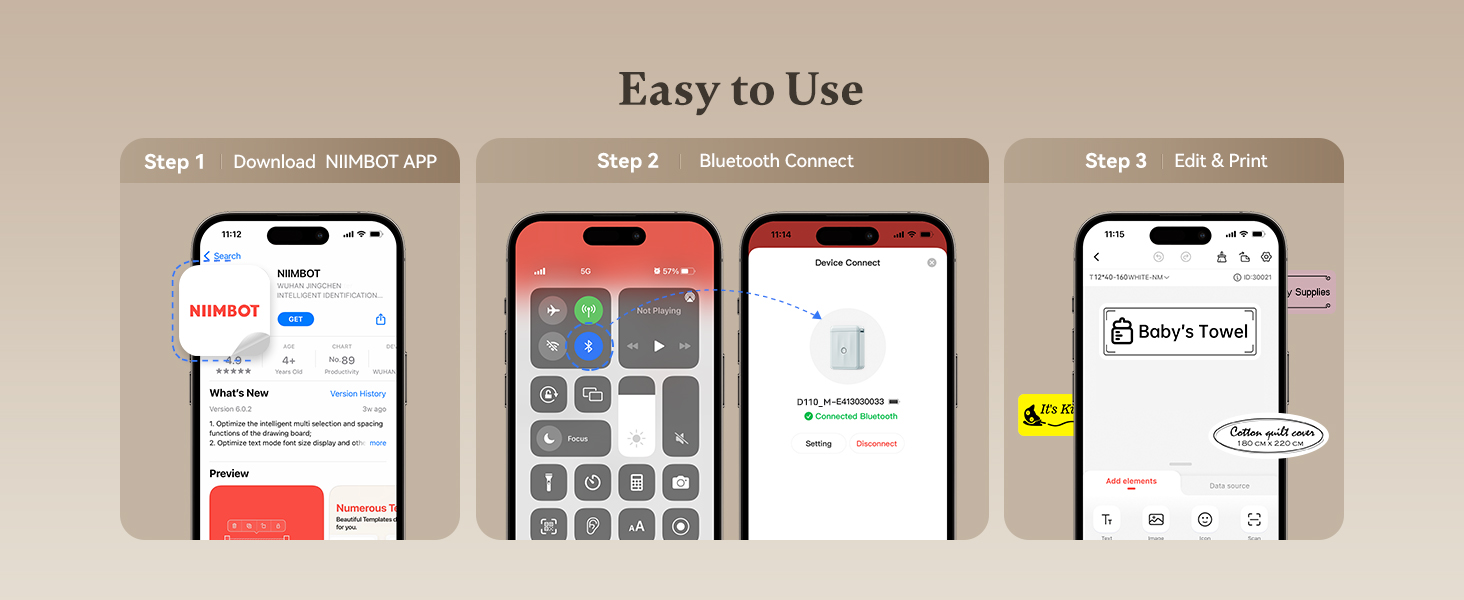
Image 4.1: A visual guide to the three-step setup process: downloading the app, connecting via Bluetooth, and then editing and printing labels.
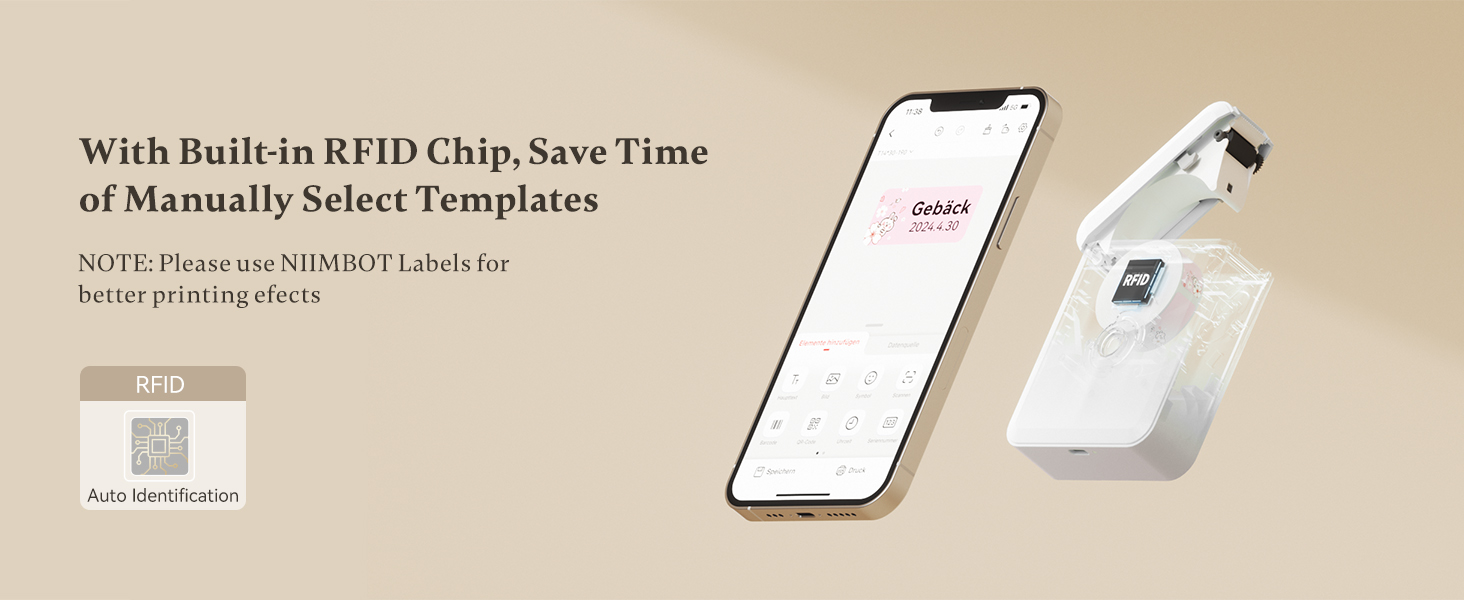
Image 4.2: The NIIMBOT app interface on a smartphone, demonstrating the automatic label identification feature via the built-in RFID chip.
5. آپريٽنگ هدايتون
5.1 ليبل ٺاهڻ ۽ ايڊٽ ڪرڻ
Once connected, use the NIIMBOT app to design your labels. The app offers various templates, fonts, symbols, and customization options.
- Select a template or start a new label design.
- Enter text, add icons, barcodes, or QR codes.
- Adjust font size, style, and alignment.
- اڳيview your label before printing.

Image 5.1: The NIIMBOT app displaying options for personalizing labels, including different categories of icons and templates.
5.2 پرنٽنگ ليبل
After designing your label, tap the print button in the app. You can choose to print a single label or multiple copies (batch printing).
- Ensure the label maker has sufficient battery and label paper.
- Confirm the label design in the app.
- Tap "Print" and select the number of copies.
- The label will print rapidly from the device.

Image 5.2: Illustration of different printing modes available with the D110M, including real-time printing and reprinting previous labels.
5.3 Label Applications
The NIIMBOT D110M is versatile for various labeling needs:
- گھر جي تنظيم: Labeling storage bins, kitchen containers, spice jars, and personal items.
- آفيس جو استعمال ترتيب ڏيڻ files, folders, cables, and office supplies.
- School Supplies: Naming school items, books, and craft materials.
- پرچون: قيمت ٺاهڻ tags and product labels for small businesses.

تصوير 5.3: اڳوڻيamples of the D110M label maker's versatility across different categories like toys, kitchen, pricing, cosmetics, and personal items.

Image 5.4: Demonstrations of label durability, showcasing resistance to water, grease, abrasion, and fading.
6. سار سنڀال
6.1 پرنٽ هيڊ کي صاف ڪرڻ
To ensure optimal print quality, regularly clean the print head. Use a cotton swab lightly dampened with isopropyl alcohol to gently wipe the print head surface. Allow it to dry completely before use.
6.2 بيٽري جي سنڀال
To prolong battery life, avoid fully discharging the device frequently. Charge the device regularly, even if not in constant use. Store the device in a cool, dry place.
6.3 ليبل اسٽوريج
Store label rolls in a cool, dry place away from direct sunlight and heat to prevent degradation of the thermal material.
7. مسئلا حل ڪرڻ
If you encounter issues with your NIIMBOT D110M, refer to the following common problems and solutions:
| مسئلو | ممڪن سبب | حل |
|---|---|---|
| ڊوائيس چالو نٿو ڪري | گھٽ بيٽري | Charge the device using the Type-C cable. |
| بلوٽوٿ ذريعي ڳنڍي نٿو سگھجي | Bluetooth off on phone; Device not discoverable; App issue | Ensure phone Bluetooth is on. Restart the label maker. Restart the NIIMBOT app. |
| Poor print quality / Faint print | Dirty print head; Incorrect label orientation; Low battery | Clean the print head. Ensure label paper is inserted correctly. Charge the device. |
| ليبل صحيح طرح سان نه پيا کائين | Label roll improperly installed; Obstruction | Re-install the label roll, ensuring it's straight. Check for any debris in the paper path. |
| App does not recognize label type | Non-NIIMBOT labels; RFID chip issue | Ensure you are using genuine NIIMBOT labels. Restart the device and app. |
8. وضاحتون
Detailed technical specifications for the NIIMBOT D110M Label Maker:
- ماڊل: D110M (Item model number: D110-M-New)
- ڇپائي ٽيڪنالاجي: حرارتي
- پرنٽ قرارداد: 203 ڊي پي آئي
- پرنٽ جي رفتار: 30mm/s
- رابطي: بلوٽوٿ
- مطابقت رکندڙ ڊوائيسز: اسمارٽ فونز (اينڊرائيڊ، آئي او ايس)
- طاقت جو ذريعو: 1500mAh Lithium-Ion Battery (rechargeable)
- چارجنگ انٽرفيس: قسم-سي USB
- پيداوار جي ماپ: 0.8 x 2.7 x 3.9 انچ
- شيء جو وزن: 10.9 اونس
- اڇو رنگ: Monochrome (Black text only)
- خاص خصوصيت: Portable, RFID Automatic Label Identification
9. وارنٽي ۽ سپورٽ
9.1 وارنٽي ڄاڻ
The NIIMBOT D110M Label Maker comes with a Limited Warranty. Please refer to the warranty card included in your package or contact NIIMBOT customer service for specific terms and conditions.
9.2 ڪسٽمر سپورٽ
For further assistance, technical support, or inquiries regarding your product, please visit the official NIIMBOT webسائيٽ تي وڃو يا پنهنجي پراڊڪٽ پيڪنگنگ ۾ ڏنل رابطي جي معلومات جو حوالو ڏيو.
يوزر مينوئل جو اليڪٽرانڪ ورزن ڊائون لوڊ لاءِ موجود آهي: يوزر مينوئل (PDF)


