1. تعارف
The AUTOOL SVB302 Two-Way Articulating Borescope is a professional inspection camera designed for detailed visual inspection in hard-to-reach areas. It features a highly flexible probe with a two-way articulating lens, adjustable LED lighting, and compatibility with both Android and iOS devices for real-time viewing and recording. This manual provides essential information for the safe and effective use of your borescope.

The AUTOOL SVB302 borescope is widely used for auto inspection, mechanical maintenance, construction industry, power facilities, chemical pipelines, and security monitoring.
2. اهم خاصيتون
- Two-Way Articulating Lens: The camera probe offers 210° two-way articulation, allowing for comprehensive inspection of complex internal structures.
- هاءِ ڊيفينيشن اميجنگ: Captures clear images and videos with 1280*720 resolution and a 70° angle of view.
- Adjustable LED Illumination: Equipped with 6 super bright LEDs with 3 adjustable brightness levels to ensure clear visibility in dark environments.
- IP67 پنروڪ جاچ: The 1-meter flexible metal cable and camera are IP67 rated, making them suitable for use in wet or submerged conditions.
- وسيع مطابقت: Supports both Android and iOS systems, connecting via USB 2.0 to your smartphone for real-time display.
- حرارت جي حفاظت: Features smart protection that cuts video signals in extreme heat to prevent damage to the device.
- ڊگھي بيٽري زندگي: Integrated 2000mAh rechargeable Lithium-ion battery provides 2-3 hours of continuous operating time.
- گھڻن ٻولين جي حمايت: User interface supports English, French, German, Italian, Spanish, Chinese, and Japanese.

تفصيلي view of the 210° articulating camera, showing its 0.25-inch diameter, 1.18-3.94 inch depth of field, 70° angle of view, and 1.38-inch bending radius.

Illustration of the 6 high-intensity illumination lights and their three adjustable brightness levels (Level 1, Level 2, Level 3).
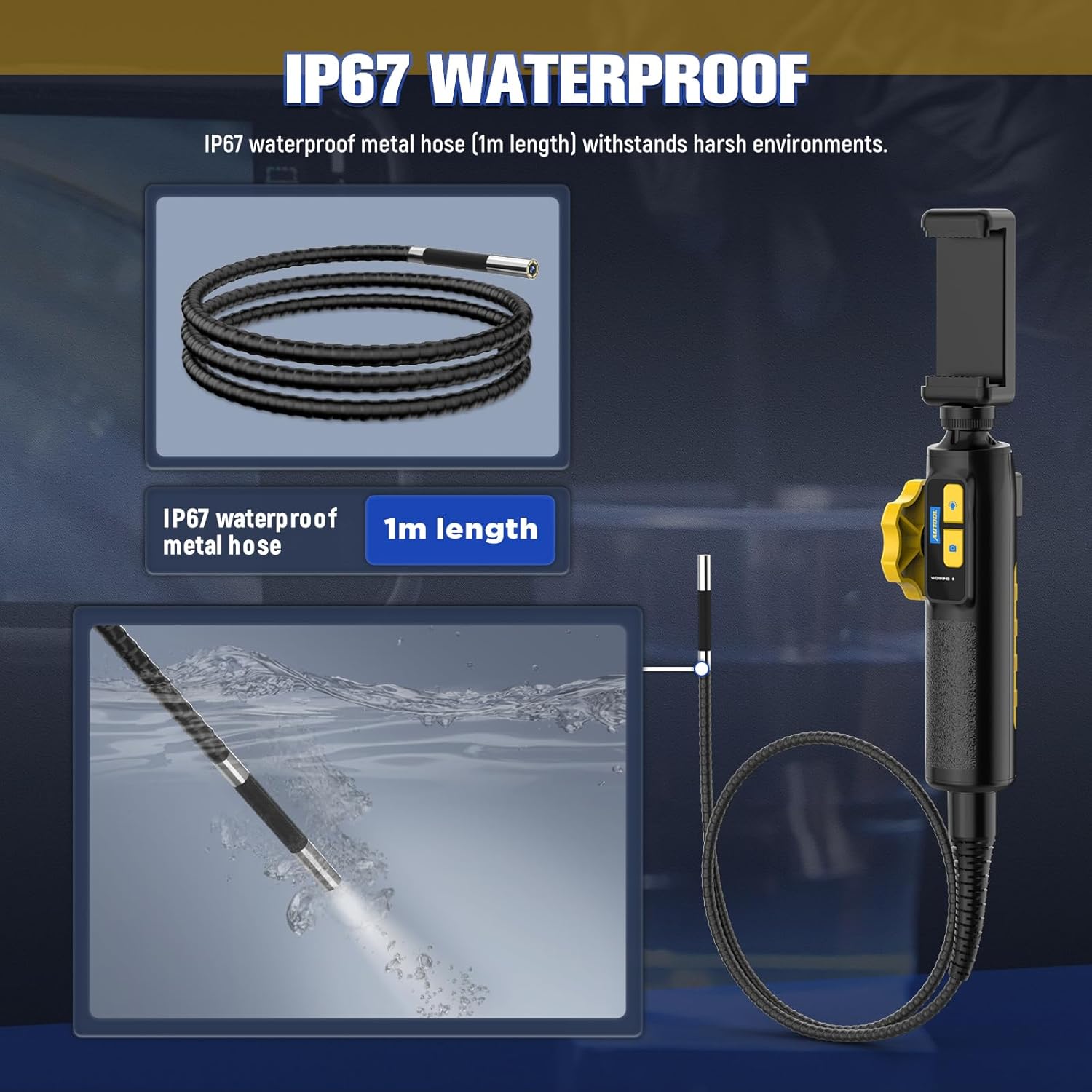
The IP67 waterproof metal hose (1m length) is designed to withstand harsh environments, as demonstrated by its submersion capability.

The borescope features a high-temperature alert system that protects the device by cutting video signals. It is powered by a 2000mAh rechargeable battery.

The device supports multilingual settings, including English, French, German, Italian, Spanish, Chinese, and Japanese.
3. دٻي ۾ ڇا آهي
پيڪيج کولڻ تي، مھرباني ڪري تصديق ڪريو ته ھيٺ ڏنل سڀ جزا موجود آھن:
- AUTOOL SVB302 Borescope Unit (Handle with integrated camera cable)
- حفاظتي سامان کڻڻ وارو ڪيس
- USB چارجنگ ڪيبل
- استعمال ڪندڙ جو دستياب (ھي دستاويز)

The AUTOOL SVB302 borescope, its protective carrying case, and included cables.
4. سيٽ اپ گائيڊ
- ايپ ڊائون لوڊ ڪريو: Scan the QR code on the device or search for "JCAM Pro" or "JCAM" in your device's app store (iOS App Store for Apple, Google Play Store for Android) and install the application.
- پنهنجو فون انسٽال ڪريو: Securely place your smartphone into the adjustable phone holder on the borescope handle. The holder is designed to fit screens from 3.5 to 6.3 inches (5.5-10.5 cm / 2.1-4.1 inches).
- فون سان ڳنڍيو: Connect the borescope to your smartphone using the appropriate USB cable (Lightning for iOS, USB-C for Android).
- پاور آن: Long press the power button on the borescope handle to turn on the device.
- ايپ کوليو: Launch the JCAM app on your smartphone. The live video feed from the borescope camera should appear automatically.

Instructions for downloading the JCAM app from the respective app stores for iOS and Android devices.

The phone holder's adjustable range, accommodating phones from 5.5cm (2.1 inches) to 10.5cm (4.1 inches).
Official product video demonstrating the setup process, including app download, phone installation, connection, power-on, and initial use of the borescope's articulating lens and features.
5. آپريٽنگ هدايتون
5.1 Articulating the Camera
Use the rotation wheel on the handle to control the two-way articulation of the camera lens. This allows you to navigate bends and view the narrowed interior in all directions without needing to reposition the entire probe.
5.2 Adjusting LED Lights
Press the light control button on the handle to cycle through the three brightness levels of the LED lights. Select the appropriate brightness for optimal visibility in different inspection areas.
5.3 Capturing Photos and Videos
Press the photo/video button on the handle to capture still images or start/stop video recording directly through the app. Captured media will be saved to your connected smartphone.
5.4 Viewing Captured Media
Access the gallery or playback section within the JCAM app to review توهان جون پڪڙيل تصويرون ۽ وڊيوز.
6. سار سنڀال
- صفائي: After each use, especially in dirty or wet environments, gently wipe the camera probe and cable with a soft, damp cloth. For stubborn dirt, a mild, non-abrasive cleaner can be used. Ensure the probe is dry before storage.
- اسٽوريج: Store the borescope and its accessories in the provided protective carrying case in a cool, dry place, away from direct sunlight and extreme temperatures.
- بيٽري جي سنڀال: بيٽري جي زندگي کي وڌائڻ لاءِ، ڊوائيس کي باقاعدي چارج ڪريو، جيتوڻيڪ بار بار استعمال ۾ نه هجي. ڊگهي عرصي تائين بيٽري کي مڪمل طور تي ڊسچارج ڪرڻ کان پاسو ڪريو.
- حرارت جي حفاظت: The device is equipped with a high-temperature alert system. If the operating temperature exceeds 80°C (176°F), the video signal may be cut to prevent damage. Allow the device to cool down before resuming operation.
7. مسئلا حل ڪرڻ
- اسڪرين تي ڪا به تصوير ناهي:
- Ensure the borescope is properly connected to your smartphone.
- Verify the borescope is powered on (long press the power button).
- Check if the JCAM app is open and has necessary permissions.
- Try restarting both the borescope and the app. - خراب تصويري معيار:
- Adjust the LED brightness using the light control button.
- Clean the camera lens if it appears smudged or dirty.
- Ensure the camera is within the optimal depth of field (1.18-3.94 inches). - ڊوائيس اوور گرم ڪرڻ:
- If the high-temperature alert activates, immediately cease operation and allow the device to cool down in a well-ventilated area. Do not use until it has returned to a safe operating temperature. - بيٽري چارج نه ٿيڻ:
- Ensure the USB charging cable is securely connected to both the borescope and a power source.
- Try a different USB port or power adapter.
8. مصنوعات جي وضاحت
| خاصيت | تفصيل |
|---|---|
| ماڊل نمبر | ايس وي بي 302 |
| ڪئميرا قطر | 0.25 انچ (6.45mm) |
| قرارداد | 1280*720 (720p HD) |
| ميدان جي کوٽائي | 1.18 - 3.94 انچ (30-100 ملي ميٽر) |
| اينگل جو View | 70° |
| بيان ڪرڻ وارو زاويه | Max. 210° (Two-way) |
| موڙيندڙ ريڊيس | 1.38 انچ (35mm) |
| ڪيبل ڊگھائي | 1 ميٽر |
| پنروڪ سطح | IP67 |
| نور جو ذريعو | 6 Highlight LEDs (3-stage adjustable brightness) |
| بيٽري جي گنجائش | 2000mAh ليتيم پوليمر |
| آپريٽنگ وقت | 2-3 ڪلاڪ |
| USB انٽرفيس | USB 2.0 |
| آپريٽنگ ماحول | -10°C کان 80°C |
| نمي | 15-90٪ |
| اعلي درجه حرارت تحفظ | Intelligent protection, automatic shutdown |
9. وارنٽي ۽ سپورٽ
9.1 وارنٽي ڄاڻ
The AUTOOL SVB302 Borescope comes with a 3 سال وارنٽي خريداري جي تاريخ کان، عام استعمال هيٺ پيداوار جي خرابين ۽ خرابين کي ڍڪيندي. مھرباني ڪري وارنٽي دعوائن لاءِ خريداري جو ثبوت رکو.
9.2 ڪسٽمر سپورٽ
For technical assistance, troubleshooting, or warranty inquiries, please contact AUTOOL customer support through their official webسائيٽ يا توهان جي پراڊڪٽ پيڪنگنگ سان گڏ مهيا ڪيل رابطي جي معلومات. توهان پڻ دورو ڪري سگهو ٿا AUTOOL Store on Amazon وڌيڪ معلومات لاءِ.


