1. تعارف
This manual provides essential information for the proper use and maintenance of your Realme 12 Plus 5G RMX3867 smartphone. Please read this guide thoroughly before operating your device to ensure optimal performance and longevity. Keep this manual for future reference.
2. پيڪنگ جي فهرست
Upon opening the package, verify that all items listed below are present and in good condition. If any items are missing or damaged, please contact your retailer.

Image: Contents of the Realme 12 Plus 5G RMX3867 retail box. Includes the phone, phone case, quick guide, detachable camera decoration replacement guide, safety guide, screwdriver, two screws, USB cable, and SIM card ejector.
- Realme 12 Plus 5G RMX3867 Smartphone
- فون ڪيس
- تڪڙو رستو
- Detachable Camera Decoration Replacement Guide
- حفاظت ھدايت
- اسڪوائر
- اسڪرو (x2)
- USB ڪيبل
- سم ڪارڊ Ejector
Note: Some accessories, such as the detachable camera decoration, may come in a separate package or require assembly. Refer to the specific guides provided.

Image: Contents of the Detachable Camera Decoration Protective Cover Set. Includes a packaging box, detachable deco case (x1), two screws, and a phone case (x1).
3. سيٽ اپ
3.1. سم ڪارڊ لڳائڻ
- پنهنجي ڊوائيس جي پاسي تي سم ڪارڊ ٽري ڳوليو.
- Insert the provided SIM card ejector tool into the small hole next to the tray.
- آهستي آهستي دٻايو جيستائين ٽري ٻاهر نه اچي.
- Place your Nano-SIM card(s) into the tray with the gold contacts facing down. Ensure the card is correctly oriented according to the tray's diagram.
- ٽري کي احتياط سان فون ۾ ٻيهر داخل ڪريو جيستائين اهو پنهنجي جاءِ تي ڪلڪ نه ڪري.

تصوير: هيٺيون view of the Realme 12 Plus 5G RMX3867, showing the USB-C port, speaker grille, microphone, and SIM card tray slot.
3.2. پاور آن/آف
- پاور آن ڪرڻ: Press and hold the Power button (located on the right side of the device) until the realme logo appears.
- پاور آف ڪرڻ: پاور بٽڻ کي دٻايو ۽ رکو جيستائين پاور آپشن مينيو ظاهر نه ٿئي. "پاور آف" تي ٽيپ ڪريو ۽ تصديق ڪريو.
- ٻيهر شروع ڪرڻ لاء: Press and hold the Power button until the power options menu appears. Tap "Restart" and confirm.

تصوير: پاسي view of the Realme 12 Plus 5G RMX3867, highlighting the power button and volume rocker on the right edge of the device.
3.3. شروعاتي سيٽ اپ
The first time you power on your device, you will be guided through the initial setup process. This includes:
- توهان جي ٻولي چونڊڻ.
- وائي فائي نيٽ ورڪ سان ڳنڍڻ.
- توهان جو گوگل اڪائونٽ سيٽ اپ ڪري رهيو آهي.
- Configuring screen lock (PIN, pattern, password, fingerprint, face unlock).
- Transferring data from an old device (optional).
4. توهان جي ڊوائيس کي هلائڻ
4.1. بنيادي نيويگيشن
- ڇڪڻ جا اشارا: Your device supports various touch gestures for navigation, including tap, swipe, pinch-to-zoom, and long press.
- گھر جي اسڪرين: توهان جي ايپس ۽ ويجيٽس لاءِ مرڪزي مرڪز. اضافي اسڪرين تائين رسائي حاصل ڪرڻ لاءِ کاٻي يا ساڄي طرف سوائپ ڪريو.
- نوٽيفڪيشن پينل: اطلاعن ۽ تڪڙي سيٽنگن تائين رسائي حاصل ڪرڻ لاءِ اسڪرين جي چوٽي کان هيٺ سوائپ ڪريو.
- ايپ ڊراور: اسڪرين جي ھيٺان کان مٿي تائين سوائپ ڪريو view سڀ انسٽال ٿيل ايپليڪيشنون.

تصوير: سامهون view of the Realme 12 Plus 5G RMX3867, displaying its large screen with a punch-hole camera cutout at the top center.
4.2. ڪئميرا جا ڪم
The Realme 12 Plus 5G RMX3867 features a powerful 200MP main camera. To access the camera, tap the Camera icon on your home screen or app drawer.
- فوٽو موڊ: Switch between various modes like Photo, Portrait, Night, Pro, and more.
- وڊيو رڪارڊنگ: Record high-quality videos. Adjust resolution and frame rate in settings.
- سيٽنگون: Access camera settings to customize features such as HDR, AI enhancements, and grid lines.
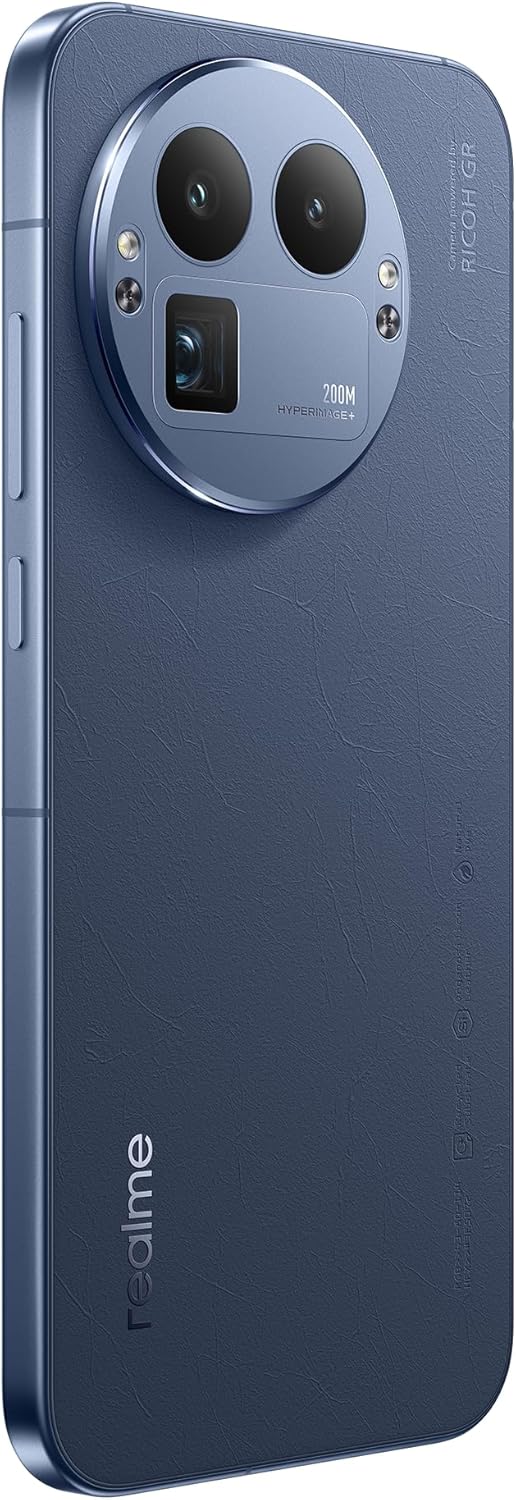
تصوير: پوئين پاسي view of the Realme 12 Plus 5G RMX3867, showcasing the prominent circular camera module with multiple lenses and a "200M HYPERIMAGE+" label.
4.3. ڪنيڪشن
- 5G نيٽ ورڪ: Your device supports 5G connectivity for faster mobile data speeds. Ensure your SIM card and plan support 5G.
- وائي فائي: Connect to wireless networks for internet access. Go to Settings > Wi-Fi to manage connections.
- بلوٽوٿ: Pair with Bluetooth devices like headphones, speakers, or car systems. Go to Settings > Bluetooth.
- USB-سي: چارجنگ ۽ ڊيٽا جي منتقلي لاءِ USB-C پورٽ استعمال ڪريو.
4.4. سيڪيورٽي خاصيتون
- فنگر پرنٽنگ سينسر: Unlock your device quickly and securely using the in-display fingerprint sensor. Register your fingerprints in Settings > Security & Privacy > Fingerprint.
- منهن جو تالو: Use facial recognition to unlock your phone. Set up Face Unlock in Settings > Security & Privacy > Face.
- اسڪرين لاڪ: Choose from PIN, pattern, or password for basic screen security.
5. سار سنڀال
5.1. توهان جي ڊوائيس کي صاف ڪرڻ
- فون جي اسڪرين ۽ باڊي کي صاف ڪرڻ لاءِ نرم، لِنٽ فري ڪپڙو استعمال ڪريو.
- سخت ڪيميڪلز، رگڙيندڙ مواد، يا ايروسول اسپري استعمال ڪرڻ کان پاسو ڪريو.
- ضدي داغن لاءِ، ٿورو ڊيampen پاڻي سان ڪپڙو يا اسڪرين ڪلينر خاص طور تي اليڪٽرانڪس لاءِ ٺهيل آهي.
5.2. سافٽ ويئر اپڊيٽ
باقاعدي طور تي سافٽ ويئر اپڊيٽس جي جانچ ڪريو ۽ انسٽال ڪريو ته جيئن پڪ ڪري سگهجي ته توهان جي ڊوائيس ۾ جديد خاصيتون، سيڪيورٽي پيچ، ۽ ڪارڪردگي بهتري آهي. اپڊيٽس جي جانچ ڪرڻ لاءِ سيٽنگون > ڊوائيس بابت > اپڊيٽ تي وڃو.
5.3. بيٽري جي سنڀال
- انتهائي گرمي پد کان پاسو ڪريو، ڇاڪاڻ ته اهي بيٽري جي زندگي کي گهٽائي سگهن ٿا.
- Use only the original charger and cable or certified compatible accessories.
- Do not let the battery drain completely frequently. It is generally recommended to keep the battery level between 20% and 80%.
6. مسئلا حل ڪرڻ
6.1. عام مسئلا ۽ حل
| مسئلو | حل |
|---|---|
| ڊوائيس چالو نه آهي | پڪ ڪريو ته بيٽري چارج ٿيل آهي. گهٽ ۾ گهٽ 10-15 سيڪنڊن لاءِ پاور بٽڻ کي دٻايو ۽ رکو. |
| ايپس جو ڪريش ٿيڻ يا منجمد ٿيڻ | ايپ بند ڪريو ۽ ان کي ٻيهر کوليو. ايپ جي ڪيش صاف ڪريو (سيٽنگون > ايپس > [ايپ جو نالو] > اسٽوريج > ڪيش صاف ڪريو). ڊوائيس کي ٻيهر شروع ڪريو. |
| غريب بيٽري جي زندگي | Check background app usage. Reduce screen brightness. Disable unnecessary features like GPS or Bluetooth when not in use. |
| وائي فائي سان ڳنڍجي نٿو سگھي | Restart your router and phone. Forget the network and reconnect. Ensure Wi-Fi is enabled on your device. |
6.2. فيڪٽري ري سيٽ
جيڪڏهن توهان کي مسلسل مسئلا درپيش اچن ٿا، ته فيڪٽري ري سيٽ انهن کي حل ڪري سگهي ٿو. خبردار: فيڪٽري ري سيٽ ڪرڻ سان توهان جي فون تي سڀ ڊيٽا ختم ٿي ويندو. اڳتي وڌڻ کان اڳ اهم ڊيٽا جو بيڪ اپ وٺو.
- سيٽنگون > سسٽم > ري سيٽ آپشنز ڏانهن وڃو.
- "سڀ ڊيٽا ختم ڪريو (فيڪٽري ري سيٽ)" تي ٽيپ ڪريو.
- پنهنجي فيصلي جي تصديق ڪريو ۽ جيڪڏهن چيو وڃي ته پنهنجو پن/پاسورڊ داخل ڪريو.
- ڊوائيس ٻيهر شروع ٿيندو ۽ ري سيٽ عمل شروع ڪندو.
7. وضاحتون
Below are the key technical specifications for the Realme 12 Plus 5G RMX3867:
| خاصيت | تفصيل |
|---|---|
| برانڊ | حقيقي |
| ماڊل نالو | Realme 12 Plus 5G (RMX3867) |
| آپريٽنگ سسٽم | Android |
| ميموري رکڻ جي صلاحيت | 256 جي بي |
| رام ميموري انسٽال ٿيل سائيز | 12 جي بي |
| سي پي يو ماڊل | سنيپراگن |
| سي پي يو اسپيڊ | 1200 MHz |
| اسڪرين جي ماپ | 6.4 انچ |
| ڊسپلي جو قسم | AMOLED |
| قرارداد | 1440 x 2560 |
| مؤثر وڊيو حل | 200 ايم پي |
| سيلولر ٽيڪنالاجي | 5G |
| بيٽري جي گنجائش | 7000 مليamp ڪلاڪ |
| بيٽري جي سراسري زندگي | 21 ڪلاڪ |
| انساني انٽرفيس ان پٽ | ٽچ اسڪرين |
| شيون ماڊل نمبر | GT 8 Pro (Note: Product title is Realme 12 Plus 5G RMX3867) |
Note: Some specifications may vary slightly based on region or specific product variant. The model number in the product title is RMX3867, while some specifications list 'GT 8 Pro'. Please refer to your device's packaging for the most accurate model information.
8. وارنٽي ۽ سپورٽ
Your Realme 12 Plus 5G RMX3867 device comes with a limited warranty. Please refer to the warranty card included in your product packaging for detailed terms and conditions, including warranty period and coverage.
For technical support, service, or further inquiries, please visit the official realme support website or contact their customer service. Contact information can typically be found on the realme official website or in the "Safety Guide" included with your device.
وارنٽي دعويٰ لاءِ خريداري جو ثبوت رکو.


