تعارف
This manual provides essential instructions for the safe and effective use of your Sony FX30 Digital Cinema Camera. The Sony FX30 is designed for content creators and filmmakers, featuring an APS-C sensor for cinematic capture. Please read this manual thoroughly before operating the camera and retain it for future reference.
پيڪيج مواد
تصديق ڪريو ته هيٺ ڏنل سڀئي شيون توهان جي پيڪيج ۾ شامل آهن. جيڪڏهن ڪا به شيءِ غائب يا خراب آهي، مهرباني ڪري پنهنجي پرچون ڪندڙ سان رابطو ڪريو.

Image: The Sony FX30 Digital Cinema Camera body with various accessories including a memory card, LED light, microphone, and stabilization grip.
Sony Manufacturer Items:
- Sony FX30 Digital Cinema Camera Body
- Sony NP-FZ100 Rechargeable Lithium-Ion Battery
- سوني اي سي اڊاپٽر
- اي-ماؤنٽ ڪيمرائن لاءِ سوني ALC-B1EM باڊي ڪيپ
- سوني ملٽي انٽرفيس شو ڪيپ
- USB-A کان USB-C ڪيبل (USB 3.2)
Bundled Items:
- SanDisk 128GB High Speed Extreme Pro SD Memory Card
- High Power LED Light with Diffusers
- شاٽگن مائڪروفون
- Padded Deluxe Camera Bag
- U-Stabilization Grip
- Extra Replacement Battery (Compatible with NP-FZ100)
- Pistol Hand Grip
- Photo & Video Editing Software (1 Year Digital Download)
- USB Memory Card Reader
- Camera Hand Grip Strap
- Lens Pen
- لينس ڦوڪيندڙ
- Camera Starter Kit (Microfiber Cloth, Memory Card Case, Buds)
سيٽ اپ ڪريو
1. بيٽري لڳائڻ
Insert the provided Sony NP-FZ100 battery into the battery compartment located at the bottom of the camera. Ensure it clicks into place securely. Charge the battery fully before first use using the supplied AC adapter and USB-A to USB-C cable.
2. ميموري ڪارڊ جي انسٽاليشن
The FX30 supports SD memory cards. Open the memory card slot cover, typically located on the side of the camera. Insert the SanDisk 128GB Extreme Pro SD card with the label facing the correct direction until it clicks into place. The camera features dual card slots for extended recording or backup.

تصوير: پوئين پاسي view of the Sony FX30 showing the open memory card slots with two SD cards partially inserted.
3. Attaching the Body Cap
When no lens is attached, always keep the Sony ALC-B1EM Body Cap on the camera's E-mount to protect the sensor from dust and damage.
4. شروعاتي پاور آن
Press the power button to turn on the camera. Follow any on-screen prompts for initial setup, such as language selection and date/time settings.
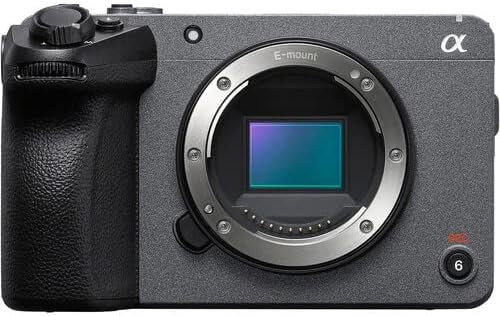
تصوير: سامهون view of the Sony FX30 camera body, showcasing the E-mount lens interface and grip.
5. لوازمات ڳنڍڻ
Attach the U-Stabilization Grip, Shotgun Microphone, and LED Light as needed for your shooting requirements. The camera features a Multi Interface Shoe for compatible accessories.
ڪئميرا هلائڻ
بنيادي ڪنٽرول ختمview
Familiarize yourself with the camera's main controls for efficient operation.

تصوير: پوئين پاسي view of the Sony FX30, highlighting the LCD screen, MODE dial, MENU button, and various control buttons and dials.
- MODE Dial: Selects shooting modes.
- مينيو بٽڻ: Accesses camera settings and functions.
- FOCUS MAG: Magnifies the display for precise focusing.
- ايف اين (فنڪشن) بٽڻ: اڪثر استعمال ٿيندڙ سيٽنگن تائين جلدي رسائي فراهم ڪري ٿي.
- DISP (ڊسپلي) بٽڻ: Changes the information displayed on the screen.
- Control Wheel: مينيو کي نيويگيٽ ڪري ٿو ۽ سيٽنگون ترتيب ڏئي ٿو.
- Zebra/Peaking: Assists with exposure and focus.

تصوير: مٿي view of the Sony FX30, showing the Multi Interface Shoe, IRIS, WB, ISO buttons, and the REC button.
- IRIS Button: Adjusts aperture.
- WB (White Balance) Button: Sets white balance.
- ISO Button: Adjusts ISO sensitivity.
- آر اي سي بٽڻ: شروع ٿئي ٿو ۽ وڊيو رڪارڊنگ کي روڪي ٿو.
ٽچ اسڪرين آپريشن
The FX30 features a touch-sensitive LCD screen for intuitive control. You can tap to select menu items, adjust focus, and navigate settings directly on the display.

Image: A hand interacting with the touch-sensitive LCD screen on the back of the Sony FX30 camera.
رڪارڊنگ وڊيو
To begin recording, ensure a memory card is inserted and the battery is charged. Press the REC button to start recording. Press it again to stop. The camera supports video capture resolutions up to 4K and 1080p in MP4 format.
رابطي
The Sony FX30 supports Wi-Fi connectivity for remote control, file transfer, and other smart functions. Refer to the camera's on-screen menu for Wi-Fi setup instructions.
سار سنڀال
- ڪئميرا جي جسم کي صاف ڪرڻ: ڪئميرا جي باڊي کي صاف ڪرڻ لاءِ نرم، سڪل ڪپڙو استعمال ڪريو. ضدي مٽيءَ لاءِ، ٿورو ڊيampپاڻي سان ڪپڙو صاف ڪريو. مضبوط صفائي ڪندڙ ايجنٽ استعمال ڪرڻ کان پاسو ڪريو.
- لينس ۽ سينسر جي صفائي: Use a lens blower to remove dust from the lens and sensor. For smudges on the lens, use a lens pen or a specialized lens cleaning solution with a microfiber cloth. Sensor cleaning should be performed with extreme care or by a professional.
- بيٽري جي سنڀال: بيٽرين کي ٿڌي، سڪل جاءِ تي رکو. بيٽرين جي عمر وڌائڻ لاءِ انهن کي بار بار مڪمل طور تي چارج ڪرڻ کان پاسو ڪريو.
- اسٽوريج: When not in use, store the camera in a dry, dust-free environment, preferably in the padded deluxe camera bag provided.
مشڪلاتون
This section addresses common issues you might encounter. For more detailed troubleshooting, refer to the official Sony support webسائيٽ.
- ڪئميرا آن نٿو ٿئي: Ensure the battery is fully charged and correctly inserted. Try using the extra replacement battery.
- ميموري ڪارڊ جي غلطي: Reinsert the memory card. Ensure it is formatted correctly by the camera. Try a different memory card if the issue persists.
- ڪابه وڊيو رڪارڊنگ: Check if the memory card has sufficient free space. Verify that the camera is in a video recording mode.
- تصويري معيار جا مسئلا: Check lens cleanliness. Ensure appropriate ISO, aperture, and shutter speed settings for your lighting conditions.
وضاحتون
| خاصيت | تفصيل |
|---|---|
| پيداوار جي ماپ | 3.3 x 3.1 x 3.3 انچ |
| شيءِ جو وزن | 8 پائونڊ |
| ASIN | B0D1RWMS36 |
| شيون ماڊل نمبر | CC-FX30BODY-41524 |
| ٺاهيندڙ | سوني |
| برانڊ | سوني |
| فوٽو سينسر ٽيڪنالاجي | APS-C |
| وڊيو ڪيپچر ريزوليوشن | 1080p، 4K |
| فليش ميموري جو قسم | SD |
| وڊيو ڪيپچر فارميٽ | ايم پي 4 |
| سپورٽ آڊيو فارميٽ | AAC، MP3 |
| اسڪرين جي ماپ | 3 انچ |
| رابطي ٽيڪنالاجي | وائي فائي |
| رنگ | ڪارو |
| خاص خصوصيت | وائرليس |
وارنٽي ۽ سپورٽ
The Sony FX30 Digital Cinema Camera comes with a Limited 1-Year Manufacturer Warranty. Please retain your proof of purchase for warranty claims.
For technical support, service, or further information, please visit the official Sony support webسائيٽ تي وڃو يا انهن جي ڪسٽمر سروس سان رابطو ڪريو. توهان وڌيڪ معلومات هتي ڳولي سگهو ٿا سوني سپورٽ Webسائيٽ.


