تعارف
This manual provides detailed instructions for setting up, operating, and maintaining your AJAZZ A3060 Wireless Keyboard and Mouse Combo. Please read this manual carefully before use to ensure optimal performance and longevity of your product.
پيڪيج مواد
- 1 x AJAZZ A3060 Wireless Keyboard
- 1 x AJAZZ A3060 Wireless Mouse
- 1 x USB 2.4G رسيور

Image: The AJAZZ A3060 wireless keyboard and mouse combo, shown with the compact USB receiver.
سيٽ اپ ڪريو
1. بيٽري لڳائڻ
- ڪي بورڊ لاءِ: Locate the battery compartment on the underside of the keyboard. Insert two (2) AAA batteries, ensuring correct polarity.
- مائوس لاءِ: Locate the battery compartment on the underside of the mouse. Insert one (1) AA battery, ensuring correct polarity.
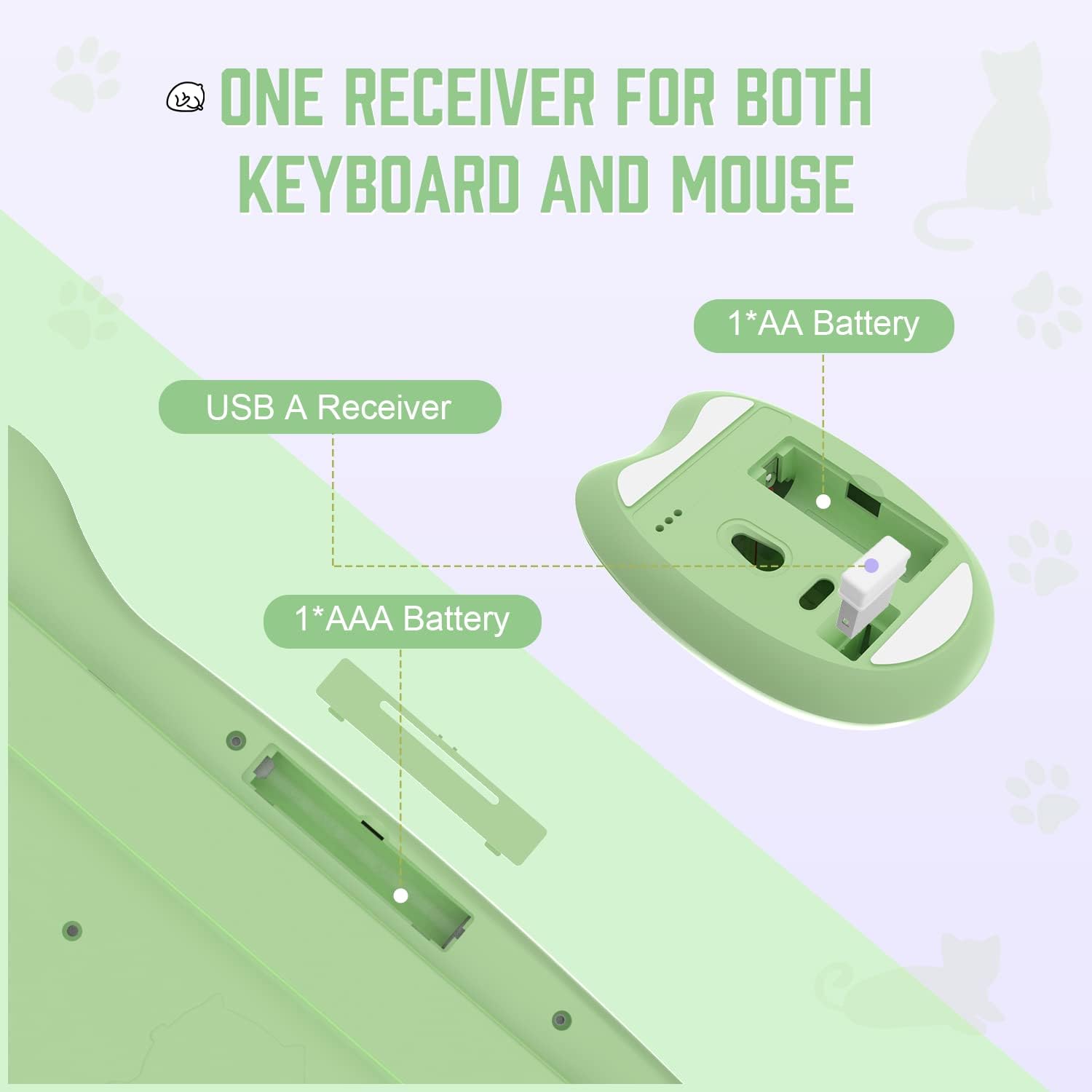
Image: Diagram illustrating the battery compartments for the keyboard (2x AAA) and mouse (1x AA), and the location of the USB receiver storage within the mouse.
2. USB رسيور کي ڳنڍڻ
- Take out the USB receiver from its storage slot on the underside of the mouse.
- Plug the USB receiver into an available USB-A port on your computer or compatible device.
- Ensure the mouse power switch (located on the underside) is in the 'ON' position.
- The keyboard and mouse should automatically connect to your device. No additional drivers are required.

Image: Visual guide demonstrating the six steps for connecting the wireless keyboard and mouse to a USB-A device, including receiver removal, plugging in, battery insertion, and power activation.
آپريٽنگ هدايتون
ڪي بورڊ افعال
The AJAZZ A3060 keyboard features 84 keys with a retro round keycap design, providing a tactile and responsive typing experience. It includes dedicated media keys for enhanced control.
- ميڊيا ڪيز: The function keys (F1-F12) have secondary media control functions. These can typically be accessed by pressing the 'Fn' key simultaneously with the desired F-key.
- اشارو بتيون: Located in the upper right corner of the keyboard. One light indicates uppercase/lowercase switching (Caps Lock), and the other indicates low battery or 2.4G connection status.

Image: An illustration of the AJAZZ A3060 keyboard highlighting the media key functions (F1-F12) and the indicator lights for Caps Lock and battery/connection status.
ماؤس جا ڪم ڪار
The ergonomic cat-shaped mouse is designed for comfort and features adjustable DPI settings.
- ڊي پي آءِ ايڊجسٽمينٽ: The mouse features a DPI button, typically located near the scroll wheel. Press this button to cycle through three adjustable DPI levels: 800, 1600, and 3200. This allows you to customize cursor sensitivity.
- پاور سوئچ: An ON/OFF switch is located on the underside of the mouse to conserve battery life when not in use.

Image: A visual representation of the AJAZZ A3060 mouse, highlighting its ergonomic design and the three adjustable DPI settings (800, 1600, 3200).
پاور بچت موڊ
The combo is equipped with an intelligent power-saving feature. After a period of inactivity, the devices will automatically enter sleep mode to conserve battery. To wake them up, simply click any key on the keyboard or move/click the mouse.
A low battery indicator will alert you when it's time to replace the batteries.
مطابقت
The AJAZZ A3060 Wireless Keyboard and Mouse Combo offers broad compatibility with various operating systems and devices, ensuring versatile use.
- آپريٽنگ سسٽم: Compatible with Windows XP, Windows 7, Windows 8, Windows 10, and macOS.
- ڊوائيسز: Suitable for use with PCs, laptops, Smart TVs, workstations, projectors, and tablets.

تصوير: هڪ اوورview showing the AJAZZ A3060 keyboard and mouse compatible with Smart TVs, PCs, Laptops, Macs, Workstations, and Projectors, and suitable for Windows operating systems.
سار سنڀال
To ensure the longevity and optimal performance of your AJAZZ A3060 combo, follow these maintenance guidelines:
- صفائي: ڪيبورڊ ۽ مائوس جي مٿاڇري کي صاف ڪرڻ لاءِ نرم، سڪل ڪپڙو استعمال ڪريو. ضدي مٽيءَ لاءِ، ٿورو ڊيamp ڪپڙو استعمال ڪري سگهجي ٿو، پر پڪ ڪريو ته نمي ڊوائيس ۾ داخل نه ٿئي.
- بيٽري مٽائڻ: Replace batteries promptly when the low battery indicator appears to avoid interruptions in use. Always use new, high-quality batteries of the specified type (AAA for keyboard, AA for mouse).
- اسٽوريج: When not in use for extended periods, turn off the mouse using its power switch and store the USB receiver in its designated slot to prevent loss.
- مائع کان بچاء: Keep the devices away from liquids to prevent damage to internal components.
مشڪلاتون
- ڪوبه ڪنيڪشن ناهي/غير جوابده:
- پڪ ڪريو ته USB رسيور محفوظ طور تي ڪم ڪندڙ USB پورٽ ۾ لڳل آهي.
- Check if the mouse power switch is in the 'ON' position.
- Replace the batteries in both the keyboard and mouse with fresh ones.
- Try plugging the USB receiver into a different USB port on your device.
- Move the keyboard and mouse closer to the USB receiver (within 10 meters).
- Lagging/Delayed Response:
- Ensure there are no other 2.4GHz wireless devices causing interference nearby.
- بيٽري جي سطح چيڪ ڪريو ۽ جيڪڏهن گهٽ آهي ته تبديل ڪريو.
- Mouse Cursor Movement Issues:
- مائوس جي هيٺئين پاسي واري آپٽيڪل سينسر کي صاف ڪريو.
- پڪ ڪريو ته توهان مائوس کي مناسب مٿاڇري تي استعمال ڪري رهيا آهيو (گهڻو عڪاسي ڪندڙ يا شفاف نه).
- Adjust the DPI setting to your preference.
وضاحتون
| ماڊل | A3060 |
| ڪنيڪشن جو قسم | 2.4GHz وائرليس (USB رسيور) |
| وائرلیس رينج | 10 ميٽر (33 فوٽ) تائين |
| ڪي بورڊ لي آئوٽ | 84 ڪنجيون |
| ڪي بورڊ جي بيٽري | 2 x AAA بيٽريون (شامل نه آهن) |
| ماؤس جي بيٽري | 1 x AA بيٽري (شامل نه آهي) |
| ماؤس DPI | 800 / 1600 / 3200 (Adjustable) |
| ڪي بورڊ جو طول و عرض | لڳ ڀڳ. 13.6 ۾ x 6 ۾ x 1.1 انچ |
| مائوس جي ماپ | Approx. 4.1 in x 2.7 in |
| پيداوار جو وزن | Approx. 730 grams (package weight) |
| اصل جو ملڪ | چين |

Image: Detailed dimensions of the AJAZZ A3060 wireless keyboard and mouse, showing measurements in inches.
وارنٽي ۽ سپورٽ
وارنٽي جي معلومات ۽ ٽيڪنيڪل سپورٽ لاءِ، مھرباني ڪري پنھنجي خريداري سان مهيا ڪيل دستاويزن جو حوالو ڏيو يا پرچون ڪندڙ/ٺاهيندڙ سان سڌو رابطو ڪريو. ڪنھن به وارنٽي دعوائن لاءِ خريداري جو ثبوت رکو.