1. تعارف
Thank you for choosing the CUKTECH 25000mAh Power Bank, model PB250. This portable power bank is designed to provide high-capacity, fast charging for a wide range of electronic devices, including laptops, smartphones, and tablets. With its multiple output ports and advanced safety features, it offers a reliable power solution for travel, work, and daily use.

Image 1.1: The CUKTECH 25000mAh Power Bank PB250, a portable charging device with a sleek grey finish, shown alongside two USB-C charging cables.
2. پيڪيج مواد
مھرباني ڪري ھيٺ ڏنل شين لاءِ پيڪيج چيڪ ڪريو:
- CUKTECH 25000mAh Power Bank (PB250)
- 1 x 3.3ft USB-A to USB-C Charging Cable
- 1 x 1.6ft USB-C to USB-C Charging Cable
- استعمال ڪندڙ جو دستياب (ھي دستاويز)
3. پراڊڪٽ ختمview
The CUKTECH PB250 features multiple ports for versatile charging and a digital display for real-time information.
3.1. پورٽ ترتيب

تصوير 3.1: هڪ تفصيلي view of the CUKTECH PB250's charging ports, showing one USB-A port with a maximum output of 65W, one USB-C1 port with a maximum output of 100W, and one USB-C2 port with a maximum output of 45W.
- USB-C1 Port (IN/OUT1): Up to 100W Max input/output. Supports Power Delivery (PD) for fast charging compatible devices and recharging the power bank.
- USB-A Port (OUT2): Up to 65W Max output. Compatible with various devices requiring USB-A charging.
- USB-C2 Port (IN2/OUT3): Up to 45W Max input/output. Supports Power Delivery (PD) for charging devices and recharging the power bank.
3.2. ڊجيٽل ڊسپلي
انٽيگريٽيڊ ڊجيٽل ڊسپلي باقي بيٽري جي فيصد ڏيکاري ٿوtagپاور بينڪ جو اي، توهان کي هڪ نظر ۾ ان جي چارج ليول جي نگراني ڪرڻ جي اجازت ڏئي ٿو.
4. سيٽ اپ
4.1. شروعاتي چارجنگ
Before first use, it is recommended to fully charge your CUKTECH PB250 Power Bank. Use a compatible USB-C power adapter (not included) and the provided USB-C to USB-C cable to connect the power bank's USB-C1 or USB-C2 port to a power source. The digital display will show the charging progress.
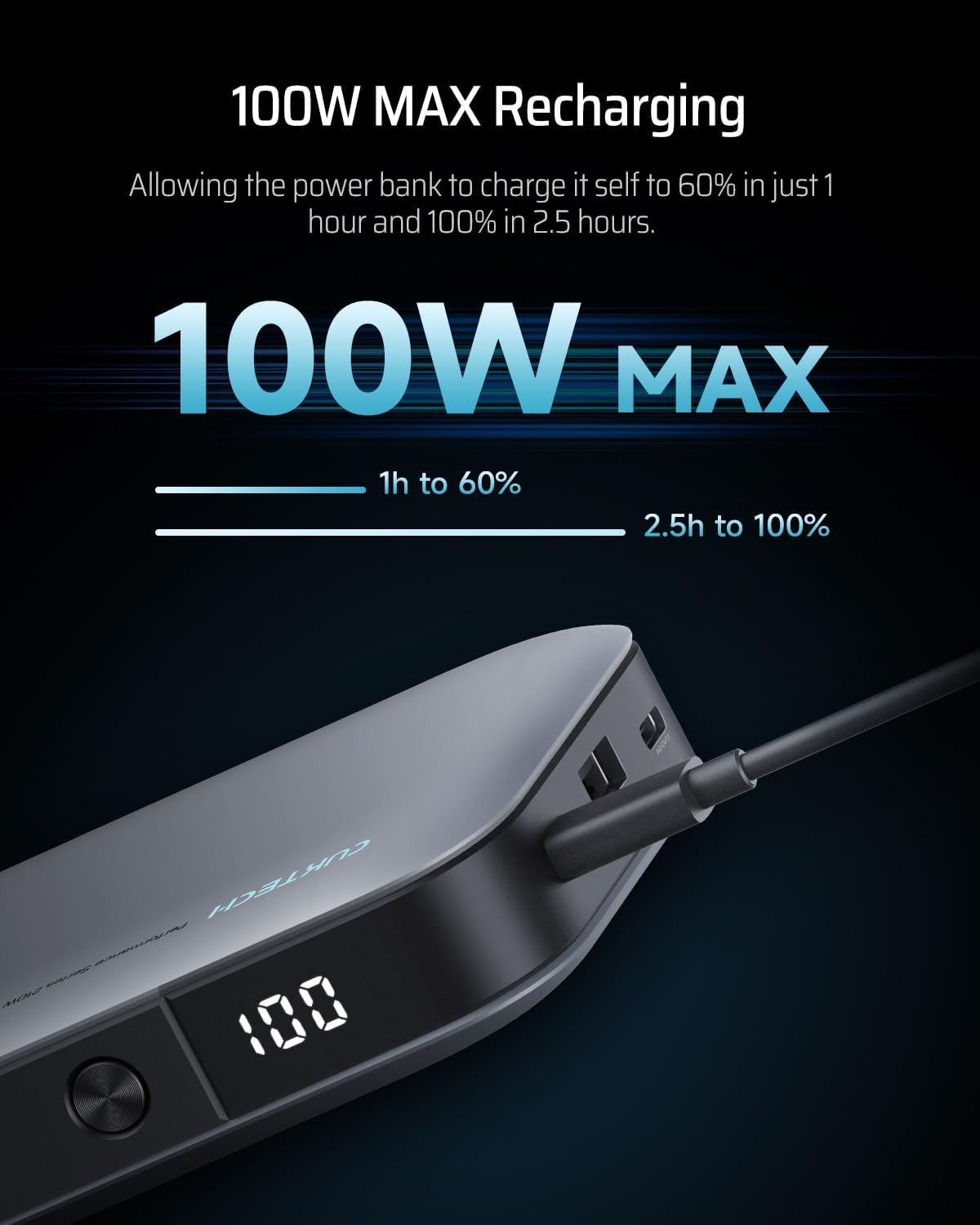
Image 4.1: The CUKTECH PB250 Power Bank connected to a power source via its USB-C port, illustrating its capability for 100W maximum recharging, reaching 60% in 1 hour and 100% in 2.5 hours.
A full charge typically takes approximately 2.5 hours when using a 100W Power Delivery charger.
5. آپريشن
5.1. پنهنجا آلات چارج ڪندي
Connect your device to the appropriate port on the power bank using a compatible charging cable. The power bank will automatically detect the device and begin charging.
- For USB-C Devices: Use the USB-C to USB-C cable to connect to either USB-C1 (up to 100W) or USB-C2 (up to 45W) ports.
- For USB-A Devices: Use the USB-A to compatible cable to connect to the USB-A port (up to 65W).

Image 5.1: The CUKTECH PB250 Power Bank connected to a MacBook Pro via a USB-C cable, demonstrating its ability to provide power comparable to a 100W MacBook Pro charger, charging the laptop to 70% in 1 hour.
5.2. Multi-Port Charging
The power bank supports simultaneous charging of up to three devices. The total output power will be dynamically distributed among the connected devices.
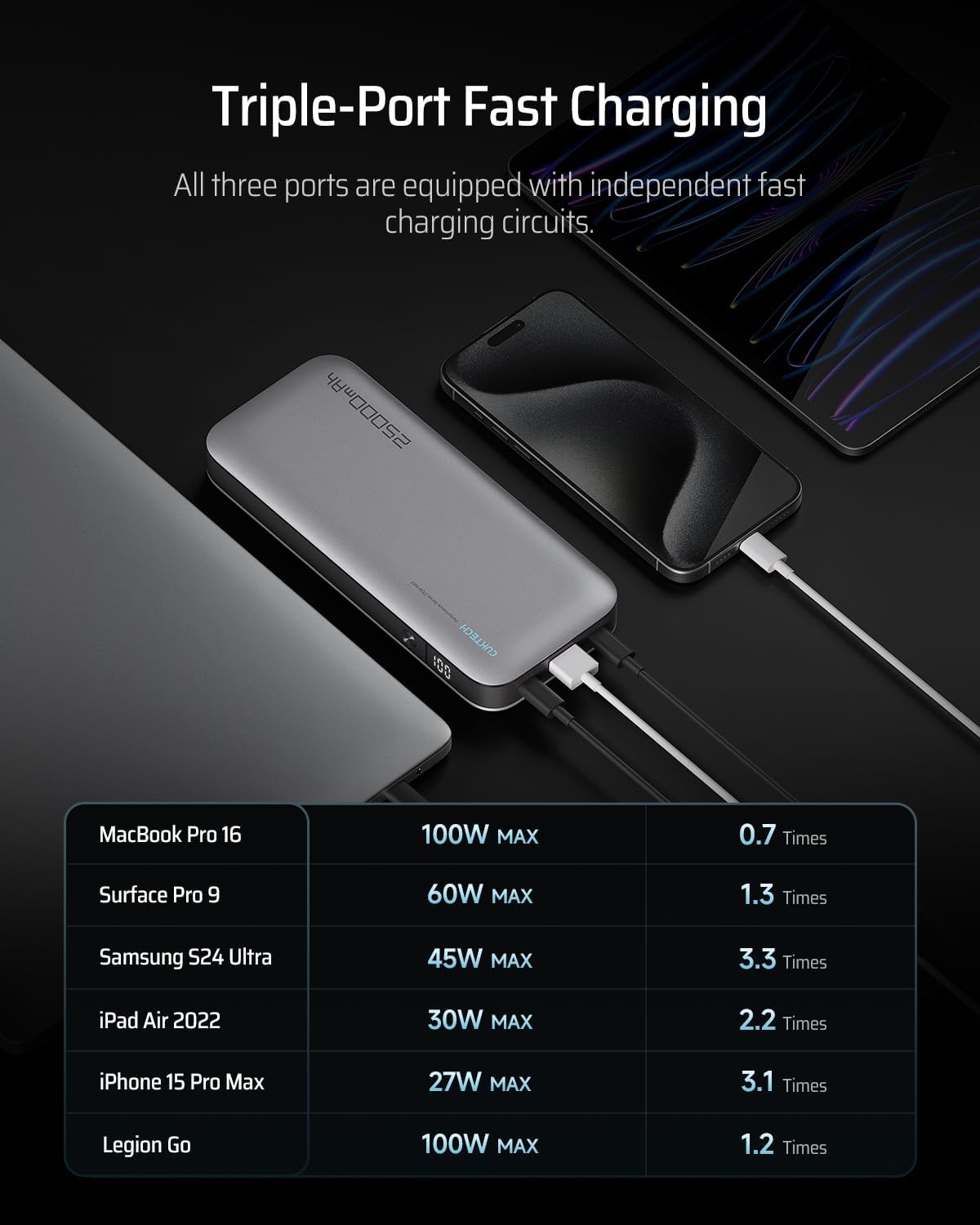
Image 5.2: The CUKTECH PB250 Power Bank simultaneously charging a MacBook Pro 16, a tablet, and a smartphone, illustrating its triple-port fast charging capability. A table shows charging capacities for various devices.
When multiple ports are in use, the power distribution may vary. Refer to the diagrams below for typical power distribution scenarios:
سنگل پورٽ چارجنگ

Image 5.3: Diagram illustrating the maximum power output when only one port is in use: USB-C1 at 100W Max, USB-A at 65W Max, and USB-C2 at 45W Max.
ٻه-پورٽ چارج

Image 5.4: Diagram detailing power distribution when two ports are used simultaneously: USB-C1 (100W Max) + USB-A (65W Max), USB-C1 (100W Max) + USB-C2 (45W Max), and USB-A (65W Max) + USB-C2 (45W Max).
ٽي-پورٽ چارجنگ
When all three ports are in use, the power bank will intelligently distribute power. The USB-A port will typically output 18W Max, while USB-C1 and USB-C2 will share the remaining power, with USB-C1 prioritizing higher output.
6. سار سنڀال
- صفائي: Use a soft, dry cloth to clean the power bank. Avoid using harsh chemicals or abrasive materials.
- ذخيرو: Store the power bank in a cool, dry place away from direct sunlight and extreme temperatures. If storing for extended periods, charge the power bank to approximately 50-70% every three months to maintain battery health.
- قطرن کان پاسو ڪريو: Do not drop or subject the power bank to strong impacts.
7. مسئلا حل ڪرڻ
- پاور بئنڪ چارج نه آهي: Ensure the charging cable is securely connected to both the power bank and the power adapter. Verify that the power adapter is functioning correctly and provides sufficient power (e.g., a 100W PD charger for optimal speed).
- ڊوائيس چارج نه آهي: Check if the power bank has sufficient charge. Ensure the charging cable is compatible with your device and securely connected. Try a different port or cable.
- سست چارج: Ensure you are using a fast-charging compatible cable and adapter. Some devices may limit charging speed based on their battery level or temperature. When multiple devices are connected, the total output is shared, which may reduce individual port speeds.
- ڊجيٽل ڊسپلي ڪم نه ڪري رهيو آهي: Press the power button briefly to activate the display. If it remains unresponsive, the power bank may require recharging or service.
8. وضاحتون
| خاصيت | تفصيل |
|---|---|
| ماڊل نمبر | پي بي 250 |
| بيٽري جي گنجائش | 25000mAh (90Wh) |
| USB-C1 ان پٽ/آئوٽ پٽ | 100W Max (PD) |
| USB-C2 ان پٽ/آئوٽ پٽ | 45W Max (PD) |
| USB-اي آئوٽ | 65W وڌو |
| مجموعي پيداوار | 165W وڌ ۾ وڌ (شيئر ٿيل) |
| طول و عرض | 7.4 x 3.2 x 1.1 انچ (18.8 x 8.1 x 2.8 سينٽي) |
| وزن | 1.28 پائونڊ (580 گرام) |
| بيٽري جو قسم | ليتيم آئن |
| خاص خاصيتون | Digital Display, Multiple Overheat Protections |
9. حفاظت جي ڄاڻ
- پاور بئنڪ کي انتهائي گرمي پد، سڌي سج جي روشني، يا باهه جي سامهون نه رکو.
- Do not disassemble, puncture, or modify the power bank.
- ٻارن جي پهچ کان پري رکو.
- پاڻي يا ٻين مائع سان رابطي کان پاسو ڪريو.
- If the power bank swells, emits odor, or becomes excessively hot, discontinue use immediately.
9.1. وڌيڪ گرمي کان بچاءُ
The CUKTECH PB250 is equipped with five NTC sensors to provide comprehensive overheat protection for the battery cells and circuit board, ensuring safe operation.

تصوير 9.1: هڪ اندروني view diagram of the CUKTECH PB250, highlighting the placement of five NTC sensors designed to provide comprehensive overheat protection for the internal components.
9.2. Air Travel Regulations
The CUKTECH PB250 has a battery capacity of 25000mAh (90Wh), which conforms to international aviation standards for carry-on luggage (typically under 100Wh). Always check with your airline for their specific regulations before traveling.

Image 9.2: A person holding the CUKTECH PB250 Power Bank in an airport, indicating its compliance with flight regulations due to its battery power being less than 100Wh.
10. وارنٽي ۽ سپورٽ
10.1. وارنٽي ڄاڻ
CUKTECH products typically come with a 24-month warranty against manufacturing defects. Please retain your proof of purchase for warranty claims. The warranty does not cover damage caused by misuse, accidents, unauthorized modifications, or normal wear and tear.
10.2. ڪسٽمر سپورٽ
For any questions, technical support, or warranty inquiries, please contact CUKTECH customer service:
- اي ميل: service@cuktech.com
- آن لائن سپورٽ: Visit the official CUKTECH webسوالن ۽ اضافي سپورٽ وسيلن لاءِ سائيٽ.


