1. تعارف
The COLMi P81 Smartwatch is a versatile and durable companion designed for an active and connected lifestyle. It offers essential functionalities in an elegant and robust design, including comprehensive health monitoring, smart notifications, and various sports modes. This manual provides detailed instructions to help you set up, operate, and maintain your smartwatch.

Figure 1.1: COLMi P81 Smartwatch
2. دٻي ۾ ڇا آهي
Upon opening your COLMi P81 Smartwatch package, please verify that all the following items are included:
- 1 x COLMi P81 Smartwatch
- 1 x مقناطيسي چارجنگ ڪيبل
- 1 x انگريزي استعمال ڪندڙ دستياب

Figure 2.1: Items Included in the Box
3. سيٽ اپ
3.1 اسمارٽ واچ کي چارج ڪرڻ
Before initial use, fully charge your COLMi P81 Smartwatch. The device uses a 2-pin magnetic charging cable.
- Connect the magnetic end of the charging cable to the charging points on the back of the smartwatch. Ensure a secure connection.
- ڪيبل جي USB پڇاڙي کي معياري USB پاور اڊاپٽر (5V/1A تجويز ڪيل) يا ڪمپيوٽر جي USB پورٽ ۾ لڳايو.
- The screen will display a charging indicator. A full charge takes approximately 2 hours.

Figure 3.1: Smartwatch Charging Indicator
3.2 پاور آن/آف
- پاور آن: اسڪرين روشن ٿيڻ تائين پاسي واري بٽڻ کي ڪجهه سيڪنڊن لاءِ دٻايو ۽ رکو.
- بجلي بند: From the watch face, swipe down to access quick settings, or navigate to 'Settings' > 'System' > 'Power Off'. Confirm your choice.
3.3 ايپ جي انسٽاليشن ۽ جوڙو ٺاهڻ
To unlock the full potential of your COLMi P81, download and install the compatible health application on your smartphone (Android or iOS).
- Scan the QR code in the manual or on the watch, or search for the official COLMi app in your phone's app store.
- ايپ انسٽال ڪريو ۽ جيڪڏهن چيو وڃي ته اڪائونٽ ٺاهيو.
- پنهنجي اسمارٽ فون تي بلوٽوت کي فعال ڪريو.
- Open the app, go to 'Device' or 'Add Device', and select 'COLMi P81' from the list of available devices.
- Follow the on-screen prompts to complete the pairing process. Ensure the pairing code displayed on the watch matches the one in the app.
4. آپريٽنگ هدايتون
4.1 بنيادي نيويگيشن
- ٽچ اسڪرين: مکيه ڪمن جي وچ ۾ نيويگيٽ ڪرڻ لاءِ کاٻي/ساڄي سوائپ ڪريو (مثال طور، سرگرمي، دل جي شرح، موسم). مٿي سوائپ ڪريو تائين view notifications. Swipe down to access quick settings.
- پاسي واري بٽڻ: Press to return to the watch face or to wake the screen. Press and hold for power options or to access the voice assistant.
4.2 نوٽيفڪيشن
Once paired with your smartphone, the COLMi P81 can receive notifications for calls, messages, and social media apps directly on your wrist. Ensure notification permissions are enabled in both the smartwatch app and your phone's settings.
4.3 صحت جي نگراني
The smartwatch provides 24/7 health monitoring, offering valuable insights into your well-being:
- دل جي شرح: سڄو ڏينهن توهان جي دل جي شرح جي نگراني ڪري ٿو.
- بلڊ پريشر: اندازي مطابق بلڊ پريشر ريڊنگ مهيا ڪري ٿو.
- رت جي آڪسيجن (SpO2): توهان جي رت جي آڪسيجن جي سنترپتي جي سطح کي ماپي ٿو.
- سمهڻ جي ٽريڪنگ: توهان جي ننڊ جي نمونن جو تجزيو ڪري ٿو، جنهن ۾ گهري ننڊ، هلڪي ننڊ، ۽ جاڳڻ جا وقت شامل آهن.
Access detailed historical data for all health metrics within the companion app.
4.4 راندين جا طريقا
The COLMi P81 supports over 100 sports modes, allowing you to track various activities comprehensively. It records data during exercise, helping you understand your performance and adjust your fitness routine.

Figure 4.1: Sports Data and Modes
4.5 بلوٽوت ڪالنگ
The COLMi P81 features an integrated microphone and speaker, enabling you to make and receive calls directly from your wrist when connected to your smartphone via Bluetooth.

شڪل 4.2: بلوٽوٿ ڪال ڪارڪردگي
4.6 وائس اسسٽنٽ
The smartwatch includes a voice assistant function, allowing you to control music playback and initiate calls on your connected mobile phone using voice commands.

Figure 4.3: Voice Assistant Interface
5. سار سنڀال
5.1 پاڻي جي مزاحمت (IP68)
The COLMi P81 Smartwatch is IP68 water-resistant, meaning it can withstand immersion in water up to 1.5 meters for 30 minutes. It is suitable for daily use, including hand washing, rain, and swimming in shallow water. However, it is not recommended for hot showers, saunas, or diving, as steam and high-pressure water jets may compromise the seal.
5.2 صفائي
پنهنجي سمارٽ واچ کي صاف ۽ سٺي حالت ۾ رکڻ لاءِ:
- اسڪرين ۽ جسم کي نرم، ڊي سان صاف ڪريوamp ڪپڙو.
- For the silicone strap, you can wash it with mild soap and water, then rinse thoroughly and dry. The silicone material is durable and adjustable.
- سخت ڪيميائي يا ٻرندڙ مواد استعمال ڪرڻ کان پاسو ڪريو.

Figure 5.1: Silicone Strap
5.3 بيٽري جي سنڀال
The COLMi P81 features a 230mAh lithium polymer battery, offering up to 7 days of continuous use on a single charge. To prolong battery life:
- انتهائي گرمي پد کان بچاء.
- Charge the device before the battery is completely depleted.
- If storing for a long period, charge it to about 50% and power it off.
6. مسئلا حل ڪرڻ
- سمارٽ واچ آن نه ٿي رهي آهي: پڪ ڪريو ته ڊوائيس مڪمل طور تي چارج ٿيل آهي. ان کي چارجر سان ڳنڍيو ۽ ٻيهر پاور آن ڪرڻ جي ڪوشش ڪرڻ کان پهريان ڪجهه منٽ انتظار ڪريو.
- اسمارٽ فون سان جوڙو نه ٿو ٺاهي سگهجي:
- پڪ ڪريو ته توهان جي فون ۽ اسمارٽ واچ تي بلوٽوٿ فعال آهي.
- پڪ ڪريو ته سمارٽ واچ توهان جي فون جي بلوٽوٿ رينج اندر آهي.
- سمارٽ واچ ۽ پنهنجو فون ٻئي ٻيهر شروع ڪريو.
- پنهنجي فون تي بلوٽوٿ ڪيش صاف ڪريو (جيڪڏهن لاڳو هجي).
- ايپ ذريعي ڊوائيس کي ختم ڪرڻ ۽ ٻيهر جوڙڻ جي ڪوشش ڪريو.
- غلط صحت جي پڙهائي: Ensure the smartwatch is worn snugly on your wrist, about one finger's width from your wrist bone. Avoid excessive movement during measurements.
- اطلاع نه مليا: Check notification permissions in both the smartwatch app and your phone's system settings. Ensure the app is running in the background.
7. وضاحتون
| خاصيت | تفصيل |
|---|---|
| برانڊ | ڪولمي |
| ماڊل | پي 81 |
| مين چپ | RTL8763EWE |
| دل جي ڌڙڪن جي چپ | HX3602 |
| ڏيکاريو | 1.9-inch IPS, 240*286 pixels |
| بيٽري جي گنجائش | 230mAh ليتيم پوليمر |
| چارج ڪرڻ جو طريقو | 2-pin Magnetic Cable |
| لڳ ڀڳ. چارج ڪرڻ وقت | 2 ڪلاڪ |
| استعمال وقت | 7 ڏينهن تائين |
| پاڻي جي مزاحمت | IP68 |
| مطابقت رکندڙ ڊوائيسز | Android Smartphones, iOS Smartphones |
| رابطي | بلوٽوٽ ، وائي فائي |
| استعمال ڪندڙ ان پٽ | ٽچ اسڪرين |
| رنگ | ڪارو |
| ميموري رکڻ جي صلاحيت | 128 ايم بي |
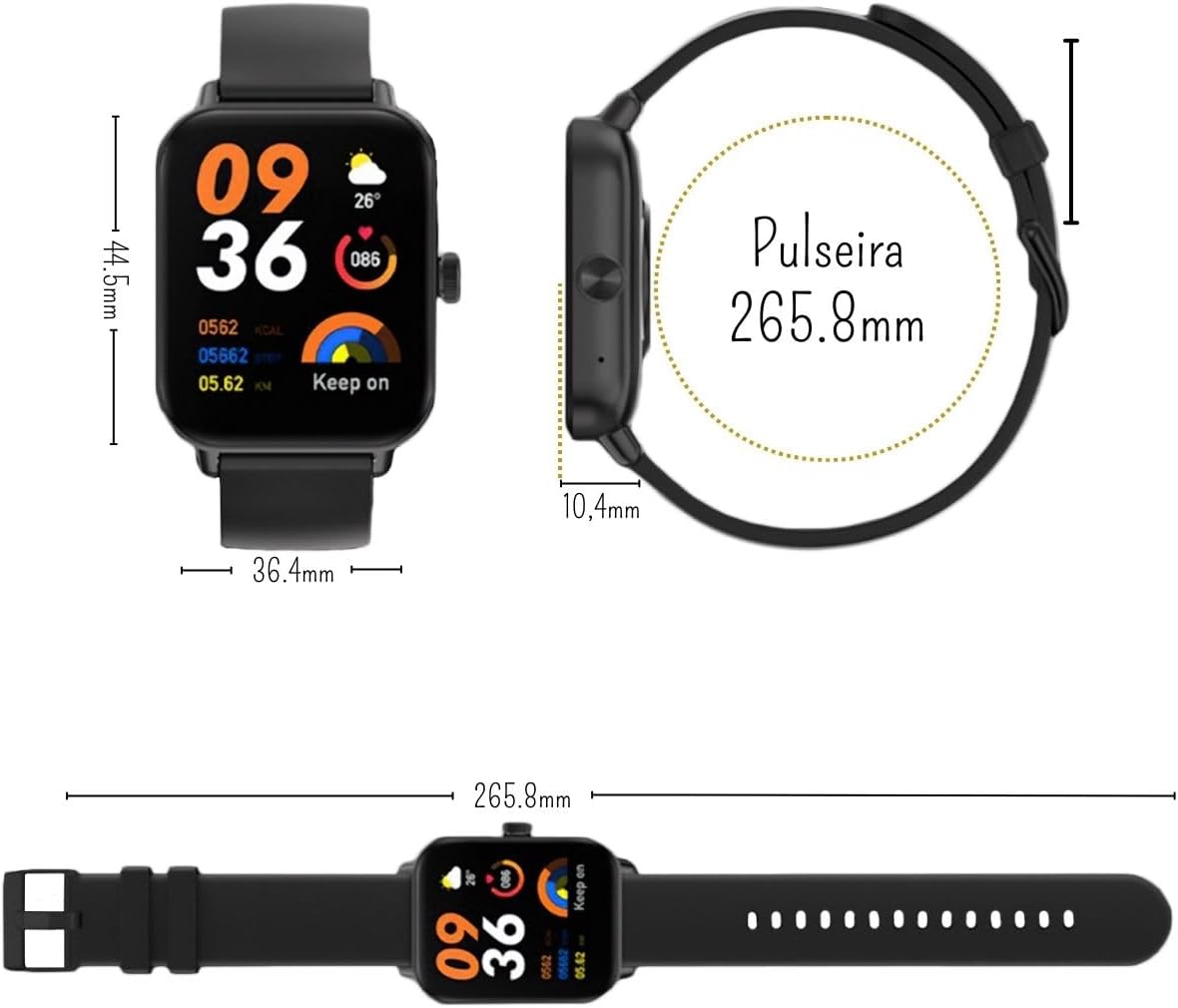
Figure 7.1: Smartwatch Dimensions
8. وارنٽي ۽ سپورٽ
8.1 ٺاهيندڙ جي وارنٽي
The COLMi P81 Smartwatch comes with a manufacturer's warranty of 30 days from the date of purchase. This warranty covers manufacturing defects and malfunctions under normal use. It does not cover damage caused by misuse, accidents, unauthorized repairs, or normal wear and tear.
8.2 ڪسٽمر سپورٽ
For any questions, technical assistance, or warranty claims, please contact the seller or the manufacturer's customer support. Refer to your purchase documentation for specific contact details.


