تعارف
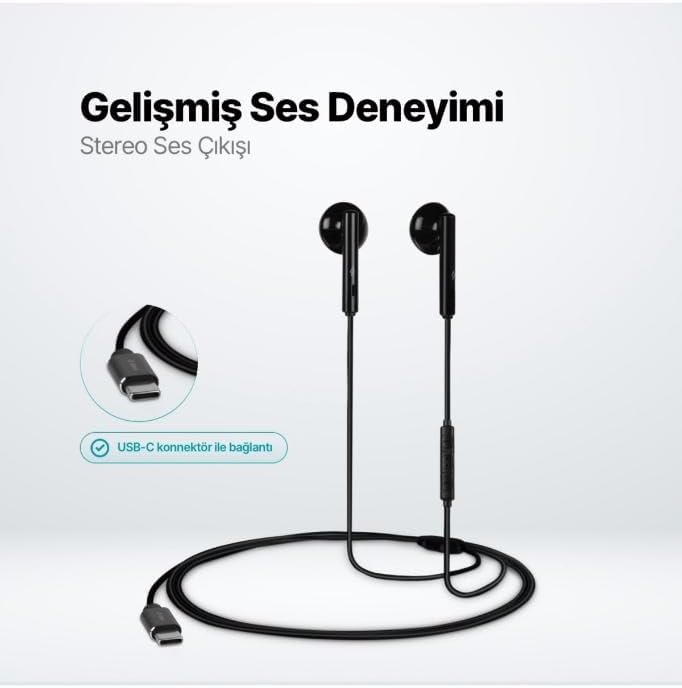
The TTEC Rio 2 Stereo USB-C Headset with Microphone is designed to provide a high-quality audio experience for music and calls. Its comfortable, lightweight design ensures a perfect fit and effective ambient noise isolation, allowing for hands-free communication and entertainment.
اهم خاصيتون:
- Advanced stereo sound output for an immersive audio experience.
- Integrated microphone for clear phone calls.
- Smart inline controller for easy management of volume, calls, and music playback.
- Lightweight and ergonomic design for extended comfort.
- Universal USB-C connection.
سيٽ اپ ڪريو
To begin using your TTEC Rio 2 headset, follow these simple steps:
- هيڊ سيٽ ڳنڍيو: Locate the USB-C port on your device (smartphone, tablet, laptop, etc.). Insert the USB-C connector of the TTEC Rio 2 headset firmly into the device's USB-C port.
- ڊوائيس جي سڃاڻپ: Your device should automatically recognize the headset. If prompted, select the TTEC Rio 2 as the audio output and input device.
- ترتيب ڏيو: Place the earbuds comfortably in your ears. The ergonomic design ensures a snug fit for optimal sound quality and noise isolation.
آپريٽنگ هدايتون
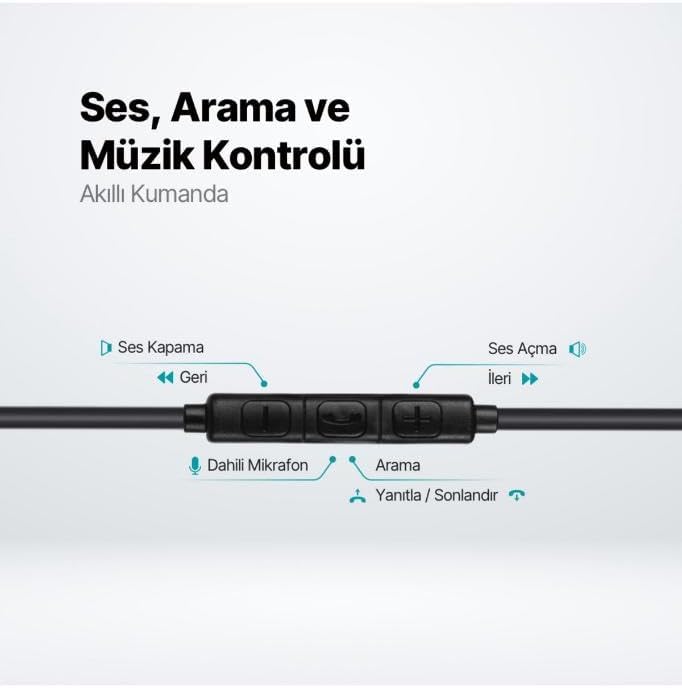
The TTEC Rio 2 headset features an inline smart controller for convenient management of your audio and calls.
Inline Controller Functions:
- حجم وڌايو (+): آڊيو جي مقدار وڌائڻ لاءِ دٻايو.
- حجم گھٽ (-): آڊيو جي مقدار کي گهٽائڻ لاءِ دٻايو.
- Play/Pause/Answer/End Call (Center Button):
- Single press to play or pause music.
- ايندڙ ڪال جو جواب ڏيڻ لاءِ هڪ ڀيرو دٻايو.
- هڪ فعال ڪال ختم ڪرڻ لاءِ هڪ ڀيرو دٻايو.
- اچڻ واري ڪال کي رد ڪرڻ لاءِ ڊگھو دٻايو.
- Next Track (Forward Button): ايندڙ گيت ڏانھن وڃڻ لاءِ دٻايو.
- Previous Track (Backward Button): Press to go back to the beginning of the current song or to the previous song.
- بلٽ ان مائڪروفون: Located on the inline controller, it captures your voice for calls and voice commands.
سار سنڀال
Proper care will extend the life and performance of your TTEC Rio 2 headset.
- صفائي: نرم، سڪل ڪپڙي سان ائربڊس ۽ ڪيبل کي نرميءَ سان صاف ڪريو. سخت ڪيميڪل يا رگڙيندڙ مواد استعمال نه ڪريو.
- اسٽوريج: When not in use, store the headset in a clean, dry place. Avoid extreme temperatures. The included cable organizer clip can help prevent tangling.
- نمي کان بچڻ: هيڊ سيٽ کي پاڻي يا گهڻي نمي جي سامهون نه رکو.
- سنڀال سان سنڀال: Avoid pulling on the cable or applying excessive force to the connectors.

مشڪلاتون
If you encounter issues with your TTEC Rio 2 headset, refer to the following common solutions:
| مسئلو | ممڪن حل |
|---|---|
| هيڊ سيٽ مان ڪوبه آواز ناهي. |
|
| مائڪروفون ڪم نه ڪري رهيو آهي. |
|
| آواز جو معيار خراب يا بگڙيل آهي. |
|
| Hissing or static noise. |
|
وضاحتون
| خاصيت | تفصيل |
|---|---|
| برانڊ | ٽي ٽي اي سي |
| ماڊل نمبر | 2KMM14S |
| رابطي | USB-C |
| هيڊفون فارم فيڪٽر | ڪن ۾ |
| ڪن جي جڳهه | ڪن ۾ |
| مائڪروفون | تعمير ٿيل |
| پيڪيج جي ماپ | 19.8 x 8.5 x 3.1 سينٽي |
| شيءِ جو وزن | 40 گرام |
| ASIN | B0D3XJ5SP7 |
وارنٽي ۽ سپورٽ
For warranty information and customer support, please refer to the documentation included with your purchase or visit the official TTEC webسائيٽ. ڪنهن به وارنٽي دعوائن لاءِ خريداري جو ثبوت رکو.