1. تعارف
Welcome to the user manual for your new BOOX Tablet Go 10.3. This ePaper E Ink tablet is designed to provide a comfortable and efficient digital experience for reading, writing, and productivity. With its 10.3-inch HD Carta 1200 glass screen and 300 PPI resolution, it offers a paper-like display that is gentle on the eyes. This manual will guide you through the setup, operation, maintenance, and troubleshooting of your device.
The BOOX Tablet Go 10.3 features a 2.4Ghz Octa-core CPU, 4GB RAM, and 64GB ROM, ensuring smooth performance for various tasks. It supports Wi-Fi and Bluetooth 5.0 connectivity, and runs on Android 12, allowing for the installation of third-party applications. Its ultra-thin design (4.6mm) and lightweight build (approx. 375g) make it highly portable for everyday use.
2. دٻي ۾ ڇا آهي
Upon unboxing your BOOX Tablet Go 10.3, please ensure all the following items are present:
- BOOX Tablet Go 10.3 Device
- BOOX Stylus

Image: The BOOX Tablet Go 10.3 with its accompanying stylus, displaying a daily schedule on its screen.
3. سيٽ اپ گائيڊ
3.1 شروعاتي پاور آن
- Press and hold the Power Button located on the side of the device until the BOOX logo appears.
- پنهنجي ٻولي ۽ علائقو چونڊڻ لاءِ اسڪرين تي ڏنل هدايتن تي عمل ڪريو.
3.2 وائي فائي سان ڳنڍڻ
- هوم اسڪرين تان، 'سيٽنگون' آئڪن تي ٽيپ ڪريو.
- Navigate to 'Network & Internet' and select 'Wi-Fi'.
- Toggle Wi-Fi to 'On' and select your preferred network from the list.
- جيڪڏهن اشارو ڪيو وڃي ته وائي فائي پاسورڊ داخل ڪريو ۽ 'ڪنيڪٽ' تي ٽيپ ڪريو.
3.3 Google Play Store Setup
Your BOOX Tablet Go 10.3 comes with the Google Play Store pre-installed, allowing you to download a wide range of applications.
- پنهنجي هوم اسڪرين يا ايپ ڊراور تي 'پلي اسٽور' آئڪن کي ڳوليو ۽ ٽيپ ڪريو.
- پنهنجي گوگل اڪائونٽ سان سائن ان ڪريو. جيڪڏهن توهان وٽ ناهي، ته توهان هڪ ٺاهي سگهو ٿا.
- Once signed in, you can browse and download apps like Kindle, Libby, OneNote, and more.
4. آپريٽنگ هدايتون
4.1 بنيادي نيويگيشن
The BOOX Tablet Go 10.3 features a responsive touch screen for intuitive navigation. Swipe left or right to move between pages, tap icons to open applications, and use gestures for various functions.
4.2 نوٽ وٺڻ جون خاصيتون
The device offers an exceptional note-taking experience with its included stylus and paper-like feel. The Notes app provides various tools to enhance your creativity and productivity.
- Stylus Interaction: The BOOX stylus provides 4,096 levels of pressure sensitivity, allowing for precise and natural writing and drawing.
- سانچو: Utilize numerous pre-installed templates for different purposes, such as daily schedules, meeting notes, or creative sketches. You can also import custom templates.
- Art Tools: Ignite your creativity with a variety of brushes and lines. The Smart Scribe feature helps you effortlessly create precise shapes and straight lines.
- Lasso Tool: Easily select, move, and organize your notes or drawings using the Free Lasso or Smart Lasso tools.
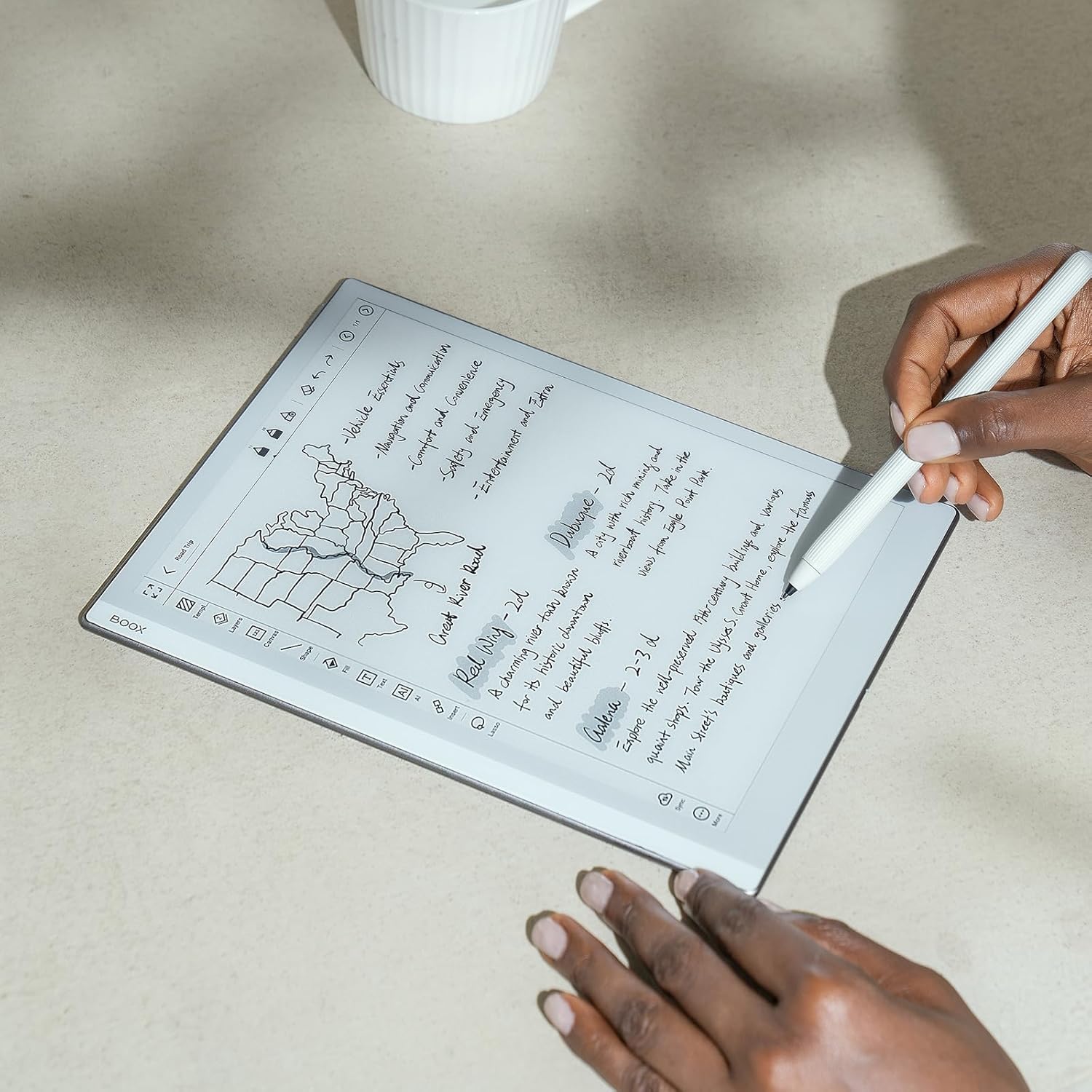
Image: A user's hands writing notes on the BOOX Tablet Go 10.3, demonstrating the natural writing experience.

Image: A user's hands drawing a detailed sketch on the BOOX Tablet Go 10.3, showcasing its artistic capabilities.
Video: Demonstrates the pen-to-paper writing feel on the BOOX Tablet Go 10.3, highlighting its responsiveness and precision.
4.3 پڙهڻ جو تجربو
The BOOX Tablet Go 10.3 is optimized for an immersive and comfortable reading experience, especially with its E Ink display that mimics real paper.
- NeoReader: The built-in NeoReader app supports a wide range of document formats including PDF, EPUB, MOBI, and more.
- اکين جي دوستانه ڊسپلي: The Carta 1200 screen with 300 PPI offers crisp, clear text without the need for a front light, making it ideal for reading in natural light conditions and reducing eye strain.
- ڊارڪ موڊ: Customize your reading experience by enabling dark mode for a more flexible and concentrated view, especially in low-light environments (when external light is available).
- خودڪار گردش: The device features a G-sensor for auto-rotation, ensuring the display is always in the correct orientation regardless of how you hold it.

Image: The BOOX Tablet Go 10.3 displaying its library interface, showcasing various e-books.

Image: The BOOX Tablet Go 10.3 displaying a PDF document, demonstrating its ability to render complex layouts.
Video: Highlights the lightweight ePaper design of the BOOX Go Series, emphasizing its portability and ease of use for everyday tasks.
Video: Showcases the ultra-thin design and paper-like weight of the BOOX Go 10.3, making it comfortable to hold for extended periods.
4.4 File انتظام ۽ حصيداري
The device allows for easy management and sharing of your content.
- Onyx Cloud: Upload your notes and documents to the free Onyx Cloud for secure backup and access across devices.
- شيئرنگ جا آپشن: Share your ideas and content through email or other third-party applications installed from the Google Play Store.
5. سار سنڀال ۽ سنڀال
5.1 اسڪرين کي صاف ڪرڻ
To maintain optimal screen clarity, gently wipe the screen with a soft, lint-free cloth. For stubborn smudges, slightly dampپاڻي يا اسڪرين ڪلينر سان ڪپڙو جيڪو خاص طور تي اليڪٽرانڪس لاءِ ٺهيل آهي. سخت ڪيميڪلز يا رگڙيندڙ مواد استعمال ڪرڻ کان پاسو ڪريو.
5.2 بيٽري لائف آپٽمائيزيشن
The BOOX Tablet Go 10.3 is equipped with a 3,700mAh Li-ion Polymer battery. To maximize battery life:
- Reduce screen refresh rate if not needed for dynamic content.
- جڏهن استعمال ۾ نه هجي ته وائي فائي ۽ بلوٽوٿ بند ڪريو.
- پس منظر واري ايپليڪيشنون بند ڪريو جيڪي فعال طور تي استعمال نه ٿي رهيون آهن.
- انتهائي گرمي پد کان بچاء، جيئن اهي بيٽري جي ڪارڪردگي کي متاثر ڪري سگهن ٿيون.
6. مسئلا حل ڪرڻ
6.1 عام مسئلا ۽ حل
- ڊوائيس آن نه آهي: Ensure the device is charged. Connect it to a power source and try powering it on after a few minutes. If the issue persists, perform a hard reset by holding the power button for 10-15 seconds.
- اسڪرين جواب نه ڏيڻ: If the screen is unresponsive, try restarting the device. If the problem continues, ensure the screen is clean and free of debris.
- اسٽائلس ڪم نه ڪري رهيو آهي: Check if the stylus tip is worn out and needs replacement. Ensure there are no magnets near the screen, as they can interfere with stylus functionality.
- ايپس جو ڪريش ٿيڻ/جمڻ: Close and reopen the app. Clear the app's cache in 'Settings > Apps'. If the issue persists, consider reinstalling the app.
- وائي فائي رابطي جا مسئلا: Restart your Wi-Fi router. Forget the network on your device and reconnect. Ensure you are within range of the Wi-Fi signal.
7. ٽيڪنيڪل وضاحتون
| خاصيت | تفصيل |
|---|---|
| اسڪرين | 10.3" HD Carta 1200 glass screen with flat cover-lens |
| قرارداد | 2480x1860 (300 ppi) B/W |
| ڇڪڻ | BOOX stylus touch (4,096 levels of pressure sensitivity) + capacitive touch |
| سي پي يو | 2.4Ghz Octa-core |
| رام | 4 جي بي |
| روم | 64 جي بي |
| رابطي | وائي فائي (2.4GHz + 5GHz) + بي ٽي 5.0 |
| جي سينسر | For Auto Rotation |
| سامهون روشني | No Front Light |
| آپريٽنگ سسٽم | Android 12 |
| دستاويز جا فارميٽ | PDF, CAJ, DJVU, CBR, CBZ, EPUB, AZW3, MOBI, TXT, DOC, DOCX, FB2, CHM, RTF, HTML, ZIP, PRC, PPT, PPTX, EPUB3 |
| تصويري فارميٽ | پي اين جي، جي پي جي، بي ايم پي، ٽي آءِ ايف ايف |
| آڊيو فارميٽ | WAV ، MP3 |
| بٽڻ | پاور بٽڻ |
| بندرگاهن | USB-C (Supports OTG or audio jack) |
| آڊيو | Built-in Dual Speakers, Built-in Microphone |
| بيٽري | 3,700mAh لي-آئن پوليمر |
| طول و عرض | 235*183*4.6mm (9.3" x 7.2" x 0.18") |
| وزن | لڳ ڀڳ. 375 ز (13.2 اوز) |
8. وارنٽي ۽ سپورٽ
BOOX products are designed for durability and performance. For information regarding your product's warranty, please refer to the warranty card included in your product packaging or visit the official BOOX website. The manufacturer typically provides firmware updates and cloud storage for registered users.
For technical support, troubleshooting assistance, or any inquiries about your BOOX Tablet Go 10.3, please contact BOOX customer service through their official website or the support channels provided in your product documentation. Keep your purchase receipt handy for warranty claims.


