تعارف
Thank you for choosing the Hodozzy Portable Car Radio. This device is designed to enhance your driving experience with its advanced features, including wireless Apple CarPlay and Android Auto, Bluetooth connectivity, and a high-definition IPS touch screen. This manual provides essential information for proper installation, operation, and maintenance of your device. Please read it thoroughly before use.
پيداوار جون خاصيتون
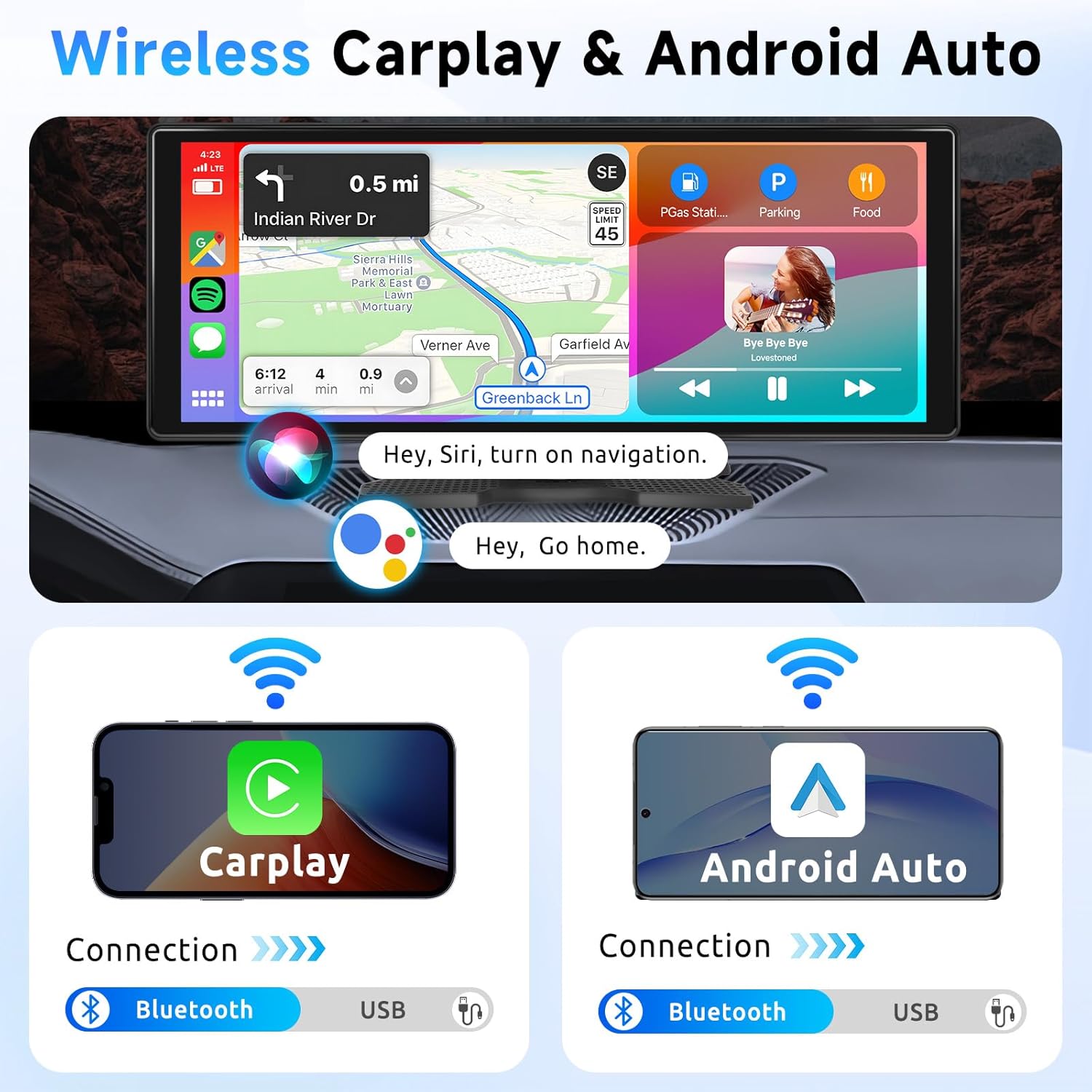
- وائرليس ڪار پلي ۽ اينڊرائيڊ آٽو: Seamlessly integrate your smartphone for navigation, calls, messages, and music. Supports both wireless and wired connections via Bluetooth or USB.
- وائس ڪنٽرول: Access Siri or Google Assistant for hands-free operation, allowing you to focus on the road.
- Mirror Link Functionality: Display your phone's screen directly on the car radio for both Android and iOS devices.
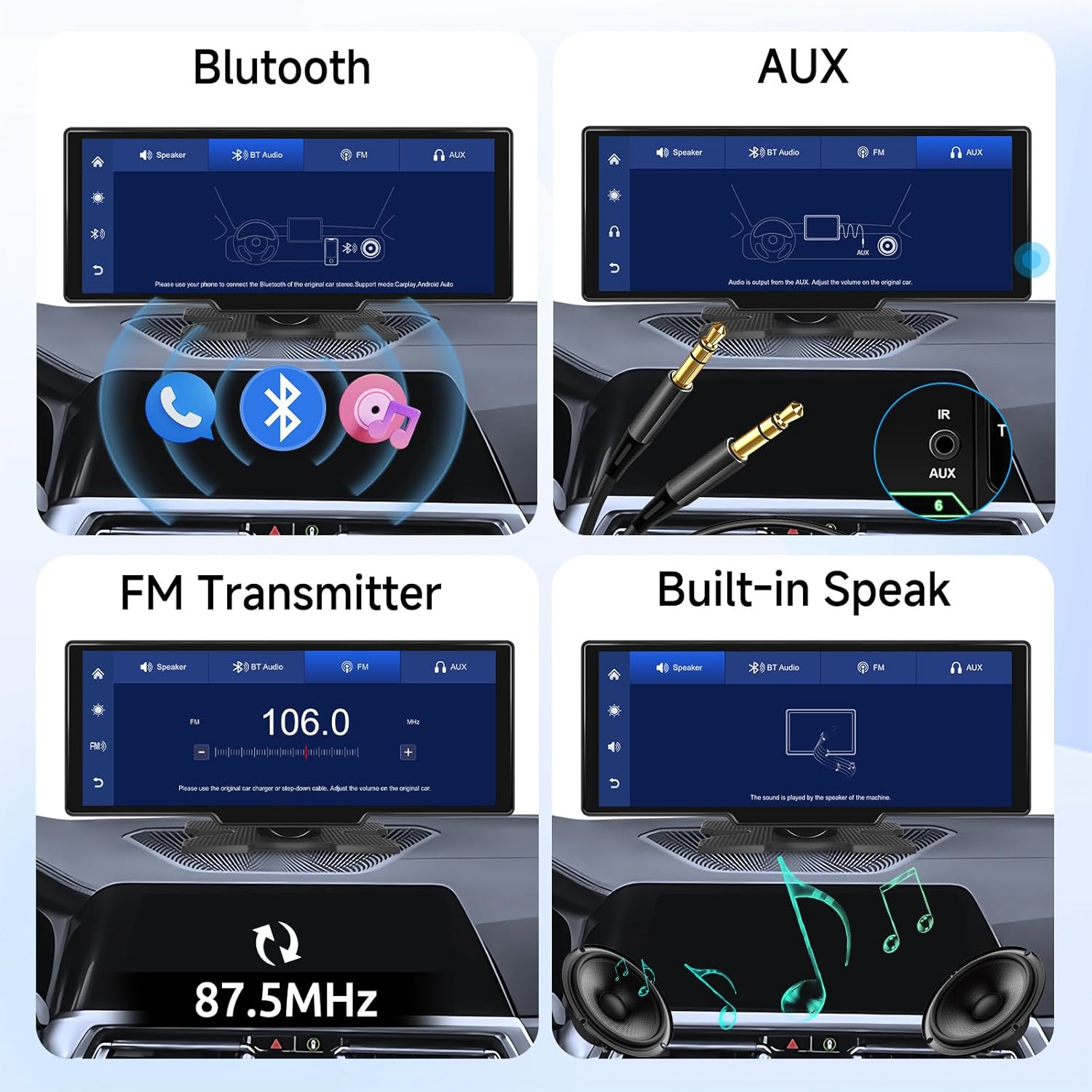
- Enhanced Audio Output: Features built-in speakers, FM transmitter for car stereo integration, and AUX input for versatile audio options. Bluetooth also supports music playback.
- 10.3 انچ HD IPS ٽچ اسڪرين: Enjoy a clear 1600x600 resolution display with vibrant colors and precise image details. Supports TF card input for media playback.
- آسان تنصيب: Designed for universal compatibility (7-32V vehicles) with a cigarette lighter plug, requiring no complex wiring or modification to your original car radio.
پيڪيج مواد
پڪ ڪريو ته سڀئي شيون پيڪيج ۾ موجود آهن:
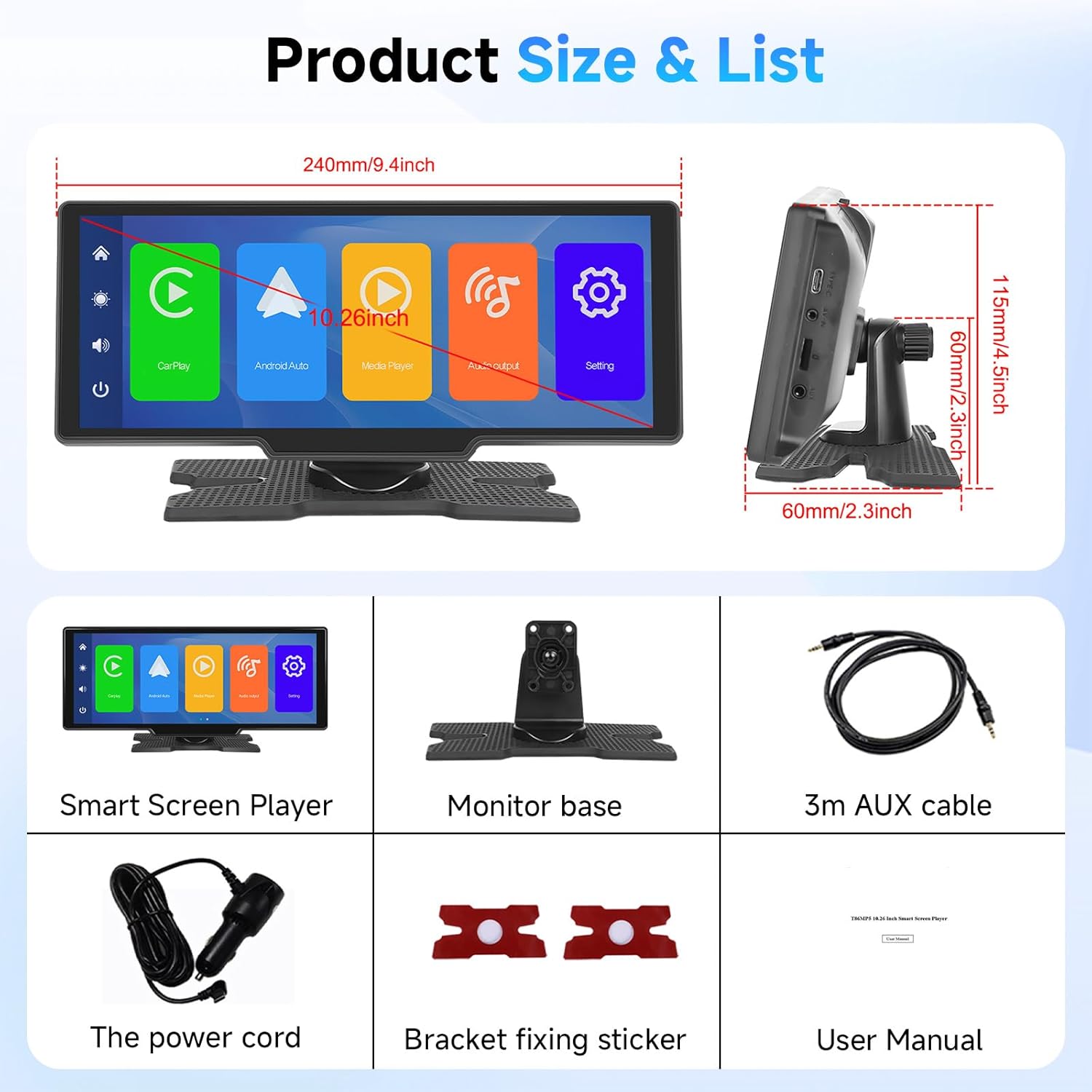
- 10.3-inch Smart Screen Player
- Universal Monitor Base
- 3 ميٽر AUX ڪيبل
- پاور ڪنڊ (سگريٽ لائٽر پلگ)
- بریکٹ فڪسنگ اسٽيڪر
- استعمال ڪندڙ دستي
- Accessories (as pictured)
وضاحتون
| خاصيت | تفصيل |
|---|---|
| ماڊل نمبر | A3614 |
| اسڪرين جي ماپ | 10.3 انچ |
| ڊسپلي قرارداد | 1600 x 600 ايڇ ڊي آئي پي ايس |
| بجلي جي فراهمي | ڊي سي 7-32 وولٽ |
| آپريٽنگ جي درجه حرارت | -86°F کان 186°F (-65°C کان 86°C) |
| ٻاھر نڪرڻ جي طاقت | 6 واٽ |
| رابطي | Bluetooth, FM Transmitter, AUX, Type-C, TF Card |
| مطابقت رکندڙ ڊوائيسز | Smartphones (Apple CarPlay, Android Auto, Mirror Link) |
| سپورٽ ٿيل وڊيو فارميٽ | F4V, MOV, MP4, TS (H.264, MPEG-4 encoding) |
| سپورٽ ٿيل آڊيو فارميٽ | MP3، WAV |
| اسٽوريج سپورٽ | SD Card up to 256GB (Class 10 recommended) |
| Audio Channel Configuration | 2.0 |
| پيداوار جو وزن | 810 جي |
| پيداوار جي ماپ | 26.06 x 26.06 x 26.06 سينٽي ميٽر (تقريبن 10.26 x 10.26 x 10.26 انچ) |

سيٽ اپ جون هدايتون
- ڊوائيس نصب ڪرڻ:
- Attach the universal monitor base to the back of the smart screen player.
- پنهنجي ڊيش بورڊ تي هڪ مناسب جڳهه چونڊيو جيڪو توهان جي ڪم ۾ رڪاوٽ نه بڻجي. view يا ايئر بيگز ۾ مداخلت ڪريو.
- Clean the dashboard surface thoroughly. Apply the bracket fixing sticker to the base and firmly press it onto the chosen location.
- پاور ڪنيڪشن:
- Insert the power cord's cigarette lighter plug into your vehicle's 7-32V power outlet.
- Ensure the connection is secure. The device should power on automatically or by pressing the power button.
- شروعاتي سيٽ اپ:
- Upon first power-on, the device may guide you through language selection and basic settings. Follow the on-screen prompts.
- Adjust screen protectors settings (Off / 10s / 30s / 1min) as desired.

آپريٽنگ هدايتون
1. وائرليس ڪار پلي / اينڊرائيڊ آٽو
- پنهنجي اسمارٽ فون تي بلوٽوت ۽ وائي فائي کي فعال ڪريو.
- On the Hodozzy device, select the "CarPlay" or "Android Auto" icon.
- ڳولھيو the device's Bluetooth name on your phone and pair.
- Confirm the pairing on both devices. Once connected, CarPlay or Android Auto will launch automatically.
- For wired connection, connect your smartphone to the device using a USB cable.
2. آئيني لنڪ (iOS/Android)
- Select the "Mirror Link" icon on the device.
- Follow the on-screen instructions to connect your iOS or Android phone via Wi-Fi or USB.
- Your phone's screen will be mirrored on the Hodozzy display.

3. آڊيو آئوٽ پُٽ موڊس
- بلٽ ان اسپيڪر: The device can play audio directly through its integrated speaker.
- بلوٽوڊيو آڊيو: Pair your phone via Bluetooth to stream music.
- AUX آئوٽ پٽ: Connect the provided 3m AUX cable from the device's AUX output to your car's AUX input for audio playback through your car's speakers.
- ايف ايم ٽرسمٽر:
- Select the "FM Transmitter" option on the device.
- Choose an unused FM frequency (e.g., 106.0 MHz) on the device.
- Tune your car's FM radio to the same frequency. Audio from the Hodozzy device will now play through your car's speakers.
4. ميڊيا پلے بیک
- TF ڪارڊ: Insert a TF (microSD) card (up to 256GB, Class 10) into the designated slot to play stored video and audio files.
- USB: Connect a USB drive to the Type-C port for media playback.
5. وائس ڪنٽرول
Activate your smartphone's voice assistant (Siri or Google Assistant) through the device to make calls, get directions, send messages, and control music using voice commands.
سار سنڀال
- صفائي: اسڪرين ۽ ڊوائيس جي جسم کي صاف ڪرڻ لاءِ نرم، سڪل ڪپڙو استعمال ڪريو. رگڙيندڙ ڪلينر يا محلولن کان پاسو ڪريو.
- گرمي پد: ڊوائيس کي گهڻي عرصي تائين انتهائي گرمي پد يا سڌي سج جي روشنيءَ ۾ نه رکو.
- اسٽوريج: جيڪڏهن ڊوائيس کي گهڻي عرصي تائين ذخيرو ڪري رهيا آهيو، ته ان کي بجلي جي ذريعن کان ڌار ڪريو ۽ ان کي ٿڌي، سڪل جاءِ تي ذخيرو ڪريو.
- فرم ويئر اپڊيٽس: ٺاهيندڙ جي چيڪ ڪريو webبهترين ڪارڪردگي ۽ نئين خاصيتن تائين رسائي کي يقيني بڻائڻ لاءِ فرم ويئر اپڊيٽس لاءِ وقتاً فوقتاً سائيٽ تي چيڪ ڪريو.
- فيڪٽري ريسٽ: If experiencing persistent issues, a factory reset option is available in the settings menu. Refer to the on-screen prompts for this procedure.
مشڪلاتون
| مسئلو | ممڪن سبب | حل |
|---|---|---|
| ڊوائيس تي طاقت نه آهي. | No power, loose connection, faulty power outlet. | Check cigarette lighter connection. Ensure vehicle's power outlet is functional. Try a different power outlet if available. |
| ڪار پلي/اينڊرائيڊ آٽو ڳنڍي نه رهيو آهي. | Bluetooth/Wi-Fi off, incorrect pairing, phone compatibility issue. | Ensure Bluetooth and Wi-Fi are enabled on your phone. Forget and re-pair the device. Try a wired connection. Update phone OS. |
| ڪابه آواز يا خراب آواز جي معيار ناهي. | Incorrect audio output mode, low volume, loose AUX cable, FM interference. | Check selected audio output mode (Built-in, Bluetooth, AUX, FM). Adjust volume on both device and car stereo. Secure AUX cable. Change FM frequency if using FM transmitter. |
| ٽچ اسڪرين غير جوابده. | Temporary software glitch, screen protector issue. | Restart the device. Ensure screen is clean and free of debris. If problem persists, perform a factory reset. |
| آئيني لنڪ ڪم نه ڪري رهيو آهي. | Incorrect connection method, phone settings. | Ensure Wi-Fi or USB connection is stable. Check phone's screen mirroring settings. |
وارنٽي ۽ سپورٽ
This Hodozzy product comes with a standard manufacturer's warranty. Please refer to the warranty card included in your package for specific terms and conditions, including the warranty period and coverage details. For technical support, troubleshooting assistance beyond this manual, or warranty claims, please contact Hodozzy customer service through the retailer where you purchased the product or visit the official Hodozzy support webسائيٽ.
مھرباني ڪري وارنٽي جي مقصدن لاءِ خريداري جو ثبوت رکو.


