تعارف
The Ducky One 3 Pro Nazca mechanical keyboard is engineered with Ducky's QUACK Mechanics design philosophy, providing a high-performance typing experience. It incorporates dual-layer, high-grade silicone and EVA foam sound dampeners for acoustic optimization. This model features a detachable USB-C cable, an improved PCB design, V2 stabilizers, a remapped macro layout, and a hotswap dual-layer PCB, allowing for easy switch customization.

Image: The Ducky One 3 Pro Nazca keyboard showcasing its RGB lighting, surrounded by loose keycaps and a mouse, illustrating its customizable nature.
اهم خاصيتون
- 8K پولنگ ريٽ: Ensures rapid response times for competitive use.
- QUACK Mechanics Design: Ducky's signature design philosophy for enhanced performance and durability.
- Advanced Sound Dampening: Equipped with dual-layer silicone and EVA foam for a quieter typing experience.
- ڌار ٿيندڙ USB-C ڪيبل: For easy portability and replacement.
- South-facing Switches: Provides better compatibility with custom keycaps and improved RGB illumination.
- چيري پروfile Triple Shot PBT Keycaps: Durable keycaps with legends that will not fade.
- Improved PCB Design & V2 Stabilizers: Enhances stability and typing feel.
- Hotswap Dual Layer PCB: سولڊرنگ کان سواءِ سوئچز کي آسانيءَ سان تبديل ڪرڻ جي اجازت ڏئي ٿو.
- Cherry MX2A Switches: High-quality mechanical switches for a consistent and reliable typing experience.
پيڪيج مواد
Please verify that all items are present in the package upon unboxing.
- Ducky One 3 Pro Nazca Mechanical Keyboard
- ڌار ڪرڻ واري USB-C ڪيبل
- Additional Keycaps (if included with specific model variant)
- ڪيپ ڪيپيندڙ
- مٽائڻ وارو

تصوير: هڪ صاف مٿي کان هيٺ تائين view of the Ducky One 3 Pro Nazca keyboard, showing the full key layout and design.
سيٽ اپ ڪريو
- ڪي بورڊ کوليو: پيڪنگ مان ڪيبورڊ ۽ سڀئي لوازمات احتياط سان هٽايو.
- USB-C ڪيبل ڳنڍيو: Insert the USB-C end of the detachable cable into the port on the back of the keyboard. Connect the other end (USB-A) to an available USB port on your computer.
- ڊرائيور لڳائڻ: The keyboard is plug-and-play and typically does not require specific drivers. Your operating system should automatically detect and install the necessary components.
- لڳائڻ: Position the keyboard comfortably on your desk. Adjust the keyboard feet for your preferred typing angle.

تصوير: هڪ پاسي وارو پروfile view of the Ducky One 3 Pro Nazca keyboard, highlighting its ergonomic design and build.
آپريٽنگ هدايتون
بنيادي استعمال
The Ducky One 3 Pro Nazca functions as a standard mechanical keyboard. Simply begin typing after connecting it to your computer. The 8K polling rate ensures minimal input lag.
آر جي بي لائٽنگ ڪنٽرول
The keyboard features per-key RGB backlighting. Various lighting modes and effects can be cycled and customized directly on the keyboard using specific key combinations, typically involving the Fn key and other function keys (e.g., Fn + F10 for brightness, Fn + F11/F12 for mode changes). Refer to the Ducky official website for a detailed list of RGB control shortcuts.
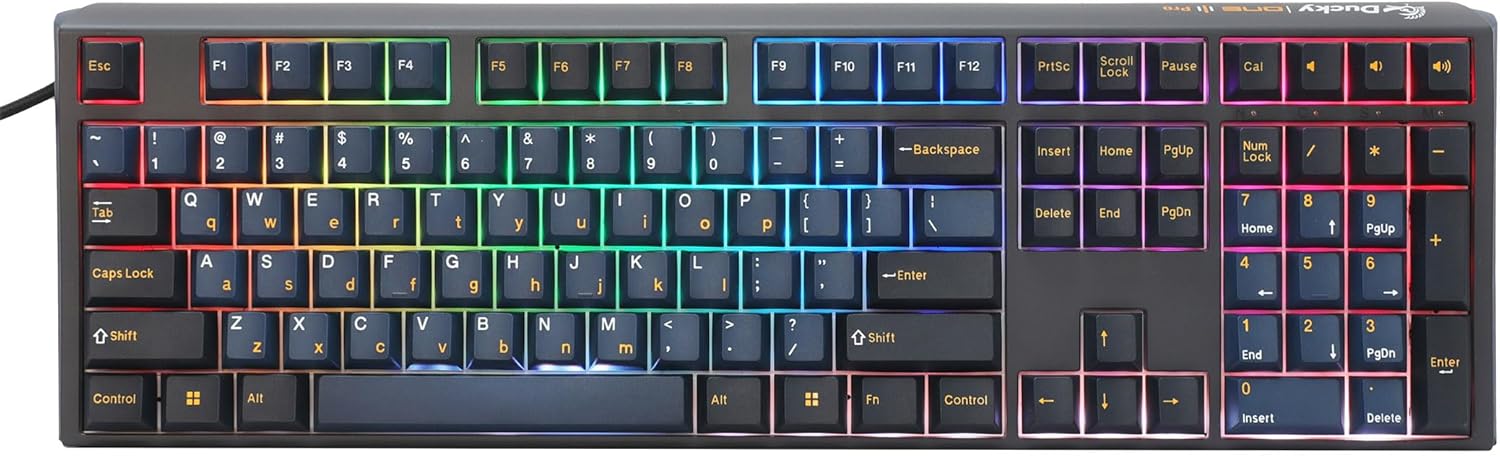
Image: The Ducky One 3 Pro Nazca keyboard illuminated with its full RGB backlighting, demonstrating the customizable lighting effects.
ميڪرو ڪارڪردگي
The Ducky One 3 Pro Nazca supports on-board macro programming. Specific key combinations allow users to record and assign macros to various keys. The remapped macro layout provides intuitive access to these functions. Consult the comprehensive manual available on the Ducky website for detailed macro programming instructions.
سار سنڀال
صفائي
- ڪي ڪيپ: The PBT keycaps are durable. Use a keycap puller to remove them. Clean with a mild soap solution and a soft cloth, then air dry completely before reattaching.
- ڪي بورڊ باڊي: Wipe the keyboard body with a slightly damp، لِنٽ کان پاڪ ڪپڙو. گهڻي نمي کان پاسو ڪريو.
- مٽي: ڪي ڪيپس ۽ سوئچز جي وچ مان مٽي ۽ ملبہ هٽائڻ لاءِ دٻيل هوا استعمال ڪريو.
Switch Replacement (Hotswap)
The hotswap PCB allows for easy replacement of mechanical switches without soldering. Use the provided switch puller to carefully remove a switch. Align the pins of the new switch with the holes on the PCB and press firmly until it clicks into place. Ensure the switch is properly seated to avoid bent pins.
مشڪلاتون
- ڪي بورڊ جواب نه ڏئي رهيو آهي:
- Ensure the USB-C cable is securely connected to both the keyboard and the computer.
- ڪيبورڊ کي پنهنجي ڪمپيوٽر تي ڪنهن ٻئي USB پورٽ سان ڳنڍڻ جي ڪوشش ڪريو.
- Test the keyboard on another computer to rule out system-specific issues. - آر بي جي روشني ڪم نه ڪندي:
- Check if the RGB lighting has been turned off using a keyboard shortcut (e.g., Fn + F10).
- Cycle through different RGB modes to see if any are active. - مخصوص ڪنجيون ڪم نه ڪري رهيون آهن:
- If you have replaced switches, ensure the new switch is fully seated and its pins are not bent.
- Remove the keycap and switch, then reinsert them carefully. - غير متوقع رويو:
- Perform a factory reset (refer to the Ducky official website for specific key combinations for your model). This will clear all custom settings and macros.
وضاحتون
| خاصيت | تفصيل |
|---|---|
| ماڊل نمبر | DKON2308ST-CRUSPTCHNAZ001 |
| برانڊ | ڊڪِي |
| رابطي ٽيڪنالاجي | USB-C (هٽائڻ لائق) |
| ڪي بورڊ جي وضاحت | مشيني |
| سوئچ جو قسم | Cherry MX2A Red (Hotswap) |
| ڪي ڪيپ مواد | PBT (Polybutylene Terephthalate) |
| ڪي ڪيپ پروfile | چيري پروfile Triple Shot |
| پٺڀرائي | آر جي بي |
| پولنگ جي شرح | 8K |
| آواز ڊيampايننگ | Dual-layer Silicone and EVA Foam |
| مطابقت رکندڙ ڊوائيسز | ليپ ٽاپ، پي سي |
| شيءِ جو وزن | 1.58 پائونڊ |
| پيڪيج جي ماپ | 17.52 x 5.31 x 1.65 انچ |
وارنٽي ۽ سپورٽ
Ducky products typically come with a manufacturer's warranty. For specific warranty terms, duration, and conditions, please refer to the warranty card included with your product or visit the official Ducky website. For technical support, troubleshooting assistance, or to inquire about replacement parts, please contact Ducky customer service through their official support channels.
Official Ducky Webسائيٽ: www.duckychannel.com.tw


