1. تعارف
خريد ڪرڻ لاءِ مهربانيasing the Aiwa AWS200BT Portable Bluetooth Speaker. This manual provides essential information for the safe and efficient operation of your device. Please read it thoroughly before use and retain it for future reference.
2. حفاظت جي ڄاڻ
- اسپيڪر کي گهڻي وقت تائين انتهائي گرمي پد يا سڌي سج جي روشنيءَ ۾ نه رکو.
- ڊپ کان پاسو ڪريو يا اسپيڪر کي مضبوط اثرن جي تابع ڪرڻ.
- اسپيڪر کي طبي ڊوائيسز کان پري رکو.
- اسپيڪر کي ڌار ڪرڻ يا تبديل ڪرڻ جي ڪوشش نه ڪريو. اهو وارنٽي کي رد ڪري ڇڏيندو.
- Ensure all ports are securely closed when using the speaker near water to maintain its IPX5 water resistance.
- صرف مخصوص چارجنگ ڪيبل ۽ اڊاپٽر استعمال ڪريو.
3. پيڪيج مواد
- آئيوا AWS200BT پورٽيبل بلوٽوٿ اسپيڪر
- USB چارجنگ ڪيبل
- استعمال ڪندڙ دستي
4. پراڊڪٽ ختمview
Familiarize yourself with the various parts and controls of your Aiwa AWS200BT speaker.

شڪل 4.1: سامهون view Aiwa AWS200BT اسپيڪر جو، شوڪasing the dual speaker grilles and illuminated RGB rings.
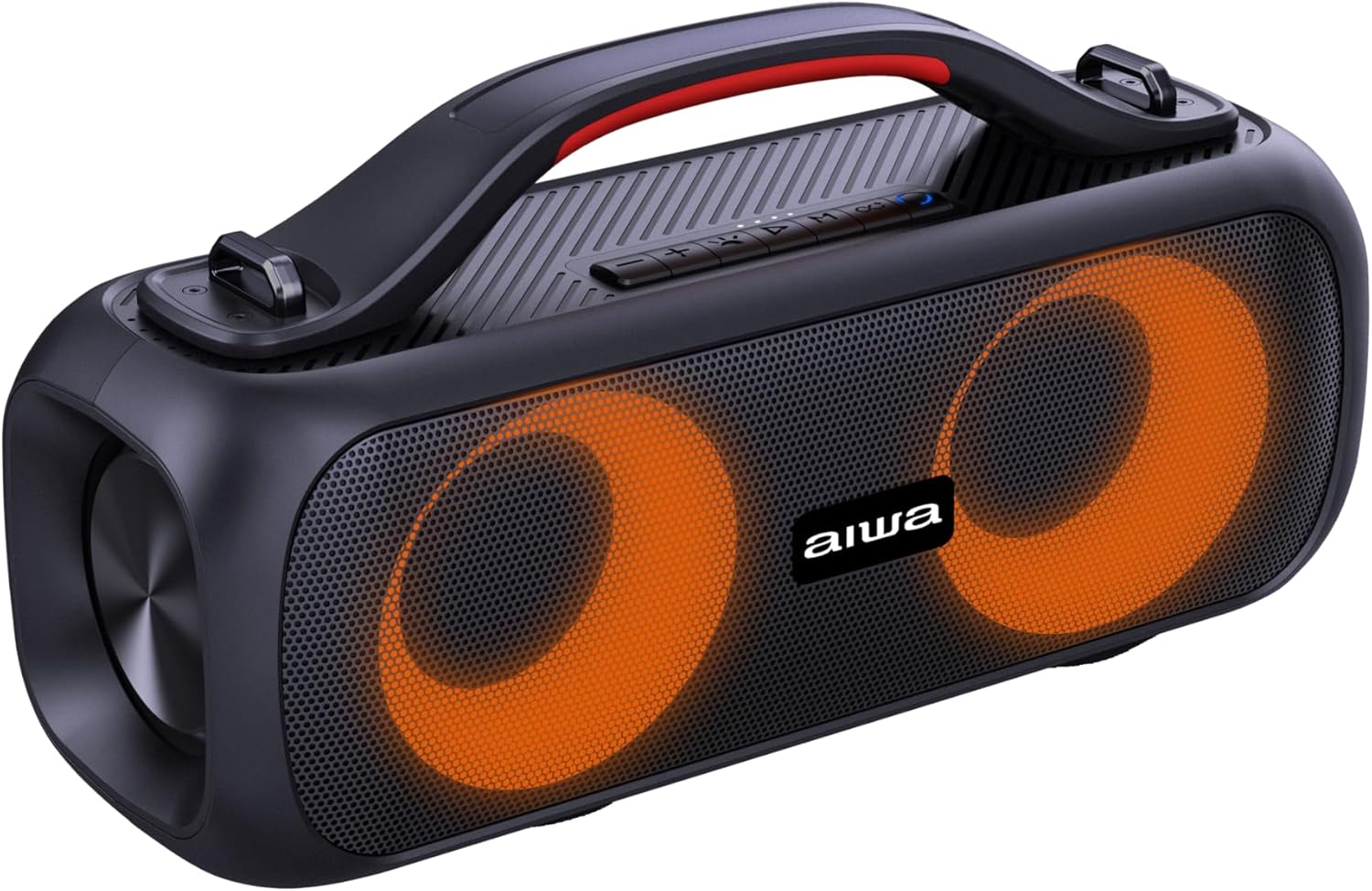
شڪل 4.2: زاويه view of the speaker, highlighting the integrated carrying handle and top-mounted control panel.

شڪل 4.3: مٿو view of the speaker, detailing the control buttons for power, volume, playback, and mode selection.
ڪنٽرول بٽڻ:
- پاور بٽڻ: دٻايو ۽ دٻايو بند ڪرڻ / بند ڪرڻ لاء.
- حجم وڌايو (+): حجم وڌايو.
- حجم گھٽ (-): حجم گھٽايو.
- راند/روڪ بٽڻ: آڊيو کيڏيو يا روڪيو.
- موڊ بٽڻ (M): بلوٽوٿ، ايف ايم ريڊيو، يو ايس بي، ۽ آڪس موڊس جي وچ ۾ سوئچ ڪريو.
- RGB لائيٽ بٽڻ: Cycle through RGB lighting modes.
- Previous Track/FM Scan Down: Short press for previous track, long press for FM scan down.
- Next Track/FM Scan Up: Short press for next track, long press for FM scan up.
بندرگاهن:

شڪل 4.4: ريڙهه view of the speaker, indicating the USB, DC 5V charging, and AUX input ports, protected by a cover.
- USB پورٽ: USB ڊرائيو پلے بیک لاءِ.
- ڊي سي 5V پورٽ: اسپيڪر چارج ڪرڻ لاء.
- AUX ان پٽ: 3.5 ايم ايم آڊيو ڪيبل ذريعي ٻاهرين آڊيو ڊوائيسز کي ڳنڍڻ لاءِ.
5. سيٽ اپ
5.1 شروعاتي چارجنگ
- پهرين استعمال کان اڳ، اسپيڪر کي مڪمل طور تي چارج ڪريو.
- مهيا ڪيل USB چارجنگ ڪيبل کي اسپيڪر تي DC 5V پورٽ سان ڳنڍيو.
- USB ڪيبل جي ٻئي ڇيڙي کي هڪ مطابقت رکندڙ USB پاور اڊاپٽر (شامل نه آهي) يا ڪمپيوٽر جي USB پورٽ سان ڳنڍيو.
- The charging indicator light will illuminate. Once fully charged (approximately 4 hours), the light may change color or turn off.
5.2 پاور آن/آف
- To power on, press and hold the Power Button until you hear an audible prompt and the RGB lights illuminate.
- To power off, press and hold the Power Button again until you hear an audible prompt and the lights turn off.
6. آپريٽنگ هدايتون
6.1 بلوٽوٽ جوڙي
- اسپيڪر آن ڪريو. اهو خودڪار طريقي سان بلوٽوٿ پيئرنگ موڊ ۾ داخل ٿيندو، جيڪو چمڪندڙ LED لائيٽ سان ظاهر ٿيندو.
- بلوٽوت کي فعال ڪريو پنھنجي اسمارٽ فون يا otherئي ڊوائس تي.
- ڳولھيو "AWS200BT" in the list of available Bluetooth devices.
- Select "AWS200BT" to connect. Once connected, you will hear a confirmation sound, and the LED light will stop flashing.
- هاڻي توهان اسپيڪر ذريعي پنهنجي ڊوائيس مان آڊيو هلائي سگهو ٿا.

شڪل 6.1: The Aiwa AWS200BT speaker highlighting its Bluetooth and TWS capabilities.
6.2 TWS (ٽرو وائرليس اسٽيريو) فنڪشن
The TWS function allows you to connect two AWS200BT speakers for a stereo sound experience.
- Ensure both AWS200BT speakers are powered on and not connected to any Bluetooth device.
- On one of the speakers (this will be the primary speaker), press and hold the TWS button (often integrated with the Play/Pause button or a dedicated button, refer to Figure 4.3 for specific button layout if available).
- پرائمري اسپيڪر سيڪنڊري اسپيڪر جي ڳولا ڪندو. هڪ ڀيرو ڳنڍيل، توهان کي تصديق جو آواز ٻڌڻ ۾ ايندو.
- هاڻي، پنهنجي ڊوائيس کي بلوٽوٿ ذريعي پرائمري اسپيڪر سان ڳنڍيو جيئن سيڪشن 6.1 ۾ بيان ڪيو ويو آهي. آڊيو ٻنهي اسپيڪرن ذريعي اسٽيريو ۾ هلندو.
6.3 ايف ايم ريڊيو
- Press the Mode Button (M) to switch to FM Radio mode.
- دستياب اسٽيشنن کي خودڪار طريقي سان اسڪين ڪرڻ ۽ محفوظ ڪرڻ لاءِ، پلي/پاز بٽڻ کي دٻايو ۽ رکو. اسپيڪر اسٽيشنن کي اسڪين ۽ اسٽور ڪندو.
- Use the Previous Track and Next Track buttons to navigate between saved stations.
6.4 USB/AUX Input
- USB پلے بیک: USB پورٽ ۾ هڪ USB فليش ڊرائيو داخل ڪريو. اسپيڪر خودڪار طريقي سان USB موڊ ۾ سوئچ ڪندو ۽ آڊيو هلائڻ شروع ڪندو. files.
- AUX ان پٽ: Connect a 3.5mm audio cable from your external device to the AUX port on the speaker. Press the Mode Button (M) to switch to AUX mode.
6.5 Voice Assistant & Hands-free Calling
- When connected via Bluetooth, the speaker supports voice assistants like Google Assistant and Siri. Press the dedicated Voice Assistant button (if available, or a long press on Play/Pause) to activate.
- For hands-free calling, when a call comes in, press the Play/Pause button to answer. Press again to end the call.
6.6 آر جي بي لائيٽنگ موڊس
The speaker features multiple RGB lighting modes that synchronize with your music.
- Press the RGB Light Button to cycle through the available lighting effects.
- Continue pressing to find your preferred mode or to turn the lights off.

شڪل 6.2: The Aiwa AWS200BT speaker showcasing its dynamic RGB lighting feature.
7. سار سنڀال
- صفائي: اسپيڪر جي ٻاهرين حصي کي صاف ڪرڻ لاءِ نرم، سڪل ڪپڙو استعمال ڪريو. رگڙيندڙ صاف ڪندڙ يا محلول استعمال نه ڪريو.
- پاڻي جي مزاحمت: Ensure the port cover is always securely closed to maintain IPX5 water resistance. Do not submerge the speaker.
- اسٽوريج: اسپيڪر کي ٿڌي، سڪل جاءِ تي رکو، سڌي سج جي روشني ۽ انتهائي گرمي پد کان پري جڏهن گهڻي عرصي تائين استعمال ۾ نه هجي.
- بيٽري: To prolong battery life, charge the speaker regularly, even if not in frequent use. Avoid fully discharging the battery for long periods.
8. مسئلا حل ڪرڻ
| مسئلو | ممڪن سبب | حل |
|---|---|---|
| اسپيڪر آن نٿو ٿئي. | گھٽ بيٽري. | اسپيڪر کي مڪمل چارج ڪريو. |
| بلوٽوٿ ذريعي جوڙي نه ٿو سگهجي. | اسپيڪر پيئرنگ موڊ ۾ نه آهي؛ ڊوائيس بلوٽوٿ بند آهي؛ اسپيڪر کان تمام پري آهي. | پڪ ڪريو ته اسپيڪر پيئرنگ موڊ ۾ آهي (ايل اي ڊي چمڪندڙ). پنهنجي ڊوائيس تي بلوٽوٿ آن ڪريو. ڊوائيس کي اسپيڪر جي ويجهو منتقل ڪريو (10 ميٽر جي اندر). |
| آواز ڪونهي. | آواز تمام گهٽ آهي؛ غلط موڊ چونڊيو ويو آهي؛ ڊوائيس نه هلي رهيو آهي. | Increase speaker and device volume. Press 'M' button to select correct input mode (Bluetooth, USB, AUX, FM). Ensure audio is playing on your connected device. |
| ايف ايم ريڊيو جي وصولي خراب آهي. | ڪمزور سگنل. | Move the speaker to a location with better reception. |
| TWS جوڙڻ ناڪام ٿيو. | Speakers already paired to another device; speakers too far apart. | Disconnect both speakers from any Bluetooth devices. Ensure they are close to each other. Try pairing again. |
9. وضاحتون
| خاصيت | تفصيل |
|---|---|
| ماڊل نالو | AWS200BT |
| برانڊ | اييوا |
| رابطي ٽيڪنالاجي | بلوٽوٿ |
| اسپيڪر جو قسم | ٽوئيٽر |
| وڌ ۾ وڌ اسپيڪر آئوٽ پُٽ پاور | 30 واٽ |
| تعدد جواب | 20 KHz |
| Sound Channel Configuration | 2.0 |
| خاص خاصيتون | Bluetooth, Portable, RGB Lighting, FM Radio, TWS, USB, AUX, Voice Assistant, Hands-free |
| پنروڪ درجه بندي | IPX5 |
| طاقت جو ذريعو | بيٽري |
| بيٽري جي گنجائش | 3000mAh (3E+3 Milliamp گھڙيون) |
| سراسري بيٽري جي زندگي | 4 ڪلاڪ (50٪ حجم تي) |
| بيٽري جي جوڙجڪ | ليتيم آئن |
| ڪنٽرول جو طريقو | آواز |
| پيداوار جي ماپ | 20.7 سينٽي ميٽر (کوٽائي) x 8.4 سينٽي ميٽر (ويڪر) x 8.4 سينٽي ميٽر (اوچائي) |
| پيداوار جو وزن | 2 ڪلوگرام |
10. وارنٽي ۽ سپورٽ
The Aiwa AWS200BT speaker comes with a limited warranty. For specific warranty terms and conditions, please refer to the warranty card included in your package or contact Aiwa customer support.
For technical support, troubleshooting assistance, or general inquiries, please visit the official Aiwa webسائيٽ يا انهن جي ڪسٽمر سروس کاتي سان رابطو ڪريو.
- وارنٽي جو قسم: محدود


