1. تعارف
This user manual provides detailed instructions for the Baseus 17-in-1 Docking Station (Model: B0D78WFLST). This versatile docking station is designed to expand the connectivity of your laptop or compatible device, offering multiple ports for display, data transfer, networking, and power delivery. Please read this manual thoroughly before using the product to ensure proper operation and to maximize its capabilities.
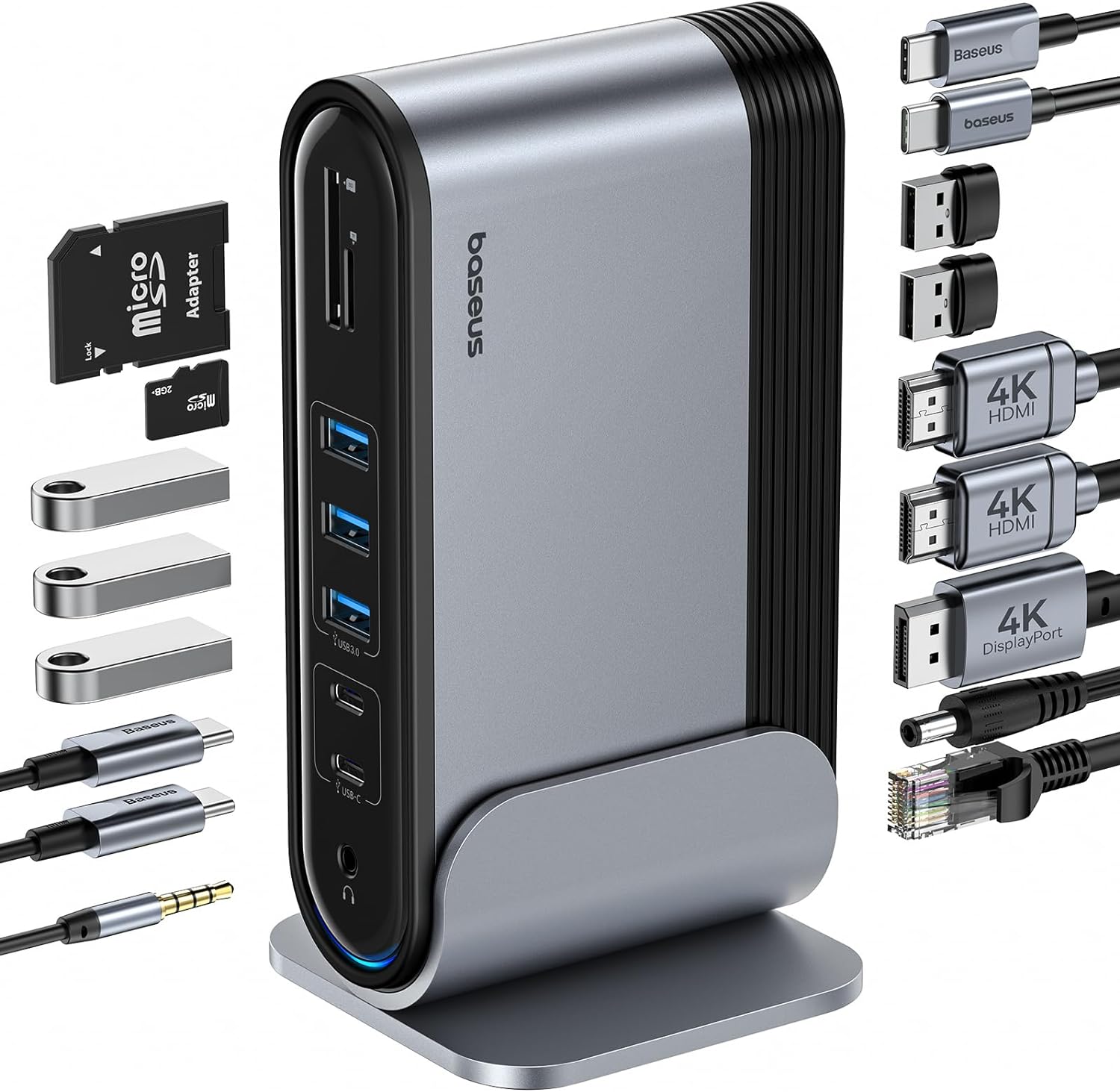
Figure 1: Baseus 17-in-1 Docking Station and included accessories.
2. اهم خاصيتون
The Baseus 17-in-1 Docking Station offers comprehensive connectivity solutions:
- 17-ان-1 پورٽ جي واڌ: Integrates a wide array of ports for diverse connectivity needs.
- ٽرپل مانيٽر سپورٽ: Connect up to three external monitors for enhanced productivity.
- هاء ريزوليوشن ڊسپلي: Supports 4K@60Hz resolution for single and dual displays, and 1080P@60Hz for triple displays on Windows systems.
- تيز ڊيٽا جي منتقلي: Features USB 3.0 ports with 5Gbps transfer speeds and USB 2.0 ports for peripherals.
- 100W پاور پهچائڻ: Provides up to 85W power output to charge your laptop (100W input required).
- گيگابٽ ايٿنيٽ: Ensures stable and high-speed wired network connection up to 1Gbps.
- SD/TF ڪارڊ پڙهندڙ: Convenient access to memory cards with speeds up to 104 MB/s.
- آڊيو ڪنيڪشن: Integrated 3.5mm audio jack for headphones or speakers.
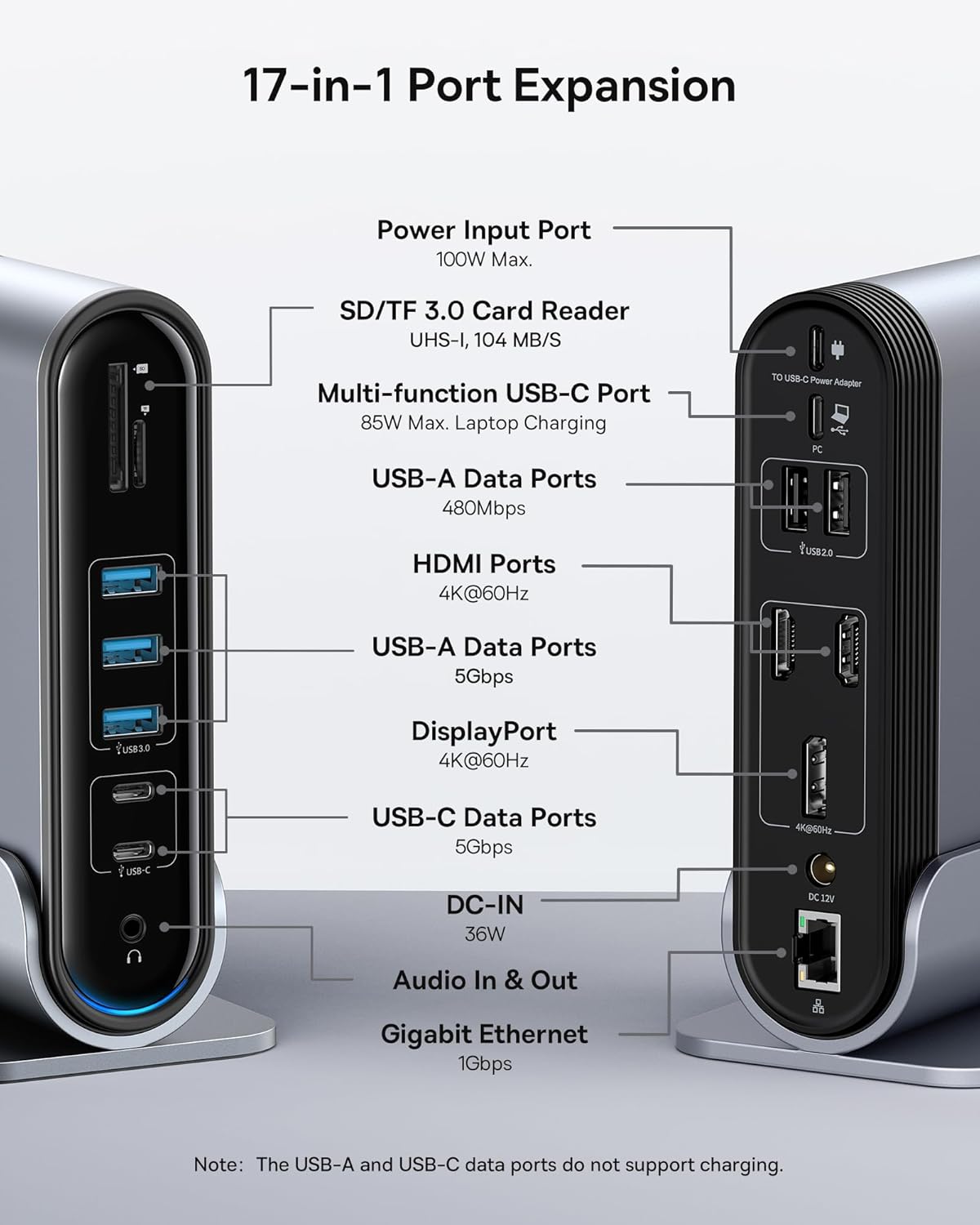
Figure 2: Detailed port layout and specifications of the docking station.
3. پيڪيج مواد
مھرباني ڪري تصديق ڪريو ته سڀ شيون پيڪيج ۾ موجود آھن:
- Baseus UnionJoy 17-پورٽ ٽرپل-ڊسپلي ڊاکنگ اسٽيشن
- ڊاک اسٽينڊ
- پاور اڊاپٽر
- USB-C کان USB-C ڪيبل
- US Adapter Plug
- EU اڊاپٽر پلگ
- UK Adapter Plug
- استعمال ڪندڙ دستي

شڪل 3: دٻي ۾ ڇا شامل آهي.
4. سيٽ اپ جون هدايتون
Follow these steps to set up your Baseus 17-in-1 Docking Station:
- پاور Connectنيو:
Connect the provided power adapter to the DC-IN port (36W) on the docking station. Use the appropriate regional adapter plug (US, EU, or UK) for your power outlet. For laptop charging, ensure a 100W PD charger (not included) is connected to the Power Input Port (100W Max.) on the docking station.

Figure 4: Power connection for the docking station and laptop charging.
- هوسٽ ڊيوائس سان ڳنڍيو:
Use the included USB-C to USB-C cable to connect the docking station's Multi-function USB-C Port (85W Max. Laptop Charging) to your laptop or compatible host device.
- ڳنڍڻ مانيٽر:
Connect your external monitors to the HDMI Ports (4K@60Hz) and/or DisplayPort (4K@60Hz) on the docking station using appropriate cables. Refer to the "Operating Instructions" section for display mode configurations.
- پردي سان ڳنڍڻ:
Connect your USB devices (keyboard, mouse, external drives, etc.) to the available USB-A Data Ports (5Gbps or 480Mbps) and USB-C Data Ports (5Gbps). Insert SD or TF cards into the respective card reader slots.
- نيٽ ورڪ ڳنڍيو (اختياري):
For a wired network connection, connect an Ethernet cable from your router/modem to the Gigabit Ethernet port (1Gbps) on the docking station.
- آڊيو ڳنڍيو (اختياري):
Connect headphones or speakers to the 3.5mm Audio In & Out jack.
5. آپريٽنگ هدايتون
5.1 ڊسپلي موڊس
The docking station supports various display configurations depending on your operating system and the number of connected monitors.
ونڊوز سسٽم لاءِ:
- Mirror Mode (A+A+A): Displays the same content on all connected monitors and the laptop screen. Supports 1080P@60Hz.
- Extend Mode (A+B+C): Extends your desktop across multiple monitors, allowing different content on each screen. Supports 1080P@60Hz for triple display.
macOS سسٽم لاءِ:
- Mirror Mode (A+A+A): Displays the same content on all connected monitors and the laptop screen. Supports 4K@60Hz.
- Extend Mode (A+B+B): Extends your desktop across external monitors, but macOS typically mirrors content across multiple external displays when using a single MST hub. Supports 4K@60Hz.
- Note: macOS does not support triple extended display (A+B+C) through a single MST hub.

Figure 5: Display mode configurations for Windows and macOS.

Figure 6: Detailed resolution capabilities for various display configurations and DP versions.
5.2 ڊيٽا جي منتقلي
The docking station provides high-speed data transfer capabilities:
- USB 3.0 (5Gbps): Ideal for external hard drives, SSDs, and other high-bandwidth devices.
- USB 2.0 (480Mbps): Suitable for keyboards, mice, printers, and other standard peripherals.
- SD/TF ڪارڊ پڙهندڙ: Quickly transfer photos and videos from memory cards.

Figure 7: Illustrating super-fast data transfer via the docking station.
5.3 بجلي پهچائڻ
The docking station supports Power Delivery (PD) to charge your laptop:
- Connect a 100W PD charger (not included) to the dedicated Power Input Port on the docking station.
- The docking station will then provide up to 85W of power to your connected laptop via the USB-C host connection.
Note: The USB-A and USB-C data ports on the front of the docking station do not support charging.
6. سار سنڀال ۽ سنڀال
To ensure the longevity and optimal performance of your docking station, follow these guidelines:
- ڊوائيس کي نرم، سڪل ڪپڙي سان صاف ڪري صاف رکو. رگڙيندڙ ڪلينر يا محلول استعمال ڪرڻ کان پاسو ڪريو.
- ڊاکنگ اسٽيشن کي پاڻي، نمي، يا انتهائي گرمي پد جي سامهون نه آڻيو.
- ڊوائيس کي مضبوط اثرن لاءِ ڇڏڻ يا تابع ڪرڻ کان پاسو ڪريو.
- ڊاکنگ اسٽيشن جي چوڌاري مناسب وينٽيليشن کي يقيني بڻايو وڃي ته جيئن وڌيڪ گرميءَ کي روڪي سگهجي.
- جڏهن ڊوائيس گهڻي عرصي تائين استعمال ۾ نه هجي ته سڀئي ڪيبل ڌار ڪريو.
7. مسئلا حل ڪرڻ
If you encounter issues with your Baseus 17-in-1 Docking Station, refer to the following common problems and solutions:
7.1 No Display Output / Flickering Screen
- ڪيبل ڪنيڪشن چيڪ ڪريو: Ensure all HDMI/DisplayPort cables are securely connected to both the docking station and the monitors.
- Verify Host Connection: Confirm the USB-C cable connecting the docking station to your laptop is firmly plugged in.
- بجلي جي فراهمي: Make sure the docking station is receiving adequate power from its power adapter.
- ڊسپلي سيٽنگون: Check your computer's display settings (e.g., Windows Display Settings, macOS System Preferences > Displays) to ensure the external monitors are detected and configured correctly (Extend, Mirror).
- ڊرائيور اپڊيٽ: Ensure your laptop's graphics drivers and USB-C drivers are up to date.
- Resolution Compatibility: Verify that the selected resolution and refresh rate are supported by your monitors and the docking station. Refer to the "Multiple Display Modes" table in Section 5.1.
- macOS Triple Display: Remember that macOS does not support triple extended display (A+B+C) through a single MST hub.
7.2 USB Devices Not Working
- Reconnect Device: Unplug and re-plug the USB device from the docking station.
- مختلف پورٽ آزمايو: Test the USB device in another USB port on the docking station or directly on your laptop to isolate the issue.
- بجلي جي فراهمي: Ensure the docking station has sufficient power, especially for power-hungry USB devices.
- ڊرائيور مسئلا: Check if the USB device requires specific drivers and ensure they are installed on your computer.
7.3 ليپ ٽاپ چارج نه ٿي رهيو آهي
- 100W PD Charger: Confirm you are using a 100W Power Delivery charger connected to the dedicated Power Input Port on the docking station. The docking station itself does not generate power for your laptop.
- USB-C ڪيبل: Ensure the USB-C cable connecting the docking station to your laptop supports power delivery.
- ليپ ٽاپ مطابقت: Verify your laptop supports charging via its USB-C port.
7.4 Ethernet Connection Issues
- ڪيبل چيڪ: پڪ ڪريو ته ايٿرنيٽ ڪيبل ڊاکنگ اسٽيشن ۽ توهان جي روٽر/موڊيم ٻنهي سان محفوظ طور تي ڳنڍيل آهي.
- نيٽ ورڪ سيٽنگون: پنهنجي ڪمپيوٽر جي نيٽ ورڪ سيٽنگز کي چيڪ ڪريو ته جيئن پڪ ڪري سگهجي ته ايٿرنيٽ اڊاپٽر فعال آهي ۽ صحيح طرح سان ترتيب ڏنل آهي.
- روٽر/موڊيم: Verify your router/modem is functioning properly.
8. وضاحتون
| خاصيت | تفصيل |
|---|---|
| ماڊل | B0D78WFLST |
| برانڊ | بيسس |
| ڪُل بندرگاهون | 17 |
| HDMI بندرگاهن | 2 (4K@60Hz) |
| ڊسپلي پورٽ | 1 (4K@60Hz) |
| USB-A ڊيٽا بندرگاهن | 7 (3x 5Gbps, 4x 480Mbps) |
| USB-C ڊيٽا بندرگاهن | 2 (5 جي بي پي ايس) |
| بجلي پهچائڻ (ان پٽ) | 100W Max (via dedicated PD port) |
| Power Output (to Laptop) | 85W Max (via Multi-function USB-C Port) |
| Ethernet پورٽ | 1 (1Gbps Gigabit Ethernet) |
| ڪارڊ ريڊر | SD/TF (UHS-I, 104 MB/s) |
| آڊيو جيڪ | 3.5 ايم ايم آڊيو ان ۽ آئوٽ |
| مطابقت رکندڙ ڊوائيسز | Dell, HP, Mac, Lenovo, Steam Deck, etc. |
| طول و عرض | 9.29 x 8.27 x 2.28 انچ |
| شيءِ جو وزن | 1.9 پائونڊ |
9. وارنٽي ۽ سپورٽ
وارنٽي جي معلومات ۽ ٽيڪنيڪل سپورٽ لاءِ، مھرباني ڪري سرڪاري بيسس جو حوالو ڏيو website or contact Baseus customer service directly. Keep your purchase receipt as proof of purchase for warranty claims.
بيسس آفيشل Webسائيٽ: www.baseus.com
For further assistance, you may also contact the seller through the platform where you purchased the product.


