1. تعارف
Thank you for choosing the GOWENIC 4K Webcam. This high-definition USB PC camera is designed to provide superior video and audio quality for your online communications, streaming, and recording needs. Featuring a 3840x2140 resolution, a built-in microphone, super bright fill light, and an auto beauty function, this webcam offers a comprehensive solution for clear and vibrant visual experiences. This manual provides detailed instructions for setup, operation, maintenance, and troubleshooting to ensure optimal performance of your device.
2. حفاظت جي ڄاڻ
- بي نقاب نه ڪريو webcam to water or excessive moisture.
- ڇڏڻ يا تابع ڪرڻ کان پاسو ڪريو webcam to strong impacts.
- جدا ڪرڻ يا مرمت ڪرڻ جي ڪوشش نه ڪريو webcam yourself. Contact customer support for assistance.
- رکي webcam away from extreme temperatures and direct sunlight.
- ڪنيڪشن لاءِ صرف مهيا ڪيل USB ڪيبل استعمال ڪريو.
3. پيڪيج مواد
مھرباني ڪري ھيٺ ڏنل شين لاءِ پيڪيج چيڪ ڪريو:
- GOWENIC 4K Webcam (Model: GOWENICd7g5q3f2rb)
- USB 2.0 Cable (integrated)
- ھدايت وارو دستور
4. پراڊڪٽ ختمview
Familiarize yourself with the main components of your GOWENIC 4K Webڪيمرا:
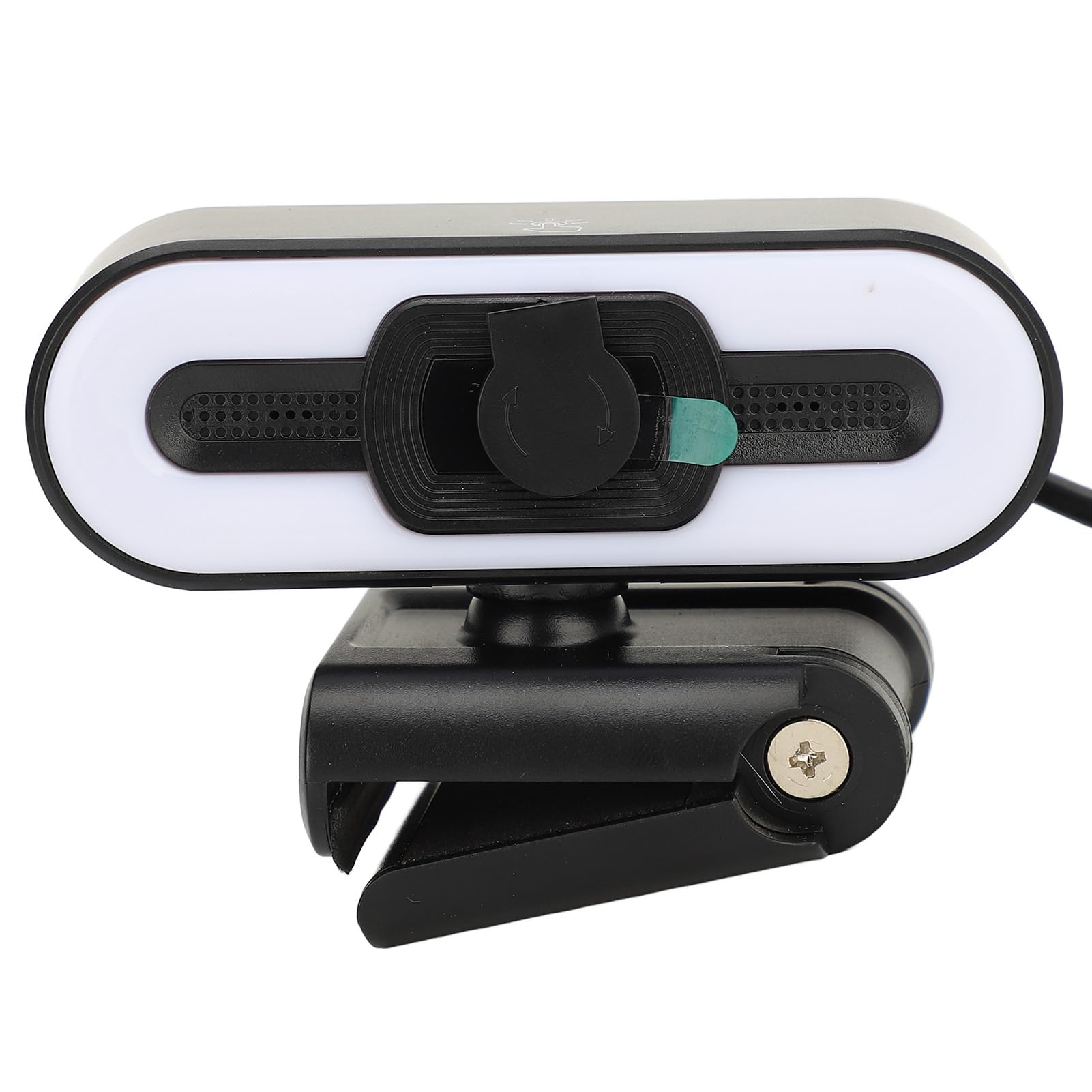

- 4K لينس: High-resolution lens for clear video capture.
- بلٽ ان مائڪروفون: Captures clear audio during calls and recordings.
- Super Bright Fill Light: Provides illumination for optimal picture quality in low-light conditions. Activated by a touch sensor.
- رازداري ڪپڙا: A physical slider to cover the lens when not in use, ensuring privacy.
- Adjustable Mounting Clip: Securely attaches the webcam to monitors, laptops, or stands.
- USB 2.0 ڪيبل: Integrated cable for power and data connection to your computer.
5. سيٽ اپ
The GOWENIC 4K Webڪيم پلگ ۽ پلي ڪارڪردگي لاءِ ٺهيل آهي، جنهن جي ڪري گھڻن آپريٽنگ سسٽمن لاءِ اضافي ڊرائيور جي انسٽاليشن جي ضرورت ناهي.
5.1 ڳنڍڻ Webڪئميرا
- جبل Webڪيمرا: Open the adjustable mounting clip and place the webcam securely on top of your computer monitor, laptop screen, or a compatible tripod. Ensure the webcam is stable and the lens is facing you.
- ڪمپيوٽر سان ڳنڍيو: Plug the integrated USB 2.0 cable into an available USB port on your computer.
- سسٽم جي سڃاڻپ: Your computer should automatically detect and install the necessary drivers for the webcam. This process may take a few moments.


5.2 سافٽ ويئر ترتيب ڏيڻ
Once connected, you can select the GOWENIC 4K Webcam as your primary video and audio device within your preferred video conferencing, streaming, or recording software (e.g., Zoom, Skype, OBS, Windows Camera app, macOS Photo Booth).
- Open your application's settings or preferences.
- Navigate to the 'Video' or 'Camera' section and select 'GOWENIC 4K Webcam'.
- Navigate to the 'Audio' or 'Microphone' section and select 'GOWENIC 4K Webcam' or 'USB Audio Device'.
6. آپريٽنگ هدايتون
6.1 Using the 4K Resolution
جي webcam supports 3840x2140 resolution. To utilize this, ensure your software settings are configured to capture or stream at 4K. Performance may vary based on your computer's specifications and internet bandwidth.
6.2 بلٽ ان مائڪروفون
The integrated microphone automatically activates when the webcam is selected as the audio input device in your software. No additional setup is required for basic use.
6.3 Super Bright Fill Light
جي webcam features an integrated fill light to improve illumination in dim environments.
- چالو ڪرڻ: Gently touch the designated sensor area on top of the webcam (indicated by a light bulb icon) to turn the fill light on or off.
- ترتيب ڏيڻ: Repeatedly touch the sensor to cycle through different brightness levels or color temperatures, if available. Refer to Figure 6.1 for the sensor location.


6.4 Auto Beauty Function
جي webcam includes an automatic beauty enhancement function that subtly refines your appearance during video calls, providing a more polished look. This feature is typically enabled by default and operates automatically.
6.5 رازداري جو احاطو
To ensure your privacy, slide the physical cover over the lens when the webcam is not in use. Slide it back to expose the lens when you need to use the camera.
7. سار سنڀال
7.1 لينس صاف ڪرڻ
To maintain optimal image quality, gently clean the webcam lens with a soft, lint-free cloth. Do not use harsh chemicals or abrasive materials.
7.2 عام سنڀال
- رکي webcam free from dust and debris.
- اسٽور webcam in a cool, dry place when not in use.
- هميشه رازداري جو احاطو استعمال ڪريو جڏهن webcam is not active.
8. مسئلا حل ڪرڻ
If you encounter issues with your GOWENIC 4K Webڪيم، مھرباني ڪري ھيٺ ڏنل عام حلن جو حوالو ڏيو:
| مسئلو | ممڪن حل |
|---|---|
| Webڪمپيوٽر طرفان ڪيم نه مليو. |
|
| ڪابه وڊيو يا ڪاري اسڪرين ناهي. |
|
| ڪابه آڊيو يا خراب آڊيو معيار ناهي. |
|
| Fill light not working. |
|
9. وضاحتون
Detailed technical specifications for the GOWENIC 4K Webڪيمرا:
| خاصيت | تفصيل |
|---|---|
| ماڊل نالو | GOWENICd7g5q3f2rb |
| قرارداد | 3840x2140 (4 ڪلو) |
| رابطي | USB 2.0 |
| مائڪروفون | تعمير ٿيل |
| روشني | Super Bright Fill Light |
| خاص خاصيتون | Auto Beauty Function, Adjustable Clip |
| فوٽو سينسر ٽيڪنالاجي | CMOS |
| شيءِ جو وزن | 4.9 آونس (140 گرام) |
| پيڪيج جي ماپ | 4.33 x 3.54 x 2.76 انچ |
| تاريخ پهرين دستياب | 27 جون 2024 |
10. وارنٽي ۽ سپورٽ
GOWENIC products are manufactured to high-quality standards. For warranty information, technical support, or any inquiries regarding your webcam, please refer to the contact information provided with your purchase or visit the official GOWENIC webسائيٽ. مھرباني ڪري وارنٽي دعوائن لاءِ خريداري جو ثبوت رکو.