تعارف
Thank you for choosing the Tibuta K7 Kids Tablet. This device is designed to provide a safe and engaging digital experience for children, featuring parental controls, educational content, and entertainment options. This manual will guide you through the initial setup, operation, and maintenance to ensure optimal performance and longevity of your tablet.
دٻي ۾ ڇا آهي
مھرباني ڪري تصديق ڪريو ته سڀ شيون پيڪيج ۾ موجود آھن:
- Tibuta K7 Kids Tablet
- Drop-proof Silicone Protective Case
- ٽائپ-سي ڪيبل
- چارجر
- استعمال ڪندڙ جي دستياب

Image: Contents of the Tibuta K7 Kids Tablet package. This image displays the tablet, its protective case, a USB-C charging cable, a power adapter, and the user manual, illustrating all items included with the product.
پيداوار ختمview
The Tibuta K7 Kids Tablet features a 7-inch HD display, a durable silicone protective case, and an Android 12 Go operating system. It is equipped with dual cameras and supports Wi-Fi connectivity.

تصوير: اڳيان ۽ پوئتي view of the Tibuta K7 Kids Tablet. The tablet is shown in a pink protective case with a handle and kickstand, displaying a colorful children's cartoon on its screen.
ٽيبلٽ اجزاء

Image: Diagram of the Tibuta K7 Kids Tablet's external features. This illustration points out the front camera, 3.5mm headphone port, TF card slot, USB 2.0 OTG port, rear camera, volume buttons, power ON/OFF/Reset button, and speaker.
- سامهون ڪئميرا: وڊيو ڪالن ۽ سيلفيز لاءِ.
- 3.5 ايم ايم هيڊ فون پورٽ: هيڊفون جوڙڻ لاءِ.
- TF ڪارڊ سلاٽ: For expanding storage with a microSD card (up to 128GB).
- USB 2.0 OTG Port (Type-C): چارج ڪرڻ ۽ ڊيٽا جي منتقلي لاء.
- پوئتي ڪئميرا: تصويرون ۽ وڊيوز ڪڍڻ لاءِ.
- حجم بٽڻ: آڊيو جي مقدار کي ترتيب ڏيو.
- Power ON/OFF/Reset Button: Powers the tablet on/off or performs a reset.
- اسپيڪر: آڊيو آئوٽ لاء.
سيٽ اپ گائيڊ
1. شروعاتي چارجنگ
Before first use, fully charge the tablet. Connect the provided Type-C cable to the tablet's USB port and the charger to a power outlet. The charging indicator will show the charging status.
2. پاور آن/آف
- پاور آن ڪرڻ: پاور بٽڻ کي دٻايو ۽ رکو جيستائين اسڪرين جي روشني نه ٿئي.
- پاور آف ڪرڻ: پاور بٽڻ کي دٻايو ۽ رکو، پوءِ اختيارن مان "پاور آف" چونڊيو.
- ٻيهر شروع ڪرڻ لاء: پاور بٽڻ کي دٻايو ۽ رکو، پوءِ اختيارن مان "ٻيهر شروع ڪريو" چونڊيو.
3. وائي فائي ڪنيڪشن
- ڏانهن وڃو سيٽنگون > نيٽ ورڪ ۽ انٽرنيٽ > وائي فائي.
- وائي فائي کي ٽوگل ڪريو On.
- فهرست مان پنھنجو مطلوب وائي فائي نيٽ ورڪ چونڊيو.
- جيڪڏهن اشارو ڪيو وڃي ته نيٽ ورڪ پاسورڊ داخل ڪريو، پوءِ ٽيپ ڪريو ڳنڍڻ.
4. Kidoz Parental Control App Setup
The tablet comes pre-installed with the Kidoz parental control application. This app allows you to manage content, screen time, and access for your child.
- لانچ ڪريو Kidoz هوم اسڪرين تان ايپ.
- Follow the on-screen instructions to create a parent account and set up child profiles.
- Configure settings such as screen time limits, content filtering, and application access.

Image: Parents setting up the Kidoz parental control app on the Tibuta K7 Kids Tablet. The image illustrates a family interacting with the tablet, highlighting features like screen time limits and content filtering.
آپريٽنگ هدايتون
نيويگيشن
- ٽچ اسڪرين: Tap, swipe, and pinch to navigate the interface.
- گھر جي اسڪرين: Access frequently used apps and widgets.
- نوٽيفڪيشن: اسڪرين جي مٿئين پاسي کان ھيٺ سوائپ ڪريو view اطلاع ۽ تڪڙا سيٽنگون.
Using Kidoz and Applications
The Kidoz app provides a child-friendly interface and access to pre-approved content. Parents can manage available applications and content through the parental control settings.
- ائپس تائين رسائي: Within the Kidoz environment, children can access approved games, educational apps, and media.
- Downloading New Apps: Parents can download additional applications from the Google Play Store, which can then be added to the child's approved list within Kidoz.
- مواد فلٽرنگ: Kidoz allows for filtering of inappropriate content, ensuring a safe browsing and viewتجربو.
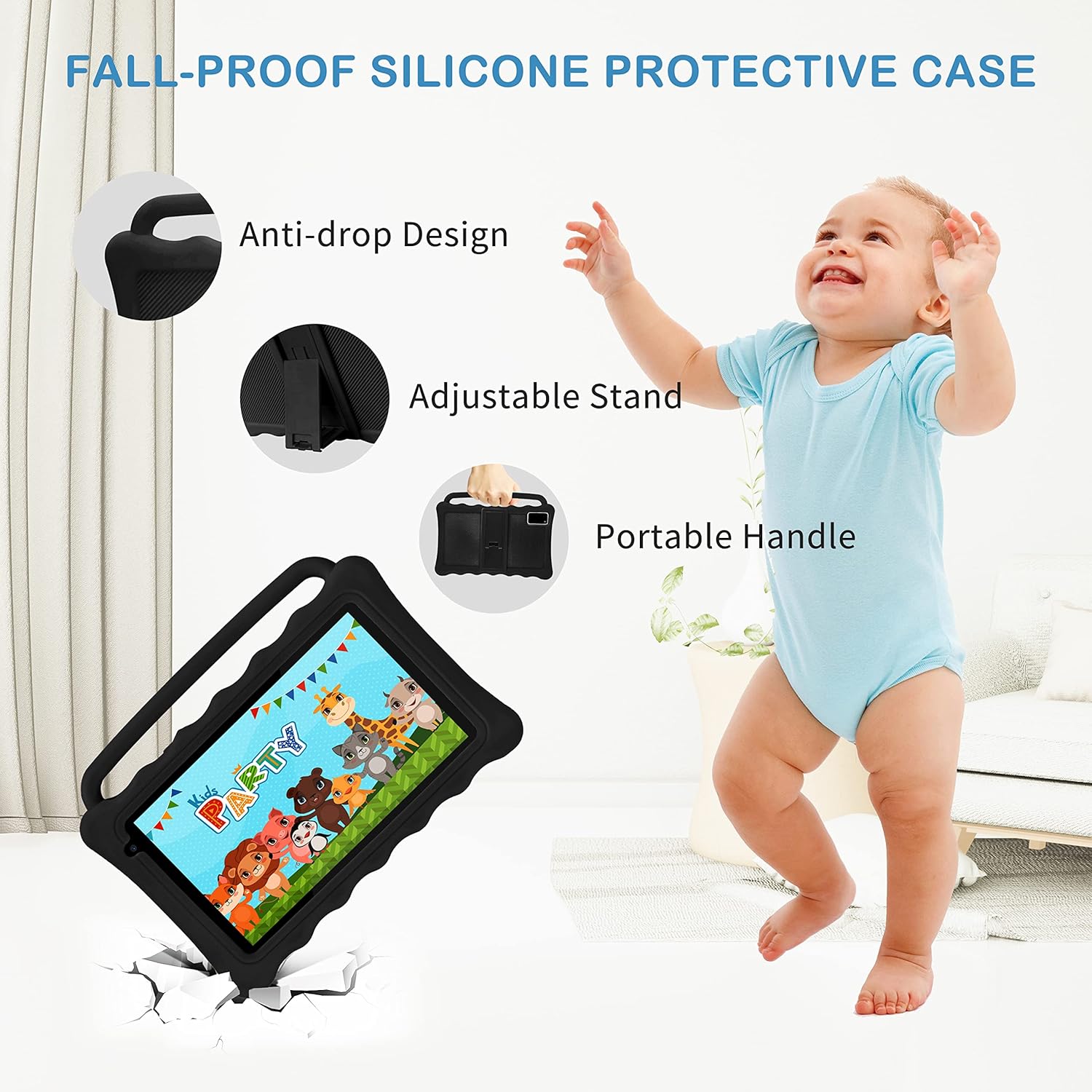
Image: The Tibuta K7 Kids Tablet showcasing its multi-functional capabilities for children. This image highlights pre-installed applications like ABCMouse, YouTube, Netflix, Google Play, and various games, books, and art tools.
اکين جي حفاظت جو طريقو
The 7-inch LCD screen is equipped with Low Blue Light technology to protect children's eyes. Activate the reading mode in settings to reduce screen flicker and harmful blue light, providing a more comfortable viewتجربو.

Image: Two children using the Tibuta K7 Kids Tablet, demonstrating the eye protection feature. The image emphasizes the 1024x600 HD screen and its low blue light technology for comfortable viewing.
ڪئميرا جو استعمال
The tablet features a 2MP front camera and a 5MP rear camera for capturing photos and videos.
- کوليو ڪئميرا درخواست.
- فوٽو ڪڍڻ يا وڊيو رڪارڊنگ شروع/بند ڪرڻ لاءِ شٽر بٽڻ کي دٻايو.
- Switch between front and rear cameras using the camera icon on the screen.

Image: Children smiling and looking into the Tibuta K7 Kids Tablet camera. This image highlights the tablet's dual cameras (2MP front, 5MP rear) for capturing fun moments.
سار سنڀال
ٽيبليٽ صاف ڪرڻ
- ٽيبليٽ جي اسڪرين ۽ باڊي کي صاف ڪرڻ لاءِ نرم، لِنٽ فري ڪپڙو استعمال ڪريو.
- ضدي داغن لاءِ، ٿورو ڊيampen اليڪٽرانڪس لاءِ ٺهيل پاڻي يا اسڪرين ڪلينر سان ڪپڙو.
- سخت ڪيميڪل، رگڙيندڙ صاف ڪندڙ، يا ايروسول اسپري استعمال ڪرڻ کان پاسو ڪريو.
بيٽري جي سنڀال
- Charge the tablet regularly, but avoid leaving it fully charged or fully depleted for extended periods.
- Use only the provided charger and cable to prevent damage to the battery.
- Avoid exposing the tablet to extreme temperatures, as this can affect battery life.
حفاظتي ڪيس
The silicone protective case is designed to safeguard the tablet from drops and impacts. Ensure the tablet is properly seated within the case at all times. The adjustable stand and portable handle enhance usability and portability.

Image: The Tibuta K7 Kids Tablet in a red protective case. This image highlights the anti-drop design, adjustable stand, and portable handle of the silicone case, demonstrating its protective and ergonomic features.
مشڪلاتون
- ٽيبليٽ آن نٿو ٿئي:
- Ensure the tablet is fully charged. Connect it to the charger and wait a few minutes before attempting to power it on again. If unresponsive, press and hold the Power button for 10-15 seconds to force a restart.
- اسڪرين غير جوابده آهي:
- Restart the tablet. If the issue persists, ensure the screen is clean and free of debris. If the problem continues, a factory reset might be necessary (data will be lost).
- وائي فائي ڪنيڪشن جا مسئلا:
- Check if Wi-Fi is enabled in settings. Restart your Wi-Fi router. Forget the network on the tablet and reconnect. Ensure you are within range of the Wi-Fi signal.
- Kidoz app not working correctly:
- Ensure the Kidoz app is updated to the latest version. Clear the app's cache and data in سيٽنگون > ايپس > Kidoz > ذخيرو. If problems persist, reinstall the app or contact Kidoz support.
- Tablet runs slowly or freezes:
- Close unnecessary background applications. Clear cache for frequently used apps. Consider uninstalling unused apps to free up storage. If the issue is severe, a factory reset may resolve it.
وضاحتون
| خاصيت | تفصيل |
|---|---|
| برانڊ | تبوتا |
| ماڊل نالو | K7 |
| آپريٽنگ سسٽم | Android 12 Go |
| پروسيسر برانڊ | سڀ فاتح |
| اسڪرين جي ماپ | 7 انچ |
| اسڪرين جي قرارداد | 1024 x 600 پکسلز |
| رام | 2 جي بي |
| رکڻ جي گنجائش | 32 جي بي (مائڪرو ايس ڊي ذريعي 128 جي بي تائين وڌائي سگهجي ٿو) |
| رابطي | وائي فائي (802.11 گرام)، بلوٽوٿ |
| ڪيمرا | اڳيان: 2 ايم پي، پوئين: 5 ايم پي |
| بيٽري جي زندگي | Over 5 hours (usage dependent) |
| رنگ | Rose (as per product listing, other colors may vary) |


