1. تعارف
The Flashpoint R2 Nano Remote is a compact and advanced wireless flash trigger designed for Panasonic and Olympus camera systems. It offers precise control over your flash settings through an intuitive touchscreen interface and OLED display, enhancing your photography experience with seamless integration and reliable performance.
اهم خاصيتون شامل آهن:
- بيحد انضمام: Full TTL compatibility with Olympus/Panasonic cameras for optimal exposure.
- Ultimate Reliability: Stable 2.4 GHz radio frequency with 32 channels, ensuring consistent triggering up to 328 feet (100 meters).
- تيز رفتار هم وقت سازي (HSS): Achieve sync speeds up to 1/8000s for creative effects and motion freezing.
- وجداني ٽچ اسڪرين ڪنٽرول: Responsive interface for quick and easy adjustments.
- Versatile Group Control: Manage up to 16 groups (A-F, 0-9) independently for complex lighting setups.
2. دٻي ۾ ڇا آهي
Upon unboxing your Flashpoint R2 Nano, please verify that all components are present:
- Flashpoint R2 Nano Remote
- USB-C چارجنگ ڪيبل
- رکڻ وارو ٿيلهو
- استعمال ڪندڙ جو دستياب (ھي دستاويز)
3. پراڊڪٽ ختمview
Familiarize yourself with the components and controls of your R2 Nano remote.
شڪل 3.1: اڳيان ۽ پاسي View of the R2 Nano with Key Components Labeled.
- ٽچ اسڪرين: Main interface for settings and control.
- ڊائل چونڊيو: مينيو کي نيويگيٽ ڪرڻ ۽ قدرن کي ترتيب ڏيڻ لاءِ.
- پاور سوئچ: ڊوائيس کي آن / بند ڪري ٿو.
- ٽيسٽ بٽڻ: Triggers a test flash.
- Installing/Detaching Button: Releases the remote from the hotshoe.
- چڙهڻ واري سلاٽ: Connects to the camera's hotshoe.
- USB-C چارجنگ پورٽ: For battery charging.

Figure 3.2: R2 Nano Touchscreen Interface Details.
- Channel (CH): Displays the current wireless channel (e.g., CH6).
- Group (A, B, C, etc.): Indicates the active flash groups.
- ٻاھرين پاور ليول: Shows the flash power setting (e.g., +0.0, 1/128).
- Parameters - / +: Touch controls for decreasinجي/انڪريasing values.
- هم وقت سازي جا طريقا: Icons indicating sync modes (e.g., HSS, front curtain, rear curtain).
- ماڊلنگ ايلamp: Icon for modeling lamp حيثيت.
- بيٽري جو اشارو: موجوده بيٽري جي سطح ڏيکاري ٿو.
4. سيٽ اپ
4.1 بيٽري کي چارج ڪرڻ
The R2 Nano is equipped with a built-in rechargeable lithium battery. Before first use, fully charge the device.
- Locate the USB-C charging port on the side of the R2 Nano.
- Connect the provided USB-C charging cable to the port.
- ڪيبل جي ٻئي ڇيڙي کي USB پاور اڊاپٽر (شامل نه آهي) يا ڪمپيوٽر جي USB پورٽ سان ڳنڍيو.
- The battery indicator on the screen will show charging status. A full charge from 0% to 100% typically takes approximately 2 hours.

Figure 4.1: Charging the R2 Nano via USB-C.
4.2 ڪئميرا تي چڙهڻ
The R2 Nano features an easy-mounting, durable hotshoe design for secure attachment to your camera.
- پڪ ڪريو ته توهان جو ڪئميرا بند آهي.
- Slide the R2 Nano's mounting slot onto your camera's hotshoe.
- Gently push until it clicks into place, ensuring a secure connection.
- To detach, press the Installing/Detaching Button and slide the remote off.

Figure 4.2: Mounting the R2 Nano on a Camera Hotshoe.
5. آپريٽنگ هدايتون
5.1 پاور آن/آف
- To power on, press and hold the Power Switch until the screen illuminates.
- To power off, press and hold the Power Switch until the screen turns off.
5.2 Navigating the Touchscreen Interface
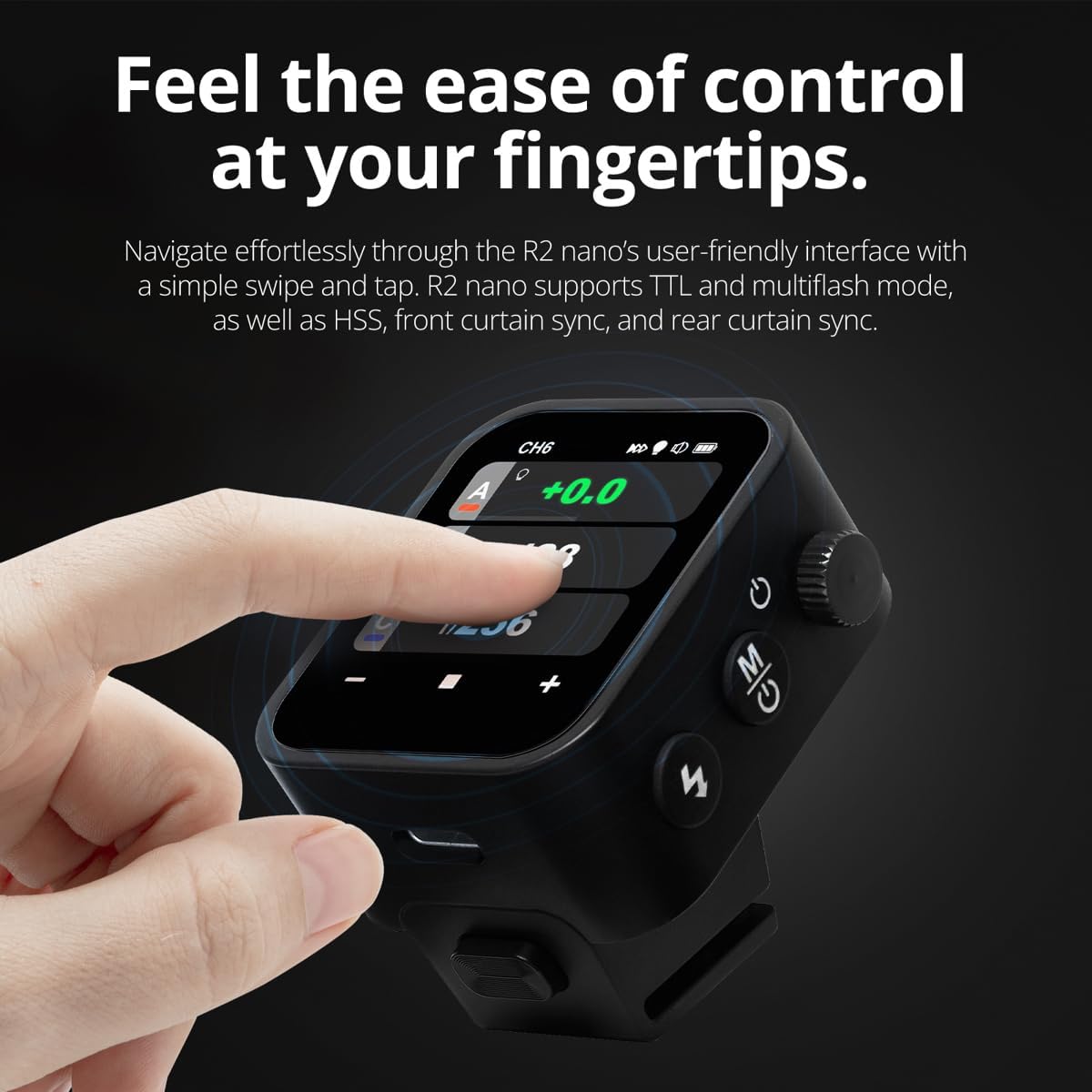
The R2 Nano features a responsive touchscreen and a select dial for intuitive control.

Figure 5.1: High Definition OLED Screen Interface.
- Touch Interaction: Tap on a group (A, B, C, etc.) to select it for adjustment. Tap on parameters like power level to modify them.
- ڊائل چونڊيو: Rotate the dial to scroll through options or adjust values. Press the dial to confirm selections.
- پيٽرول جي ترتيب: Use the on-screen '-' and '+' buttons or the Select Dial to change flash power, exposure compensation, or other settings.

Figure 5.2: Touchscreen Interaction for Settings Adjustment.
5.3 Setting Channels and Groups
To avoid interference and control multiple flashes, set appropriate channels and groups.
- Access the channel settings through the touchscreen menu. Select a channel from 1 to 32. Ensure your flash units are set to the same channel.
- Assign flash units to different groups (A-F, 0-9) to control them independently. The R2 Nano allows control of up to 16 groups.
5.4 Flash Modes (TTL, Manual, Multi-flash)
The R2 Nano supports various flash modes to suit different shooting scenarios.
- TTL (Through-The-Lens): Automatically adjusts flash output for correct exposure. Ideal for fast-paced shooting where lighting conditions change frequently.
- دستور (M): Allows precise control over flash power output (e.g., 1/1 to 1/256). Suitable for consistent lighting setups and creative control.
- Multi-flash (Stroboscopic): Fires a series of rapid flashes during a single exposure to capture multiple movements of a subject.
5.5 Sync Modes (HSS, Front Curtain, Rear Curtain)
Select the appropriate sync mode based on your shutter speed and desired effect.
- HSS (High-Speed Sync): Enables flash synchronization at shutter speeds faster than the camera's native sync speed (up to 1/8000s). Useful for overpowering ambient light or using wide apertures in bright conditions.
- سامهون واري پردي جي هم وقت سازي: The flash fires at the beginning of the exposure. This is the standard sync mode.
- پوئين پردي جي هم وقت سازي: The flash fires just before the second curtain closes. This creates a streaking effect behind moving subjects, giving a sense of motion.
6. سار سنڀال
Proper maintenance ensures the longevity and optimal performance of your R2 Nano remote.
- صفائي: Use a soft, dry cloth to clean the exterior of the device. For the touchscreen, use a microfiber cloth specifically designed for electronics. Avoid using harsh chemicals or abrasive materials.
- اسٽوريج: When not in use, store the R2 Nano in its provided storage bag to protect it from dust and scratches. Store in a cool, dry place away from direct sunlight and extreme temperatures.
- بيٽري جي سنڀال: To maintain battery health, avoid fully discharging the battery frequently. If storing for extended periods, charge the battery to approximately 50% every few months.
- Hotshoe Contacts: Keep the hotshoe contacts clean and free of debris to ensure reliable communication with your camera.
7. مسئلا حل ڪرڻ
If you encounter issues with your Flashpoint R2 Nano, refer to the following common problems and solutions.
| مسئلو | ممڪن سبب | حل |
|---|---|---|
| ڊوائيس تي طاقت نه آهي. | بيٽري ختم ٿي وئي آهي. | Charge the device using the USB-C cable. |
| Flash units not firing. | غلط چينل يا گروپ سيٽنگون. | Ensure the R2 Nano and flash units are set to the same channel and correct groups. |
| Flash units not firing. | Remote not securely mounted. | Ensure the R2 Nano is fully seated in the camera's hotshoe. |
| Inconsistent flash triggering. | ماحولياتي مداخلت. | Change the wireless channel to one with less interference. Ensure no obstructions between remote and flash. |
| ٽچ اسڪرين غير جوابي. | عارضي سافٽ ويئر جي خرابي. | Power off the device, wait a few seconds, then power it back on. |
| HSS not working. | Camera or flash not set to HSS mode. | Verify HSS is enabled on both the R2 Nano and your compatible flash unit. Ensure camera shutter speed is above sync speed. |
8. وضاحتون
| خاصيت | تفصيل |
|---|---|
| ماڊل | Flashpoint R2 Nano |
| مطابقت | Panasonic and Olympus Cameras |
| وائرليس فريڪوئنسي | 2.4 GHz |
| چينل | 32 |
| گروهه | 16 (AF، 0-9) |
| وائرلیس رينج | 100 ميٽر (328 فوٽ) تائين |
| هم وقت سازي جي رفتار | Up to 1/8000s (HSS) |
| ڏيکاريو | Touchscreen OLED |
| بيٽري | بلٽ ۾ ريچارج قابل ليتيم بيٽري |
| چارجنگ پورٽ | USB-C |
| پيداوار جي ماپ | 5.25 x 4.25 x 2.5 انچ |
| شيءِ جو وزن | 6.4 اونس |
| ٺاهيندڙ | فليش پوائنٽ |
| تاريخ پهرين دستياب | 19 جون 2024 |
9. وارنٽي ۽ سپورٽ
Flashpoint products are designed for reliability and performance. For warranty information, technical support, or service inquiries, please refer to the official Flashpoint webسائيٽ تي وڃو يا پنهنجي مجاز ڊيلر سان رابطو ڪريو.
مھرباني ڪري ڪنھن به وارنٽي دعوائن لاءِ خريداري جو ثبوت رکو.


