1. اهم حفاظتي ڄاڻ
Please read all instructions carefully before using the SANSUI ES-24C1 monitor. Keep this manual for future reference.
- باهه يا بجليءَ جي جھٽڪن جي خطرن کان بچڻ لاءِ مانيٽر کي مينهن يا نمي جي سامهون نه رکو.
- مانيٽر نه کوليو casing. اندر ڪو به استعمال ڪندڙ جي خدمت لائق پرزا نه آهن. سڀني سروسنگ کي قابل اهلڪارن جي حوالي ڪريو.
- مانيٽر کي هڪ مستحڪم، فليٽ مٿاڇري تي رکو ته جيئن ان کي ڪري نه پوي.
- مانيٽر جي چوڌاري مناسب وينٽيليشن کي يقيني بڻايو. وينٽيليشن جي سوراخن کي بند نه ڪريو.
- صرف مانيٽر سان فراهم ڪيل پاور اڊاپٽر استعمال ڪريو.
- بجلي جي طوفان دوران يا ڊگهي عرصي تائين استعمال نه ٿيڻ تي مانيٽر کي پاور آئوٽليٽ مان ڪڍو.
2. پيڪيج مواد
پڪ ڪريو ته سڀئي شيون پيڪيج ۾ موجود آهن:
- SANSUI ES-24C1 24-inch Curved Monitor
- مانيٽر اسٽينڊ (بنياد ۽ گردن)
- پاور اڊاپٽر
- HDMI ڪيبل
- استعمال ڪندڙ دستي
3. پراڊڪٽ ختمview
The SANSUI ES-24C1 is a 24-inch Full HD (1920x1080) curved monitor featuring a 100Hz refresh rate, 1ms MPRT response time, and built-in speakers. It is designed for both home and office use, offering a 1500R curvature for an immersive viewتجربو.

تصوير: مٿانview of the SANSUI ES-24C1 monitor highlighting its key features and curved design.

Image: Summary of the monitor's main features including 100Hz, 1ms MPRT, USB Type-C, HDR, 100% sRGB, 3000:1 contrast, 250 Nits, built-in speakers, and VESA mount.
بندرگاهن ۽ ڪنٽرول

تصوير: ويجهو تصوير view of the monitor's rear ports, including HDMI, USB Type-C, and Audio Out.
- USB قسم-سي: 1 port for video input (does not support charging).
- HDMI1.4: 1 port for video input.
- 3.5mm آڊيو جيڪ: ٻاهرين هيڊفون يا اسپيڪر کي ڳنڍڻ لاءِ.
- ڊي سي اندر پاور ان پٽ پورٽ.
- Five-Way Joystick: Located on the back for OSD menu navigation.
4. سيٽ اپ
4.1 مانيٽر اسيمبلي
مانيٽر اسٽينڊ کي گڏ ڪرڻ لاءِ انهن قدمن تي عمل ڪريو:
- اسٽينڊ گردن کي مانيٽر پينل سان ڳنڍيو.
- Secure the stand base to the neck.
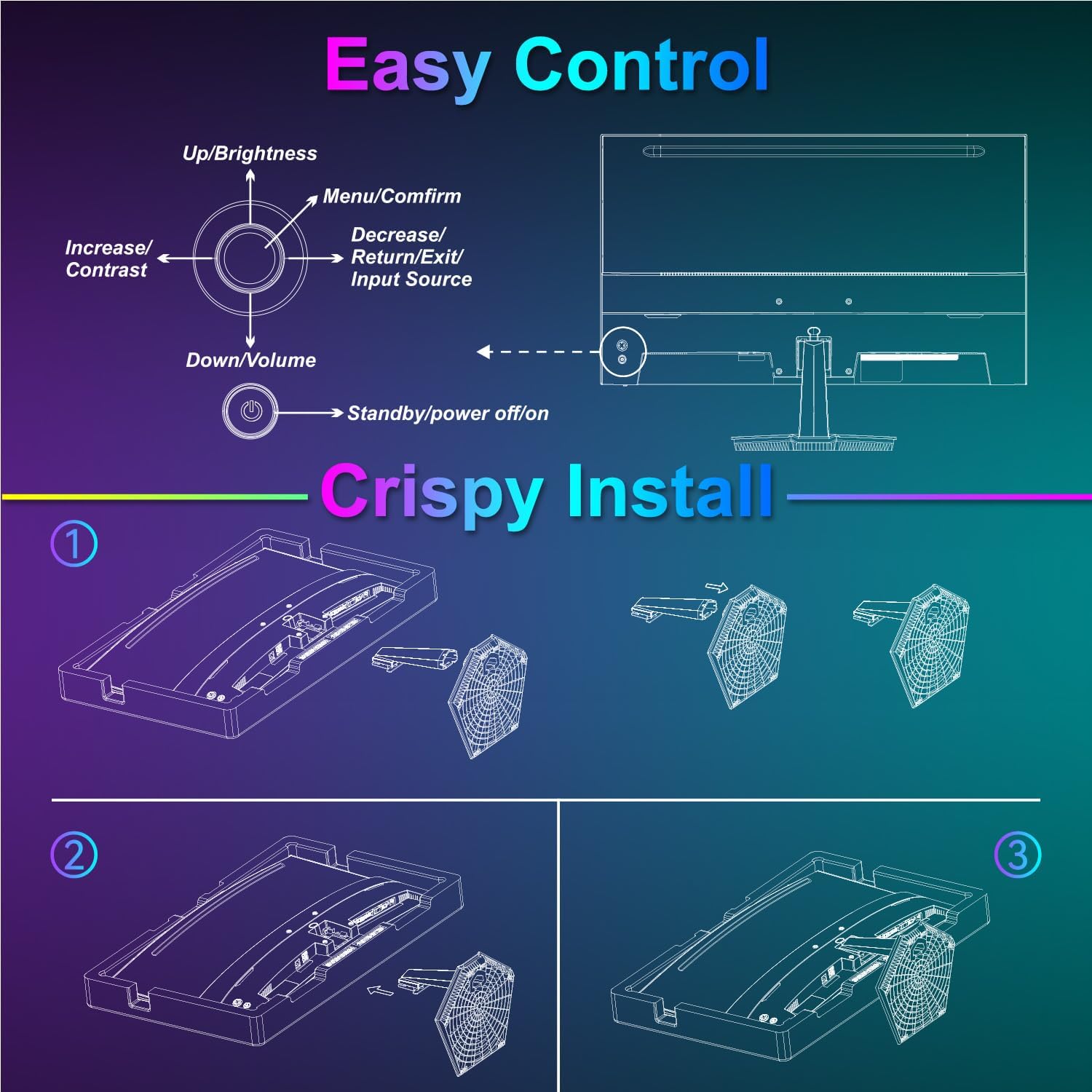
Image: Diagram illustrating the step-by-step assembly of the monitor stand.
4.2 ڊوائيسز سان ڳنڍڻ
Connect your monitor to a computer or other video source using the appropriate cable.
- HDMI: Connect one end of the HDMI cable to the monitor's HDMI port and the other end to your device's HDMI output.
- USB قسم-سي: Connect one end of the USB Type-C cable to the monitor's USB Type-C port and the other end to your device's compatible USB Type-C output.
- آڊيو: If using external audio devices, connect them to the 3.5mm audio jack.

Image: Visual representation of various devices connecting to the monitor via HDMI and USB Type-C.
4.3 پاور آن/آف
Connect the power adapter to the monitor's DC IN port and then plug it into a power outlet. Press the power button located on the back of the monitor to turn it on or off.
5. آپريٽنگ هدايتون
5.1 او ايس ڊي مينيو نيويگيشن
The On-Screen Display (OSD) menu is controlled using the five-way joystick on the back of the monitor. Press the joystick to open the menu, then move it up/down/left/right to navigate and select options.

Image: Diagram showing the five-way joystick and its functions for OSD menu navigation.
5.2 ڊسپلي سيٽنگون
Adjust various display parameters to optimize your viewتجربو.
- چمڪ/ برعڪس: مجموعي روشني ۽ برعڪس جي سطحن کي ترتيب ڏيو.
- رنگ سيٽنگون: رنگ جي گرمي پد، رنگت، ۽ سنترپتي کي بهتر بڻايو.
- HDR: Enable or disable High Dynamic Range for enhanced contrast and color.
- Low Blue Light/Anti-Flicker: Reduce eye strain during prolonged use.
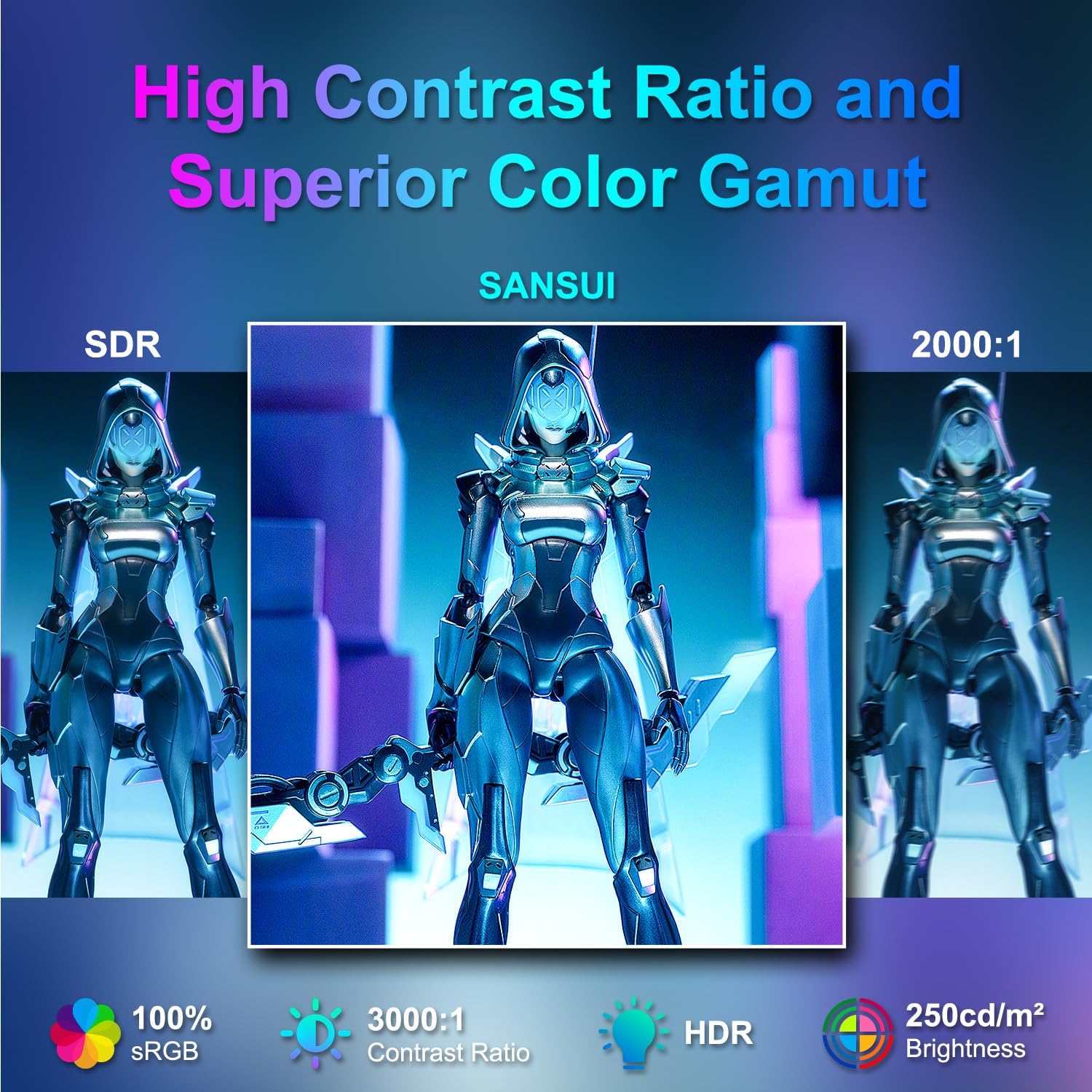
Image: Visual comparison demonstrating high contrast ratio and superior color gamut of the SANSUI monitor.

Image: Highlights of display features like 3000:1 contrast ratio, 100% sRGB, and 250 Nits brightness.

Image: Comparison of display quality with and without HDR enabled.

Image: Illustration of Low Blue Light and Flicker-Free technologies for reduced visual fatigue.
5.3 گيمنگ جون خاصيتون
The ES-24C1 monitor includes features optimized for gaming performance.
- 100Hz ريفريش جي شرح: Provides smoother motion and reduced input lag.
- 1ms MPRT جوابي وقت: Minimizes motion blur and ghosting.
- موافقت واري هم وقت سازي: Synchronizes the monitor's refresh rate with the GPU's frame rate to eliminate screen tearing and stuttering.
- راند جا طريقا: Pre-set display modes optimized for different game genres (e.g., FPS, RTS, RPG).
- AI Crosshair: An on-screen crosshair overlay for improved aiming accuracy.
- Game Timer: An on-screen timer for tracking in-game events.

Image: Demonstrates the difference in smoothness between 60Hz, 75Hz, and 100Hz refresh rates, highlighting low blue light and Adaptive FreeSync.

Image: Illustrates the benefits of 100Hz refresh rate and 1ms MPRT response time in reducing screen tearing and improving fluidity.
5.4 Multi-Window Modes (PIP/PBP)
The monitor supports Picture-in-Picture (PIP) and Picture-by-Picture (PBP) modes, allowing you to view content from multiple input sources simultaneously.
- PBP (Picture-by-Picture): Divides the screen into two halves, displaying content from two different sources side-by-side.
- PIP (تصوير ۾ تصوير): Displays content from a secondary source in a smaller window overlaid on the main display.

تصوير: Examples of Duplicated Mode, Second Screen Mode, and Single Display Screen Mode for enhanced productivity.
6. سار سنڀال
6.1 صفائي
- هميشه صاف ڪرڻ کان اڳ مانيٽر کي انپلگ ڪريو.
- استعمال ڪريو نرم، lint-آزاد ڪپڙو روشنيءَ سان ڊيampپاڻي سان يا هڪ نرم، غير رگڙيندڙ ڪلينر سان صاف ڪيو وڃي جيڪو خاص طور تي اليڪٽرانڪس لاءِ ٺهيل آهي.
- صاف ڪندڙ کي سڌو سنئون اسڪرين تي نه اسپري ڪريو.
6.2 سنڀال
- مانيٽر يا ان جي ڪيبل تي ڳري شيون رکڻ کان پاسو ڪريو.
- مانيٽر کي سڌي سج جي روشني، گرمي جي ذريعن ۽ انتهائي گرمي پد کان پري رکو.
- Do not expose the monitor to strong magnetic fields.
7. مسئلا حل ڪرڻ
If you encounter issues with your SANSUI ES-24C1 monitor, refer to the following common problems and solutions:
- طاقت ناهي: پڪ ڪريو ته پاور اڊاپٽر مانيٽر ۽ ڪم ڪندڙ پاور آئوٽليٽ ٻنهي سان محفوظ طور تي ڳنڍيل آهي. چيڪ ڪريو ته ڇا پاور انڊيڪيٽر لائيٽ آن آهي.
- ڪوبه سگنل: Verify that the video cable (HDMI or USB Type-C) is correctly connected to both the monitor and your device. Ensure the correct input source is selected in the OSD menu.
- چمڪندڙ اسڪرين: Check the video cable for damage or loose connections. Try a different video cable or port. Ensure your graphics card drivers are up to date.
- خراب تصويري معيار: Adjust brightness, contrast, and color settings in the OSD menu. Ensure the display resolution and refresh rate are set correctly in your device's display settings.
- اسپيڪرن مان ڪو به آواز نه: Check the volume settings on both the monitor and your connected device. Ensure the audio cable (if used) is properly connected.
8. وضاحتون
Detailed technical specifications for the SANSUI ES-24C1 24-inch Curved Monitor:
| خاصيت | تفصيل |
|---|---|
| ماڊل نمبر | ES-24C1 |
| اسڪرين جي ماپ | 24 انچ |
| پينل جو قسم | Curved (1500R) |
| قرارداد | 1920 x 1080 (FHD) |
| ريفريش جي شرح | 100Hz |
| جوابي وقت | 1ms (MPRT) |
| مقابلي جي نسبت | 3000:1 |
| روشني | 250 نٽس |
| رنگ ڏيکاريو | 16.7 ملين |
| رنگ گامٽ | 100٪ sRGB |
| Viewزاويه | 178° (H/V) |
| وڊيو انپٽس | 1x HDMI 1.4, 1x USB Type-C |
| آڊيو آئوٽ | 1x 3.5mm آڊيو جيڪ |
| ڳالهائيندڙ | 2x 2W Built-in Speakers |
| وي سي اي جبل | 75 x 75mm |
| جھلڻ جي ترتيب | -5° کان 15° |
| پيداوار جي ماپ | 21 x 38 x 49 انچ |
| شيءِ جو وزن | 7.78 پائونڊ |

Image: Detailed dimensions and ergonomic features like 178° wide viewing angle and -5°~15° tilt.

Image: Visual representation of the 178° wide viewزاويه.

Image: Tips for VESA mounting (75x75mm, M4*8mm screw size) and tilt adjustment.

تصوير: پوئين پاسي view of the monitor detailing port locations and key specifications.
9. وارنٽي ۽ سپورٽ
SANSUI provides a limited warranty for this product. For detailed warranty information, please refer to the warranty card included in your package or visit the official SANSUI website. For technical support or service inquiries, please contact SANSUI customer service.
آن لائن سپورٽ: Visit the SANSUI Store on Amazon
10. سرڪاري پراڊڪٽ وڊيو
Watch the official product video for a visual guide to the SANSUI ES-24C1 monitor's features and benefits.
Video: SANSUI 24" 100Hz Curved Monitor USB C with Speakers. This video provides an overview of the monitor's design, key features, and connectivity options.


