تعارف
The Xtorm FS405 Fuel Series Solar Powerbank 20W – 10.000 mAh is designed to provide portable power for your electronic devices, offering the flexibility to charge via USB-C or its integrated solar panel. This power bank is built for outdoor adventures, featuring a durable, splash-resistant design and a powerful LED flashlight.
حفاظت جي ڄاڻ
- Do not expose the power bank to extreme temperatures (above 45°C or below -10°C).
- ڊوائيس کي ڇڏڻ، ڌار ڪرڻ، يا پاڻ مرمت ڪرڻ جي ڪوشش ڪرڻ کان پاسو ڪريو.
- Keep away from water, except for the specified splash resistance (IPX4). Do not submerge.
- صرف تصديق ٿيل چارجنگ ڪيبل ۽ اڊاپٽر استعمال ڪريو.
- ٻارن جي پهچ کان پري رکو.
- مقامي ضابطن جي مطابق ذميواري سان پيداوار کي ختم ڪريو.
پيڪيج مواد
مھرباني ڪري ھيٺ ڏنل شين لاءِ پيڪيج چيڪ ڪريو:
- Xtorm FS405 Solar Powerbank
- USB-C چارجنگ ڪيبل (0.30m)
- استعمال ڪندڙ دستي
پيداوار ختمview

سامهون View: Shows the main solar charging panel and the Xtorm logo. The robust casing is visible around the edges.

پوئتي View (LED Off): Displays the textured back casing and the integrated LED light panel in its off state.
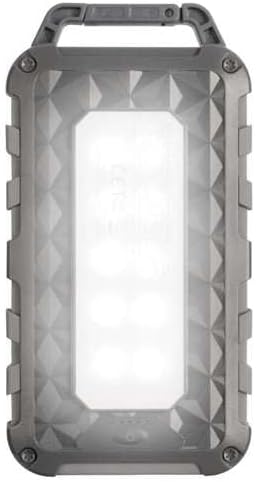
پوئتي View (LED On): Shows the powerful LED light panel fully illuminated, indicating the flashlight function is active.

مٿو View: Highlights the sturdy integrated carabiner handle, designed for easy attachment to bags or gear.
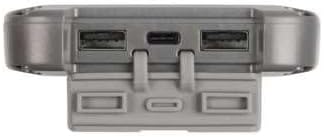
هيٺيون View: Displays the USB-C PD input/output port and two USB-A Quick Charge 3.0 output ports, protected by a cover.
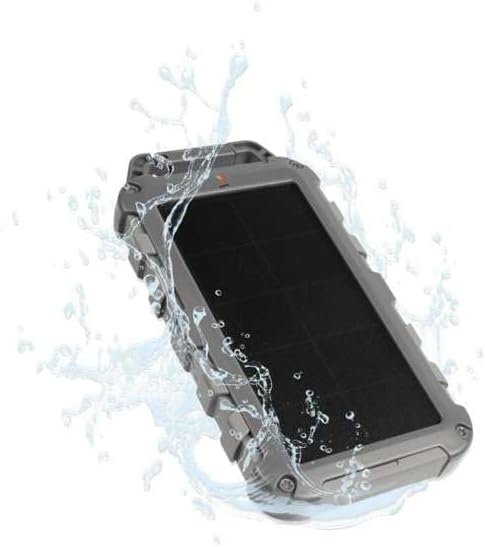
Durability Feature: Illustrates the power bank's splash-resistant design, suitable for outdoor conditions (IPX4 rated).
سيٽ اپ ڪريو
شروعاتي چارج
Before first use, it is recommended to fully charge the Xtorm FS405 Solar Powerbank via the USB-C port for optimal performance.
- Connect the provided USB-C cable to the USB-C port on the power bank.
- Connect the other end of the USB-C cable to a compatible USB wall adapter (not included) or a computer's USB port.
- The LED indicators on the power bank will show the charging status. A full charge via USB-C typically takes approximately 2 hours.
آپريٽنگ هدايتون
پاور بئنڪ کي چارج ڪرڻ
The Xtorm FS405 can be charged using two methods:
1. Via USB-C (Recommended for Fast Charging)
- Connect the power bank to a USB-C power source using the included cable.
- The power bank will begin charging. This method provides the fastest charging speed for the power bank itself.
2. Via Solar Panel
The integrated solar panel allows for convenient charging when outdoors. For best results, place the power bank directly under strong sunlight.
- Place the solar panel facing direct sunlight.
- A small indicator light (usually green) will illuminate when solar charging is active.
- Note on Solar Charging Speed: Solar charging is a supplementary method and is significantly slower than USB-C charging. Factors like season, location, time of day, and cloud cover heavily influence charging speed.
Approximate solar charging times for a full charge:
- Spring/Summer (mostly sunny day): لڳ ڀڳ 10 ڏينهن
- Autumn/Winter (mostly sunny day): لڳ ڀڳ 20 ڏينهن
Solar charging is not effective on mostly cloudy days.
خارجي ڊوائيسز کي چارج ڪرڻ
The power bank features one USB-C PD (Power Delivery) output and two USB-A Quick Charge 3.0 outputs.

فاسٽ چارج ڪرڻ جي صلاحيت: The power bank can charge compatible smartphones, such as an iPhone 14 or 12/13, up to 50% in approximately 30 minutes using the 20W USB-C PD output.
- Connect your device's charging cable to one of the available output ports (USB-C or USB-A) on the power bank.
- ڪيبل جي ٻئي پڇاڙي کي پنهنجي ڊوائيس سان ڳنيو.
- پاور بينڪ خودڪار طريقي سان توهان جي ڊوائيس کي چارج ڪرڻ شروع ڪندو.
- The LED indicators on the power bank will show the remaining battery level.
The 10,000mAh capacity is sufficient to charge most smartphones at least 2 times.
ايل آئي ڊي ٽارچ استعمال ڪندي
The Xtorm FS405 includes a powerful integrated LED flashlight on its back.
- Locate the power button (usually on the side or near the ports).
- Press and hold the power button for a few seconds to turn the flashlight ON.
- Press and hold the power button again to turn the flashlight OFF.
سار سنڀال
- پاور بينڪ کي نرم، سڪل ڪپڙي سان صاف ڪريو. سخت ڪيميڪل يا رگڙيندڙ مواد استعمال نه ڪريو.
- جڏهن استعمال ۾ نه هجي ته پاور بئنڪ کي ٿڌي، سڪل جاءِ تي اسٽور ڪريو.
- For long-term storage, charge the power bank to about 50-70% every 3-6 months to preserve battery health.
- Ensure the port covers are properly sealed when exposed to water splashes.
مشڪلاتون
پاور بئنڪ نه چارج
- ڪيبل چيڪ ڪريو: Ensure the USB-C cable is securely connected to both the power bank and the power source. Try a different cable.
- طاقت جو ذريعو چيڪ ڪريو: Verify that the wall adapter or USB port is functioning correctly.
- شمسي چارج: For solar charging, ensure the panel is in direct, strong sunlight. Remember solar charging is slow and not effective in low light or cloudy conditions.
پاور بئنڪ مان ڊوائيس چارج نه ٿي رهي آهي
- Check Power Bank Charge: پڪ ڪريو ته پاور بينڪ ۾ ڪافي چارج آهي.
- ڪيبل چيڪ ڪريو: Use the original charging cable for your device and ensure it's properly connected to both the power bank and your device. Try a different cable.
- مطابقت: Verify that your device is compatible with USB charging.
- ٻيهر شروع ڪريو: Disconnect and reconnect the device.
ٽارچ ڪم نه ڪري رهيو آهي
- Check Power Bank Charge: Ensure the power bank has some charge remaining.
- درست آپريشن: Ensure you are pressing and holding the power button correctly to activate the flashlight.
وضاحتون
| خاصيت | تفصيل |
|---|---|
| ماڊل | FS405 |
| برانڊ | ايڪسٽرم |
| سلسلو | Fuel Series 4 |
| بيٽري جي گنجائش | 10,000 mAh (ليٿيم پوليمر) |
| وڌ ۾ وڌ پاور آئوٽ | 20 ڊبليو |
| Output 1 (USB-C PD) | 20 ڊبليو |
| Output 2 (USB-A QC 3.0) | 18 ڊبليو |
| Output 3 (USB-A QC 3.0) | 18 ڊبليو |
| ٻاھرين جو تعداد | 3 |
| ان پٽ جو قسم | USB-C PD |
| شمسي پينل پاور | 1 W (SunPower cells) |
| طول و عرض (L x W x H) | 17 سينٽي x 9 سينٽي x 2 سينٽي ميٽر |
| وزن | 289 جي |
| مواد | PC، ABS |
| پاڻي جي مزاحمت | IPX4 (اسپليش مزاحمتي) |
| انٽيگريٽيڊ ٽارچ | ها |
| Battery Charge Time (USB-C) | لڳ ڀڳ. 2 ڪلاڪ |
وارنٽي ۽ سپورٽ
For warranty information and customer support, please refer to the Xtorm official webسائيٽ تي وڃو يا پنهنجي مقامي پرچون ڪندڙ سان رابطو ڪريو. ڪنهن به وارنٽي دعوائن لاءِ خريداري جو ثبوت رکو.
آن لائن سپورٽ: www.xtorm.eu


