تعارف
This manual provides essential information for setting up, operating, and maintaining your Amazon Echo Show 11. The Echo Show 11 is a smart display designed to enhance your daily routines with its vibrant Full-HD 11-inch touchscreen, spatial audio, and integrated Alexa+ capabilities. It functions as a central hub for smart home control, communication, and entertainment.

Image: The Amazon Echo Show 11, showcasing its 11-inch display with a smart home interface and a voice assistant prompt.
سيٽ اپ ڪريو
دٻي ۾ ڇا آهي
- Echo Show 11 (2025 release)
- پاور اڊاپٽر (30W)
- تڪڙو شروع ھدايت
Initial Setup Requirements
Your Echo Show 11 is designed for easy connection to your Wi-Fi network.
- وائي فائي نيٽورڪ: Ensure you have an active Wi-Fi network available. The device supports Wi-Fi 6E (802.1ax), tri-band, Wi-Fi (SISO), and 802.11a/b/g/n/ac networks. Ad-hoc Wi-Fi networks are not supported.
- Alexa ايپ: The Alexa app is compatible with Fire OS, Android, and iOS devices. It is also accessible via a web برائوزر.
- پاور ڪنيڪشن: Connect the provided 30W power adapter to the device and a power outlet.
Amazon Wi-Fi simple setup allows for quick connection of smart devices to your Wi-Fi network. Follow the on-screen prompts after powering on your device for the first time.
توهان جي ايڪو شو 11 کي هلائڻ
Alexa+ خاصيتون
Alexa+ offers a personalized experience, helping you manage your home, boost productivity, and enjoy entertainment.
- Everyday Assistant: Use the 11-inch display to view recipes, calendars, shopping lists, and more. Alexa+ can find recipes based on your preferences, make reservations, and order groceries.
- وندر: Watch shows on Prime Video, Netflix, and other services on the Full-HD screen. Enjoy room-filling spatial audio with crisper vocals and enhanced bass. Alexa+ can help you discover new shows and identify music.
- فوٽو ڊسپلي: The home screen can display your favorite photo memories as a slideshow when not in active use. Ask Alexa+ to find specific photos or curate a personal slideshow.
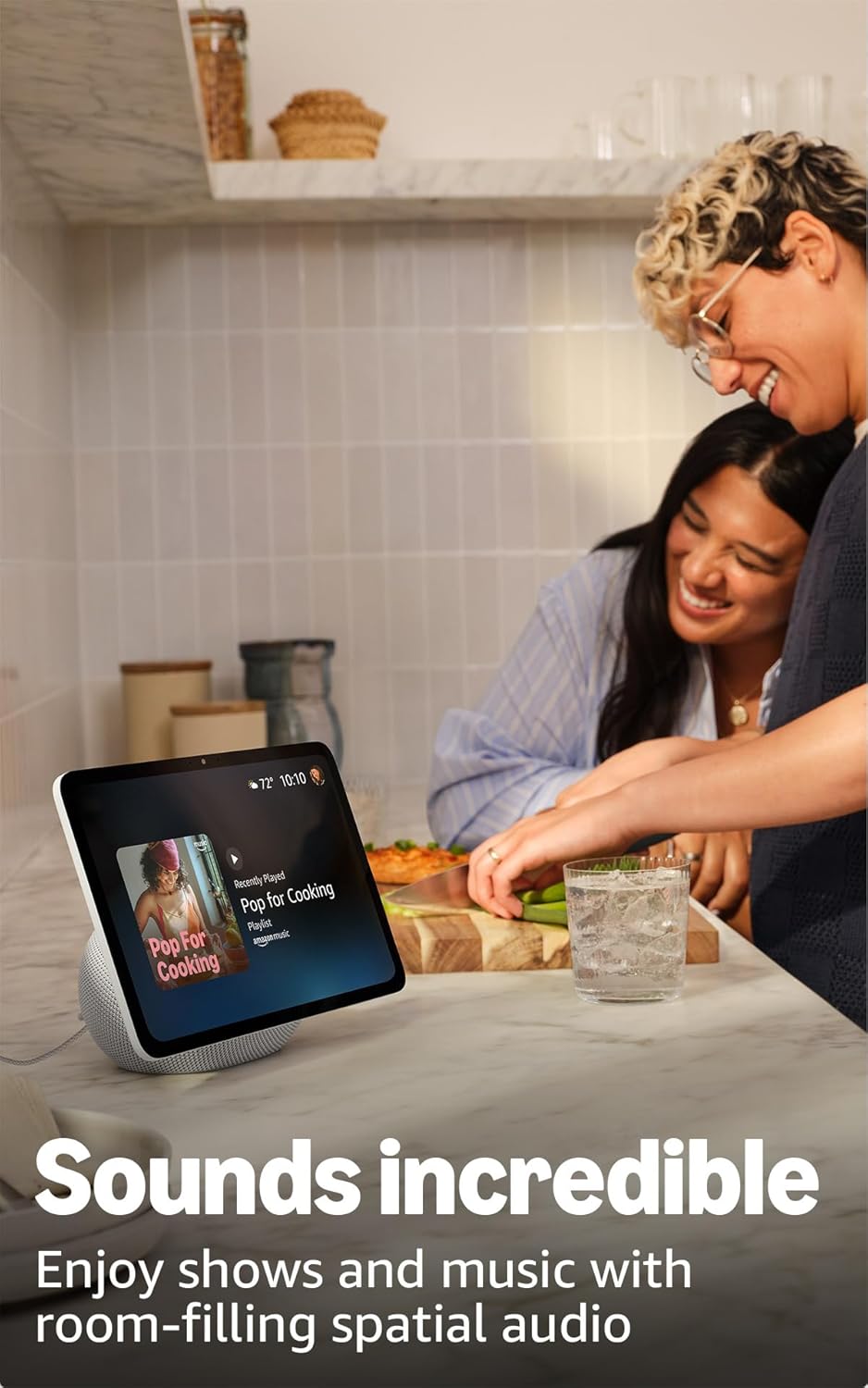
Image: The Echo Show 11 displaying music, demonstrating its use for entertainment in a home setting.
سمارٽ گهر ڪنٽرول
The Echo Show 11 includes a built-in smart home hub (Zigbee + Matter + Thread Border Router), allowing you to control thousands of compatible devices without an additional hub.
- ڊوائيس جو انتظام: Manage lights, thermostats, and other smart devices using the display or voice commands.
- Camera Feeds: آسانيءَ سان view feeds from compatible security cameras.
- Omnisense Technology: This technology enables proactive and personalized experiences, including activating routines via temperature, presence, or visual ID detection.

Image: The Echo Show 11 screen showing a smart home dashboard, illustrating its function as a central control unit.
Video Calls and Communication
Engage in crystal-clear video calls with the 13 MP auto-framing camera, 3.3x zoom, and noise reduction technology.
- Centered Camera: The camera automatically frames you during calls, ensuring you remain in view.
- جيئڻ View: Use the live view feature to check on your family or pets remotely.
بلوٽوت ڪنيڪشن
The Echo Show 11 supports Advanced Audio Distribution Profile (A2DP) توهان جي موبائل ڊوائس کان ايڪو شو 11 تائين، يا ايڪو شو 11 کان بلوٽوٿ اسپيڪر تائين آڊيو اسٽريمنگ لاءِ. آڊيو/وڊيو ريموٽ ڪنٽرول پروfile (AVRCP) allows for voice control of connected mobile devices. Bluetooth speakers requiring PIN codes are not supported.
سار سنڀال
پنهنجي ايڪو شو 11 جي ڊگهي عمر ۽ بهترين ڪارڪردگي کي يقيني بڻائڻ لاءِ، انهن عام سار سنڀال جي هدايتن تي عمل ڪريو:
- صفائي: اسڪرين ۽ ٻاهرين حصي کي صاف ڪرڻ لاءِ نرم، لِنٽ کان پاڪ ڪپڙو استعمال ڪريو. ڊوائيس تي سڌو سنئون رگڙيندڙ ڪلينر يا اسپري کان پاسو ڪريو.
- لڳائڻ: ڊوائيس کي هڪ مستحڪم، هموار مٿاڇري تي رکو جيڪو سڌي سج جي روشني، گرمي جي ذريعن ۽ نمي کان پري هجي. ڊوائيس جي چوڌاري مناسب هوا جي وهڪري کي يقيني بڻايو.
- سافٽ ويئر اپڊيٽ: The device will automatically receive software security updates. Ensure it is connected to Wi-Fi to receive these updates.
مشڪلاتون
جيڪڏهن توهان کي پنهنجي ايڪو شو 11 سان مسئلا درپيش اچن ٿا، ته هيٺ ڏنل قدمن تي غور ڪريو:
- طاقت ناهي: پڪ ڪريو ته پاور اڊاپٽر ڊوائيس ۽ ڪم ڪندڙ پاور آئوٽليٽ ٻنهي سان محفوظ طور تي ڳنڍيل آهي.
- وائي فائي رابطي جا مسئلا:
- پڪ ڪريو ته توهان جو وائي فائي نيٽ ورڪ فعال آهي ۽ حد اندر آهي.
- Restart your Wi-Fi router and the Echo Show 11.
- Check your Wi-Fi password in the Alexa app if prompted.
- اليڪسا جواب نه ڏئي رهي آهي:
- Ensure the microphone is not muted (check the microphone enable/disable button).
- Speak clearly and ensure you are within hearing range of the device.
- Restart the device by unplugging it for a few seconds and plugging it back in.
- ڊسپلي مسئلا: جيڪڏهن اسڪرين غير جوابده يا منجهيل آهي، ته ڊوائيس کي ٻيهر شروع ڪرڻ جي ڪوشش ڪريو.
For further assistance, refer to the official Amazon support resources or the Alexa app.
وضاحتون
| خاصيت | تفصيل |
|---|---|
| ماپ | 10 "x 5" x 7.2" (255mm x 127mm x 182mm) |
| وزن | 45.92 اوز (1302 گرام) |
| ڏيکاريو | 10.95 انچ مڪمل HD ٽچ اسڪرين 1920 x 1200 ريزوليوشن سان |
| ڪئميرا | 13 ايم پي خودڪار فريمنگ سان |
| آڊيو | 1 x 2.8” Woofer and 2 full-range drivers |
| وائي فائي ڪنيڪشن | وائي فائي 6E (802.1ax) سپورٽ ٿيل آهي. ٽرائي بينڊ، وائي فائي (SISO). 802.11a/b/g/n/ac وائي فائي نيٽ ورڪن کي سپورٽ ٿيل آهي. ايڊ-هاڪ وائي فائي نيٽ ورڪن سان ڳنڍڻ کي سپورٽ نه ٿو ڪري. |
| اسمارٽ گهر حب | زگبي + ميٽر + ٿريڊ بارڊر روٽر |
| بلوٽوت ڪنيڪشن | A2DP support for audio streaming. AVRCP for voice control of connected mobile devices. Bluetooth speakers requiring PIN codes are not supported. |
| پروسيسر | اي جي 3 پرو اي آءِ ايڪسيليٽر سان |
| سينسر | ايمبيئنٽ ٽمپريچر سينسر، ايمبيئنٽ لائيٽ سينسر، موجودگي جي سڃاڻپ، ڪئميرا |
| اومني سينس ٽيڪنالاجي | Custom technology for ambient AI, enabling visual ID, proximity/presence detection, temperature sensing, adaptive brightness/color. |
| سسٽم گهرجون | ايڪو شو 11 وائي فائي سان ڳنڍيل آهي. Alexa ايپ فائر او ايس، اينڊرائيڊ، آئي او ايس، ۽ سان مطابقت رکي ٿي. web برائوزر. |
| ٻولي | اليڪسا انگريزي ۽ اسپيني ڳالهائي ٿي. |
رازداري خاصيتون
ايڪو شو 11 رازداري ڪنٽرول جي ڪيترن ئي پرتن سان ٺهيل آهي:
- مائڪروفون ۽ ڪئميرا فعال/بند ڪرڻ وارو بٽڻ: A physical button allows you to turn off the microphones and camera.
- وقف ٿيل ڪئميرا ڪنٽرول: Controls are available both on the device and within the Alexa app.
- وائيس رڪارڊنگ جو انتظام: ٻيهر ڪرڻ جي صلاحيتview ۽ وائس رڪارڊنگ ختم ڪريو.
- ويڪ ورڊ ٽيڪنالاجي: The device only begins listening after detecting the wake word.

تصوير: هڪ ويجهو تصوير view of the Echo Show 11's side, highlighting the privacy button for microphone and camera control.
وڌيڪ تفصيلن لاءِ، Alexa Privacy Hub جو دورو ڪريو.
رسائي جون خاصيتون
The Echo Show 11 includes various accessibility features to personalize Alexa to your abilities. These can be enabled via سيٽنگون → رسائي توهان جي ڊوائيس تي.
- Alexa ڏانهن ٽيپ ڪريو: Access Alexa via touch through on-screen tiles or a keyboard, including saving favorite actions.
- موافق ٻڌڻ: Alexa جي جواب ڏيڻ کان اڳ ڳالهائڻ ختم ڪرڻ لاءِ وڌيڪ وقت فراهم ڪري ٿو.
- ترجيحي ڳالهائڻ جي شرح: ڪنٽرول ڪريو ته Alexa ڪيترو تيز يا سست ڳالهائي ٿو.
- ڪيپشننگ: Alexa ڪيپشننگ، ڪال ڪيپشننگ، ۽ بند ڪيل ڪيپشننگ سپورٽ ٿيل مواد لاءِ ٽيڪسٽ ڪيپشن مهيا ڪن ٿا.
- ڏيکاريو ۽ ٻڌايو: نابين يا بصارت کان محروم استعمال ڪندڙن کي "Alexa، مان ڇا کڻي رهيو آهيان" چئي شين جي سڃاڻپ ۾ مدد ڪري ٿو.
- آوازView اسڪرين ريڊر: نابين يا بصارت کان محروم استعمال ڪندڙن لاءِ رسائي کي فعال بڻائي ٿو.
- اسڪرين ميگنيفائر: اسڪرين جي چوڌاري زوم ان/آئوٽ ۽ پيننگ جي اجازت ڏئي ٿو.
- ويجهو هجڻ تي اطلاع ڏيو: Plays notification sounds when detected near your Echo device.
- ڪِنڊل زور سان پڙهو: اليڪسا توهان جون ڪِنڊل ڪتابون زور سان پڙهي سگهي ٿي.
- اصل وقت جو متن: وڊيو ڪال ۾ لائيو ٽيڪسٽ ٽائيپ ڪرڻ کي فعال ڪري ٿو.
- Additional features include Color Inversion, Color Correction, Request Sound, and more.
وارنٽي ۽ سپورٽ
Your Echo Show 11 comes with a 1-year limited warranty and service. Optional 1-year, 2-year, and 3-year extended warranties are available for U.S. customers and sold separately.
Use of the Echo Show 11 is subject to the terms found on the official Amazon website. For information specific to your device or to manage your content and devices, visit the Amazon webسائيٽ.
For software security updates, please refer to the official Amazon support pages.


