1. تعارف
خريد ڪرڻ لاءِ مهربانيasing the AFK Portable Bluetooth Wireless Speaker. This manual provides detailed instructions on how to set up, operate, and maintain your speaker to ensure optimal performance and longevity. Please read this manual thoroughly before using the product.

Image: The AFK Portable Bluetooth Wireless Speaker, showcasing its sleek black cylindrical design and top-mounted control panel.
2. پراڊڪٽ ختمview
2.1 پيڪيج مواد
مھرباني ڪري انباڪسنگ ڪرڻ وقت پيڪيج جي مواد کي چيڪ ڪريو:
- AFK Portable Bluetooth Wireless Speaker (Model: BT528) with built-in microphone
- USB-C چارجنگ ڪيبل
- استعمال ڪندڙ جو دستياب (ھي دستاويز)
2.2 اهم خاصيتون
- طاقتور آڊيو: Dual speaker drivers and a powerful amplifier module deliver up to 15W room-filling sound with punchy bass, strong midranges, and crisp highs.
- بلوٽوت 5.3 ڪنيڪشن: Offers fast and stable wireless connections up to 100 feet (30 meters).
- متحرڪ روشني: Features 5 colorful light colors and 6 light modes, including mixed color flashes that sync with the beat, creating an immersive audio-visual experience.
- وڌايل راند جو وقت: Enjoy up to 18 hours of non-stop playback at 50% volume, or up to 4 hours at 100% volume. Lights can be turned off to conserve battery.
- گھڻن پلے بیک جا اختيار: Supports wireless playback via Bluetooth, TF card, or USB.
- بلٽ ان مائڪروفون: Allows for clear hands-free calls within the Bluetooth range.
- پورٽبل ڊيزائن: Lightweight and easy to carry for indoor and outdoor use.
- USB-C چارج ڪرڻ: چارج ڪرڻ لاءِ آسان ۽ جديد USB-C پورٽ.
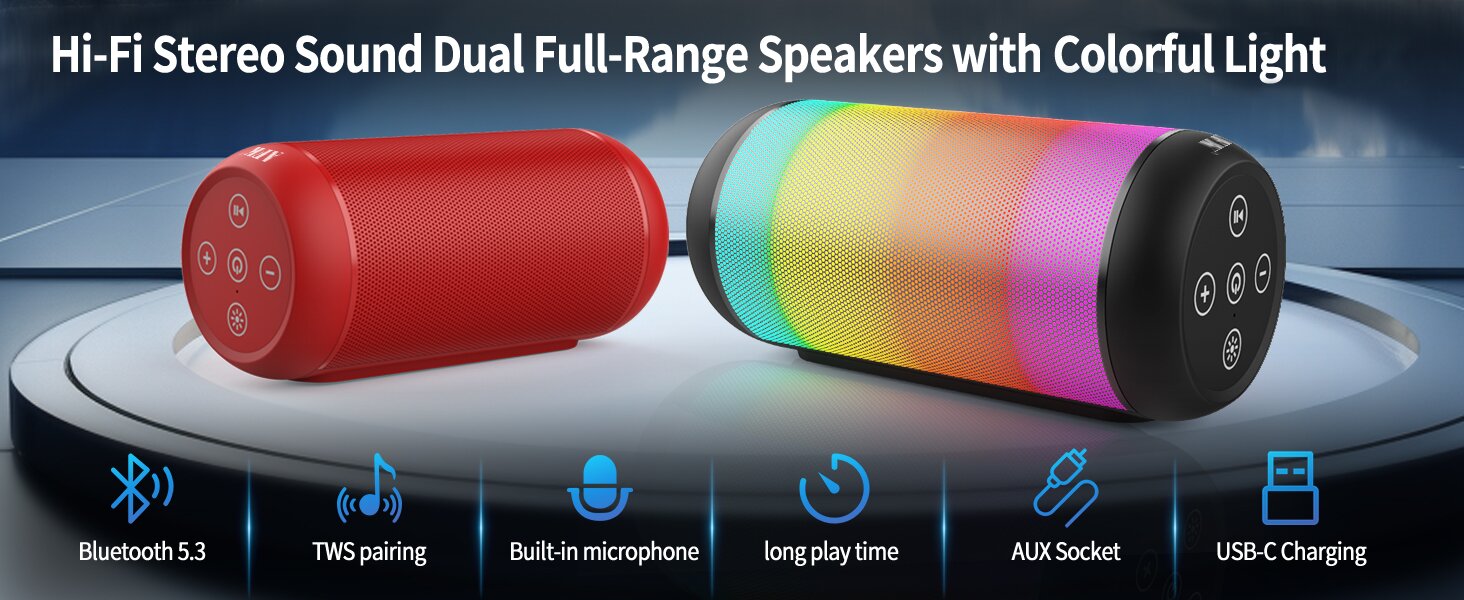
Image: An illustration highlighting key features such as Bluetooth 5.3, TWS pairing, built-in microphone, long playtime, AUX socket, and USB-C charging.

تصوير: هڪ ڪٽ وي view illustrating the dual speaker drivers responsible for deep bass stereo sound.

Image: The speaker positioned on a table, demonstrating its 360-degree stereo surround sound capability.
3. سيٽ اپ
3.1 اسپيڪر کي چارج ڪرڻ
Before first use, fully charge the speaker. Connect the provided USB-C charging cable to the speaker's USB-C port and the other end to a compatible USB power adapter (not included) or a computer's USB port. The charging indicator light will show the charging status and turn off when fully charged.
3.2 پاور آن/آف
- پاور آن ڪرڻ لاءِ: پاور بٽڻ کي دٻايو ۽ رکو (🏻) for a few seconds until you hear an audible prompt and the indicator lights turn on.
- پاور آف ڪرڻ لاءِ: پاور بٽڻ کي دٻايو ۽ رکو (🏻) again for a few seconds until you hear an audible prompt and the indicator lights turn off.
4. آپريٽنگ هدايتون
4.1 بلوٽوٽ جوڙي
پنهنجي اسپيڪر کي بلوٽوٿ-فعال ڊوائيس سان ڳنڍڻ لاءِ:
- Ensure the speaker is powered on and in Bluetooth pairing mode (indicated by a flashing blue light, or similar).
- پنهنجي ڊوائيس (اسمارٽ فون، ٽيبليٽ، ڪمپيوٽر) تي، بلوٽوٿ کي فعال ڪريو ۽ موجود ڊوائيسز جي ڳولا ڪريو.
- Select "AFK Speaker" (or similar name) from the list of found devices.
- Once paired, the speaker will indicate a successful connection (e.g., a solid blue light or an audible prompt).
The speaker will automatically attempt to reconnect to the last paired device when powered on, if the device is within range and Bluetooth is enabled.

Image: The speaker in an outdoor setting, demonstrating its stable Bluetooth connection range of up to 100 feet.
4.2 ميوزڪ پلے بیک
- بلوٽوٽ موڊ: Once paired, play music from your connected device. Use the speaker's control buttons or your device to control playback (play/pause, next/previous track, volume).
- TF ڪارڊ/USB موڊ: Insert a TF card or USB drive containing audio files into the respective port on the speaker. The speaker will automatically switch to the corresponding mode and begin playback. Use the speaker's control buttons for navigation.
4.3 Controlling Lights
The speaker features dynamic lighting modes. Press the Light button (💡) to cycle through the available light modes:
- Tarry Sky Light
- ساهه کڻڻ
- وهندڙ
- جلدي ٽپو
- Rhythm Jump
- روشني بند

تصوير: هڪ اوورview of the six dynamic light modes available on the speaker, including options to turn the lights off.
4.4 ڪال هينڊلنگ
With the built-in microphone, you can manage calls when connected via Bluetooth:
- جواب/آخر ڪال: پريس / رڪاوٽ جو بٽڻ دٻايو (⏸) هڪ دفعو.
- ڪال رد ڪريو: پلي/پاز بٽڻ کي دٻايو ۽ رکو (⏸) 2 سيڪنڊن لاء.

Image: The speaker being used for a hands-free call, demonstrating the functionality of its built-in microphone.
5. سار سنڀال
5.1 صفائي
To clean your speaker, use a soft, dry, lint-free cloth. Do not use abrasive cleaners, alcohol, or chemical solvents, as these may damage the surface or internal components. Avoid getting moisture into any openings.
5.2 اسٽوريج
Store the speaker in a cool, dry place away from direct sunlight, extreme temperatures, and humidity. If storing for an extended period, charge the battery periodically (e.g., every 3 months) to maintain battery health.
6. مسئلا حل ڪرڻ
If you encounter issues with your AFK Portable Bluetooth Wireless Speaker, please refer to the following common problems and solutions:
| مسئلو | ممڪن سبب | حل |
|---|---|---|
| اسپيڪر پاور آن نٿو ٿئي. | بيٽري گهٽ آهي؛ پاور بٽڻ صحيح طرح نه دٻايو ويو آهي. | اسپيڪر کي مڪمل طور تي چارج ڪريو. ڪجهه سيڪنڊن لاءِ پاور بٽڻ کي دٻايو ۽ رکو. |
| آواز ڪونهي. | آواز تمام گهٽ آهي؛ ڊوائيس ڳنڍيل ناهي؛ غلط ان پٽ موڊ. | Increase speaker and device volume. Ensure Bluetooth is connected or TF/USB is inserted correctly. |
| بلوٽوٿ ذريعي جوڙي نه ٿو سگهجي. | اسپيڪر پيئرنگ موڊ ۾ نه آهي؛ ڊوائيس بلوٽوٿ بند آهي؛ اسپيڪر کان تمام پري آهي؛ مداخلت. | Ensure speaker is in pairing mode. Turn device Bluetooth off/on. Move device closer to speaker. Avoid strong electromagnetic interference. |
| مختصر بيٽري جي زندگي. | High volume usage; Lights constantly on; Battery degradation. | Reduce volume. Turn off lights when not needed. Battery life naturally decreases over time. |
7. وضاحتون
| خاصيت | تفصيل |
|---|---|
| ماڊل نالو | BT528-BLK-US |
| اسپيڪر جو قسم | دوئي اسپيڪر |
| رابطي ٽيڪنالاجي | بلوٽوٿ 5.3 |
| وائرليس ڪميونيڪيشن ٽيڪنالاجي | بلوٽوٿ |
| وڌ ۾ وڌ رينج | 30 ميٽر (100 فوٽ) |
| اسپيڪر وڌ ۾ وڌ آئوٽ پاور | 11 Watts (RMS) / 15 Watts (Peak) |
| تعدد جواب | 20 ڪلو هرٽز (نوٽ: هي شايد مٿئين حد آهي، عام حد 20 هز-20 ڪلو هرٽز آهي) |
| آڊيو آئوٽ پٽ موڊ | اسٽيريو |
| چوڌاري آواز چينل جي جوڙجڪ | 2.0 |
| خاص خصوصيت | Built-in Microphone, Dynamic LED Lights |
| تجويز ڪيل استعمال | Indoor/Outdoor, Sport, Outdoor Events, Parties, Campجابلو ، جابلو |
| مطابقت رکندڙ ڊوائيسز | Desktop, Smartphone, Tablet, Television |
| طاقت جو ذريعو | بيٽري سان هلندڙ (1 ليتيم آئن بيٽري شامل آهي) |
| ڪنٽرول جو طريقو | ٽچ بٽڻ |
| رنگ | ڪارو |
| پيداوار جي ماپ | 2.6"D x 6.1"W x 2.6"H (6.6cmD x 15.5cmW x 6.6cmH) |
| شيءِ جو وزن | 1.26 پائونڊ (0.57 ڪلوگرام) |
| پنروڪ آهي | ڪوڙو |
8. وارنٽي ۽ سپورٽ
8.1 محدود وارنٽي
This AFK Portable Bluetooth Wireless Speaker comes with a limited warranty. Please refer to the warranty card included in your package or contact AFK customer support for specific terms and conditions. The warranty typically covers manufacturing defects and malfunctions under normal use.
8.2 ڪسٽمر سپورٽ
For further assistance, technical support, or warranty claims, please contact AFK customer service. Contact information can usually be found on the product packaging, the official AFK webسائيٽ، يا توهان جي پرچون ڪندڙ جي سپورٽ چينلز ذريعي.


