ڀلي ڪري آيا
This manual provides essential information for using your new OPPO F27 5G smartphone. Please read it carefully to ensure proper operation and to maximize your device's capabilities.
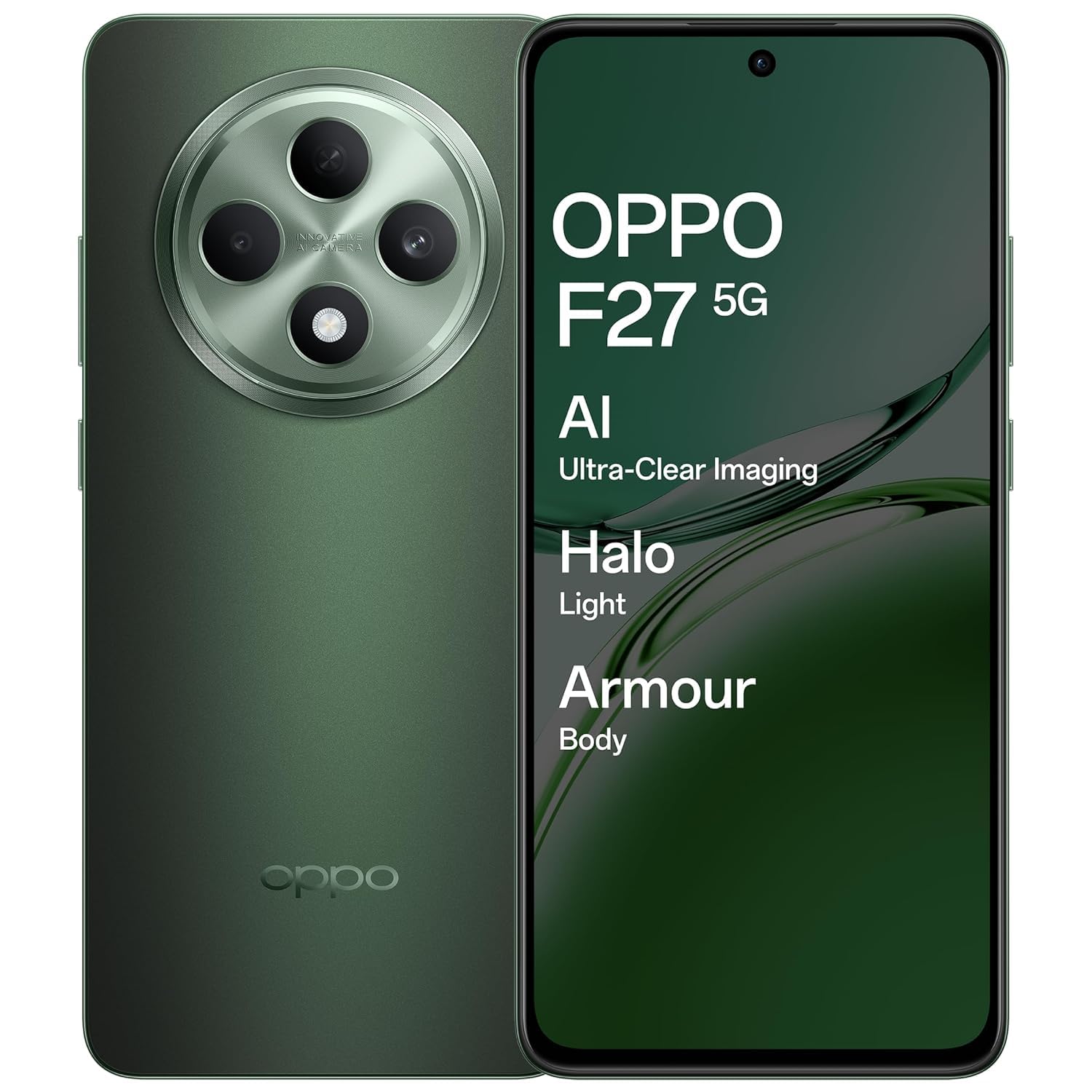
An image showing the OPPO F27 5G smartphone, highlighting its sleek design and display.
پيڪيج مواد
پڪ ڪريو ته سڀئي شيون توهان جي پراڊڪٽ پيڪيج ۾ موجود آهن:
- OPPO F27 5G Smartphone
- فون ڪيس
- پاور اڊاپٽر
- USB ڪيبل
- سم ٽري Ejector
شروعاتي سيٽ اپ
1. سم ڪارڊ داخل ڪريو
Locate the SIM card tray on the side of your device. Use the provided SIM tray ejector tool to open the tray. Insert your Nano-SIM card(s) and/or microSD card into the tray, ensuring correct orientation. Close the tray securely.
2. پاور آن
Press and hold the Power button (usually on the right side) until the OPPO logo appears. Follow the on-screen instructions to complete the initial setup, including language selection, Wi-Fi connection, and Google account login.
3. بيٽري چارج ڪريو
Before first use, it is recommended to fully charge your device. Connect the USB cable to the power adapter and then to your phone's USB-C port. Plug the power adapter into a wall outlet.
بنيادي آپريشن
Power On/Off/Restart
To power on, press and hold the Power button. To power off or restart, press and hold the Power button and Volume Up button simultaneously, then select the desired option from the menu.
ٽچ اسڪرين اشارو
- ٽيپ ڪريو: ڪا شيءِ چونڊيو يا ايپليڪيشن کوليو.
- ڇڪيو ۽ رکو: لاڳاپيل مينيو تائين رسائي ڪريو يا شيون منتقل ڪريو.
- سوائپ اسڪرينن ذريعي وڃو يا فهرستن کي اسڪرول ڪريو.
- چٽيو: تصويرن کي زوم ان يا آئوٽ ڪريو ۽ web صفحا.
ڪالون ڪرڻ
Open the Phone app, enter the number, and tap the call icon. To answer an incoming call, swipe up on the screen. To reject, swipe down.
پيغام موڪلڻ
ميسيجز ايپ کوليو، نئين ميسيج آئڪن تي ٽيپ ڪريو، وصول ڪندڙ جو نمبر داخل ڪريو يا رابطن مان چونڊيو، پنهنجو پيغام ٽائيپ ڪريو، ۽ موڪليو تي ٽيپ ڪريو.
وائي فائي سان ڳنڍڻ
ڏانهن وڃو سيٽنگون > وائي فائي, turn Wi-Fi on, and select your desired network. Enter the password if prompted.
بلوٽوتڪ ڪنيڪشن سان ڳنڻ
ڏانهن وڃو سيٽنگون > بلوٽوت, turn Bluetooth on, and select the device you wish to pair with from the list of available devices.
ڪئميرا جو استعمال
The OPPO F27 5G features a versatile camera system:
- پوئتي ڪئميرا: 50MP main sensor + 2MP depth sensor for clear photos.
- سامهون ڪئميرا: هاءِ ريزوليوشن سيلفيز لاءِ 32 ايم پي.
اي آءِ پورٽريٽ ري ٽچنگ
Utilize AI Portrait Retouching for enhanced portrait photos, automatically optimizing facial features and skin tones.
وڊيو رڪارڊنگ
Switch to video mode in the camera app to record high-quality videos.
معلومات ڏيکاريو
Your device is equipped with a 6.67-inch FHD+ AMOLED 120Hz Ultra Bright Display.
- 120Hz ريفريش جي شرح: Provides smoother scrolling and improved responsiveness.
- الٽرا برائيٽ ڊسپلي: روشن ٻاهرين حالتن ۾ به واضح نمائش کي يقيني بڻائي ٿو.
- Screen-to-body ratio of 92.2%: هڪ عمدي پيش ڪري ٿو viewتجربو.
ڊسپلي سيٽنگون
Adjust brightness, color temperature, and dark mode settings via سيٽنگون > ڊسپلي ۽ چمڪ.
بيٽري جو انتظام
The OPPO F27 5G is powered by a 5000mAh Hyper Energy Battery, designed for extended usage.
45W SUPERVOOC Flash Charge
Use the provided 45W SUPERVOOC charger for rapid charging. This technology allows for quick power replenishment.
اسمارٽ چارج
The device features Smart Charging to optimize battery health and longevity over time.
Battery Optimization Tips
- اسڪرين جي روشني کي گھٽايو.
- جڏهن استعمال ۾ نه هجي ته وائي فائي، بلوٽوٿ ۽ جي پي ايس کي بند ڪريو.
- پس منظر واري ايپليڪيشنون بند ڪريو.
- Enable power saving modes.
ڊوائيس جي سنڀال
پنھنجي ڊوائيس کي صاف ڪريو
پنهنجي فون جي اسڪرين ۽ باڊي کي صاف ڪرڻ لاءِ نرم، لِنٽ فري ڪپڙو استعمال ڪريو. سخت ڪيميڪلز يا رگڙيندڙ مواد استعمال ڪرڻ کان پاسو ڪريو.
سافٽ ويئر اپڊيٽس
باقاعدي طور تي سسٽم اپڊيٽ جي جانچ ڪريو ۽ انسٽال ڪريو ذريعي سيٽنگون > ڊوائيس بابت > تازه ڪاري بهترين ڪارڪردگي ۽ سيڪيورٽي کي يقيني بڻائڻ لاءِ.
اسٽوريج جو انتظام
وقتي طور تي غير ضروري صاف ڪريو files, cache data, and uninstall unused applications to free up storage space. Go to سيٽنگون> اسٽوريج تفصيل لاءِ.
بيڪ اپ ڊيٽا
ڊيٽا جي نقصان کي روڪڻ لاءِ باقاعدي طور تي پنهنجي اهم ڊيٽا جو ڪلائوڊ سروس يا ڪمپيوٽر ۾ بيڪ اپ وٺو.
عام مسئلا ۽ حل
ڊوائيس آن نه ٿي رهي آهي
Ensure the battery is charged. Connect the charger and wait a few minutes before attempting to power on again. If unresponsive, try a force restart by holding the Power button and Volume Up button for about 10 seconds.
چارج ڪرڻ جا مسئلا
Check the charging cable and adapter for damage. Ensure the USB-C port is clean and free of debris. Try a different charger if available.
نيٽ ورڪ ڪنيڪٽيويٽي جا مسئلا
Toggle Airplane Mode on and off. Restart your device. Check SIM card insertion. Verify network settings in سيٽنگون > موبائل نيٽ ورڪ.
Applications Crashing/Freezing
Close and reopen the application. Clear the app's cache (Settings > Apps > [App Name] > Storage usage > Clear cache). جيڪڏهن مسئلو برقرار رهي، ته ايپ کي انسٽال ڪريو ۽ ٻيهر انسٽال ڪريو.
فيڪٽري ري سيٽ
خبردار: فيڪٽري ري سيٽ ڪرڻ سان توهان جي فون تي سڀ ڊيٽا ختم ٿي ويندو. اڳتي وڌڻ کان اڳ اهم ڊيٽا جو بيڪ اپ وٺو. ڏانهن وڃو سيٽنگون > سسٽم سيٽنگون > بيڪ اپ ۽ ري سيٽ ڪريو > فون ري سيٽ ڪريو > سڀ ڊيٽا ختم ڪريو.
ٽيڪنيڪل وضاحتون
| خاصيت | تفصيل |
|---|---|
| ماڊل نمبر | سي پي ايڇ 2637 |
| آپريٽنگ سسٽم | ميڊيا ٽيڪ ڊائمينسٽي 6300 |
| رام | 8 جي بي |
| ڏيکاريو | 6.67-inch FHD+ AMOLED, 120Hz Refresh Rate |
| پوئين ڪئميرا | 50 ايم پي + 2 ايم پي |
| سامهون ڪئميرا | 32MP |
| بيٽري جي گنجائش | 5000 mAh |
| چارج ڪرڻ | 45W SUPERVOOC Flash Charge |
| طول و عرض (LxWxH) | 16.3 x 7.6 x 0.8 سينٽي |
| وزن | 187 جي |
| رابطي | Bluetooth, Cellular, Wi-Fi, NFC |
| آڊيو جيڪ | USB قسم-سي |
| خاص خاصيتون | Built-In GPS, Dual SIM, Fast Charging Support, Mobile Hotspot Capability, Stereo Speakers |
وارنٽي ۽ ڪسٽمر سپورٽ
وارنٽي ڄاڻ
Your OPPO F27 5G device comes with a standard manufacturer's warranty. Please refer to the warranty card included in your package for specific terms and conditions, including coverage period and limitations.
ڪسٽمر سپورٽ
For technical assistance, service, or warranty claims, please contact OPPO customer support:
- ٽيليفون: 18001032777
- ٺاهيندڙ ائڊريس: اوپو موبائيلز انڊيا پرائيويٽ لميٽيڊ، پنجين منزل، ٽاور بي، بلڊنگ، اين-8، ڊي ايل ايف سائبر سٽي، ڊي ايل ايف فيز 2، گروگرام، هريانا 122002
آن لائين وسيلن
سرڪاري OPPO جو دورو ڪريو website for additional support, FAQs, and software downloads.


