1. تعارف
This manual provides detailed instructions for the setup, operation, maintenance, and troubleshooting of your KiiBoom Phantom 81 V3 Transparent Mechanical Gaming Keyboard. Please read this manual thoroughly to ensure proper use and to maximize your keyboard's performance.

Image: KiiBoom Phantom 81 V3 Transparent Mechanical Gaming Keyboard with RGB backlighting.
2. پيڪيج مواد
پڪ ڪريو ته سڀئي شيون پيڪيج ۾ موجود آهن:
- KiiBoom Phantom 81 V3 Mechanical Keyboard
- USB-سي ڪيبل
- ڪيپ ڪيپيندڙ
- مٽائڻ وارو
- Extra Switches (2 units)
- استعمال ڪندڙ جو دستياب (ھي دستاويز)
3. سيٽ اپ
3.1 ڪنيڪٽوٽي موڊس
The KiiBoom Phantom 81 V3 supports three connectivity modes: Wired (USB-C), 2.4GHz Wireless, and Bluetooth 5.0. You can switch between modes using the function (FN) key combinations.

Image: Diagram illustrating the three connectivity modes: 2.4G, Bluetooth, and Wired, with corresponding FN key combinations.
- وائرڊ موڊ Connect the keyboard to your device using the provided USB-C cable. Press ايف اين + 5 to activate wired mode.
- 2.4GHz وائرليس موڊ: Insert the 2.4GHz USB receiver into your device. Press ايف اين + 4 to activate 2.4GHz mode. The keyboard will automatically connect to the receiver.
- بلوٽوٽ موڊ: The keyboard supports up to three Bluetooth devices. Press ايف اين + 1, ايف اين + 2، يا ايف اين + 3 to select a Bluetooth channel. The indicator light will flash, indicating pairing mode. On your device, search for 'KiiBoom Phantom 81 V3' and connect.
3.2 شروعاتي چارجنگ
Before first use, it is recommended to fully charge the keyboard. Connect the USB-C cable to the keyboard and a power source (e.g., computer USB port or wall adapter). The charging indicator light will show the charging status. The Phantom 81 V3 features an 8000mAh battery for extended use.
4. آپريٽنگ هدايتون
4.1 بنيادي ڪي بورڊ جا ڪم
The KiiBoom Phantom 81 V3 is a 75% layout keyboard with 82 keys and a multi-functional knob. It is compatible with both Windows and Mac operating systems. Standard key functions operate as expected.
4.2 آر جي بي بيڪ لائيٽ ڪنٽرول
The keyboard features 16.8 million RGB backlights with south-facing LEDs. Use the following FN key combinations to control the lighting effects:
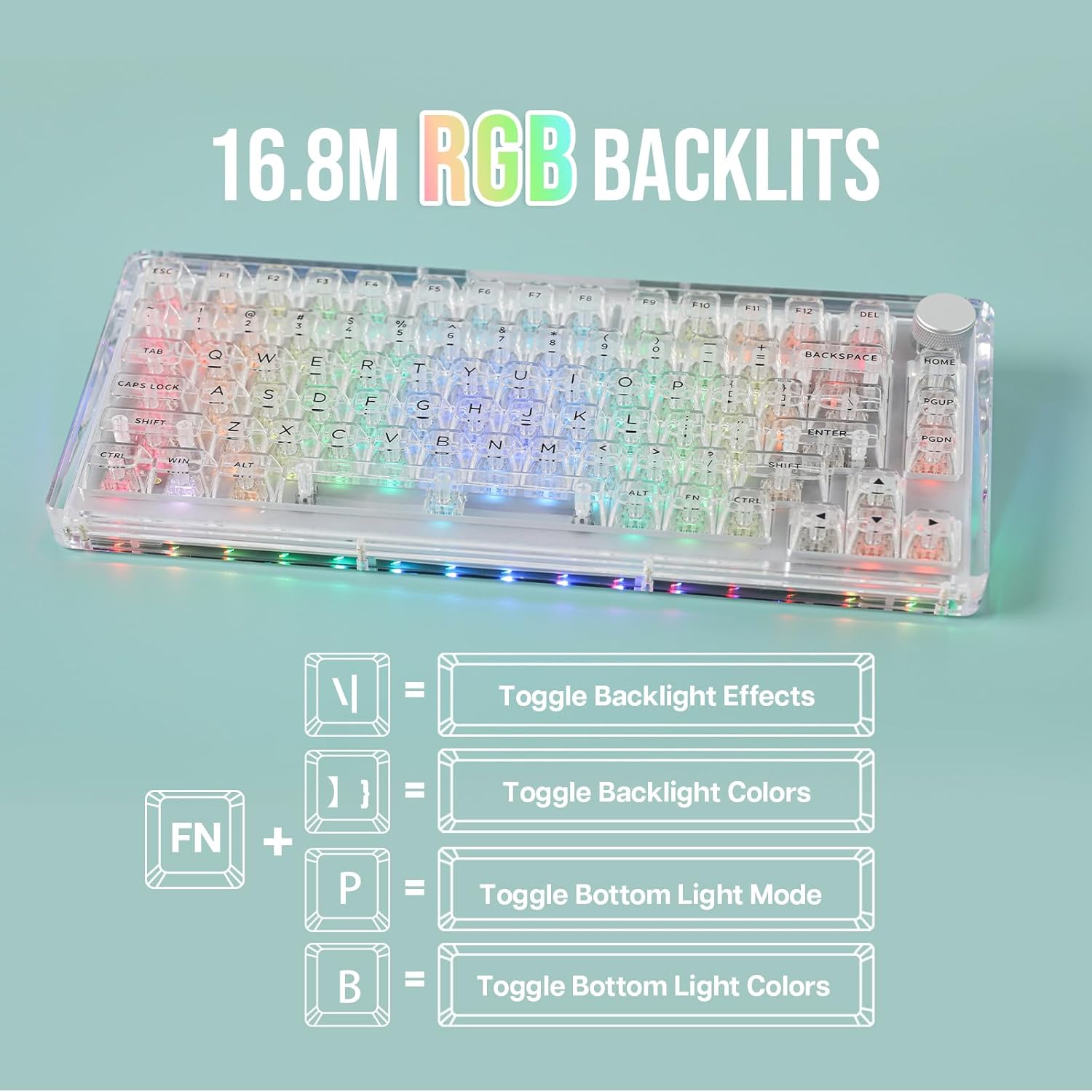
Image: Visual guide for RGB backlight control using FN key combinations.
- FN + \ |: Toggle backlight effects.
- FN + ]}: Toggle backlight colors.
- FN + P: Toggle bottom light mode.
- FN + B: Toggle bottom light colors.
4.3 Software Programmable Features
Customize your keyboard experience using the dedicated KiiBoom software. The software allows for:

Image: Screenshot of the KiiBoom software interface showing options for key remapping, lighting effects, and macro creation.
- Keys Remap: انفرادي ڪنجين کي ڪمن کي ٻيهر تفويض ڪريو.
- Lights Effects: Fine-tune RGB lighting patterns and colors.
- ميڪرو: بهتر پيداوار يا گيمنگ لاءِ پيچيده ميڪرو ٺاهيو ۽ تفويض ڪريو.
- Share Settings: Save and share your custom profiles.
Refer to the KiiBoom official webسافٽ ويئر ڊائون لوڊ ۽ تفصيلي هدايتن لاءِ سائيٽ.
4.4 بيٽري جي حالت چيڪ ڪريو
موجوده بيٽري جي سطح کي جانچڻ لاءِ، دٻايو FN + Backspace. The indicator lights on the keyboard will display the approximate battery percentage.
4.5 اين-ڪي رول اوور (اين ڪي آر او)
The KiiBoom Phantom 81 V3 supports N-Key Rollover (NKRO), which means all keys can be registered simultaneously. This ensures that every keystroke is detected, even during rapid and complex typing or gaming sequences, preventing ghosting or missed inputs.
5. سار سنڀال
5.1 صفائي
To clean your keyboard, disconnect it from all power sources. Use a soft, lint-free cloth to wipe down the acrylic frame and keycaps. For deeper cleaning, remove keycaps using the provided keycap puller and use compressed air to clear debris from between switches. Avoid using harsh chemicals or abrasive materials.
5.2 Switch and Keycap Replacement (Hot-Swappable)
The Phantom 81 V3 features a full-key hot-swappable PCB, allowing you to easily change switches without soldering. Use the included switch puller to carefully remove switches. Ensure new switches are 3-pin or 5-pin compatible and align correctly before pressing them into place. Use the keycap puller to remove and replace keycaps.

Image: A hand demonstrating the removal of a keycap and switch from the hot-swappable PCB of the KiiBoom Phantom 81 V3 keyboard.
6. مسئلا حل ڪرڻ
- ڪي بورڊ جواب نه ڏئي رهيو آهي: Ensure the keyboard is charged. Check the connectivity mode (Wired, 2.4GHz, Bluetooth) and ensure it matches your device's connection. Try reconnecting the USB cable or re-pairing Bluetooth.
- آر جي بي بتيون ڪم نه ٿيون ڪن: Verify that the backlight is enabled using the FN key combinations. Check software settings if custom profiles are in use.
- ڪيز رجسٽر نه ٿي رهيون آهن: If specific keys are not working, try removing and re-inserting the switch for that key. Ensure the switch pins are not bent. If the issue persists, replace the switch with one of the included spare switches.
- بلوٽوٿ ڪنيڪشن غير مستحڪم: Ensure the keyboard is within range of your device. Avoid interference from other wireless devices. Try unpairing and re-pairing the keyboard.
- 2.4GHz connection issues: Ensure the USB receiver is securely plugged in. Try a different USB port. Avoid placing the receiver near large metal objects that may cause interference.
7. وضاحتون

تصوير: ڌماڪو ٿيو view diagram of the KiiBoom Phantom 81 V3 showing its internal gasket structure components.
| ماڊل | Phantom 81 V3 |
| ترتيب | 75٪ (82 چاٻيون + 1 نوب) |
| رابطي | ٽائپ-سي وائرڊ، بلوٽوٿ 5.0، 2.4GHz وائرليس |
| سوئچز | KiiBoom Crystal Linear Switch (Hot-Swappable) |
| اسٽيبلائيزر | Plate-Mounted |
| پٺڀرائي | 16.8M RGB, South-Facing LEDs |
| بيٽري جي گنجائش | 8000mAh |
| فريم مواد | Crystal-Clear Acrylic |
| چڙهڻ جو انداز | Gasket Mount with PC Plate |
| مطابقت | ونڊوز، ميڪ او ايس، گيمنگ ڪنسولز، ليپ ٽاپ، پي سي، اسمارٽ فونز، ٽيبليٽس |
| شيءِ جو وزن | 4.44 پائونڊ (تقريبن 2.01 ڪلوگرام) |
| پيڪيج جي ماپ | 16.45 x 10.79 x 2.91 انچ |
8. وارنٽي ۽ سپورٽ
KiiBoom products are designed for quality and durability. For specific warranty information regarding your Phantom 81 V3 keyboard, please refer to the warranty card included in your product packaging or visit the official KiiBoom webسائيٽ.
For technical support, troubleshooting assistance, or further inquiries, please visit the KiiBoom official support page or contact their customer service directly. You can find more information and resources on the KiiBoom Brand Store on Amazon.


