تعارف
This manual provides detailed instructions for the setup, operation, and maintenance of your Porodo 4-in-1 Ultimate Gaming Kit. This comprehensive kit includes an RGB membrane gaming keyboard, a high-precision adjustable DPI gaming mouse, a surround sound gaming headset with a microphone, and an XL mouse pad. Please read this manual thoroughly before using the product to ensure optimal performance and longevity.

تصوير: مٿانview of the Porodo 4-in-1 Ultimate Gaming Kit, showcasing the keyboard, mouse, headset, and mouse pad.
پيداوار جا اجزاء
1. RGB Membrane Gaming Keyboard
- Membrane Gaming Switches: Designed for durability with a lifespan of up to 10 million keystrokes.
- Arabic Keys: Provides localized support for Arabic language input.
- حسب ضرورت بٽڻ: Features 8 programmable buttons for personalized control.
- رابطي: Connects via USB with a 1.5-meter PVC cable.
- مطابقت: Compatible with Windows and Linux operating systems.

تصوير: هڪ تفصيلي view of the RGB membrane gaming keyboard, highlighting the Arabic key layout and colorful backlighting.
2. High-Precision Adjustable DPI Gaming Mouse
- ڊي پي آئي رينج: Adjustable DPI from 800 to 7200 for precise sensitivity control.
- آر بي جي روشني: Features 13 vibrant RGB lighting modes.
- بٽڻ: Equipped with 8 programmable buttons.
- ڊيزائن: آرامده ڊگهي استعمال لاءِ ايرگونومڪ ڊيزائن.
- ڪيبل: لچڪدار حرڪت لاءِ 1.5 ميٽر ڪيبل.
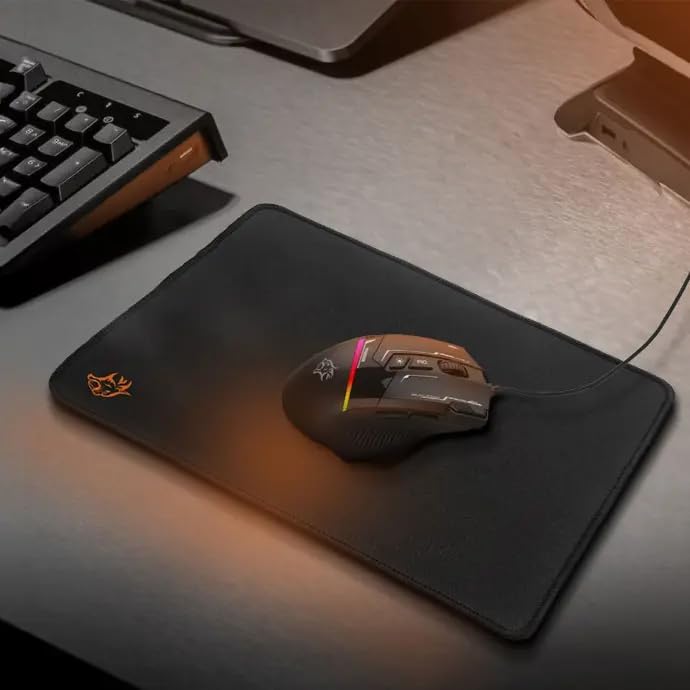
Image: The gaming mouse resting on the mouse pad, showcasing its ergonomic shape and illuminated RGB elements.
3. Surround Sound Gaming Headset with Microphone
- ڊرائيور: 40mm drivers for immersive audio experience.
- مائڪروفون: Omnidirectional microphone for clear voice communication.
- رابطي: Dual 3.5mm jacks and a USB connection for RGB lighting.
- ڪيبل: 2.1-meter cable for ample movement.
- آرام: Combination of fabric and rubber for comfortable long gaming sessions.

Image: A user wearing the Porodo gaming headset, demonstrating its fit and the RGB lighting on the earcups.
4. XL Mouse Pad
- طول و عرض: 250 x 350 x 3 mm (XL size).
- مواد: Made from durable fabric and rubber for smooth and precise tracking.
- سطح: Provides an optimal surface for gaming mouse control.

Image: The XL gaming mouse pad, showing its texture and size, designed for smooth mouse movement.
سيٽ اپ جون هدايتون
- انپيڪ اجزاء: Carefully remove all items from the packaging: keyboard, mouse, headset, and mouse pad.
- Position Mouse Pad: Place the XL mouse pad on a flat, stable surface.
- ڪي بورڊ ڳنڍيو: Plug the keyboard's USB cable into an available USB port on your computer. The keyboard is plug-and-play and does not require driver installation.
- ماؤس ڳنڍيو: Plug the mouse's USB cable into another available USB port on your computer. The mouse is also plug-and-play.
- هيڊ سيٽ ڳنڍيو:
- Plug the two 3.5mm audio jacks (one for audio, one for microphone) into the corresponding audio ports on your computer.
- Plug the headset's USB cable into an available USB port for RGB lighting functionality.
- شروعاتي چڪاس: Verify that all devices are recognized by your computer and that their RGB lighting is active.
آپريٽنگ هدايتون
ڪي بورڊ آپريشن
- ٽائپنگ: Use the standard QWERTY layout with integrated Arabic keys for text input.
- فنڪشن ڪيچ: Utilize F1-F12 keys for various system functions, often in combination with the 'Fn' key.
- حسب ضرورت بٽڻ: Refer to your operating system's peripheral settings or third-party software (if applicable) to program the 8 customizable buttons for macros or specific commands.
- آر بي جي روشني: The keyboard features dynamic RGB lighting. Specific key combinations (e.g., Fn + Scroll Lock) may cycle through lighting modes or adjust brightness. Consult the keyboard's quick start guide for exact controls.
مائوس آپريشن
- تحريڪ: Glide the mouse smoothly over the mouse pad for cursor control.
- ڊي پي آءِ ايڊجسٽمينٽ: Use the dedicated DPI button (usually located near the scroll wheel) to cycle through the 6 adjustable DPI levels (800-7200 DPI). Select the sensitivity that best suits your task or game.
- آر بي جي روشني جا طريقا: Press the RGB lighting button (often near the DPI button or on the underside) to switch between the 13 available RGB lighting modes. There is also an option to turn off the lighting.
- پروگرام لائق بٽڻ: The mouse has 8 buttons. Use your computer's mouse settings or dedicated software to assign functions to these buttons.
هيڊٽڪس آپريشن
- آڊيو پلے بیک: Ensure the 3.5mm audio jack is correctly connected. Adjust volume using your computer's sound settings or the inline volume control on the headset cable.
- مائڪروفون استعمال: Position the omnidirectional microphone appropriately for clear voice capture. Ensure the 3.5mm microphone jack is connected and the microphone is enabled in your computer's sound settings. An inline mute switch may be present on the cable.
- آر بي جي روشني: The headset's RGB lighting is powered via the USB connection. It will illuminate automatically when connected.
سار سنڀال
- صفائي:
- Use a soft, dry cloth to wipe down the surfaces of the keyboard, mouse, and headset.
- ڪيبورڊ لاءِ، چاٻين جي وچ مان مٽي ۽ ملبہ هٽائڻ لاءِ دٻيل هوا استعمال ڪريو.
- Do not use harsh chemicals or abrasive cleaners on any component.
- ڪيبل جي سنڀال: Avoid sharp bends or excessive pulling on the cables to prevent damage.
- اسٽوريج: Store the kit in a cool, dry place away from direct sunlight and extreme temperatures when not in use.
مشڪلاتون
| مسئلو | حل |
|---|---|
| ڪي بورڊ/ماؤس جواب نه ڏئي رهيو آهي |
|
| Headset audio not working |
|
| مائڪرو فون ڪم نه ڪري رهيو آهي |
|
| آر بي جي روشني ڪم نه ڪندي |
|
وضاحتون
- ماڊل نمبر: 6849108443906
- ڪي بورڊ جو قسم: Membrane Gaming Keyboard with Arabic Keys
- Keyboard Lifespan: 10 ملين keystrokes تائين
- مائوس DPI: 800-7200 ڊي پي آءِ (ايڊجسٽبل)
- Mouse RGB Modes: 13
- Headset Driver Size: 40mm
- هيڊ سيٽ مائڪروفون: هر طرفي
- ڪي بورڊ ڪيبل ڊگھائي: 1.5 ميٽر پي وي سي
- ماؤس ڪيبل ڊگھائي: 1.5 ايم
- Headset Cable Length: 2.1 ايم
- ماؤس پيڊ ڊيمانيشن: 250 x 350 x 3 mm (XL)
- رابطي: USB (Keyboard, Mouse, Headset RGB), Dual 3.5mm (Headset Audio/Mic)
- مطابقت: ونڊوز، لينڪس
- شپنگ جي ماپ: 48.4 x 19.8 x 13.6 سينٽي
- شيء جو وزن: 1.1 ڪلو
وارنٽي ۽ سپورٽ
Your Porodo 4-in-1 Ultimate Gaming Kit is covered by a manufacturer's warranty against defects in materials and workmanship. For specific warranty details, including duration and terms, please refer to the warranty card included in your product packaging or visit the official Porodo website. For technical support, troubleshooting assistance, or to inquire about replacement parts, please contact Porodo customer service through their official channels. Keep your purchase receipt as proof of purchase for warranty claims.
اضافي مدد لاءِ، توهان دورو ڪري سگهو ٿا ايميزون تي پوروڊو اسٽور.


