1. تعارف
The PWAY PW-DT273P HDMI Extender is designed to transmit high-definition HDMI signals over long distances using standard Cat5e/6 Ethernet cables. This device supports 1080p@60Hz resolution and offers flexible deployment options, including one-to-one and one-to-many configurations via 100M/1000M Ethernet switches. It also supports Power over Ethernet (POE) for simplified installation.
اهم خاصيتون:
- Extends HDMI signals up to 400ft (120 meters) over Cat5e/6 cable.
- Supports multi-video output via Ethernet switches for flexible management.
- Compatible with POE switches, reducing the need for additional power adapters.
- Works with conventional 100M/1000M Ethernet switches.
- Delivers crisp 1080p@60Hz full HD resolution.
2. پيڪيج مواد
مھرباني ڪري تصديق ڪريو ته سڀئي شيون توھان جي پيڪيج ۾ شامل آھن:
- 1x HDMI Transmitter (TX) Unit
- 1x HDMI Receiver (RX) Unit
- 2x DC 12V Power Adapters
- 1x استعمال ڪندڙ دستياب

تصوير: پيڪيج مواد
3. پراڊڪٽ ختمview
The PWAY PW-DT273P system consists of a Transmitter (TX) unit and a Receiver (RX) unit. Familiarize yourself with the ports and indicators on each unit:
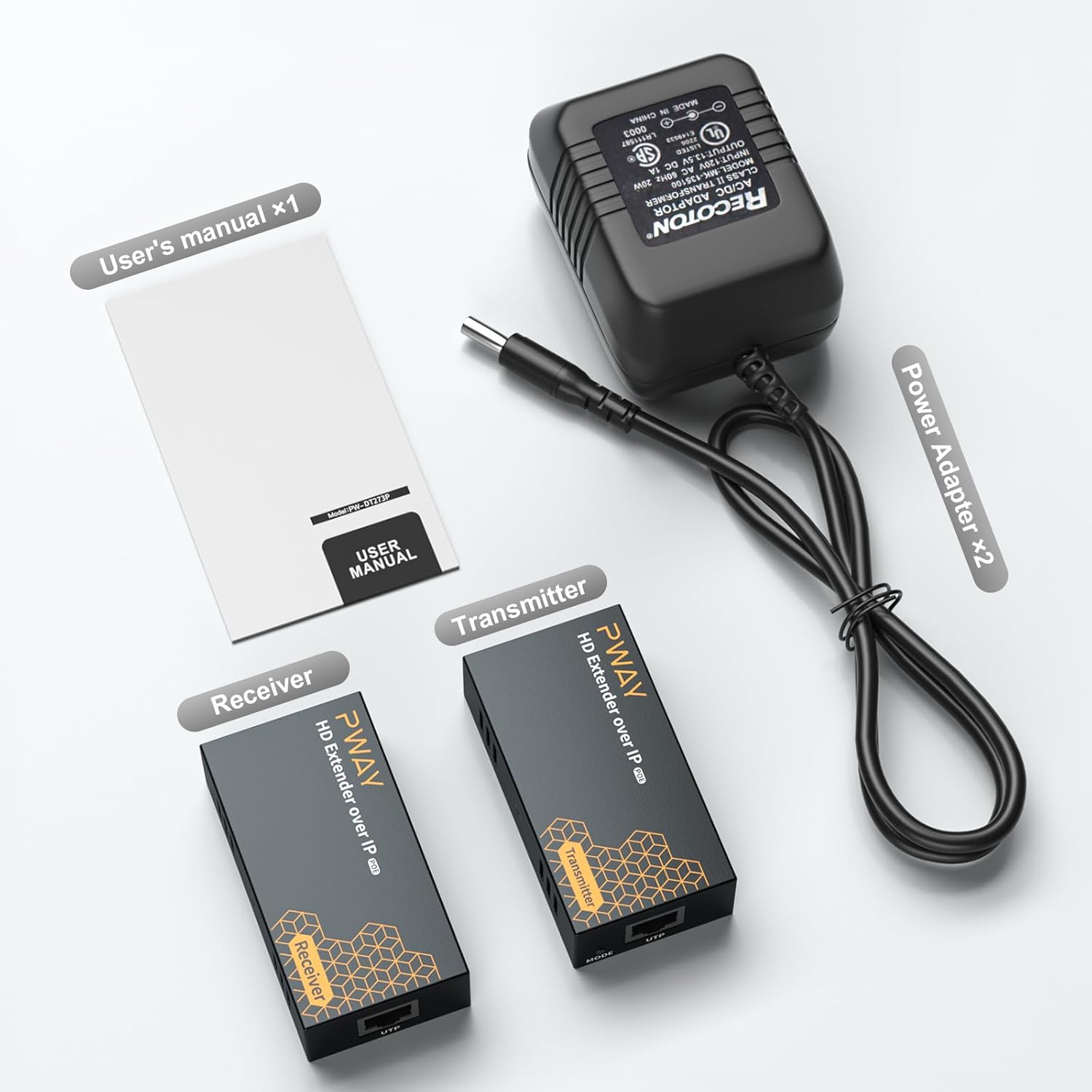
Image: Transmitter and Receiver Ports
Transmitter (TX) Unit:
- HD ۾: HDMI input port for connecting to the source device (e.g., DVD player, laptop).
- يو ٽي پي: RJ45 Ethernet port for connecting to the Receiver unit or network switch.
- ڊي سي 12V: Power input port (use one of the provided adapters if not using POE).
- LINK LED: Indicates Ethernet link status.
- ايس ٽي اي ايل اي ڊي: Indicates HDMI signal status.
- موڊ بٽڻ: For specific operational modes (refer to advanced settings if applicable, typically for pairing or reset).
Receiver (RX) Unit:
- HD ٻاهر: HDMI output port for connecting to the display device (e.g., TV, monitor).
- يو ٽي پي: RJ45 Ethernet port for connecting to the Transmitter unit or network switch.
- ڊي سي 12V: Power input port (use one of the provided adapters if not using POE).
- LINK LED: Indicates Ethernet link status.
- ايس ٽي اي ايل اي ڊي: Indicates HDMI signal status.
4. سيٽ اپ جون هدايتون
4.1 حفاظتي احتياط
- ڪنيڪشن ٺاهڻ کان اڳ پڪ ڪريو ته سڀئي ڊوائيس بند آهن.
- Use only the provided power adapters or a compatible POE switch.
- Avoid exposing the units to moisture or extreme temperatures.
4.2 ڪيبل گهرجون
Use high-quality Cat5e or Cat6 Ethernet cables for optimal performance and signal integrity. The maximum recommended distance is 400ft (120 meters).
4.3 هڪ کان هڪ ڪنيڪشن
This configuration extends an HDMI signal from a single source to a single display.
- Connect your HDMI source device (e.g., DVD player, laptop) to the HD IN HDMI ڪيبل استعمال ڪندي ٽرانسميٽر (TX) يونٽ جو پورٽ.
- Connect your display device (e.g., TV, monitor) to the HD ٻاهر HDMI ڪيبل استعمال ڪندي رسيور (RX) يونٽ جو پورٽ.
- ڳنڍيو يو ٽي پي TX يونٽ جو پورٽ ڏانهن يو ٽي پي port of the RX unit using a single Cat5e/6 Ethernet cable.
- Connect the provided DC 12V power adapters to both the TX and RX units, or ensure both units are connected to a POE-enabled network switch.
- سڀني ڳنڍيل ڊوائيسز تي پاور.

Image: One-to-One Connection Diagram
4.4 One-to-Many Connection via POE Switch
This configuration allows a single HDMI source to be displayed on multiple screens using a POE-enabled network switch.
- پنھنجي HDMI سورس ڊيوائس کي Connectنيو HD IN HDMI ڪيبل استعمال ڪندي ٽرانسميٽر (TX) يونٽ جو پورٽ.
- ڳنڍيو يو ٽي پي port of the TX unit to a port on your POE-enabled network switch using a Cat5e/6 Ethernet cable.
- ڳنڍيو يو ٽي پي port of each Receiver (RX) unit to a separate POE-enabled port on the same network switch using Cat5e/6 Ethernet cables.
- Connect each display device to the HD ٻاهر port of its respective RX unit using an HDMI cable.
- Power on all connected devices. The TX and RX units will receive power from the POE switch.

Image: One-to-Many POE Switch Connection Diagram
4.5 One-to-Many Connection via Regular Switch
This configuration allows a single HDMI source to be displayed on multiple screens using a standard network switch. External power adapters are required for the RX units.
- پنھنجي HDMI سورس ڊيوائس کي Connectنيو HD IN HDMI ڪيبل استعمال ڪندي ٽرانسميٽر (TX) يونٽ جو پورٽ.
- ڳنڍيو يو ٽي پي port of the TX unit to a port on your regular network switch using a Cat5e/6 Ethernet cable.
- ڳنڍيو يو ٽي پي port of each Receiver (RX) unit to a separate port on the same network switch using Cat5e/6 Ethernet cables.
- Connect each display device to the HD ٻاهر port of its respective RX unit using an HDMI cable.
- Connect the provided DC 12V power adapters to the TX unit and each RX unit.
- سڀني ڳنڍيل ڊوائيسز تي پاور.

Image: One-to-Many Regular Switch Connection Diagram
5. آپريٽنگ هدايتون
Once all connections are made and power is supplied, the system should operate automatically.
- Ensure all source and display devices are powered on.
- چيڪ ڪريو LINK ۽ STA LED indicators on both the TX and RX units. A solid light typically indicates a successful connection and signal transmission.
- The extender supports 1080p@60Hz resolution. Your display should automatically detect and show the extended HDMI signal.

Image: 1080p@60Hz HD Vision
6. سار سنڀال
- Keep the units clean by wiping them with a soft, dry cloth. Do not use liquid cleaners or aerosols.
- Store the units in a cool, dry place away from direct sunlight and heat sources.
- يونٽن جي چوڌاري مناسب وينٽيليشن کي يقيني بڻايو وڃي ته جيئن وڌيڪ گرم ٿيڻ کان بچي سگهجي.
- ڪيبل ڪنيڪشن کي باقاعدي طور تي چيڪ ڪريو ته جيئن اهي محفوظ هجن.
7. مسئلا حل ڪرڻ
If you encounter issues with your PWAY HDMI Extender, refer to the following common problems and solutions:
| مسئلو | ممڪن سبب | حل |
|---|---|---|
| ڊسپلي تي ڪا به تصوير ناهي. | No power to TX/RX units; Loose HDMI/Ethernet cables; Incorrect input selection on display; Incompatible resolution. | Check power connections and adapters; Ensure all cables are securely connected; Select the correct HDMI input on your display; Try a different HDMI source or display. |
| Flickering or poor image quality | Poor quality Ethernet cable; Ethernet cable too long; Interference; Encoder overload with fast-moving images at 1080p. | Use a high-quality Cat6 cable; Ensure cable length is within 400ft (120m); Reduce interference by separating cables; Try setting the source resolution to 720p, especially for content with rapid motion. |
| نه آڊيو | Audio settings on source/display; HDMI cable issue. | Check audio output settings on your source device; Ensure your display's audio is not muted; Try a different HDMI cable. |
| LINK/STA LEDs not lit | No power; No Ethernet link; No HDMI signal. | Verify power supply to both units; Check Ethernet cable connection; Ensure HDMI source is active and connected. |
8. وضاحتون
| خاصيت | تفصيل |
|---|---|
| ماڊل نمبر | PW-DT273P |
| پيداوار جي ماپ | 3.2 x 1.7 x 0.9 انچ |
| شيءِ جو وزن | 1.01 پائونڊ |
| ڪنيڪٽر جو قسم | HDMI |
| ڪيبل جو قسم | HDMI, Cat5e/6 Ethernet |
| مطابقت رکندڙ ڊوائيسز | DVD Player, Laptop, Monitor, Television |
| قرارداد جي حمايت | 1080p@60Hz تائين |
| ٽرانسميشن جو فاصلو | 400 فوٽ (120 ميٽر) تائين |
| بجلي جي فراهمي | DC 12V (included adapters) or POE |
| رنگ | ڪارو |
| ٺاهيندڙ | PWAY Technology |
9. وارنٽي ۽ سپورٽ
PWAY products are designed for reliability and performance. This product comes with a standard manufacturer's warranty against defects in materials and workmanship. For specific warranty details, please refer to the warranty card included in your package or contact PWAY customer support.
For technical assistance, troubleshooting, or further inquiries, please visit the official PWAY store or contact their customer service department. You can find more information and support resources at the PWAY Store on Amazon.


