تعارف
This manual provides essential information for setting up, operating, maintaining, and troubleshooting your HP Elite Mini 800 G9 Desktop Computer. This compact and powerful mini PC is designed for business environments, offering high performance in a small form factor.
The HP Elite Mini 800 G9 features an Intel Core i5-12500T processor, 16 GB DDR5 RAM, and a 256 GB SSD, running on Windows 11 Pro. Its small size allows for flexible deployment options, including mounting behind a monitor or discreet placement on a desk.
دٻي ۾ ڇا آهي
پڪ ڪريو ته سڀئي شيون پيڪنگ ۾ موجود آهن:
- ايڇ پي ايليٽ ميني 800 جي 9 ڊيسڪ ٽاپ پي سي
- AC اڊاپٽر
- ڪي بورڊ
- مائوس
سيٽ اپ ڪريو
Follow these steps to set up your HP Elite Mini 800 G9 Desktop Computer:
1. Unpacking ۽ لڳائڻ
Carefully remove the mini PC and all accessories from the packaging. Place the mini PC on a stable, flat surface with adequate ventilation. Ensure no vents are obstructed.
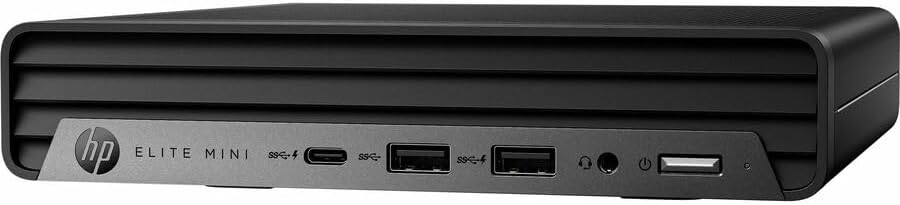
تصوير: سامهون view of the HP Elite Mini 800 G9 Desktop PC, highlighting the accessible front ports including USB-C, USB-A, and a headphone jack.
2. پردي کي ڳنڍڻ
- مانيٽر ڳنڍيو: Connect your monitor to one of the available video output ports (e.g., DisplayPort, HDMI) on the rear of the mini PC.
- ڪي بورڊ ۽ مائوس ڳنڍيو: Plug the included keyboard and mouse into the USB ports on the mini PC.
- نيٽ ورڪ ڳنڍيو (اختياري): For a wired internet connection, connect an Ethernet cable from your router or network switch to the Ethernet port on the mini PC. Wireless connectivity (Wi-Fi 6) is also available.
- پاور Connectنيو: Connect the AC adapter to the power input port on the mini PC, then plug the power cord into a wall outlet.
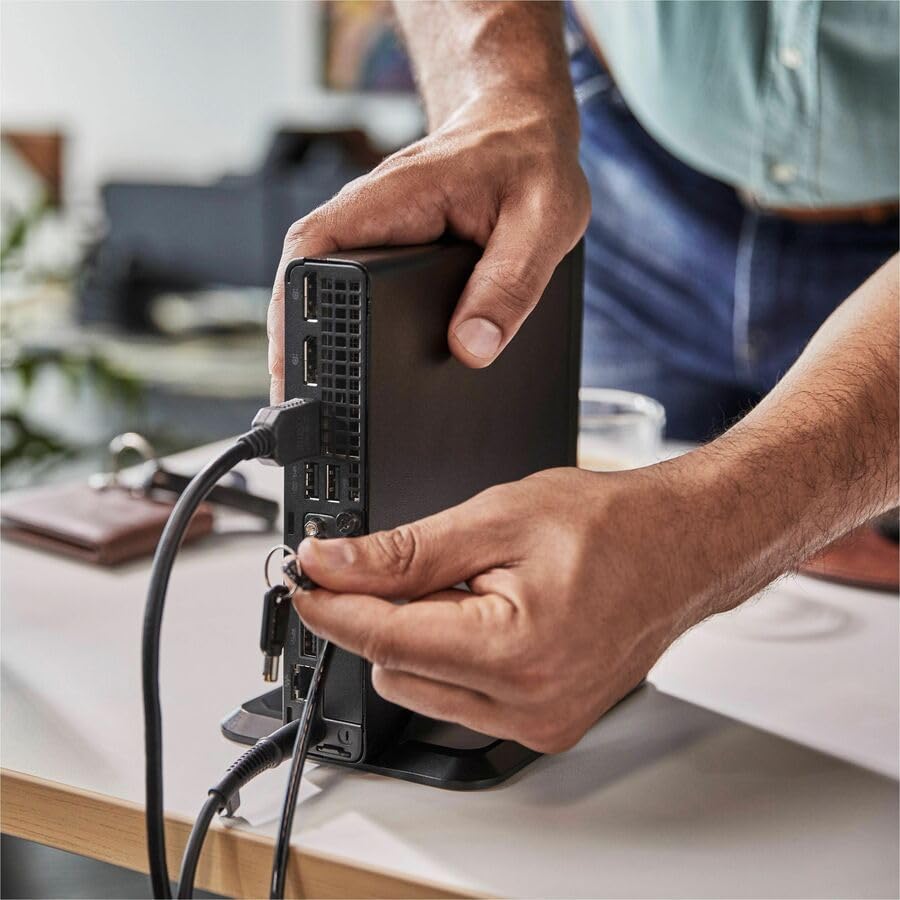
Image: A user connecting various cables, including power and display, to the rear ports of the HP Elite Mini 800 G9. This illustrates the typical connection process for peripherals.
آپريٽنگ هدايتون
Once your HP Elite Mini 800 G9 is set up, follow these steps for basic operation:
1. پاورنگ آن
Press the power button located on the front of the mini PC. The power indicator light will illuminate, and the system will begin to boot up. The operating system (Windows 11 Pro) will load automatically.
2. شروعاتي سيٽ اپ (پهريون استعمال)
Upon first boot, you will be guided through the Windows 11 Pro setup process. This includes selecting your region, language, accepting terms, and setting up a user account. Follow the on-screen prompts to complete this process.
3. بند ڪرڻ
To properly shut down the computer, click the شروع button in Windows, then select طاقت > بند ڪريو. Avoid powering off the system by holding the power button, as this can lead to data loss or system corruption.

Image: A professional working at a desk, demonstrating the compact integration of the HP Elite Mini 800 G9, which is mounted discreetly behind a monitor.
سار سنڀال
Regular maintenance helps ensure the longevity and optimal performance of your HP Elite Mini 800 G9 Desktop Computer.
1. سافٽ ويئر اپڊيٽ
پنهنجي آپريٽنگ سسٽم ۽ ڊرائيورز کي اپڊيٽ رکو. ونڊوز اپڊيٽ خودڪار طريقي سان او ايس اپڊيٽس کي سنڀاليندو آهي. ڊرائيور اپڊيٽس لاءِ، سرڪاري HP سپورٽ تي وڃو. webتوهان جي ماڊل لاءِ سائيٽ.
2. صفائي
- ٻاهران: نرم، لِنٽ کان خالي ڪپڙو استعمال ڪريو ٿورڙو ڊيampٻاهرين سطحن کي صاف ڪرڻ لاءِ پاڻي يا هلڪي صفائي واري محلول سان صاف ڪريو.
- وينٽس: Periodically use compressed air to clear dust from the ventilation grilles to prevent overheating. Ensure the system is powered off before cleaning vents.
3. ڊيٽا بيڪ اپ
Regularly back up important data to an external drive or cloud storage to prevent data loss in case of hardware failure or other issues.
مشڪلاتون
This section addresses common issues you might encounter with your HP Elite Mini 800 G9.
ڪابه طاقت
- Ensure the AC adapter is securely connected to both the mini PC and a working power outlet.
- ٻئي ڊوائيس ۾ پلگ ان ڪندي پڪ ڪريو ته پاور آئوٽليٽ ڪم ڪري رهيو آهي.
- Check the power button for any damage or obstruction.
مانيٽر تي ڪابه ڊسپلي ناهي
- Confirm the monitor is powered on and correctly connected to the mini PC's video output port.
- پڪ ڪريو ته توهان جي مانيٽر تي صحيح ان پٽ سورس چونڊيو ويو آهي.
- Try connecting the mini PC to a different monitor or using a different video cable if available.
سست ڪارڪردگي
- پس منظر ۾ هلندڙ غير ضروري ايپليڪيشنون بند ڪريو.
- ڪنهن به التوا واري ونڊوز اپڊيٽ يا ڊرائيور اپڊيٽ جي جانچ ڪريو ۽ انسٽال ڪريو.
- ڊسڪ ڪلين اپ ۽ ڊيفراگمينٽيشن هلايو (HDDs لاءِ، عام طور تي SSDs لاءِ گهربل نه آهي).
- مشهور اينٽي وائرس سافٽ ويئر استعمال ڪندي مالويئر يا وائرس لاءِ اسڪين ڪريو.
وضاحتون
Detailed technical specifications for the HP Elite Mini 800 G9 Desktop Computer:
| خاصيت | تفصيل |
|---|---|
| ماڊل نمبر | AS1F8AT#ABA |
| پروسيسر | Intel Core i5-12500T (12th Gen, Hexa-core, 2 GHz) |
| رام | 16 GB DDR5 رام |
| ذخيرو | 256 GB SSD |
| گرافڪس | انٽيل يو ايڇ ڊي گرافڪس 770 (انٽيگريٽڊ) |
| آپريٽنگ سسٽم | ونڊوز 11 پرو |
| وائرليس ڪنيڪشن | وائي فائي 6 (802.11ax)، بلوٽوٿ |
| طول و عرض (LxWxH) | 6.9 x 7 x 1.4 انچ |
| وزن | 3.13 پائونڊ |
| بندرگاھون (اڳيون) | USB-C, USB-A, Headphone/Microphone Combo |
| بندرگاھون (پوئتي) | Multiple USB-A, Video Outputs (e.g., DisplayPort, HDMI), Ethernet, Power Input |
وارنٽي ۽ سپورٽ
Your HP Elite Mini 800 G9 Desktop Computer comes with a standard manufacturer's warranty. For specific warranty terms and conditions, please refer to the documentation included with your product or visit the official HP support webسائيٽ.
For technical assistance, driver downloads, or further support, please visit the HP Support webسائيٽ: