1. پراڊڪٽ ختمview
The GeekTale Fingerprint Deadbolt Smart Lock (Model F08) offers advanced security and convenient keyless entry for your home or office. This smart lock integrates multiple unlocking methods, including fingerprint recognition, mobile application control, and traditional physical keys, providing flexible access solutions. Its robust design and intelligent features ensure reliable performance and enhanced security.
اهم خاصيتون:
- فنگر پرنٽ جي سڃاڻپ: High-accuracy scanner for one-touch unlocking, supporting up to 50 unique user profiles.
- ائپ ڪنٽرول: Manage users, unlock via Bluetooth within 10 meters, and review access logs through a dedicated mobile application.
- ريموٽ ڪنٽرول جي صلاحيت: When paired with a separately sold gateway, enables remote unlocking and real-time notifications.
- بلٽ ان ريچارجبل بيٽري: Provides up to 8 months of use on a 2-hour charge, with low-battery alerts and emergency USB power access.
- يونيورسل ايپليڪيشن: Suitable for various doors, including front doors, garage doors, and office doors.
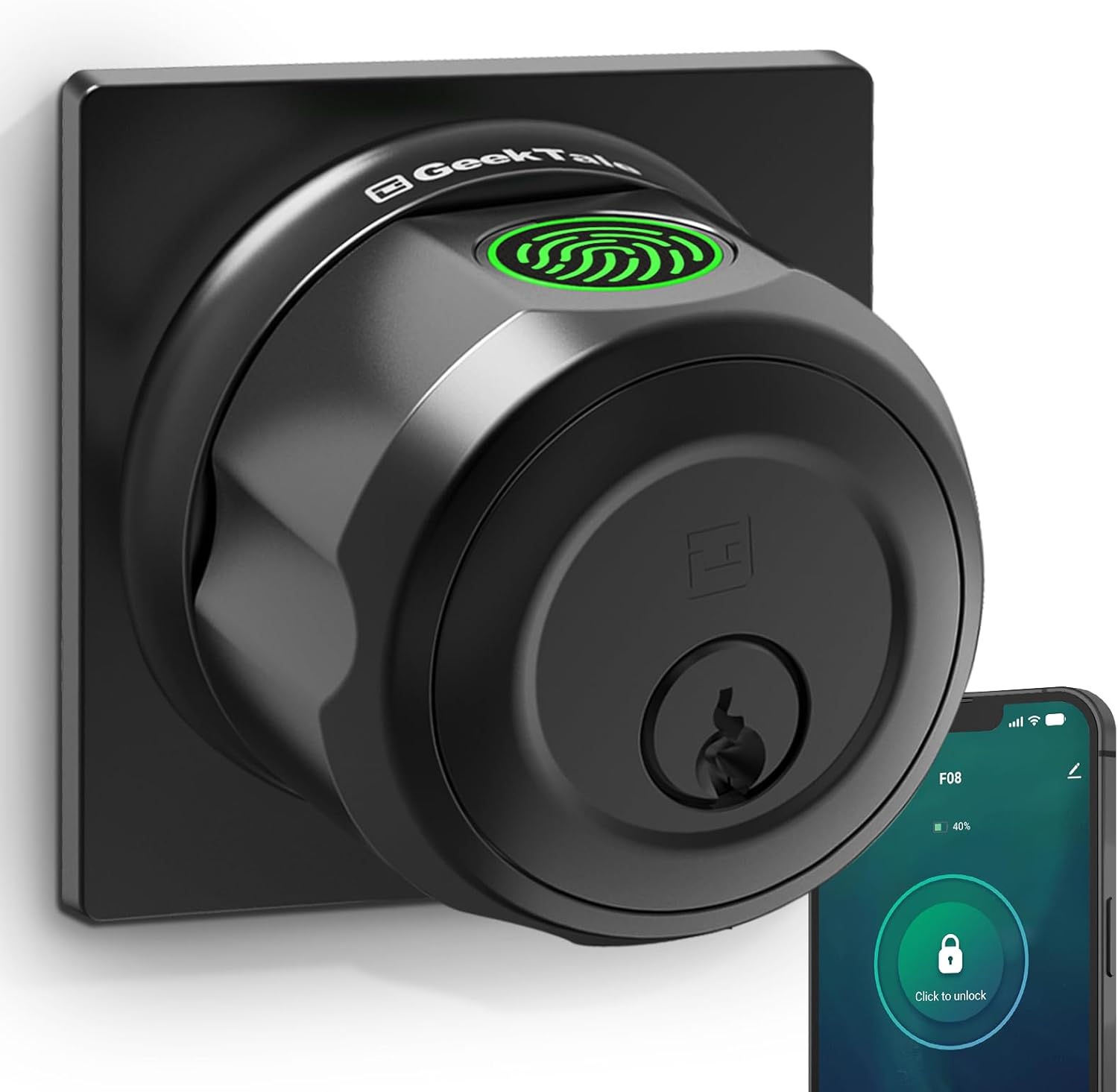
Image 1.1: The GeekTale Fingerprint Deadbolt Smart Lock, showcasing its sleek black square design and integrated fingerprint sensor.

Image 1.2: Illustration of the three primary unlocking methods: App Unlock, Fingerprint Unlock, and Key Unlock.

Image 1.3: Demonstrates the rapid 0.3-second fingerprint recognition speed for quick access.
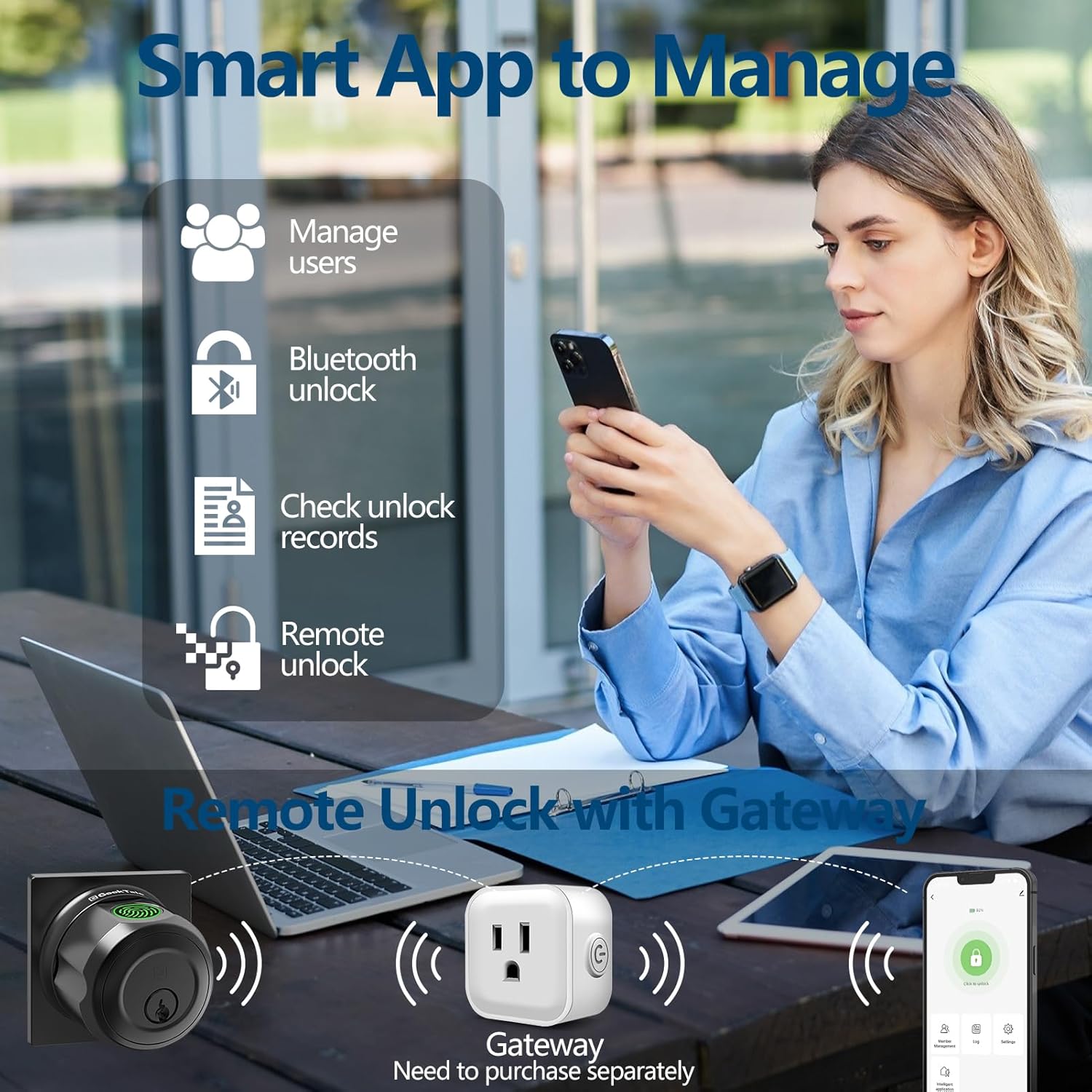
تصوير 1.4: مٿيview of the smart app interface for managing users, Bluetooth unlocking, viewing records, and remote unlocking (gateway sold separately).

تصوير 1.5: اڳوڻيamples of suitable locations for installation, including front doors, garages, offices, and backyards.
Video 1.1: Demonstrates the three unlocking methods of the F08 Deadbolt Lock: Fingerprint, App, and Key. This video also shows the low battery alert and charging process.
2. حفاظت جي ڄاڻ
مھرباني ڪري انسٽاليشن ۽ استعمال کان اڳ سڀ حفاظتي هدايتون احتياط سان پڙھو. انھن هدايتن تي عمل ڪرڻ ۾ ناڪامي جي نتيجي ۾ پيداوار، ملڪيت، يا ذاتي زخم ٿي سگھي ٿو.
- Do not expose the lock to direct rain or extreme weather conditions if installed outdoors without proper cover.
- Use only the specified charging cable and power source for recharging the battery.
- Keep backup keys in a secure location outside the property.
- Ensure the door frame and door are structurally sound before installation.
- تالي جي مٿاڇري تي رگڙيندڙ صاف ڪندڙ يا محلول استعمال ڪرڻ کان پاسو ڪريو.
3. پيڪيج مواد
انسٽاليشن شروع ڪرڻ کان اڳ پڪ ڪريو ته سڀئي جزا موجود آهن:
- GeekTale Fingerprint Deadbolt Smart Lock (Main Unit)
- Keys (2 back-up keys included)
- انسٽاليشن هارڊويئر (اسڪرو، اسٽرائڪ پليٽ، وغيره)
- استعمال ڪندڙ جو دستياب (ھي دستاويز)
- USB چارجنگ ڪيبل
4. Setup (Installation Guide)
Follow these steps to install your GeekTale Fingerprint Deadbolt Smart Lock. It is recommended to watch the installation video if available or consult a professional if unsure.
4.1 Door Preparation:
پڪ ڪريو ته توهان جو دروازو هيٺ ڏنل وضاحتن کي پورو ڪري ٿو:
- دروازي جي سوراخ قطر: 2-1/8 انچ (54mm)
- دروازي جي ٿلهي: 1-3/8 انچ کان 2-1/8 انچ (35 ملي ميٽر کان 54 ملي ميٽر)
- پٺيون Adjustable for 2-3/4 inches (70mm) or 2-3/8 inches (60mm). If your backset is 2-3/4 inches (70mm), pull out the face plate to extend.

Image 4.1: Detailed diagram illustrating the required door dimensions for proper installation.
4.2 تنصيب جا مرحلا:
- Install the latch bolt into the door edge, ensuring the correct backset is selected.
- ٻاهرين اسيمبلي کي نصب ڪريو، ڪيبل کي دروازي جي سوراخ ذريعي کارايو.
- اندروني ماؤنٽنگ پليٽ انسٽال ڪريو.
- ڪيبل کي ٻاهرين اسيمبليءَ کان اندروني اسيمبليءَ تائين ڳنڍيو.
- اندروني اسيمبلي کي ماؤنٽنگ پليٽ سان محفوظ ڪريو.
- Test the lock's operation with a physical key to ensure smooth movement.
5. آپريٽنگ هدايتون
The GeekTale Smart Lock offers multiple convenient ways to lock and unlock your door.
5.1 Fingerprint Unlock:
To unlock using your fingerprint:
- پنهنجي رجسٽرڊ آڱر کي فنگر پرنٽ سينسر تي رکو.
- The lock will illuminate green upon successful recognition.
- Twist the deadbolt knob to unlock the door.
To register fingerprints, use the dedicated mobile application (see Section 5.2).
5.2 App Control (Bluetooth & Remote Unlock):
Download the GeekTale app from your smartphone's app store. Follow the in-app instructions to pair your lock via Bluetooth.
- بلوٽوٿ ان لاڪ: Open the app within 10 meters of the lock and tap the unlock icon.
- استعمال ڪندڙ جو انتظام: Add or delete fingerprints and other user access permissions directly from the app.
- رسائي لاگز: View لاڪ ۽ ان لاڪ واقعن جي تاريخ.
- Remote Unlock (Gateway Required): For remote unlocking functionality, a GeekTale gateway (sold separately) is required. Pair the gateway with your lock and connect it to your home Wi-Fi network. This enables unlocking from anywhere with an internet connection and real-time status notifications.

Image 5.1: Illustrates the remote unlock feature when the smart lock is connected to a GeekTale Gateway (sold separately).
5.3 Key Unlock:
In case of battery depletion or other issues, you can always use the provided physical keys.
- ڪي هول ۾ ڪنجي داخل ڪريو.
- Turn the key to unlock the deadbolt.
5.4 Locking and Unlocking:
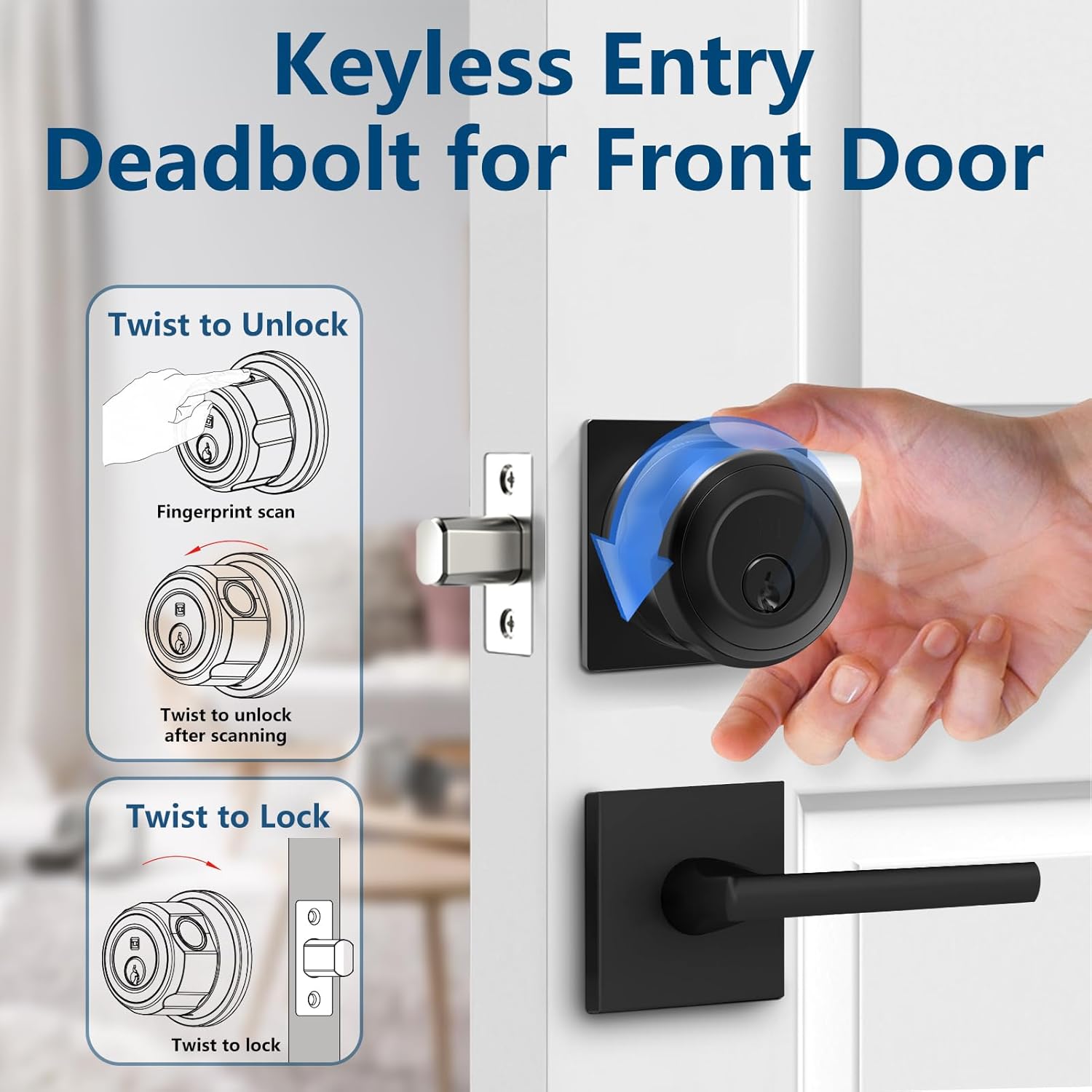
Image 5.2: Visual guide for twisting the knob to unlock after a successful scan and twisting to lock the deadbolt.
جي طرف لاڪ: After successful fingerprint scan or app unlock, manually twist the deadbolt knob to retract the bolt.
جي طرف تالا: Manually twist the deadbolt knob to extend the bolt. The lock will automatically engage.
6. Battery and Charging (Maintenance)
The GeekTale Smart Lock is equipped with a built-in rechargeable Lithium-Ion battery designed for long-lasting performance.
6.1 بيٽري جي زندگي:
A full charge (approximately 2 hours) can provide up to 8 months of typical use.
6.2 Low Battery Alert:
The lock will provide visual and/or audible alerts when the battery level is low, indicating that charging is required soon.
6.3 چارج ڪرڻ:
To charge the lock, connect the provided USB charging cable to the charging port on the lock and a standard USB power source. A full charge takes approximately 30 minutes for 8 months of use.

Image 6.1: Information on the built-in rechargeable battery, including charging time and battery life, along with a visual of the low battery alert.
7. عام سار سنڀال
To ensure the longevity and optimal performance of your GeekTale Smart Lock, follow these maintenance guidelines:
- صفائي: Wipe the lock's surface with a soft, dry cloth. Do not use harsh chemicals, abrasive cleaners, or polishes.
- ماحولياتي تحفظ: While durable, for exterior doors, it is recommended to install the lock under covered entries (e.g., porches) to avoid direct exposure to heavy rain or prolonged sunlight.
- بيٽري جي سنڀال: Recharge the battery promptly when low battery alerts are indicated. Avoid completely draining the battery frequently.
8. مسئلا حل ڪرڻ
If you encounter issues with your GeekTale Smart Lock, refer to the following common problems and solutions:
| مسئلو | ممڪن سبب | حل |
|---|---|---|
| آڱرين جي نشان جي سڃاڻپ نه ٿي. | Finger wet/dirty, unregistered fingerprint, sensor issue. | Ensure finger is clean and dry. Re-register fingerprint if necessary. Clean sensor. |
| لاک جواب نٿو ڏئي. | Low battery, complete battery drain. | Charge the lock via USB. Use backup key to open. |
| ايپ لاڪ سان ڳنڍجي نٿي سگهي. | Bluetooth off, lock too far, app glitch. | Ensure Bluetooth is on. Move closer to the lock. Restart app/phone. |
| ريموٽ ان لاڪ ڪم نه ڪري رهيو آهي. | Gateway not connected, internet issue. | Verify gateway is powered on and connected to Wi-Fi. Check internet connection. |
If the problem persists after trying these solutions, please contact GeekTale customer support.
9. وضاحتون
Detailed technical specifications for the GeekTale Fingerprint Deadbolt Smart Lock (Model F08):
| تفصيل | تفصيل |
|---|---|
| برانڊ | GeekTale |
| ماڊل نالو | F08 |
| تالا جو قسم | Deadbolt Smart Lock |
| مواد | المونيم |
| رنگ | ڪارو |
| شيون طول و عرض (L x W x H) | 2.67 x 2.67 x 1.87 انچ |
| شيءِ جو وزن | 1.39 پائونڊ |
| طاقت جو ذريعو | 1 ليتيم آئن بيٽري (شامل) |
| ڪنيڪشن پروٽوڪول | بلوٽوٿ |
| ڪنٽرول جو طريقو | App, Touch (Fingerprint), Mechanical Knob |
| خاص خاصيتون | Fingerprint Deadbolt, Smart Deadbolt Lock, Fingerprint Door Lock, Smart Door Lock, Keyless Entry Door Lock |
| تجويز ڪيل استعمال | Front doors, entry doors, garage doors |
10. وارنٽي ۽ سپورٽ
GeekTale products are designed for reliability and performance. For specific warranty details, please refer to the warranty card included with your product or visit the official GeekTale webسائيٽ.
ڪسٽمر سپورٽ:
If you require assistance with installation, operation, or troubleshooting, please contact GeekTale customer support through the following channels:
- Webسائيٽ: Visit the official GeekTale webسوالن ۽ سپورٽ وسيلن لاءِ سائيٽ.
- اي ميل: Refer to your product packaging or the GeekTale webسپورٽ اي ميل پتي لاءِ سائيٽ.
- فون: رابطي جا نمبر سرڪاري ويب سائيٽ تي موجود هوندا. webسڌي مدد لاءِ سائيٽ.
Please have your product model (F08) and purchase information ready when contacting support.


