1. حفاظت جي ڄاڻ
- انسٽاليشن ۽ استعمال ڪرڻ کان پهريان سڀ هدايتون احتياط سان پڙهو.
- پاڻ تالا کي ڌار ڪرڻ يا مرمت ڪرڻ جي ڪوشش نه ڪريو. مدد لاءِ ڪسٽمر سپورٽ سان رابطو ڪريو.
- Keep keys in a safe place, separate from the lock.
- Ensure the door frame and door are structurally sound before installation.
- For exterior doors, install under a covered entry to protect from direct rain exposure.
2. پيڪيج مواد
انسٽاليشن شروع ڪرڻ کان اڳ پڪ ڪريو ته سڀئي جزا موجود آهن:
- Front Lock Assembly
- Rear Lock Assembly
- Deadbolt Latch
- چڙهڻ واري پليٽ
- هڙتال واري پليٽ
- اسڪرو (مختلف سائز)
- بيڪ اپ ڪيز (2)
- USB چارجنگ ڪيبل
- استعمال ڪندڙ دستي
3. پراڊڪٽ ختمview
The GeekTale F08 Smart Deadbolt Lock offers multiple access methods and smart features for enhanced security and convenience.

Image: The GeekTale F08 Smart Deadbolt Lock, showing the fingerprint sensor and keyhole.
اهم خاصيتون:
- فنگر پرنٽ جي سڃاڻپ: Fast and accurate one-touch unlocking. Supports up to 50 unique user profiles.
- ائپ ڪنٽرول: Manage users, unlock via Bluetooth, and review access logs through the dedicated mobile application.
- ريموٽ ڪنٽرول جي صلاحيت: When paired with a separate gateway (sold separately), enables remote unlocking and real-time notifications.
- Rechargeable بيٽري: Built-in battery provides up to 8 months of use on a 2-hour charge. Features low-battery alerts and emergency USB power access.
- ڪيترائي ان لاڪ طريقا: Fingerprint, App, and Physical Key.

Image: Illustration showing the three unlocking methods: App Unlock, Fingerprint Unlock, and Key Unlock.
4. انسٽاليشن گائيڊ
The GeekTale F08 Smart Deadbolt Lock is designed for easy installation. Please refer to the following steps and the installation video for a smooth process.
Video: Demonstrates the installation process for the F08 Deadbolt Lock, highlighting its quick 15-minute setup.
Door Preparation and Measurement:
پڪ ڪريو ته توهان جو دروازو هيٺ ڏنل وضاحتن کي پورو ڪري ٿو:
- دروازي جي سوراخ قطر: 2-1/8 انچ (54mm)
- دروازي جي ٿلهي: 1-3/8 انچ کان 2-1/8 انچ (35 ملي ميٽر کان 54 ملي ميٽر)
- پٺيون Adjustable for 2-3/4 inches (70mm) or 2-3/8 inches (60mm). Pull out the face plate to extend if your backset is 2-3/4 inches (70mm).
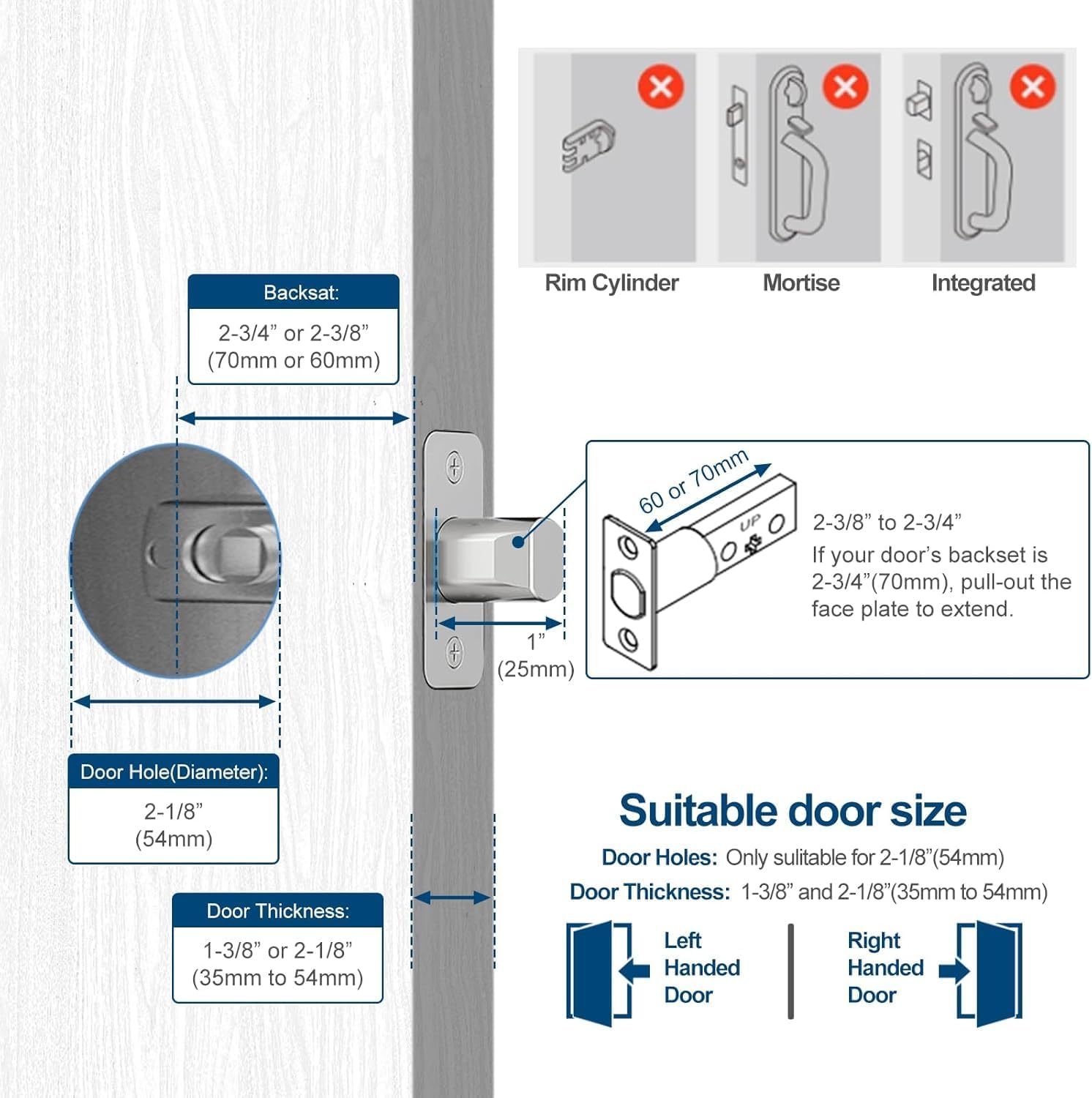
Image: Diagram illustrating required door hole diameter, thickness, and backset measurements for installation.
تنصيب جا مرحلا:
- Remove Existing Hardware: Carefully remove your old deadbolt and any associated hardware.
- Deadbolt Latch انسٽال ڪريو: Insert the new deadbolt latch into the door edge. Ensure it is oriented correctly for your door's swing (left-handed or right-handed). Secure with screws.
- وائر ڳنڍڻ: Connect the wire from the front lock assembly to the wire from the rear lock assembly.
- Install Front and Rear Assemblies: Align the front and rear lock assemblies with the deadbolt latch and secure them to the door using the provided screws. Ensure the wires are not pinched.
- اسٽرائڪ پليٽ انسٽال ڪريو: دروازي جي فريم تي اسٽرائڪ پليٽ لڳايو، ان کي ڊيڊ بولٽ لچ سان ترتيب ڏيو.
- ٽيسٽ آپريشن: هموار آپريشن کي يقيني بڻائڻ لاءِ دستي طور تي لاڪ ۽ ان لاڪ ميڪانيزم جي جانچ ڪريو.
5. سيٽ اپ
ايپ ڊائون لوڊ ۽ ڪنيڪشن:
- Download the dedicated GeekTale app from your smartphone's app store.
- اڪائونٽ ٺاهيو يا لاگ ان ٿيو.
- Follow the in-app instructions to add your F08 Smart Deadbolt Lock. This typically involves selecting the lock model and pairing via Bluetooth.
Video: Guide on how to connect the lock to the app and add fingerprints for control.
فنگر پرنٽ داخلا:
- Within the app, navigate to 'Member Management' or 'Fingerprint Settings'.
- Select 'Add Fingerprint' and follow the on-screen prompts.
- Place your finger on the lock's fingerprint sensor multiple times as instructed until enrollment is complete.
- Test the enrolled fingerprint to ensure it unlocks the deadbolt.

Image: A hand demonstrating the 0.3-second fingerprint recognition speed for unlocking the deadbolt.
استعمال ڪندڙ جو انتظام:
- The app allows you to add, modify, or delete user fingerprints.
- You can assign names to each enrolled fingerprint for easy identification in access logs.
- Access logs can be viewed in the app to track entry and exit times.

Image: A person using the smart app to manage the lock, showing options for user management, Bluetooth unlock, and checking unlock records. A gateway is shown as a separate purchase for remote unlock.
6. آپريٽنگ هدايتون
Unlocking the Deadbolt:
- فنگر پرنٽ ذريعي: Place an enrolled finger on the fingerprint sensor. Once recognized (indicated by a green light), twist the deadbolt knob to unlock.
- By App (Bluetooth): Open the GeekTale app on your smartphone. Ensure Bluetooth is enabled and you are within range (approx. 10 meters). Tap the 'Unlock' button in the app.
- By Physical Key: Insert one of the provided backup keys into the keyhole and turn to unlock.
Video: Demonstrates the three unlocking methods for the F08 Deadbolt Lock: fingerprint, app, and physical key.
Locking the Deadbolt:
- دستي لاڪنگ: From the inside, twist the deadbolt knob to the locked position. From the outside, after closing the door, twist the deadbolt knob to the locked position.
- App Locking (Bluetooth): Open the GeekTale app and tap the 'Lock' button.
- Auto-Lock (Configurable): The lock can be configured via the app to automatically lock after a set period.

Image: Diagram showing the 'Twist to Unlock' and 'Twist to Lock' actions for the keyless entry deadbolt.
7. سار سنڀال
بيٽري چارج ڪرڻ:
- The lock features a built-in rechargeable battery.
- When the battery is low, the lock will provide an audible and visual alert, and the app will display a low battery notification.
- Connect the provided USB charging cable to the charging port on the lock (typically located on the underside of the exterior unit) and to a standard USB power source.
- A full charge takes approximately 2 hours and provides up to 8 months of use.
- In case of a completely drained battery, you can temporarily power the lock using a portable power bank connected via the USB port.

Image: Illustration of the built-in rechargeable battery and low battery alert feature, indicating 30 minutes of charge for 8 months of use.
صفائي:
- تالي جي مٿاڇري کي نرم، ڊي سان صاف ڪريوamp ڪپڙو.
- گھڙڻ وارا صاف ڪندڙ يا محلول استعمال ڪرڻ کان پاسو ڪريو، ڇاڪاڻ ته اهي ختم کي نقصان پهچائي سگهن ٿا.
- بهترين ڪارڪردگي لاءِ فنگر پرنٽ سينسر کي صاف ۽ ملبي کان پاڪ رکو.
8. مسئلا حل ڪرڻ
- لاڪ جواب نه ڏئي رهيو آهي: Check battery level. Recharge if necessary. Ensure the lock is properly installed and all connections are secure.
- آڱرين جي نشان جي سڃاڻپ نه ٿي: Ensure your finger is clean and dry. Try re-enrolling the fingerprint. Ensure the sensor is clean.
- ايپ ڪنيڪشن جا مسئلا: Ensure Bluetooth is enabled on your phone and you are within range of the lock. Restart the app and/or your phone.
- ريموٽ ان لاڪ ڪم نه ڪري رهيو آهي: Verify that the optional gateway is properly installed, connected to Wi-Fi, and paired with the lock. Check internet connectivity.
- ڊيڊ بولٽ مڪمل طور تي نه وڌي رهيو آهي/ پوئتي نه هٽي رهيو آهي: Check for obstructions in the door frame or strike plate. Ensure the deadbolt latch is correctly aligned.
9. وضاحتون
| برانڊ | GeekTale |
| ماڊل نالو | F08 |
| تالا جو قسم | چاٻي کان سواءِ داخلا ڊيڊ بولٽ |
| مواد | المونيم |
| رنگ | ڪارو |
| ڪنيڪشن پروٽوڪول | بلوٽوٿ |
| ڪنٽرول جو طريقو | App, Touch (Fingerprint) |
| شيءِ جو وزن | 0.62 ڪلوگرام (1.37 پائونڊ) |
| بيٽري جو قسم | ليٿيم آئن (ريچارج ٿيندڙ) |
| تجويز ڪيل استعمال | Under an awning residential front doors, back door, garage door |
10. وارنٽي ۽ سپورٽ
GeekTale products are covered by a limited warranty. For specific warranty details, please refer to the warranty card included with your product or visit the official GeekTale webسائيٽ.
For technical support, troubleshooting assistance, or to inquire about replacement parts, please contact GeekTale customer service through their official channels. Contact information can typically be found on the product packaging or the GeekTale webسائيٽ.


