1. تعارف
This manual provides detailed instructions for the installation, operation, and maintenance of the Aigo B760L D4 Motherboard. Please read this manual thoroughly before installing or using the product to ensure proper functionality and to prevent damage.
2. حفاظت جي ڄاڻ
هميشه هيٺ ڏنل حفاظتي احتياطن تي عمل ڪريو:
- Disconnect power before installing or removing any components.
- حساس حصن کي ڇهڻ کان بچڻ لاءِ مدر بورڊ کي ان جي ڪنارن کان هٿ لڳايو.
- Use an anti-static wrist strap to prevent electrostatic discharge (ESD) damage.
- ڪمپيوٽر جي ڪيس اندر مناسب وينٽيليشن کي يقيني بڻايو وڃي ته جيئن گرميءَ کان بچي سگهجي.
- مدر بورڊ کي نمي يا انتهائي گرمي پد جي سامهون نه رکو.
3. پيڪيج مواد
پڪ ڪريو ته سڀئي شيون پيڪيج ۾ موجود آهن:
- Aigo B760L D4 Motherboard
- استعمال ڪندڙ جو دستياب (ھي دستاويز)
- SATA Cables (quantity may vary)
- اي / اي سي جو
- Driver CD/USB (if included)
4. پراڊڪٽ ختمview
The Aigo B760L D4 is an M-ATX motherboard designed for Intel LGA 1700 processors, featuring the Intel B760 chipset. It supports DDR4 memory and offers a range of connectivity options.
4.1 مدر بورڊ لي آئوٽ
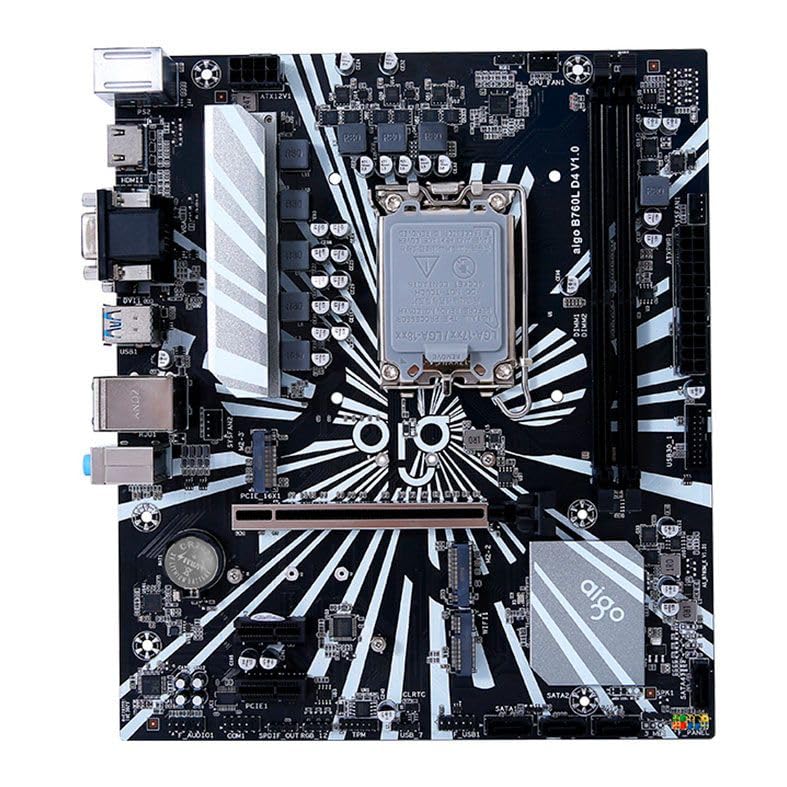
شڪل 1: ختمview of the Aigo B760L D4 Motherboard alongside its retail packaging.

شڪل 2: مٿي کان هيٺ view of the Aigo B760L D4 Motherboard, highlighting component placement.

شڪل 3: زاويه view of the Aigo B760L D4 Motherboard, showing the CPU socket and memory slots.
4.2 ريئر I/O پينل

Figure 4: Rear I/O panel of the Aigo B760L D4 Motherboard, displaying various connectivity ports.
The rear I/O panel includes:
- 1 x PS/2 Keyboard and Mouse port
- 2 x USB 2.0 بندرگاهن
- 4 x USB 3.0 بندرگاهن
- 1 x HDMI پورٽ
- 2 x DVI ports
- 1 x VGA پورٽ
- 1 x RJ45 LAN port
- Audio jacks (Line In, Line Out, Mic In)
5. سيٽ اپ
5.1 سي پي يو انسٽال ڪرڻ
- مدر بورڊ تي LGA 1700 CPU ساکٽ ڳوليو.
- سي پي يو ساڪٽ ليور کوليو ۽ لوڊ پليٽ کي مٿي ڪريو.
- احتياط سان سي پي يو کي ساڪٽ سان ترتيب ڏيو، پڪ ڪريو ته سي پي يو تي ٽڪنڊي نشان ساڪٽ تي نشان سان ملي ٿو.
- سي پي يو کي زور سان دٻائڻ کان سواءِ ساڪٽ ۾ نرميءَ سان رکو.
- Close the load plate and secure it with the lever.
5.2 Installing DDR4 Memory
The motherboard supports up to 64GB of DDR4 memory across two slots, with speeds from 2133 MHz to 3200 MHz in dual-channel configuration.
- DIMM سلاٽ جي ٻنهي پاسن تي ڪلپس کوليو.
- ميموري ماڊيول کي سلاٽ سان ترتيب ڏيو، پڪ ڪريو ته ماڊيول تي نشان سلاٽ ۾ موجود چاٻي سان ملي ٿو.
- ميموري ماڊيول جي ٻنهي پاسن تي مضبوطيءَ سان دٻايو جيستائين ڪلپس پنهنجي جاءِ تي نه اچن.
5.3 Installing Storage Devices
The motherboard features 4 x SATA 3.0 ports and 2 x M.2 NVME Dual-Protocol slots.
5.3.1 SATA Drives
- SATA ڊيٽا ڪيبل جي هڪ ڇيڙي کي مدر بورڊ تي SATA پورٽ سان ڳنڍيو.
- SATA ڊيٽا ڪيبل جي ٻئي ڇيڙي کي پنهنجي SATA هارڊ ڊرائيو يا SSD سان ڳنڍيو.
- پنهنجي پاور سپلائي مان ڊرائيو سان SATA پاور ڪيبل ڳنڍيو.
5.3.2 M.2 NVME Drives
- Locate an M.2 slot on the motherboard.
- M.2 اسٽينڊ آف اسڪرو هٽايو.
- Insert the M.2 NVME drive into the slot at a 30-degree angle.
- Gently push the drive down and secure it with the standoff screw.
5.4 ڳنڍڻ واري طاقت
Connect the 24-pin ATX power connector and the 8-pin ATX 12V power connector from your power supply to the corresponding ports on the motherboard.
5.5 Installing Expansion Cards
The motherboard includes 1 x PCIe x16 slot and 1 x PCIe x1 slot.
- Align your expansion card (e.g., graphics card) with the appropriate PCIe slot.
- Press down firmly until the card is seated correctly in the slot.
- Secure the card with a screw to the computer case.
6. آپريٽنگ
6.1 پهريون بوٽ ۽ BIOS سيٽ اپ
After assembling your system, connect a monitor, keyboard, and mouse. Power on the system. During startup, press the designated key (usually ڊي ايل or F2) to enter the BIOS/UEFI setup utility. Here you can configure boot order, system time, and other advanced settings.
6.2 آپريٽنگ سسٽم جي انسٽاليشن
The Aigo B760L D4 Motherboard supports Windows 10 and Windows 11 operating systems. Insert your OS installation media (USB drive or DVD) and follow the on-screen instructions to install the operating system.
6.3 ڊرائيور لڳائڻ
After OS installation, install the necessary drivers for the chipset, audio, LAN, and other integrated components. These drivers are typically provided on a CD/USB with the motherboard or can be downloaded from the manufacturer's webسائيٽ.
7. سار سنڀال
- صاف رکو: Regularly clean dust from inside your computer case using compressed air. Dust accumulation can lead to overheating.
- BIOS اپڊيٽس: وقتي طور تي ٺاهيندڙ جي چيڪ ڪريو website for BIOS/UEFI updates. Updates can improve stability, compatibility, and performance. Follow update instructions carefully.
- ڊرائيور اپڊيٽ: نئين سافٽ ويئر ۽ هارڊويئر سان بهترين ڪارڪردگي ۽ مطابقت کي يقيني بڻائڻ لاءِ پنهنجن ڊرائيورن کي اپڊيٽ رکو.
- ماحولياتي ڪنٽرول: Operate the system in a cool, dry, and well-ventilated environment.
8. مسئلا حل ڪرڻ
8.1 پاور ناهي
- Ensure the power supply is connected correctly to the motherboard (24-pin and 8-pin ATX 12V).
- Check if the power supply switch is in the "ON" position.
- Verify that the power button on the case is correctly connected to the motherboard's front panel header.
8.2 ڪابه ڊسپلي
- Ensure the monitor is connected to the correct video output (either integrated graphics or a dedicated graphics card).
- گرافڪس ڪارڊ ۽ ميموري ماڊلز کي ٻيهر سيٽ ڪريو.
- Try booting with only one memory module installed.
8.3 سسٽم جي عدم استحڪام / حادثا
- سي پي يو ۽ جي پي يو جي گرمي پد چيڪ ڪريو ته جيئن اهي وڌيڪ گرم نه ٿين.
- Verify that all power connectors are securely attached.
- ناقص رام جي جانچ ڪرڻ لاءِ ميموري تشخيصي اوزار هلايو.
- Ensure BIOS is updated to the latest stable version.
9. وضاحتون
| خاصيت | تفصيل |
|---|---|
| برانڊ | ايگو |
| ماڊل | AIGO-B760L-D4 |
| چپ سيٽ | Intel B760 |
| سي پي يو ساکٽ | LGA 1700 |
| ميموري سلاٽ | 2 x DDR4 DIMM سلاٽ |
| وڌ ۾ وڌ ياداشت جي گنجائش | 64 جي بي |
| ياداشت جي رفتار جي حمايت | 2133 ~ 3200 MHz (Dual Channel) |
| آڊيو انٽرفيس | 1 x HDMI, 2 x DVI, 1 x VGA |
| SATA Slots | 4 x SATA 3.0 |
| M.2 سلاٽ | 2 x M.2 NVME Dual-Protocol |
| USB پورٽ (پوئتي) | 2 x USB 2.0 ، 4 x USB 3.0 |
| توسيع سلاٽ | 1 x PCIe x1، 1 x PCIe x16 |
| آپريٽنگ سسٽم جي حمايت | ونڊوز 10/11 |
| پي ايس / 2 پورٽ | 1 x PS/2 Keyboard and Mouse |
| پاور فيز | 8-مرحلو |
| پاور ڪنيڪٽر | 1 x 24-pin ATX, 1 x 8-pin ATX 12V |
| وائي فائي انٽرفيس | 1 x WiFi interface (PCIe compatible) |
| لين پورٽ | 1 x RJ45 |
| طول و عرض | 24.4 x 21 cm (M-ATX) |
10. وارنٽي ۽ سپورٽ
For warranty information and technical support, please refer to the documentation provided with your purchase or visit the official Aigo webسائيٽ. وارنٽي دعوائن لاءِ خريداري جو ثبوت رکو.