1. تعارف
Thank you for choosing the DOOGEE V40 Rugged Smartphone. This device is engineered for exceptional durability and performance, making it suitable for various demanding conditions. It combines advanced technology with robust construction to provide a reliable mobile experience. This manual will guide you through the setup, operation, and maintenance of your new smartphone.
2. حفاظت جي ڄاڻ
Please read this section carefully before using your device to ensure safe and proper operation. Failure to follow these guidelines may result in injury, damage to the device, or voiding of the warranty.
- پاڻي ۽ مٽي جي مزاحمت: While the DOOGEE V40 is rated IP68, IP69K, and MIL-STD-810H for water, dust, and drop resistance, it is not indestructible. Ensure all port covers are securely closed before exposing the device to water or dust. Avoid prolonged submersion or exposure to high-pressure water jets.
- گرمي پد: Do not expose the device to extreme temperatures (below -40°C or above +70°C). This can damage the battery and internal components.
- بيٽري: Do not attempt to replace the battery yourself. Only authorized service centers should perform battery replacement. Avoid puncturing, heating, or disassembling the battery.
- چارج ڪرڻ: Use only DOOGEE-approved chargers and cables. Unapproved accessories may cause fire, explosion, or other hazards.
- مرمت: Do not attempt to repair the device yourself. Unauthorized repairs will void the warranty and may cause further damage.
- نيڪال: Dispose of the device and its battery responsibly according to local regulations. Do not dispose of them with household waste.
3. پيڪيج مواد
Verify that all items are present in your DOOGEE V40 package:
- 1 x DOOGEE V40 5G Cellphone
- 1 x ٽائپ-سي USB ڪيبل
- 1 x Charger (33W Fast Charger)
- 1 x پيڪنگ باڪس
- 1 x User Manual and Warranty Card
- 1 x Screen Protector Accessories (including thick protective film)

Image: Contents included in the DOOGEE V40 retail box.
4. پراڊڪٽ ختمview
Familiarize yourself with the physical components and key features of your DOOGEE V40 Rugged Smartphone.

تصوير: اڳيان ۽ پوئتي view of the DOOGEE V40 Rugged Smartphone.
4.1 اهم اجزاء
- ڏيکاريو: 6.78-inch FHD+ IPS display with 120Hz refresh rate for smooth visuals and responsive touch.
- پوئين ڪئميرا سسٽم: Features a 108MP main camera, 20MP night vision camera, and an 8MP ultra-wide/macro camera.
- سامهون ڪئميرا: 16MP Ultra HD front camera for high-quality selfies and video calls.
- پاسي تي لڳل فنگر پرنٽ سينسر: جلدي ۽ محفوظ ان لاڪنگ لاءِ پاور بٽڻ ۾ ضم ٿيل.
- USB قسم-سي پورٽ: چارج ڪرڻ ۽ ڊيٽا جي منتقلي لاء.
- سم/ٽي ايف ڪارڊ سلاٽ: Supports dual 5G SIM cards and a TF card for expandable storage up to 2TB.
4.2 Core Technologies

Image: Illustration of the 4nm MediaTek Dimensity 7300 Octa-core 5G Chip.
- پروسيسر: Powered by the 4nm MediaTek Dimensity 7300 Octa-core 5G chip, ensuring powerful performance and energy efficiency.
- ياداشت ۽ ذخيرو: Equipped with 12GB Basic RAM (expandable to 32GB with virtual expansion) and 512GB ROM, supporting up to 2TB TF card expansion.

Image: Visual representation of the 12GB RAM and 512GB ROM with expansion capabilities.
- بيٽري: A large 8680mAh battery provides extended usage, complemented by 33W fast charging.
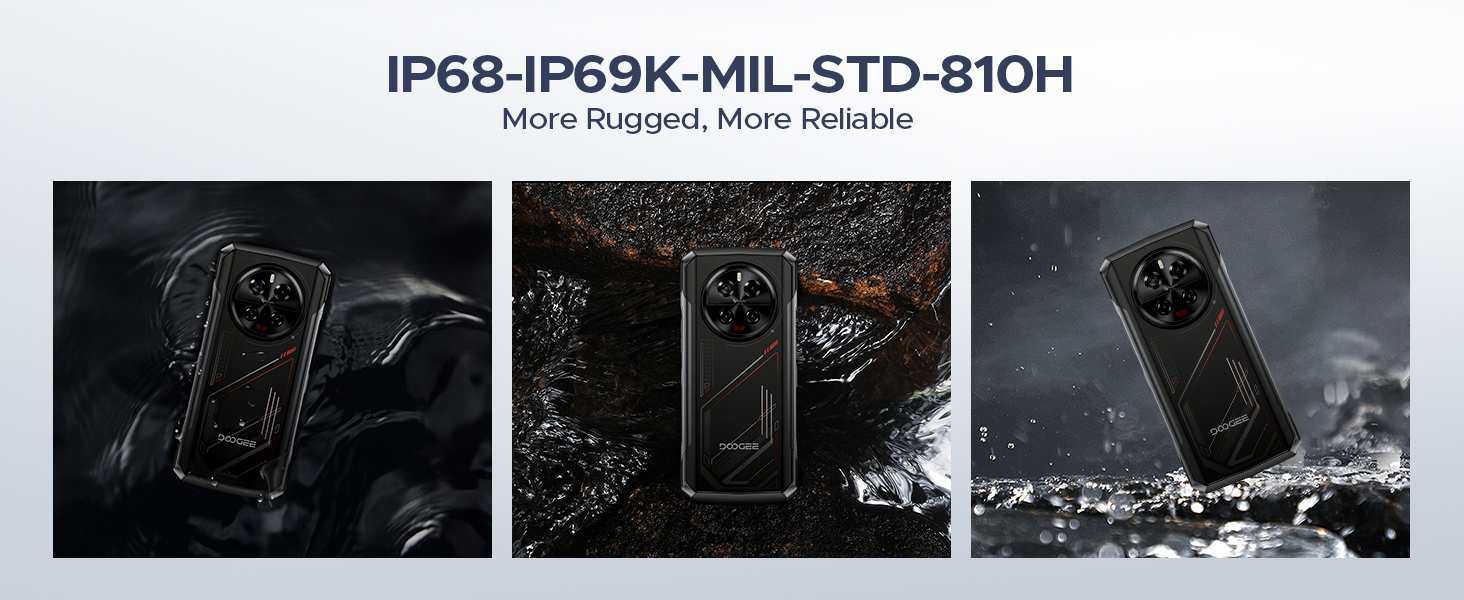
Image: The 8680mAh large battery with 33W fast charging capability.
- آپريٽنگ سسٽم: Runs on the latest Android 14 with DOOGEE OS 4.0, offering enhanced features like Game Mode, App Cloning, and Dynamic Capsule.

تصوير: مٿانview of the new DOOGEE OS 4.0 based on Android 14.
4.3 پائيداري خاصيتون

Image: The DOOGEE V40 demonstrating its IP68, IP69K, and MIL-STD-810H durability in various environments.
The DOOGEE V40 is built to withstand harsh conditions, certified with:
- پي 68: پاڻي ۽ مٽي مزاحمتي.
- IP69K: Resistant to high-pressure, high-temperature water jets.
- مل-ايس ٽي ڊي-810 ايڇ: ڦاٽن، جھٽڪن، ۽ انتهائي گرمي پد جي خلاف فوجي گريڊ جي پائيداري.
5. سيٽ اپ
5.1 سم ۽ ٽي ايف ڪارڊ جي انسٽاليشن
- ڊوائيس جي پاسي تي سم ڪارڊ ٽري ڳوليو.
- سم ايجيڪٽر ٽول (يا هڪ ننڍڙي پيپر ڪلپ) کي ٽري جي ڀرسان ننڍڙي سوراخ ۾ داخل ڪريو ۽ مضبوطيءَ سان دٻايو جيستائين ٽري ٻاهر نه اچي.
- احتياط سان ٽري ڪڍو.
- Place your Nano-SIM cards and/or TF card into the designated slots on the tray. Ensure the gold contacts are facing down and the cards are correctly oriented.
- نرميءَ سان ٽري کي سلاٽ ۾ واپس ڌڪيو جيستائين اهو ڊوائيس سان فلش نه ٿئي.
5.2 شروعاتي پاور آن ۽ سيٽ اپ مددگار
- Press and hold the Power button (located on the side) until the DOOGEE logo appears.
- Follow the on-screen instructions to complete the initial setup. This typically includes selecting your language, connecting to a Wi-Fi network, setting up your Google account, and configuring security features like fingerprint or Face ID.
5.3 ڊوائيس چارج ڪرڻ
Before first use, it is recommended to fully charge your DOOGEE V40. Connect the provided Type-C USB cable to the phone's charging port and the other end to the 33W fast charger. Plug the charger into a power outlet. The battery indicator on the screen will show the charging status.
6. آپريٽنگ هدايتون
6.1 بنيادي نيويگيشن
- ٽچ اسڪرين اشارو: چونڊڻ لاءِ ٽيپ ڪريو، اسڪرول ڪرڻ لاءِ سوائپ ڪريو، زوم ڪرڻ لاءِ پنچ ڪريو.
- پاور بٽڻ: Press to wake/sleep the screen, press and hold to power off or restart.
- حجم بٽڻ: ميڊيا جي مقدار، ڪال جي مقدار، ۽ رنگ ٽون جي مقدار کي ترتيب ڏيو.
6.2 ڪال ۽ پيغام
- ڪال ڪرڻ: فون ايپ کوليو، نمبر داخل ڪريو، ۽ ڪال آئڪن تي ٽيپ ڪريو.
- پيغام موڪلڻ: Open the Messages app, start a new conversation, enter the recipient and your message.
6.3 ڪئميرا جو استعمال
The DOOGEE V40 features a versatile camera system:

تصوير: مٿانview of the DOOGEE V40's camera system and Morpho Imaging Algorithm.
- ڪئميرا ايپ کوليو: پنهنجي هوم اسڪرين يا ايپ ڊراور تي ڪئميرا آئڪن تي ٽيپ ڪريو.
- مٽائڻ جا طريقا: Swipe left or right on the screen to switch between Photo, Video, Night Vision, Macro, and other modes.
- تصويرون/ وڊيوز ڪڍو: تصوير ڪڍڻ يا وڊيو رڪارڊنگ شروع ڪرڻ/بند ڪرڻ لاءِ شٽر بٽڻ کي دٻايو.
- وڏو ڪريو: Pinch in or out on the screen to adjust zoom.
Video: DOOGEE V40 Android 14 Rugged Smartphone, Gaming Phone. This video demonstrates the phone's performance and gaming capabilities.
Video: DOOGEE V40 Rugged Phone, 200MP AI Camera+20MP Night Vision. This video highlights the advanced camera features of the phone.
6.4 ڪنيڪشن
- وائي فائي: Connect to Wi-Fi networks via Settings > Network & internet > Wi-Fi. Supports Wi-Fi 6E for fast and stable connections.
- بلوٽوٿ: Pair with Bluetooth devices via Settings > Connected devices > Bluetooth. Supports Bluetooth 5.4.
- اين ايف سي: Enable NFC for contactless payments (Google Pay) and quick data sharing via Settings > Connected devices > Connection preferences > NFC.
6.5 سيڪيورٽي خاصيتون
- فنگر پرنٽ انلاڪ: Register your fingerprints via Settings > Security & privacy > Device unlock > Fingerprint unlock.
- منهن جي سڃاڻپ: Set up face recognition for convenient unlocking via Settings > Security & privacy > Device unlock > Face unlock.
6.6 بيٽري جو انتظام
- پاور بچائڻ جو طريقو: Activate battery saver to extend battery life when needed via Settings > Battery > Battery Saver.
- Reverse Charging (OTG): Use your DOOGEE V40 as a power bank to charge other devices. Connect the devices using an OTG cable.

Image: The DOOGEE V40's OTG reverse charging capability, allowing it to charge other devices.
6.7 DOOGEE OS 4.0 Features
- Game Mode (No Disturb): Optimize your gaming experience by minimizing distractions.
- ايپ ڪلوننگ: Run multiple instances of the same app, useful for managing different accounts.
- Drama Mode (Video): Enhance video viewتجربو.
- متحرڪ ڪيپسول: Provides quick access to notifications and system information.
7. سار سنڀال
Proper maintenance will extend the lifespan of your DOOGEE V40.
- صفائي: Use a soft, lint-free cloth to clean the screen and body. For stubborn dirt, slightly dampپاڻي سان ڪپڙو. سخت ڪيميڪلز يا رگڙيندڙ مواد کان پاسو ڪريو.
- سافٽ ويئر اپڊيٽ: Regularly check for and install system updates via Settings > System > System update. Updates provide new features, security patches, and performance improvements.
- بيٽري جي سنڀال: Avoid fully discharging the battery frequently. For long-term storage, charge the device to about 50% and store it in a cool, dry place.
- اسٽوريج جو انتظام: وقتي طور تي غير ضروري صاف ڪريو fileاسٽوريج جي جاءِ خالي ڪرڻ ۽ بهترين ڪارڪردگي برقرار رکڻ لاءِ.
8. مسئلا حل ڪرڻ
If you encounter issues with your DOOGEE V40, try the following solutions before contacting support:
| مسئلو | ممڪن حل |
|---|---|
| ڊوائيس آن نه ٿيندي | Ensure the battery is charged. Connect to the charger and wait a few minutes before attempting to power on again. If it still doesn't turn on, try holding the Power button for 10-15 seconds. |
| بيٽري جلدي ختم ٿي ويندي آهي | Close unused apps running in the background. Reduce screen brightness. Turn off Wi-Fi, Bluetooth, or GPS when not in use. Check battery usage in Settings to identify power-hungry apps. |
| ايپس ڪريش ٿي رهيون آهن يا منجمد ٿي رهيون آهن | Restart the app. Clear the app's cache and data (Settings > Apps > [App Name] > Storage > Clear cache/Clear data). Update the app to the latest version. If the problem persists, uninstall and reinstall the app. |
| Cannot connect to Wi-Fi/Mobile Network | Restart the device. Toggle Wi-Fi/Mobile Data off and on. Check if Airplane Mode is enabled. For Wi-Fi, restart your router. For mobile network, ensure SIM card is properly inserted and you have signal. |
| فنگر پرنٽ سينسر ڪم نه ڪري رهيو آهي | پڪ ڪريو ته توهان جي آڱر صاف ۽ سڪل آهي. سيٽنگون ۾ پنهنجا فنگر پرنٽس ٻيهر رجسٽر ڪريو. |
| ڊوائيس سست يا غير جوابده آهي | Clear cache, uninstall unnecessary apps, and free up storage space. Restart the device. As a last resort, perform a factory reset (back up your data first). |
Video: DOOGEE V40 5G Rugged Phone, 36GB+512GB Android 14. This video showcases the phone's overall performance and features.
9. وضاحتون
Detailed technical specifications for the DOOGEE V40 Rugged Smartphone:
| خاصيت | تفصيل |
|---|---|
| ماڊل نالو | V40 Rugged Smartphone Unlocked 5G |
| آپريٽنگ سسٽم | Android 14 |
| سي پي يو ماڊل | MediaTek Dimensity 7300 Octa-core (4nm) |
| رام | 12GB (expandable to 32GB) |
| اندروني اسٽوريج (ROM) | 512 جي بي |
| وسعت وارو اسٽوريج | TF ڪارڊ ذريعي 2TB تائين |
| ڊسپلي سائيز | 6.78 انچ |
| ڊسپلي قرارداد | 2560 x 1440 (ايف ايڇ ڊي+) |
| ريفريش جي شرح | 120 هز |
| مکيه ڪئميرا | 108MP |
| نائيٽ ويزن ڪيمرا | 20MP |
| الٽرا وائڊ / ميڪرو ڪئميرا | 8MP |
| سامهون ڪئميرا | 16MP |
| بيٽري جي گنجائش | 8680mAh |
| چارج ڪرڻ | 33W فاسٽ چارجنگ |
| پائيداري جي درجه بندي | IP68، IP69K، MIL-STD-810H |
| رابطي | 5G, Dual SIM, Wi-Fi 6E, Bluetooth 5.4, NFC |
| شيءِ جو وزن | 13.3 اونس |
| رنگ | ڳاڙهو |
Video: DOOGEE V40 Rugged Smartphone 5G Unlocked, NFC/WiFi 6E/Face ID. This video highlights the connectivity and security features.
10. وارنٽي ۽ سپورٽ
Your DOOGEE V40 Rugged Smartphone comes with a limited warranty. Please refer to the 'Manual and Warranty Card' included in your package for detailed terms and conditions, including warranty period and coverage.
For technical support, troubleshooting assistance, or warranty claims, please visit the official DOOGEE website or contact their customer service. Keep your purchase receipt as proof of purchase for warranty services.
Video: DOOGEE V40 Rugged Phone 5G, Android 14 Rugged Smartphone. This video provides a general overview of the phone's capabilities.
Video: DOOGEE V40 Rugged SmartPhone Unlocked with 1.47" Rear Screen. This video highlights the unique rear screen feature.


