تعارف
The Hiicam Speed 60 is a high-performance action camera designed to capture your adventures in stunning 4K resolution. Featuring a 48MP photo sensor, dual screens including a 2.35-inch HDR touch screen, advanced EIS 2.0 stabilization, and built-in 5G Wi-Fi, this camera is built for dynamic environments. It is natively waterproof up to 10 meters (33 feet) and can be used with an external waterproof housing for depths up to 40 meters (131 feet).

Figure 1: Hiicam Speed 60 Action Camera and included batteries.
دٻي ۾ ڇا آهي
پڪ ڪريو ته سڀئي شيون توهان جي پيڪيج ۾ موجود آهن:
- 1 x Hiicam Speed 60 Action Camera
- 2 x 2150 mAh Batteries
- 1 X بيٽري چارجر
- 1 x USB ڪيبل
- 1 x پنروڪ ڪيس
- 1 x Wireless Mic & Remote
- Various Mounts and Accessories (Buckle Mount, AE Mount, C Mount, D Mount, F Mount, H Mount, Helmet Mount)
- Double-Sided Adhesive Pads
- تار جو رس
- پٽيون
- 1 x استعمال ڪندڙ دستياب
- 1 x لينس ڪپڙو
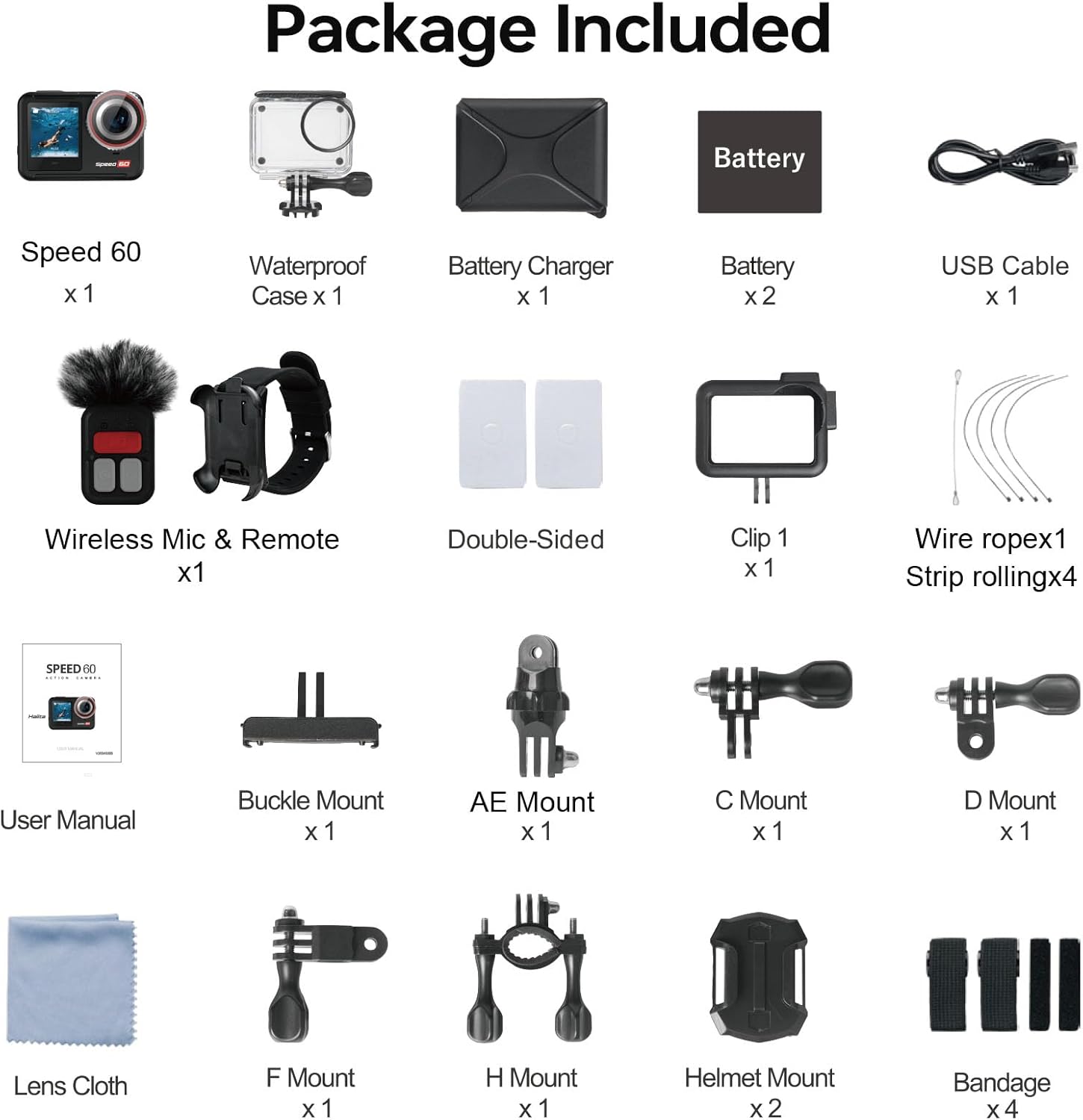
Figure 2: Complete package contents of the Hiicam Speed 60.
سيٽ اپ ڪريو
1. بيٽري لڳائڻ ۽ چارج ڪرڻ
The Speed 60 comes with two 2150 mAh lithium-ion batteries. For optimal performance, fully charge both batteries before first use.
- ڪئميرا تي بيٽري جي ڪمپارٽمينٽ جو ڍڪ کوليو.
- Insert a charged battery, ensuring the contacts align correctly.
- بيٽري جي ڪمري واري ڍڪ کي محفوظ طور تي بند ڪريو.
- To charge batteries, use the included battery charger and USB-C cable. The charger supports sequential charging of both batteries.

Figure 3: Battery charging and capacity.
2. ميموري ڪارڊ داخل ڪرڻ
The camera supports SD flash memory cards. A high-speed (U3 or V30 recommended) microSD card is required for 4K video recording.
- ڪئميرا جي پاسي تي مائڪرو ايس ڊي ڪارڊ سلاٽ ڳوليو.
- مائڪرو ايس ڊي ڪارڊ داخل ڪريو رابطن کي ڪئميرا جي سامهون واري پاسي سان جيستائين اهو جاءِ تي ڪلڪ نه ڪري.
- ڪڍڻ لاءِ، ڪارڊ کي نرميءَ سان دٻايو جيستائين اهو ٻاهر نه اچي.
آپريٽنگ هدايتون
بنيادي ڪنٽرول
- پاور بٽڻ: Press and hold to turn the camera on/off. Short press to switch modes (Video, Photo, Playback).
- شٽر بٽڻ: Press to start/stop recording video or take a photo.
- ٽچ اسڪرين: Navigate menus and settings by swiping and tapping on the 2.35-inch rear touch screen.

Figure 4: Touch screen operation for intuitive control.
Video Recording (4K60FPS, EIS 2.0, HDR)
The Speed 60 captures video at up to 4K resolution at 60 frames per second (FPS). Ensure EIS 2.0 (Electronic Image Stabilization) is enabled for smooth footage, especially during dynamic activities.
- Navigate to Video mode using the Power button or touch screen.
- Access video settings to select resolution (e.g., 4K/60FPS), enable EIS 2.0, and activate HDR for improved dynamic range.
- رڪارڊنگ شروع ڪرڻ لاءِ شٽر بٽڻ دٻايو. روڪڻ لاءِ ٻيهر دٻايو.

Figure 5: EIS 2.0 for stable video recording.

Figure 6: HDR function for vivid and detailed images.
Photo Capture (48MP)
Capture high-resolution still images up to 48 megapixels.
- ڦوٽو موڊ ڏانھن تبديل ڪريو.
- Adjust photo settings as needed (e.g., resolution, wide-angle).
- ڦوٽو ڪڍڻ لاءِ شٽر بٽڻ کي دٻايو.

Figure 7: High-resolution video and photo capabilities.
پنروڪ استعمال
The Speed 60 is natively waterproof to 10 meters (33 feet) without an additional case. For deeper dives up to 40 meters (131 feet), use the included waterproof housing.
- Before using underwater, ensure all port covers are securely closed.
- When using the waterproof housing, ensure the seal is clean and free of debris, and the latch is fully secured.

Figure 8: Waterproof camera for underwater adventures.
Wi-Fi Connectivity and App
Connect your Speed 60 to your smartphone via built-in 5G Wi-Fi for easy file منتقلي ۽ ريموٽ ڪنٽرول.
- Download the official Hiicam app from your device's app store.
- On the camera, enable Wi-Fi from the settings menu.
- پنهنجي اسمارٽ فون تي، ڪئميرا جي وائي فائي نيٽ ورڪ سان ڳنڍيو.
- Open the Hiicam app to view زنده فوtage, control recording, and download photos/videos.

Figure 9: Seamless sharing via 5G Wi-Fi.
ڊجيٽل زوم
The camera features a 5X digital zoom to get closer to your subject.
- While in video or photo mode, use the zoom controls on the touch screen to adjust the magnification.

Figure 10: 5X Digital Zoom capability.
ريموٽ ڪنٽرول
Use the included wireless remote control for convenient operation from a distance.
- Ensure the remote control is paired with the camera (refer to the full user manual for pairing instructions).
- Use the remote to start/stop recording or take photos without touching the camera.
سار سنڀال
ڪئميرا ۽ لينس کي صاف ڪرڻ
- Use the provided lens cloth to gently clean the camera lens and screens.
- ضدي داغن لاءِ، ٿورو ڊيampپاڻي سان ڪپڙو. سخت ڪيميڪلز کان پاسو ڪريو.
- The camera features a removable anti-fog lens protector for easy cleaning and replacement.

Figure 11: Removable lens protector and other features for maintenance.
بيٽري جي سنڀال
- بيٽرين کي ٿڌي، سڪل جاءِ تي ذخيرو ڪريو جڏهن استعمال ۾ نه هجي.
- بيٽرين جي عمر وڌائڻ لاءِ انهن کي بار بار مڪمل طور تي چارج ڪرڻ کان پاسو ڪريو.
- Use only the original Hiicam charger and batteries.
Waterproof Seal Care
- After each use in water, rinse the camera (if bare) or waterproof housing with fresh water.
- Allow to air dry completely before opening any compartments.
- Regularly inspect the rubber seals for any dirt, sand, or damage. Clean them gently if necessary.
مشڪلاتون
ڪئميرا آن نه ٿي رهيو آهي
- پڪ ڪريو ته بيٽري مڪمل طور تي چارج ٿيل آهي ۽ صحيح طرح سان داخل ڪئي وئي آهي.
- جيڪڏهن موجود هجي ته ٻي چارج ٿيل بيٽري آزمايو.
- گهٽ ۾ گهٽ 5 سيڪنڊن لاءِ پاور بٽڻ کي دٻايو ۽ رکو.
Poor Video/Photo Quality
- Clean the camera lens and lens protector.
- Ensure sufficient lighting conditions.
- Check if EIS 2.0 is enabled for video stabilization.
- Verify that the correct resolution and frame rate settings are selected.
- Use a high-speed microSD card (U3 or V30).
وائي فائي ڪنيڪشن جا مسئلا
- پڪ ڪريو ته ڪئميرا تي وائي فائي فعال آهي.
- ڪئميرا ۽ پنهنجي اسمارٽ فون ٻئي ٻيهر شروع ڪريو.
- Make sure you are within range of the camera's Wi-Fi signal.
- Try forgetting the network on your phone and reconnecting.
وضاحتون
| خاصيت | تفصيل |
|---|---|
| ماڊل نمبر | رفتار 60 |
| وڊيو ڪيپچر ريزوليوشن | 4K (up to 60FPS) |
| فوٽو حل | 48 ايم پي |
| تصوير جي استحڪام | EIS 2.0 (Electronic Image Stabilization) |
| Waterproof Depth (Bare) | 10 ميٽر (33 فوٽ) |
| Waterproof Depth (with Housing) | 40 ميٽر (131 فوٽ) |
| ڏيکاريو | 2.35-inch HDR Touch Screen (rear), 1.4-inch Front Screen |
| رابطي | 5G وائي فائي |
| بيٽري جي گنجائش | 2 x 2150 mAh Lithium Ion |
| ڊجيٽل زوم | 5X |
| طول و عرض | 2.9 x 6.99 x 3.51 سينٽي |
| وزن | 890 جي |
| فليش ميموري جو قسم | SD (MicroSD recommended) |
وارنٽي ۽ سپورٽ
Hiicam provides a warranty for its products. To activate your extended warranty and access online service, please scan the QR code provided on the battery packaging or visit the official Hiicam support page.
For further assistance, troubleshooting, or to contact customer support, please refer to the full user manual or visit the Hiicam official webسائيٽ.

Figure 12: Scan QR code on battery for extended warranty and service.
لاڳاپيل لنڪ: Activate Extended Warranty / Online Service


