1. تعارف
This manual provides detailed instructions for the HOU Keyboard Case designed for the iPad Pro 13-inch M5/M4 models. Please read this manual carefully before use to ensure proper operation and to maximize the product's lifespan.
1.1 مطابقت
This keyboard case is specifically designed for the iPad Pro 13-inch M5/M4 (2025 models). Compatible iPad models include: A2925، A2926، A3007.
Important: This case is NOT compatible with iPad Air 13 (M2) 2024 (models A2898, A2899, A2900) or iPad Pro 12.9-inch (2017-2022) (6th/5th/4th/3rd/2nd/1st generation).
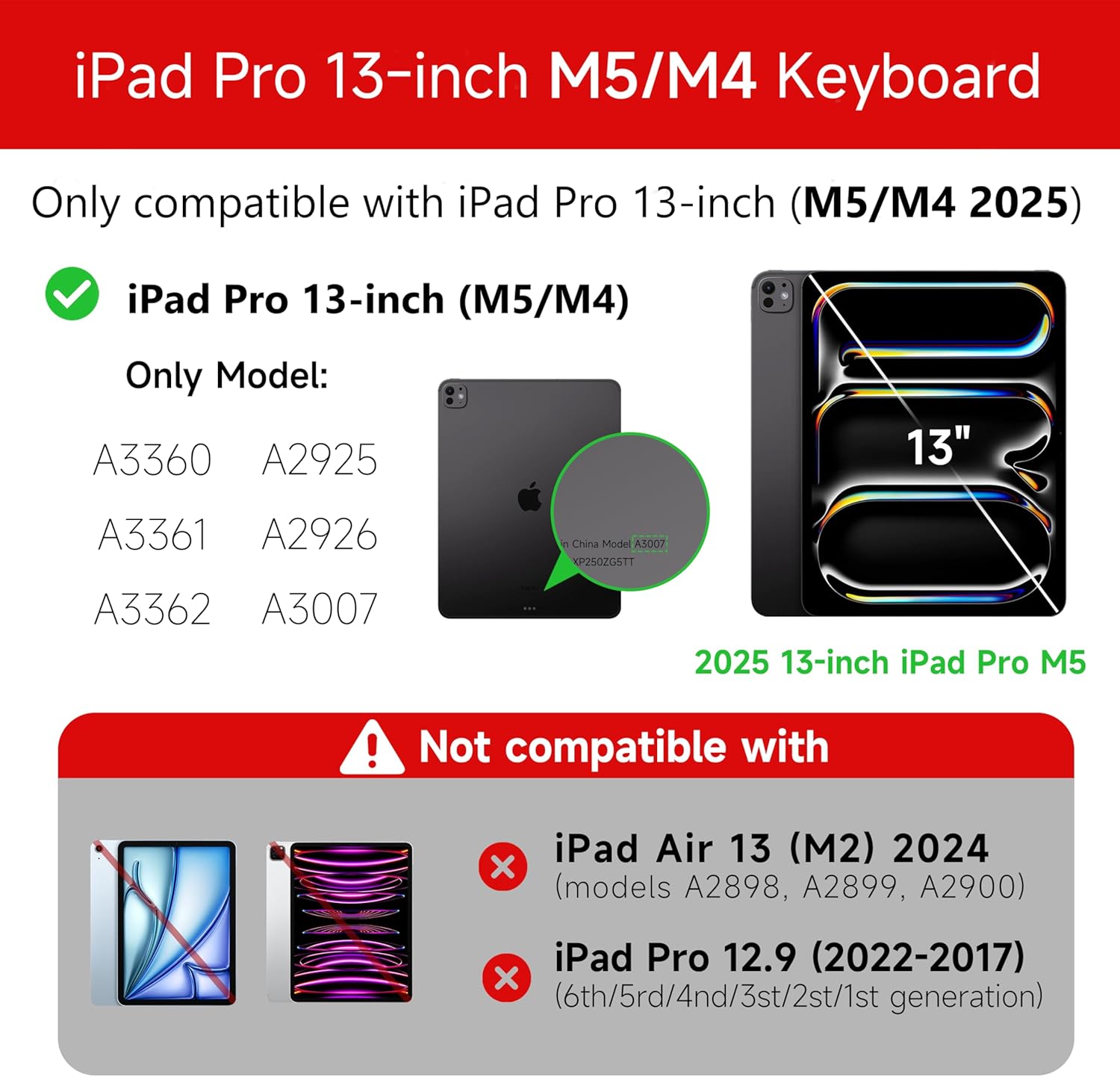
Figure 1: Compatibility details for the HOU iPad Pro 13-inch Keyboard Case.
2. سيٽ اپ
2.1 ڪي بورڊ کي چارج ڪرڻ
Before initial use, fully charge the keyboard. Connect the provided USB-C cable to the charging port on the keyboard and to a power source. The charging indicator light will show the charging status.
- چارج پورٽ: ٽائپ-سي
- چارج ڪرڻ وقت: Approximately <2 hours
- بيٽري جي گنجائش: 500mAh
2.2 توهان جي iPad پرو کي ڳنڍڻ
The keyboard case features a magnetic design for secure attachment. Align your iPad Pro 13-inch with the magnetic back panel of the case. The strong magnets will securely hold your iPad in place, providing stability.

Figure 2: Magnetic attachment for secure iPad placement.
2.3 بلوٽوٿ ڪنيڪشن
To connect the keyboard to your iPad Pro via Bluetooth:
- پڪ ڪريو ته ڪيبورڊ چارج ٿيل آهي ۽ پاور آن آهي.
- پنهنجي iPad تي، وڃو سيٽنگون > بلوٽوت ۽ بلوٽوٿ آن ڪريو.
- ڪيبورڊ تي، دٻايو ۽ رکو ايف اين + ڪنٽرول + آر for 3 seconds until the indicator light flashes, indicating pairing mode.
- On your iPad, select the keyboard from the list of available devices (e.g., "HOU Keyboard").
- Once connected, the indicator light on the keyboard will stop flashing.
After the initial connection, the keyboard should automatically reconnect to your iPad when both devices are powered on and Bluetooth is enabled.
3. آپريٽنگ هدايتون
3.1 ترتيب ڏيڻ وارو Viewاننگز
The keyboard case features a floating design that allows for angle adjustment up to 135 degrees. The keyboard base opens at a 45-degree angle, providing enhanced stability for various viewing and typing positions.
شڪل 3: ترتيب ڏيڻ وارو viewing angle up to 135 degrees.
3.2 بيڪ لائيٽ فنڪشن
The keyboard features an adaptive backlight with 7 different colors and 3 adjustable brightness levels. This allows for comfortable typing in various lighting conditions, including low-light environments.

Figure 4: Keyboard backlight in use for typing at night.
3.3 ملٽي ٽچ ٽريڪ پيڊ
The integrated multi-touch trackpad supports full-area press and various swipe gestures, transforming your iPad into a laptop-like experience. It provides responsive controls for scrolling, dragging, input, and media control.
Adjusting Trackpad Sensitivity: You can adjust the trackpad sensitivity directly from your iPad's settings to match your personal preference.
- ڏانهن وڃو سيٽنگون توهان جي iPad تي.
- ڏانهن وڃو پهچ.
- Find and adjust ٽريڪنگ حساسيت.

Figure 5: Multi-touch trackpad functionality and sensitivity adjustment.
3.4 شارٽ ڪٽ ڪيز
The keyboard includes a series of shortcut keys to boost productivity. Refer to the keyboard layout for specific functions.
4. سار سنڀال
The exterior of the keyboard case is made from a semi-silicone material, which is wear-resistant and designed to resist fingerprints and stains, making it easy to clean.
- To clean, gently wipe the surface with a soft, damp ڪپڙو.
- سخت ڪيميڪلز يا رگڙيندڙ مواد استعمال ڪرڻ کان پاسو ڪريو، ڇاڪاڻ ته اهي ختم کي نقصان پهچائي سگهن ٿا.
- Ensure the charging port and keys are free from dust and debris.
5. مسئلا حل ڪرڻ
5.1 ڪي بورڊ بلوٽوٿ ذريعي ڳنڍي نه رهيو آهي
- پڪ ڪريو ته ڪيبورڊ مڪمل طور تي چارج ٿيل آهي.
- پڪ ڪريو ته توهان جي iPad تي بلوٽوٿ فعال آهي.
- Re-enter pairing mode on the keyboard by pressing and holding ايف اين + ڪنٽرول + آر 3 سيڪنڊن لاء.
- Forget the device in your iPad's Bluetooth settings and attempt to pair again.
- پنهنجو iPad ۽ ڪيبورڊ ٻئي ٻيهر شروع ڪريو.
5.2 Trackpad Lag or Unresponsiveness
- This can sometimes occur due to Bluetooth connectivity. Try turning the keyboard off and then back on.
- Ensure there are no obstructions between the keyboard and the iPad that might interfere with the Bluetooth signal.
- Check for any available iPadOS updates, as software improvements can sometimes resolve connectivity issues.
5.3 بيڪ لائيٽ ڪم نه ڪري رهي آهي
- پڪ ڪريو ته ڪيبورڊ ۾ ڪافي بيٽري چارج آهي.
- Check the keyboard's function keys for backlight control (usually a dedicated key or Fn combination).
6. وضاحتون
| خاصيت | تفصيل |
|---|---|
| برانڊ | ايڇ او يو |
| مطابقت رکندڙ ڊوائيسز | 2025 (M4/M5) iPad Pro 13-inch (A2925/A2926/A3007) |
| رابطي ٽيڪنالاجي | بلوٽوٿ 5.2 |
| ڪي بورڊ جي وضاحت | Multi-functional with Trackpad |
| سفارش ٿيل استعمال | ذاتي |
| خاص خاصيتون | Trackpad, Backlit, Hot Keys & Media Keys, Rechargeable, Lightweight |
| رنگ | اڇو |
| Backlight رنگ | 7 RGB رنگ |
| پيداوار جي ماپ (L x W x H) | 32 x 24.2 x 2.7 سينٽي |
| مواد | Aluminum, Metal, ABS, Polyurethane (PU), Semi-silicone |
| شيءِ جو وزن | 1.1 ڪلوگرام |
| طاقت جو ذريعو | بيٽري سان هلندڙ |
| بيٽري جي گنجائش | ~500mAh |
| آپريٽنگ موجوده | <10mA |
| اسٽينڊ بائي ٽائيم | ≥ 30 ڏينهن |
| آپريٽنگ فاصلو | ≤10 م |
7. سپورٽ
For any questions or further assistance, please contact the seller directly through your Amazon account:
- پنهنجي Amazon اڪائونٽ ۾ لاگ ان ڪريو.
- Go to "Order History".
- Locate your order for the HOU iPad Pro 13-inch Keyboard Case.
- "وڪرو ڪندڙ سان رابطو ڪريو" تي ڪلڪ ڪريو.


