1. تعارف
The BOYA BY-V10 is a compact and lightweight wireless lavalier microphone system designed for use with USB-C compatible devices, including Android smartphones, iPhone 15/16, iPads, and laptops. It offers high-quality audio recording with features like one-click noise cancellation and stable wireless transmission, making it suitable for various content creation scenarios.

Image: The BOYA BY-V10 USB-C Wireless Lavalier Microphone system, showing the transmitter and receiver.
وڊيو: هڪ اوورview of the BOYA BY-V10 Wireless Microphone, highlighting its ease of use for recording.
2. دٻي ۾ ڇا آهي
پڪ ڪريو ته سڀئي جزا توهان جي پيڪيج ۾ موجود آهن:
- 1 x ٽرانسميٽر (TX)
- 1 x Receiver (RXU) with USB-C connector
- 1 x USB-A کان USB-C چارجنگ ڪيبل
- 1 x فوم ونڊ اسڪرين
- 1 x کڻندڙ بيگ
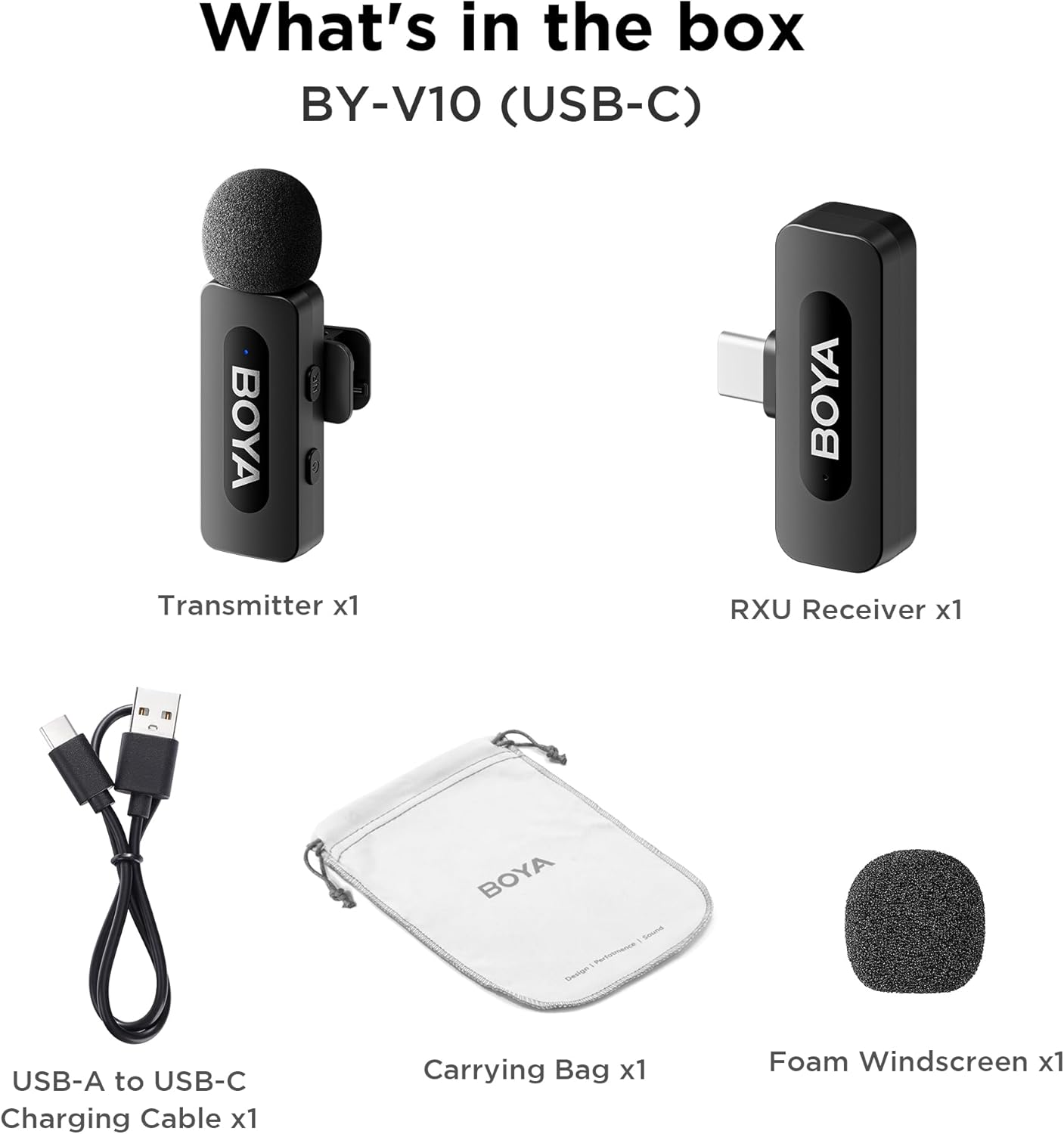
Image: The complete packing list for the BY-V10, showing all included accessories.
Video: An unboxing video demonstrating the contents of the BOYA BY-V Wireless Lavalier Microphone package.
3. سيٽ اپ گائيڊ
3.1 شروعاتي چارجنگ
Before first use, ensure the transmitter is fully charged using the provided USB-A to USB-C charging cable. The receiver does not require charging as it draws power directly from your connected device.

Image: Battery life and charging details for the BY-V10 transmitter.
3.2 توهان جي ڊوائيس سان ڳنڍڻ
- Press and hold the power button on the Transmitter (TX) for 2 seconds to turn it on. The indicator light will blink.
- Plug the Receiver (RXU) directly into the USB-C port of your smartphone, iPad, or laptop.
- The Transmitter and Receiver will automatically pair within 10 seconds. The indicator light on both units will turn solid blue once successfully paired.
- Android استعمال ڪندڙن لاء نوٽ: Enable the "OTG" function in your device's settings before connecting the USB Type-C microphone.

Image: Visual instructions for the plug-and-play setup process.
3.3 ڊوائيس مطابقت
The BY-V10 is compatible with devices featuring a USB-C port, including:
- Android اسمارٽ فونز
- آئي فون 15/16 ماڊل
- iPads with USB-C
- Laptops with USB-C
Please ensure your device supports external USB-C audio input.

Image: Visual representation of compatible devices for the BY-V10 microphone.
4. آپريٽنگ هدايتون
4.1 Wearing the Microphone
The transmitter features a 360° rotatable clip for easy attachment to your clothing. For optimal sound capture, clip the microphone approximately 6-8 inches from your mouth.

Image: The compact size and clip-on design of the BY-V10 transmitter.
4.2 One-Click Noise Cancellation
To activate or deactivate the noise reduction mode, press the 'NR' button on the side of the transmitter. The indicator light will change to static green when noise reduction is enabled, and blink blue slowly when muted.

Image: Visual comparison of audio with and without noise cancellation enabled.

Image: Detailed explanation of the noise cancellation button and indicator lights.
4.3 خاموش فنڪشن
To mute the microphone, briefly press the power button on the transmitter. The indicator light will blink blue slowly. Press again to unmute.
4.4 ٽرانسميشن رينج
The BY-V10 offers a stable audio signal transmission range of up to 100 meters (328 feet) in open environments without obstacles or interference.

Image: Demonstration of the microphone's long-distance transmission capability.

Image: Further illustration of the extended transmission range.
4.5 رڪارڊنگ دوران چارج
The receiver allows you to charge your phone or connected device while recording, ensuring uninterrupted long sessions for streaming or course recording.

Image: The receiver connected to a smartphone, illustrating the ability to charge the phone during recording.

Image: Another visual of the 'Support Using While Charging' feature.
5. سار سنڀال
To ensure the longevity and optimal performance of your BOYA BY-V10 microphone, follow these maintenance guidelines:
- صفائي: مائڪروفون ۽ رسيور کي صاف ڪرڻ لاءِ نرم، سڪل ڪپڙو استعمال ڪريو. مائع يا رگڙيندڙ ڪلينر استعمال ڪرڻ کان پاسو ڪريو.
- اسٽوريج: Store the microphone system in its carrying bag when not in use to protect it from dust, moisture, and physical damage.
- بيٽري جي سنڀال: Fully charge the transmitter before long periods of storage to maintain battery health.
- سنڀال سان سنڀال: Avoid dropping the devices or exposing them to extreme temperatures.
6. مسئلا حل ڪرڻ
If you encounter problems when using the unit, please refer to the following checklist. If the problem cannot be solved, please contact the seller for after-sales service.
- The unit fails to pair: Make sure to pair the transmitter(s) with one receiver. If paired with more than one receiver, which receiver will be paired with the transmitter(s) cannot be specified.
- No sound from the unit or no sound when connected to an external device:
- پڪ ڪريو ته رسيور تي کنیکٹر توهان جي ڊوائيس سان چڱي طرح ڳنڍيل آهي.
- پڪ ڪريو ته ٽرانسميٽر خاموش نه آهي. جيڪڏهن ان جو اشارو نيرو تيزيءَ سان چمڪي ٿو، ته صارفين کي هڪ ڀيرو پاور بٽڻ کي دٻائڻو پوندو ته جيئن ٽرانسميٽر (ن) کي چالو ڪيو وڃي.
- The operation range of the unit is limited and the sound is frequently intermittent: Make sure there is no interference between the transmitter(s) and receiver. If the intermittent sound still occurs frequently, please contact us for after-sales service.
- The unit shuts off automatically: جڏهن جوڙيو نه ويو، ٽرانسميٽر خودڪار طور تي 10 منٽن کان پوء بند ٿي ويندو.
- The unit fails to be powered on: پڪ ڪريو ته يونٽ وٽ ڪافي بيٽري آهي جيڪو هلائڻ لاءِ. سرڪٽ کي چالو ڪرڻ لاءِ چارجنگ ڪيبل لڳائڻ جي ڪوشش ڪريو.
- The charging case fails to charge the unit:
- Make sure the charging case's battery is not depleted. Try charging the case.
- Wipe the charging contacts of the unit and charging pins of the charging case with a clean cloth and to make sure no dust is covering them.
- Try to push down the unit placed in the charging case until the charging contacts are fully connected. After that, if the unit still fails to be charged, the magnetic force may be aging. Please contact us for after-sales service.

Image: A troubleshooting guide with solutions for common operational problems.
7. وضاحتون
| خاصيت | تفصيل |
|---|---|
| برانڊ | بويا |
| ماڊل نالو | BY-V10(USB-C) |
| مائڪروفون فارم فيڪٽر | لاوليئر |
| رابطي ٽيڪنالاجي | USB |
| ڪنيڪٽر جو قسم | USB قسم-سي |
| پولر نمونو | هر طرفي |
| آڊيو حساسيت | 42 ڊيسيبل |
| سگنل کان شور جي نسبت | 80 ڊي بي |
| شيءِ جو وزن | 1.76 اونس (0.05 ڪلوگرام) |
| پيداوار جي ماپ | 3.27 x 4.45 x 1.38 انچ |
| طاقت جو ذريعو | Battery Powered (Transmitter) |
| بيٽري جي زندگي (ٽرانسميٽر) | 9 ڪلاڪ تائين |
| چارج ڪرڻ جو وقت (ٽرانسميٽر) | لڳ ڀڳ. 2 ڪلاڪ |
| خاص خصوصيت | Mute Function, One-Click Noise Cancellation |
| مطابقت رکندڙ ڊوائيسز | Laptop, Smartphone (USB-C) |
8. وارنٽي ۽ سپورٽ
For warranty information, technical support, or any inquiries regarding your BOYA BY-V10 microphone, please refer to the official BOYA webسائيٽ تي وڃو يا پنهنجي خريداري پليٽ فارم ذريعي سڌو سنئون وڪرو ڪندڙ سان رابطو ڪريو. وارنٽي دعوائن لاءِ خريداري جو ثبوت رکو.


