1. تعارف
This manual provides detailed instructions for the installation, operation, and maintenance of the Axis M3126-LVE Network Surveillance System. Please read this manual thoroughly before using the product to ensure proper functionality and safety. The Axis M3126-LVE is an outdoor-rated, vandal-proof, and weather-resistant network camera designed for reliable surveillance.
2. حفاظت جي ڄاڻ
پراڊڪٽ کي نقصان کان بچائڻ ۽ استعمال ڪندڙ جي حفاظت کي يقيني بڻائڻ لاءِ هيٺ ڏنل حفاظتي احتياطن تي عمل ڪريو:
- تنصيب: Installation must be performed by qualified personnel in accordance with all local codes and regulations.
- طاقت جو ذريعو: Use only the specified Power over Ethernet (PoE) source. Do not use unauthorized power adapters.
- ماحول: Although the camera is weather-resistant, avoid direct exposure to extreme conditions beyond its operating specifications.
- صفائي: صفائي ڪرڻ کان اڳ بجلي بند ڪريو. نرم، سڪل ڪپڙو استعمال ڪريو. مائع يا ايروسول ڪلينر استعمال نه ڪريو.
- خدمت ڪرڻ: ھن پراڊڪٽ کي پنھنجي خدمت ڪرڻ جي ڪوشش نه ڪريو. س servني خدمتن جو حوالو ڏيو قابل سروس اهلڪارن کي.
3. پيڪيج مواد
پڪ ڪريو ته سڀئي شيون پيڪيج ۾ موجود آهن:
- Axis M3126-LVE Network Surveillance Camera
- انسٽاليشن ھدايت
- چڙهڻ جو سامان
- ڊرل سانچو
- Resistorx T20 tool
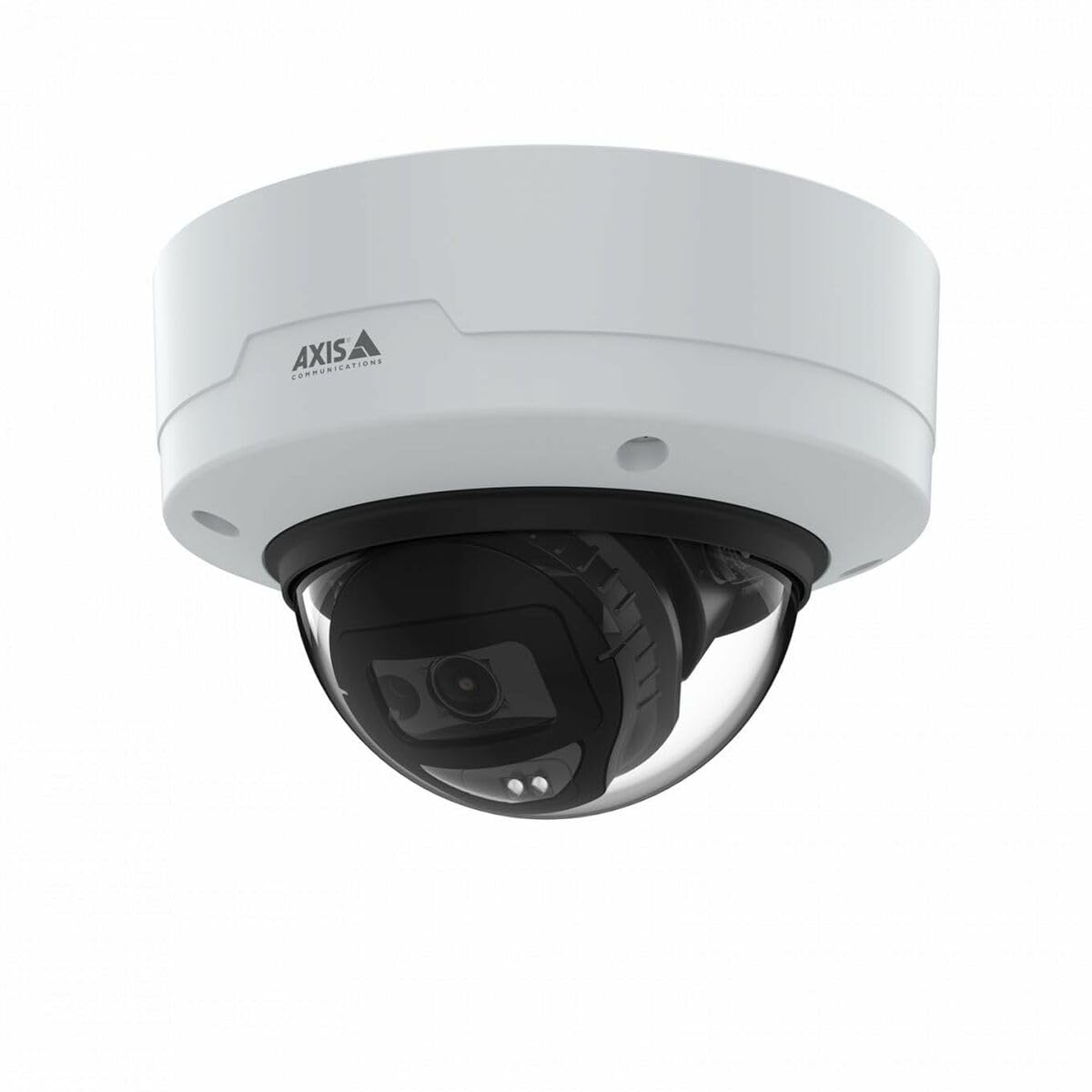
Image: The Axis M3126-LVE Network Surveillance System, a white dome camera, shown with its included mounting accessories.
4. سيٽ اپ ۽ تنصيب
4.1 ڪئميرا لائڻ
The Axis M3126-LVE is designed for ceiling mount installation in outdoor environments. Ensure the mounting surface is strong enough to support the camera's weight (approximately 1.1 kg / 2.42 lbs).
- جڳھ چونڊيو: Choose a suitable outdoor location for optimal surveillance coverage, considering power and network cable access.
- مٿاڇري تيار ڪريو: Use the provided drill template to mark and drill holes for mounting screws and cable routing.
- محفوظ جبل: Attach the camera's mounting base securely to the ceiling using appropriate screws and anchors.
- ڪيبل ڳنڍڻ: Route the Ethernet cable through the designated opening. Connect the Ethernet cable to the camera's M12 connection port. This camera supports Power over Ethernet (PoE) for both power and data transmission.
- ڪئميرا باڊي لڳايو: Secure the camera body to the mounting base. Ensure all seals are properly seated to maintain weather resistance.
4.2 Network Connection and Initial Configuration
The camera connects to your network via a wired PoE Ethernet connection.
- پاور آن: Once connected to a PoE-enabled network switch or injector, the camera will power on automatically.
- ڪئميرا دريافت ڪريو: Use the Axis IP Utility or Axis Device Manager software (available on the Axis Communications webسائيٽ) توهان جي نيٽ ورڪ تي ڪئميرا ڳولڻ لاءِ.
- IP پتو مقرر ڪريو: Assign a static IP address or configure DHCP settings as required by your network infrastructure.
- پهچ Web انٽرفيس: کوليو a web برائوزر ۽ ڪئميرا جو IP پتو داخل ڪريو ان تائين رسائي حاصل ڪرڻ لاءِ web انٽرفيس.
- شروعاتي لاگ ان: Follow the on-screen prompts to set a strong password for the administrator account.
- بنيادي سيٽنگون: Configure essential settings such as date, time, and video resolution (up to 4 MP, 2688 x 1512).
5. ڪئميرا کي هلائڻ
The Axis M3126-LVE offers advanced surveillance capabilities. Access the camera's web interface for full control and configuration.
5.1 زنده View ۽ رڪارڊنگ
- جيئڻ View: کان web interface, navigate to the "Live View" section to see real-time video feed.
- وڊيو معيار: Adjust video stream settings (resolution, frame rate, compression using MJPEG, H.264, H.265, Zipstream) to optimize for network bandwidth and storage.
- رڪارڊنگ: Configure recording schedules, motion detection triggers, and storage locations (e.g., network-attached storage, SD card if supported).
5.2 ترقي يافته خاصيتون
- آر جي رات جو نظارو: The camera automatically switches to infrared (IR) night vision in low-light conditions, providing clear black and white video.
- وسيع متحرڪ رينج (WDR): WDR technology ensures clear images even in scenes with both very bright and very dark areas.
- آڊيو: The camera supports audio input for surveillance with sound. Configure audio settings in the web انٽرفيس.
- تقريب جو انتظام: Set up event triggers (e.g., motion detection, tampering alarm) and corresponding actions (e.g., send email, start recording, upload video).
6. سار سنڀال
باقاعده سار سنڀال توهان جي نگراني نظام جي بهترين ڪارڪردگي ۽ ڊگهي عمر کي يقيني بڻائي ٿي.
- لينس جي صفائي: Periodically clean the camera lens with a soft, lint-free cloth. For stubborn dirt, use a mild lens cleaning solution. Do not use abrasive materials.
- فرم ويئر اپڊيٽس: ايڪسس ڪميونيڪيشن کي باقاعدي طور تي چيڪ ڪريو webفرم ويئر اپڊيٽس لاءِ سائيٽ. فرم ويئر کي اپڊيٽ رکڻ سان جديد خصوصيتن، سيڪيورٽي پيچس، ۽ ڪارڪردگي بهتري تائين رسائي يقيني بڻائي ٿي.
- ڪيبل جي چڪاس: وقتي طور تي سڀني ڪيبلن جو معائنو ڪريو ته جيئن انهن جي خرابي يا نقصان جي نشانين لاءِ، خاص طور تي ٻاهرين تنصيبات ۾.
- حفاظتي حفاظت: Verify that the camera remains securely mounted and that all screws are tight.
7. مسئلا حل ڪرڻ
This section addresses common issues you might encounter with the Axis M3126-LVE.
| مسئلو | ممڪن سبب | حل |
|---|---|---|
| ڪابه وڊيو فيڊ | بجلي ناهي؛ نيٽ ورڪ ڪيبل ڪٽيل آهي؛ غلط IP پتو. | Check PoE connection; Verify network cable is securely connected; Confirm IP address and network settings. |
| خراب تصوير جو معيار | Dirty lens; Incorrect video settings; Insufficient lighting. | Clean the camera lens; Adjust resolution, compression, and WDR settings; Ensure IR night vision is active in low light. |
| رسائي نه ٿو ڪري سگھجي web انٽرفيس | غلط IP پتو؛ نيٽ ورڪ ڪنيڪٽوٽي جو مسئلو؛ فائر وال جي رسائي کي بلاڪ ڪرڻ. | Verify IP address; Check network cable and switch; Temporarily disable firewall for testing; Use Axis IP Utility to find camera. |
| ڪئميرا وقفي وقفي سان آف لائن | Unstable network connection; Faulty PoE injector/switch; Loose cable connection. | Check network infrastructure; Test PoE equipment; Secure all cable connections. |
8. وضاحتون
Key technical specifications for the Axis M3126-LVE Network Surveillance System:
- ماڊل نالو: AXIS M3126-LVE
- حصو نمبر: 02918-001
- اندروني / ٻاهرين استعمال: ٻاھران
- ڪنيڪشن پروٽوڪول: ايٿرنيٽ
- چڙهڻ جو قسم: ڇت جو جبل
- رنگ: اڇو
- شيء جو وزن: 1.1 ڪلوگرام (2.42 پائونڊ)
- وڊيو ڪيپچر فارميٽ: MPEG-4, H.264, H.265, MJPEG
- ٺاهيندڙ: Axis Communications
- خاص خاصيتون: 4 MP HD, IR night vision, WDR (Wide Dynamic Range), Zipstream, rugged weather/vandal resistance
- رابطي ٽيڪنالاجي: Wired PoE Ethernet, extensive network protocol support
- قرارداد: Up to 2688 x 1512 (4 MP)
- شامل اجزاء: Camera, Mounting Accessories
- بيٽرين جي ضرورت آهي: نه
- تجويز ڪيل استعمال: Outdoor/indoor security, wide-area monitoring, day/night surveillance, smart detection
9. وارنٽي ۽ سپورٽ
تفصيلي وارنٽي جي معلومات لاءِ، مھرباني ڪري سرڪاري ايڪسس ڪميونيڪيشنز جو حوالو ڏيو website or the warranty card included with your product. Axis Communications provides technical support and resources for their products.
آن لائن سپورٽ: Visit the official Axis Communications support portal for FAQs, documentation, and software downloads.
رابطي جي حمايت: For direct assistance, contact Axis Communications customer support through their webسائيٽ يا توهان جي پراڊڪٽ دستاويزن ۾ ڏنل رابطي جي معلومات.
نوٽ: Protection plans may be available from third-party providers. These are separate from the manufacturer's warranty.


