1. پراڊڪٽ ختمview
The LINOVISION POE-SP02BT-POE is an industrial-grade Gigabit PoE++ splitter designed to convert a single IEEE802.3bt PoE input into both IEEE802.3bt PoE output and selectable DC power outputs. This device is suitable for powering various network devices, including PTZ cameras, IP cameras, wireless access points, LED lighting, and VoIP phones, especially in harsh industrial environments.

Figure 1: LINOVISION POE-SP02BT-POE Splitter
This image displays the LINOVISION POE-SP02BT-POE Industrial Gigabit 90W PoE++ Splitter, a compact black device with two RJ45 ports and a green terminal block, shown mounted on a standard DIN rail.
2. اهم خاصيتون
- 90W PoE++ Input: Accepts IEEE802.3bt compliant PoE input, providing up to 90W of power.
- Dual Power Output: Splits the input power into one Gigabit IEEE802.3bt PoE output and one DC output.
- Flexible DC Output: Offers switchable DC outputs of 5V/14A, 9V/7.8A, 12V/5.9A, or 24V/3A via terminal blocks, with a maximum total output of 72W (DC + PoE).
- Intelligent LED Indicators: Provides visual feedback for PoE status (PoE IN, PoE OUT) and selected DC output voltagاي (5V، 9V، 12V، 24V).
- Rugged Industrial Design: هڪ ڌاتو سي جي خاصيت آهيasing, DIN rail mount capability, and operates within a wide temperature range of -40°C to 75°C (-40°F to 167°F).
- حفاظتي خاصيتون: Includes short-circuit protection and thermal cut-off for enhanced reliability.
- Active PoE: The IEEE802.3bt PoE output follows PD Detection, Classification Type, and Power On procedures to protect standard Powered Devices (PDs). Non-PoE devices are also supported.

Figure 2: Environmental Resilience
This image highlights the robust design of the splitter, featuring icons for short-circuit protection, wide operating temperature range (-40°F to 167°F), and wide voltage tolerance (44V to 57V).
3. پينل View ۽ اشارا
Familiarize yourself with the ports, indicators, and controls on the POE-SP02BT-POE splitter.

شڪل 3: فرنٽ پينل لي آئوٽ
This diagram illustrates the front panel of the splitter, showing the Gigabit PoE Input Port (Max 90W), Gigabit PoE Output Port (Max 72W), 5/9/12/24V DC Output Port (Max 72W), Voltage Switch Button, DC Output Indicators, and PoE Status Indicators.
3.1 LED اشارا
The LED indicators provide real-time status of the device's operation and power output.
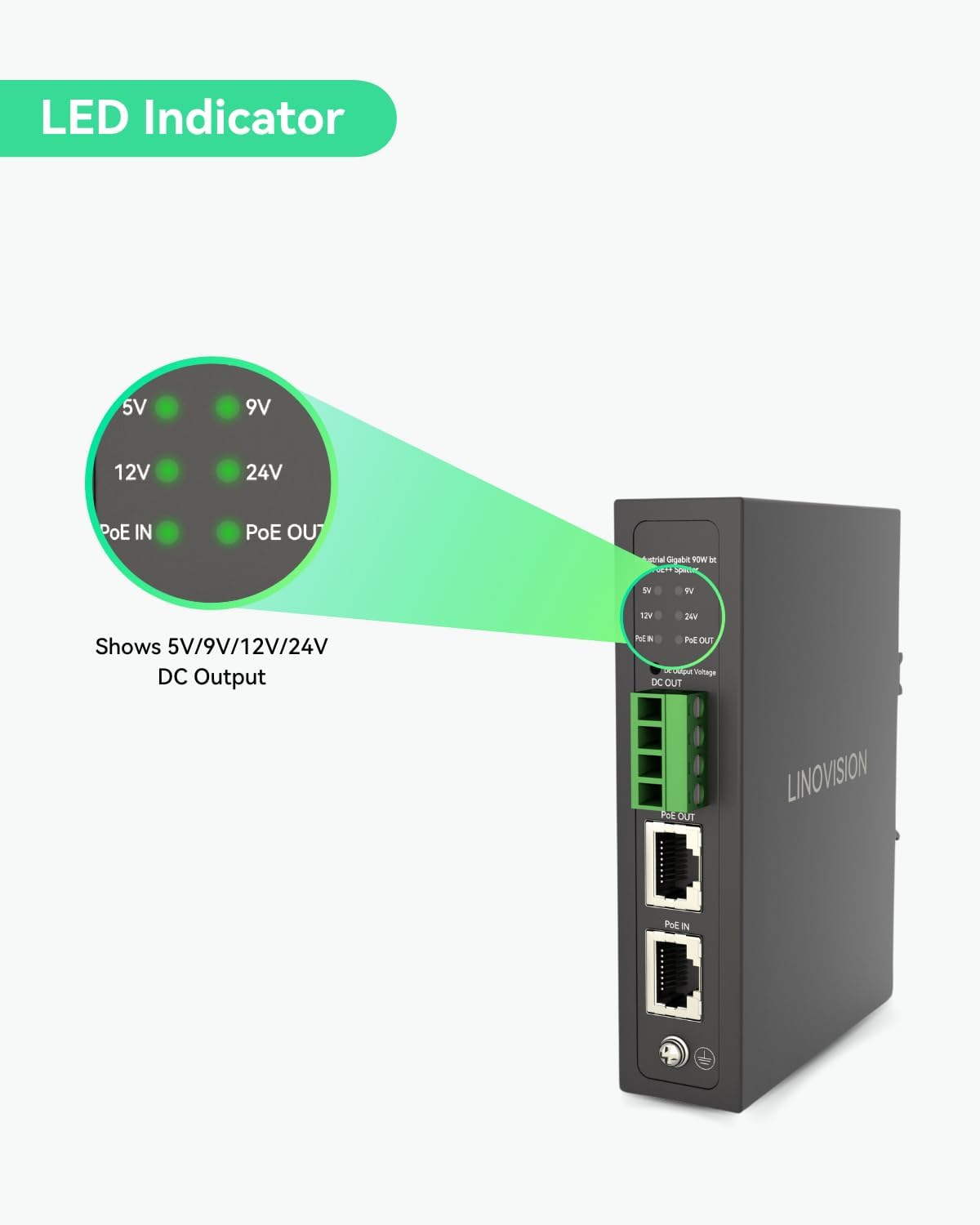
Figure 4: LED Indicator Details
This image provides a close-up of the LED indicators. The 'PoE IN' and 'PoE OUT' LEDs indicate PoE activity, while the 5V, 9V, 12V, and 24V LEDs illuminate to show the currently selected DC output voltage.
- PoE IN LED: Illuminates when a valid IEEE802.3bt/at PoE input is detected.
- PoE OUT LED: Illuminates when PoE power is being supplied to a connected Powered Device (PD).
- 5V/9V/12V/24V LEDs: One of these LEDs will illuminate to indicate the currently selected DC output voltage.
4. سيٽ اپ ۽ تنصيب
4.1 DIN-ريل چڙهڻ
The POE-SP02BT-POE splitter is designed for easy installation on a standard DIN rail.
- Attach the DIN-rail mounting accessory to the back of the splitter using the provided screws.
- Hook the top edge of the splitter onto the DIN rail.
- Push the bottom edge of the splitter towards the DIN rail until it clicks into place, securing the device.
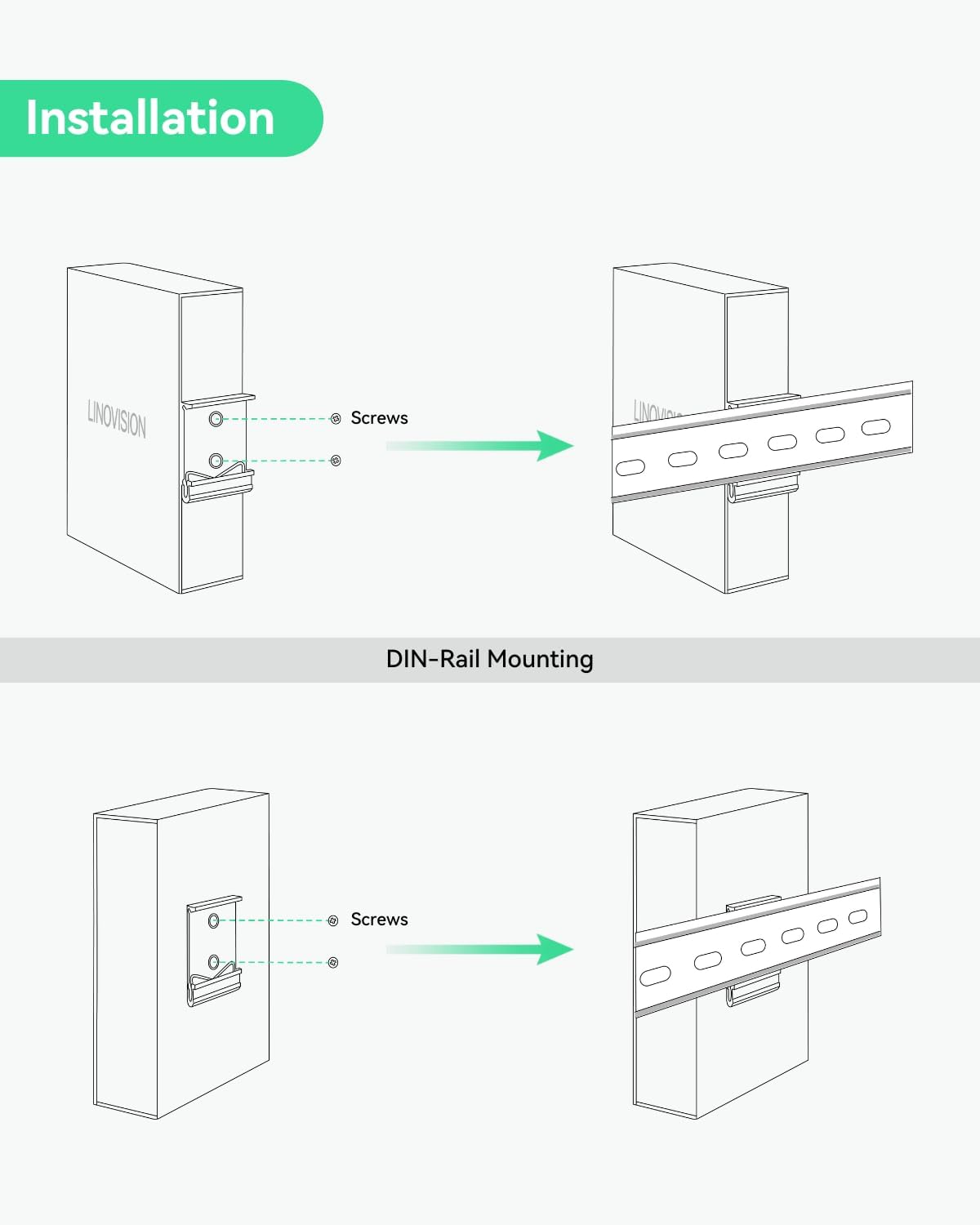
Figure 5: DIN-Rail Mounting
This illustration demonstrates the two-step process of attaching the DIN-rail bracket to the splitter with screws and then securing the splitter onto a DIN rail.
4.2 ڪنيڪشن جون شڪلون
The splitter can power various devices simultaneously using its PoE and DC outputs.

Figure 6: PTZ Camera and Alarm Connection
This diagram shows the POE-SP02BT-POE splitter receiving up to 90W PoE input from a PoE switch via a network cable. It then provides Gigabit data + power output to a PTZ camera and a separate DC 5/9/12/24V output to an alarm system.

Figure 7: Wireless AP and Access Control Connection
This diagram illustrates the POE-SP02BT-POE splitter connected to a PoE switch for input power. It then provides Gigabit data output to a Wireless AP and a separate DC 5/9/12/24V output to an access control system.
اهم نوٽ:
- The POE-SP02BT-POE requires a standard IEEE802.3bt/at compliant PoE switch or injector for input. Do not connect it with non-standard BT PoE switches or injectors.
- When using the DC output port to power a PoE device, do not connect the PoE output port to the same PoE device. The total maximum output for all devices (DC Output + PoE Output) is 72W.
5. آپريٽنگ هدايتون
5.1 پاور آن
- Connect a standard IEEE802.3bt/at PoE source (e.g., a PoE switch) to the 'PoE IN' port using a network cable. The 'PoE IN' LED will illuminate.
- Connect your Powered Device (PD) to the 'PoE OUT' port. The 'PoE OUT' LED will illuminate once the device is detected and powered.
- Connect your DC-powered device to the green terminal block.
5.2 Selecting DC Output Voltage
To select the desired DC output voltage (5V, 9V, 12V, or 24V):
- Ensure the splitter is powered on.
- Press the 'DC Output Voltage' button located next to the DC output indicators.
- Each press will cycle through the available voltages (5V, 9V, 12V, 24V). The corresponding LED will illuminate to indicate the selected voltage.
- Verify that the selected voltage matches the requirements of your connected DC device before operation.
6. وضاحتون
Detailed technical specifications for the LINOVISION POE-SP02BT-POE splitter.
| خاصيت | تفصيل |
|---|---|
| ماڊل نمبر | POE-SP02BT-POE |
| PoE ان پٽ | 1 x Gigabit IEEE802.3bt PoE++ (Max 90W) |
| PoE آئوٽ | 1 x Gigabit IEEE802.3bt PoE (Max 72W) |
| ڊي سي اوٽ | 1 x Terminal Block, Switchable 5V/14A, 9V/7.8A, 12V/5.9A, 24V/3A (Max 72W total with PoE output) |
| ڊيٽا جي منتقلي جي شرح | 1000 Mbps (Gigabit) |
| انٽرفيس جو قسم | PoE+, RJ45 |
| آپريٽنگ جي درجه حرارت | -40 ° C کان 75 ° C (-40 ° F کان 167 ° F) |
| ڪيس جو مواد | ڌاتو |
| طول و عرض (L x W x H) | 4.72 x 3.15 x 1.57 انچ (119 x 80 x 40 ملي ميٽر) |
| شيءِ جو وزن | 300 گرام (10.6 آونس) |
| چڙهڻ | ڊين ريل جبل |
| شامل اجزاء | PoE Splitter, Terminal Block, DIN-Rail Mounting Accessory, User Manual |

شڪل 8: پيداوار جا طول و عرض
This image provides a detailed dimensional drawing of the POE-SP02BT-POE splitter, showing its length (4.69" / 119mm), width (3.37" / 85.5mm), and height (1.1" / 28mm), along with its weight (0.7kg / 1.54 lb).
7. پيڪيج مواد
پراڊڪٽ پيڪيج ۾ هيٺيون شيون شامل آهن:
- LINOVISION POE-SP02BT-POE Splitter
- ٽرمينل بلاڪ
- DIN-Rail Mounting Accessory (with screws)
- استعمال ڪندڙ دستي

شڪل 9: پيڪيج مواد
This image displays the items included in the box: the POE-SP02BT-POE splitter, a terminal block, the DIN-Rail mounting accessory, and the user manual.
8. سار سنڀال
To ensure optimal performance and longevity of your LINOVISION POE-SP02BT-POE splitter, follow these maintenance guidelines:
- صفائي: Periodically clean the device with a soft, dry cloth. Avoid using liquid or aerosol cleaners.
- ماحول: Ensure the operating environment remains within the specified temperature and humidity ranges. Avoid exposure to excessive dust, moisture, or direct sunlight.
- ڪيبل جو انتظام: Keep all connected cables neatly organized and free from kinks or excessive tension to prevent damage to ports.
- چڪاس: Regularly inspect the device and connections for any signs of physical damage or loose connections.
9. مسئلا حل ڪرڻ
If you encounter issues with your POE-SP02BT-POE splitter, refer to the following common troubleshooting steps:
- ڪابه بجلي/ايل اي ڊي بند ناهي:
- Verify that the PoE source connected to the 'PoE IN' port is active and compliant with IEEE802.3bt/at standards.
- Check the network cable connection to the 'PoE IN' port.
- No Output Power (PoE OUT/DC OUT):
- Ensure the 'PoE IN' LED is illuminated, indicating successful power input.
- For PoE OUT, confirm the connected device is a Powered Device (PD) and compatible with IEEE802.3bt PoE.
- For DC OUT, verify the correct voltage is selected using the voltage switch button and the corresponding LED is lit. Check the terminal block wiring.
- Ensure the total power consumption of connected devices does not exceed the 72W maximum output.
- وقتي ڪنيڪشن:
- Check all network and power cable connections for looseness or damage.
- پڪ ڪريو ته آپريٽنگ گرمي پد مخصوص حد اندر آهي.
- ڊوائيس نه سڃاڻي:
- Confirm that the connected device is compatible with Gigabit Ethernet.
- Try using a different network cable.
If the issue persists after following these steps, please contact LINOVISION technical support.
10. وارنٽي ۽ سپورٽ
LINOVISION products are designed for reliability and performance. This product was first available on October 18, 2024.
10.1 وارنٽي ڄاڻ
For specific warranty terms and conditions, please refer to the official LINOVISION warranty policy available on their website or contact customer support. Protection plans may be available for extended coverage.
10.2 ٽيڪنيڪل سپورٽ
LINOVISION offers 24/7 US local and global technical support. For assistance with installation, configuration, or troubleshooting, please visit the official LINOVISION store or contact their support team:
- LINOVISION Store: Visit LINOVISION on Amazon
- رابطو: Refer to the contact information provided in your product packaging or on the official LINOVISION website for direct support channels.


