تعارف
This manual provides detailed instructions for the GOBOULT Mirage Smart Watch. Please read this guide thoroughly to ensure proper setup, operation, and maintenance of your device. This smartwatch features a 1.39-inch HD display, Bluetooth calling, comprehensive health monitoring, and various sports modes.
دٻي ۾ ڇا آهي
- GOBOULT Mirage Smart Watch
- چارج ڪيبل
- استعمال ڪندڙ دستي
- وارنٽي ڪارڊ
سيٽ اپ ڪريو
1. ڊوائيس کي چارج ڪرڻ
Before initial use, fully charge your GOBOULT Mirage Smart Watch. Connect the provided charging cable to the charging port on the back of the watch and to a standard USB power adapter (not included). The watch typically charges within 120 minutes.

Image: GOBOULT Mirage Smart Watch displaying its features, including charging capability.
2. توهان جي اسمارٽ فون سان جوڙڻ
- Download the official GOBOULT companion app from your smartphone's app store (available for iOS and Android).
- پڪ ڪريو ته توهان جي اسمارٽ فون تي بلوٽوت فعال آهي.
- Open the app and follow the on-screen instructions to search for and connect to your GOBOULT Mirage Smart Watch.
- پنهنجي واچ ۽ اسمارٽ فون ٻنهي تي جوڙي جي درخواست جي تصديق ڪريو.
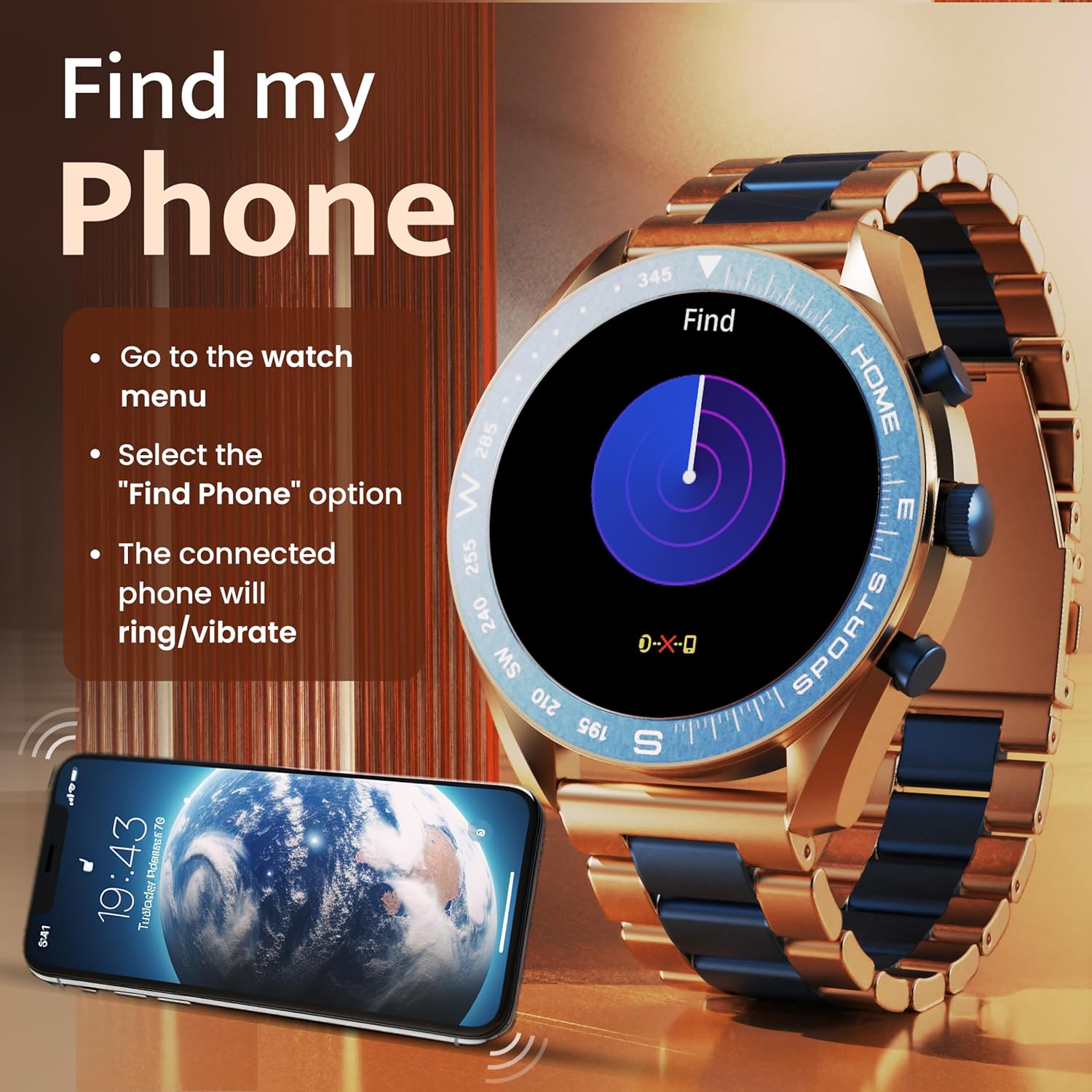
Image: The GOBOULT Mirage Smart Watch connected to a smartphone, illustrating connectivity.
آپريٽنگ هدايتون
1. ڊسپلي ۽ نيويگيشن
The GOBOULT Mirage features a 1.39-inch HD display with 360x360 pixels resolution and 500 nits peak brightness for clear visibility. Navigate the watch interface using touch gestures and the digital crown.
- ڊجيٽل تاج: Press to power on/off, switch UIs, and navigate menus. Rotate to scroll through options.
- پاسي جا بٽڻ: Use for quick access to specific functions, such as launching sports modes.

Image: GOBOULT Mirage Smart Watch highlighting the digital crown and its various functions.
2. بلوٽوٿ ڪالنگ
With the built-in speaker and microphone, you can make and receive calls directly from your wrist once paired with your smartphone via Bluetooth 5.3.
- To answer a call, tap the green icon on the watch screen.
- To reject a call, tap the red icon.
- To make a call, access the dial pad or contacts through the watch menu.
Image: GOBOULT Mirage Smart Watch showing an incoming call notification.
3. صحت جي نگراني
The GOBOULT Mirage provides comprehensive health tracking features:
- SpO2 Blood Oxygen Monitor: رت ۾ آڪسيجن جي سطح کي ماپي ٿو.
- دل جي شرح مانيٽر: 24/7 دل جي شرح جي ٽريڪنگ.
- ننڊ مانيٽر: ننڊ جي نمونن ۽ معيار کي ٽريڪ ڪري ٿو.
- Breath Training Mode: Guides you through breathing exercises.
- پيئڻ جو پاڻي ياد ڏياريندڙ: توهان کي پاڻي پيئارڻ لاءِ ترغيب ڏئي ٿو.
- بيڪار ياد ڏياريندڙ: Alerts you after periods of inactivity.
- سرگرمي ٽريڪنگ: قدم، فاصلو، ۽ ساڙيل ڪيلوريون رڪارڊ ڪري ٿو.
- حيض جي چڪر جي ٽريڪنگ: Helps monitor menstrual cycles.

Image: GOBOULT Mirage Smart Watch showcasing its complete health suite on the display.
4. راندين جا طريقا
Track your performance across over 120 sports modes. Access these modes quickly using the shortcut buttons.
- Examples include Running, Cycling, Yoga, Cricket, Badminton, and Basketball.

Image: GOBOULT Mirage Smart Watch showing the selection of over 120 sports modes.
5. واچ فيز
Personalize your watch with over 300 cloud-based watch faces. You can also customize the dial to match your style.

Image: GOBOULT Mirage Smart Watch illustrating the variety of 300+ cloud watch faces.
6. سمارٽ نوٽيفڪيشن
Receive SMS and other smart notifications directly on your watch. Ensure your watch is connected to your phone via Bluetooth for this feature to function.

Image: GOBOULT Mirage Smart Watch showing a push notification from a messaging app.
7. اي آءِ وائيس اسسٽنٽ
Access an intelligent AI voice assistant for hands-free control. Long press the designated button or use the voice assistant icon on the screen to activate.
8. منهنجو فون ڳولھيو
If you misplace your connected smartphone, use the 'Find My Phone' feature on your watch:
- Go to the watch menu.
- Select the "Find Phone" option.
- The connected phone will ring or vibrate, helping you locate it.
Image: GOBOULT Mirage Smart Watch showing the 'Find My Phone' interface.
9. پاڻي جي مزاحمت
The GOBOULT Mirage Smart Watch is IP67 water-resistant, offering protection against dust and temporary immersion in water. It is suitable for daily wear and activities like hand washing or light rain.

Image: GOBOULT Mirage Smart Watch demonstrating its IP67 water resistance.
10. Mini Games
The watch includes several mini-games for entertainment during leisure time.
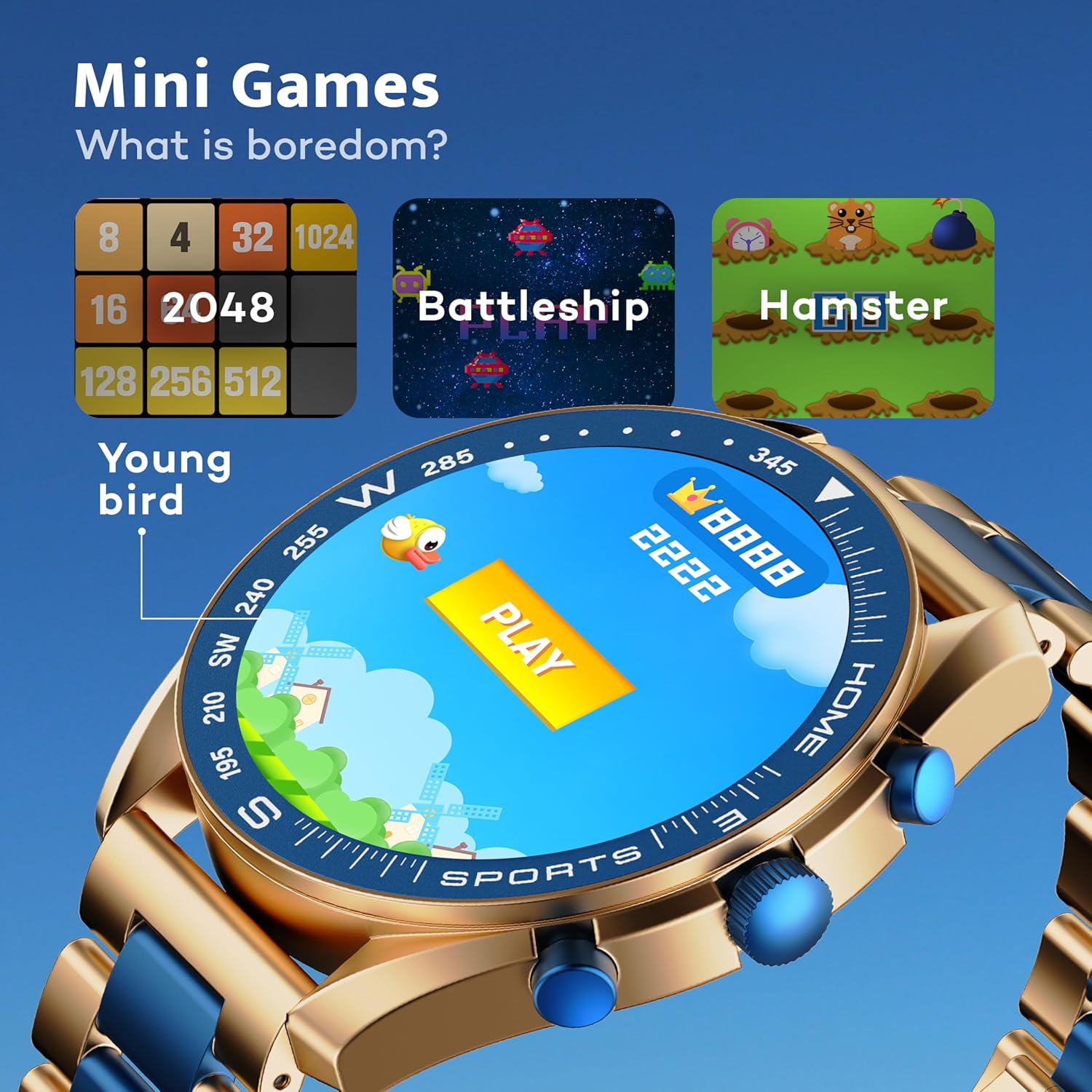
Image: GOBOULT Mirage Smart Watch showing the selection of mini-games.
سار سنڀال
1. صفائي
- Wipe the watch screen and body with a soft, dry cloth.
- ضد واري مٽي لاء، ٿورڙي ڊي استعمال ڪريوamp cloth and immediately dry the watch.
- سخت ڪيميڪلز يا رگڙيندڙ مواد استعمال ڪرڻ کان پاسو ڪريو، ڇاڪاڻ ته اهي ختم کي نقصان پهچائي سگهن ٿا.
2. پاڻي جي مزاحمت جون هدايتون
- The IP67 rating means the watch is protected from dust and can withstand immersion in water up to 1 meter for 30 minutes.
- Do not use the watch for swimming, showering with hot water, or diving.
- گھڙي کي تيز دٻاءُ واري پاڻي يا ٻاڦ جي سامهون آڻڻ کان پاسو ڪريو.
- If the watch gets wet, dry it thoroughly before charging or using any buttons.
مشڪلاتون
- واچ آن نه ٿي رهي آهي: پڪ ڪريو ته گھڙي مڪمل طور تي چارج ٿيل آهي. ان کي گهٽ ۾ گهٽ 30 منٽن لاءِ چارجر سان ڳنڍيو.
- فون سان جوڙو نه ٿو ٺاهي سگهجي: Make sure Bluetooth is enabled on your phone and the watch is within range. Restart both devices and try pairing again.
- صحت جي غلط ڊيٽا: پڪ ڪريو ته گھڙي توهان جي کلائي تي چستيءَ سان لڳل آهي، نه ته تمام گهڻي تنگ ۽ نه ئي گهڻي ڍلي. سينسرز کي باقاعدي صاف ڪريو.
- مختصر بيٽري جي زندگي: Reduce screen brightness, disable unnecessary notifications, and limit continuous heart rate monitoring if not needed.
- ڊسپلي مسئلا: Restart the watch. If the problem persists, contact customer support.
وضاحتون
| خاصيت | تفصيل |
|---|---|
| برانڊ | گوبولٽ |
| ماڊل نمبر | 8906133853464 |
| ڊسپلي سائيز | 1.39 انچ |
| روشني | 500 نٽس |
| فريم مواد | زنڪ مصر |
| وائرليس جو قسم | بلوٽوٿ 5.3 |
| آپريٽنگ سسٽم | iOS، Android |
| پاڻي جي مزاحمت | IP67 |
| بيٽري چارج وقت | 120 منٽ |
| بيٽري جو قسم | ليتيم پوليمر |
| شيءِ جو وزن | 106 جي |
وارنٽي ۽ سپورٽ
Your GOBOULT Mirage Smart Watch comes with a warranty card included in the box. Please refer to this card for details regarding warranty coverage and terms.
For technical support, troubleshooting assistance, or warranty claims, please contact GOBOULT customer service through their official webسائيٽ يا توهان جي وارنٽي ڪارڊ تي ڏنل رابطي جي معلومات.


