تعارف
Welcome to the GOBOULT Mirage Smart Watch user manual. This guide provides detailed instructions on how to set up, operate, and maintain your new smartwatch. Please read this manual thoroughly to ensure optimal performance and longevity of your device.
پيداوار ختمview
The GOBOULT Mirage Smart Watch is a feature-rich device designed to enhance your daily life with advanced health monitoring, communication, and fitness tracking capabilities. It features a vibrant 1.39-inch HD display, Bluetooth calling, and a durable zinc alloy frame.
اهم خاصيتون:
- 1.39 انچ ايڇ ڊي ڊسپلي: Bright and clear screen with 500 nits brightness and 360x360 pixel resolution.
- بلوٽوٿ ڪالنگ: Make and receive calls directly from your wrist with a built-in speaker and microphone.
- جامع صحت جي نگراني: Includes SpO2, heart rate, blood pressure, sleep tracking, breath training, and menstrual cycle tracking.
- 120+ راندين جا طريقا: Track a wide range of physical activities with detailed metrics.
- اي آءِ وائيس اسسٽنٽ: Hands-free control and access to features.
- IP67 پاڻي جي مزاحمت: Designed to withstand splashes and dust.
- حسب ضرورت واچ فيس: Over 300 cloud-based watch faces to personalize your device.
- سمارٽ اطلاعن: ڪالن، پيغامن، ۽ ايپ جي اطلاعن لاءِ الرٽ وصول ڪريو.
- ڊگھي بيٽري زندگي: عام استعمال جي 7 ڏينهن تائين.
دٻي ۾ ڇا آهي:
- GOBOULT Mirage Smart Watch (Coal Black)
- چارج ڪيبل
- استعمال ڪندڙ دستي
- وارنٽي ڪارڊ

تصوير: مٿانview of the GOBOULT Mirage Smart Watch highlighting its main features.
سيٽ اپ گائيڊ
1. سمارٽ واچ کي چارج ڪرڻ
- مقناطيسي چارجنگ ڪيبل کي پنهنجي سمارٽ واچ جي پوئين پاسي واري چارجنگ پنن سان ڳنڍيو.
- ڪيبل جي USB پڇاڙي کي معياري USB پاور اڊاپٽر (5V/1A تجويز ڪيل) يا ڪمپيوٽر جي USB پورٽ ۾ لڳايو.
- The watch display will show a charging indicator. A full charge takes approximately 120 minutes.
- Ensure the charging pins are clean and dry before charging to prevent corrosion.
2. پاور آن/آف
- پاور آن: Press and hold the side button (digital crown) for a few seconds until the GOBOULT logo appears.
- بجلي بند: From the watch face, swipe down to access quick settings, or navigate to the settings menu. Select "Power Off" and confirm. Alternatively, press and hold the side button until the power off option appears.
3. توهان جي اسمارٽ فون سان جوڙڻ
- Download the official GOBOULT companion app from your smartphone's app store (available for iOS and Android).
- پڪ ڪريو ته توهان جي اسمارٽ فون تي بلوٽوت فعال آهي.
- GOBOULT ايپ کوليو ۽ اڪائونٽ ٺاهڻ يا لاگ ان ڪرڻ لاءِ اسڪرين تي ڏنل هدايتن تي عمل ڪريو.
- In the app, select "Add Device" or a similar option to search for your smartwatch.
- Select "GOBOULT Mirage" from the list of available devices.
- پنهنجي اسمارٽ فون ۽ اسمارٽ واچ ٻنهي تي جوڙي جي درخواست جي تصديق ڪريو.
- هڪ ڀيرو جوڙيو ويندو، واچ توهان جي فون سان ڊيٽا کي هم وقت سازي ڪندي، ۽ توهان ايپ ذريعي سيٽنگون ترتيب ڏئي سگهو ٿا.
آپريٽنگ هدايتون
بنيادي نيويگيشن:
- ٽچ اسڪرين: مينيو ۽ اطلاعن ذريعي نيويگيٽ ڪرڻ لاءِ کاٻي/ساڄي، مٿي/هيٺ سوائپ ڪريو. شيون چونڊڻ لاءِ ٽيپ ڪريو.
- Digital Crown (Side Button):
- هڪ ڀيرو دٻايو: Return to the watch face from any screen, or wake the screen.
- دٻايو ۽ رکو: Power on/off, or access the AI Voice Assistant (configurable).
- گھمايو: Scroll through menus, lists, or adjust settings.
- شارٽ ڪٽ بٽڻ: The second physical button on the side can be customized for quick access to specific functions, such as launching sports modes.

Image: Digital crown and button functionalities for navigation and quick access.
صحت جي نگراني
The GOBOULT Mirage Smart Watch offers a comprehensive suite of health tracking features. For accurate readings, ensure the watch is worn snugly on your wrist, about one finger's width from your wrist bone.
- دل جي شرح جي نگراني: The watch continuously tracks your heart rate. View واچ تي حقيقي وقت جو ڊيٽا يا ايپ ۾ تفصيلي رجحانات.
- SpO2 (بلڊ آڪسيجن) مانيٽرنگ: Measure your blood oxygen levels on demand. Navigate to the SpO2 function on your watch and remain still for accurate results.
- بلڊ پريشر مانيٽرنگ: Access the blood pressure feature on your watch for readings.
- سمهڻ جي نگراني: Wear your watch to bed to track your sleep patterns, including deep sleep, light sleep, and awake times. Data is available in the app.
- Breath Training Mode: Follow guided breathing exercises to help reduce stress and improve relaxation.
- سرگرمي ٽريڪنگ: Monitors steps, distance, and calories burned throughout the day.
- پيئڻ جو پاڻي ياد ڏياريندڙ: Set reminders in the app to ensure you stay hydrated.
- بيڪار ياد ڏياريندڙ: Receive alerts when you've been inactive for too long, encouraging you to move.
- حيض جي چڪر جي ٽريڪنگ: For female users, track and predict menstrual cycles through the companion app.

Image: The watch's health sensors and a summary of its health monitoring capabilities.
راندين جا طريقا
The GOBOULT Mirage Smart Watch supports over 120 sports modes to accurately track your workouts. From running to yoga, you can monitor your performance and progress.
Using Sports Modes:
- Access the sports mode menu from the watch's main interface or by using the dedicated shortcut button.
- Scroll through the list and select your desired activity (e.g., Running, Cycling, Yoga, Cricket, Badminton, Basketball).
- Tap to start the activity. The watch will begin recording data such as duration, heart rate, calories burned, and distance (where applicable).
- To pause or end an activity, swipe right or press the side button and follow the on-screen prompts.
- Review your workout summaries on the watch or in detail within the companion app.

Image: The watch interface showing various sports modes and quick access options.
Bluetooth Calling & Smart Notifications
With Bluetooth 5.3 connectivity, your GOBOULT Mirage Smart Watch allows you to manage calls and receive notifications directly on your wrist.
بلوٽوٿ ڪالنگ:
- پڪ ڪريو ته توهان جي واچ بلوٽوٿ ذريعي توهان جي فون سان جوڙيل آهي.
- ڪال ڪرڻ: Access the dial pad or contact list on your watch to initiate a call.
- ڪال وصول ڪرڻ: When a call comes in, the watch will display the caller ID. You can answer or reject the call directly from your wrist using the built-in speaker and microphone.
- رابطي جي هم وقت سازي: Synchronize your phone contacts with the watch through the companion app for easy access.
سمارٽ اطلاعن:
- Enable app notifications in the GOBOULT companion app on your smartphone.
- Your watch will display incoming messages, social media alerts, and other app notifications.
- Swipe up or down on the watch face to view توهان جي نوٽيفڪيشن جي تاريخ.

Image: Bluetooth calling features and interface on the smartwatch.

Image: Smart notifications and other quick access features like calculator and voice assistant.
حسب ضرورت
منهن ڏسو
Personalize your GOBOULT Mirage Smart Watch with over 300 cloud-based watch faces. You can change the watch face directly from the device or through the companion app.
- واچ تي: From the watch face, press and hold the screen. Swipe left or right to browse available watch faces and tap to select.
- ايپ ذريعي: Open the GOBOULT app, navigate to the watch face section, and explore a wider selection of designs. Download and apply your preferred watch face.

تصوير: Exampسمارٽ واچ لاءِ موجود ڪجھ ڪسٽمائيزبل واچ فيس.
اضافي خاصيتون
اي آءِ وائيس اسسٽنٽ:
Activate the AI Voice Assistant (compatible with Hey Siri and Ok Google) by long-pressing the digital crown or through a dedicated menu option. Use voice commands to perform various tasks hands-free.
منهنجو فون ڳولهيو:
If your paired smartphone is misplaced, use the "Find My Phone" feature on your watch to make it ring or vibrate, helping you locate it quickly.
- Go to the watch menu.
- Select the "Find Phone" option.
- The connected phone will ring or vibrate.
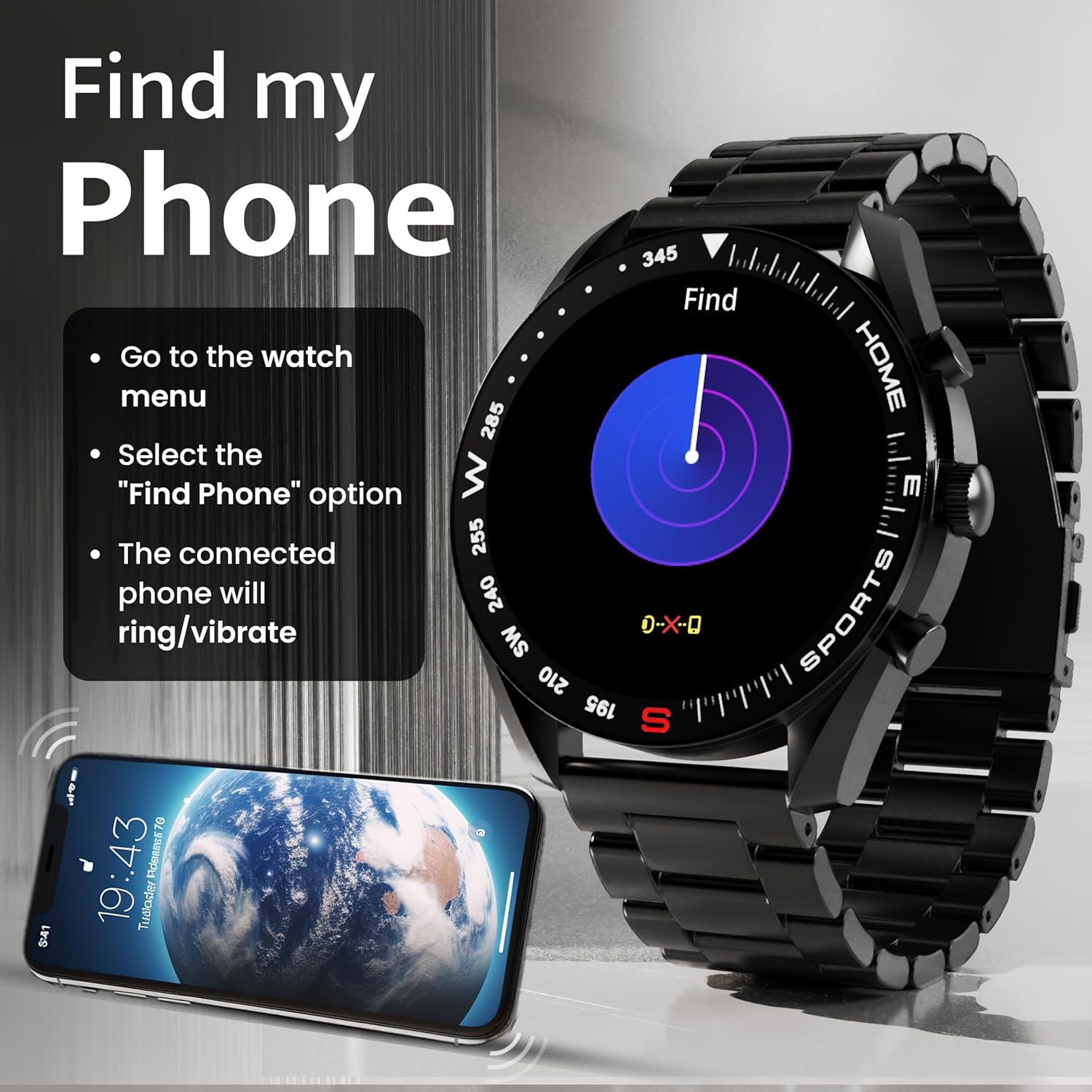
Image: How to use the 'Find My Phone' feature on the smartwatch.
ننڍيون رانديون:
The watch includes several mini-games for entertainment, such as 2048, Battleship, Hamster, and Young Bird.

تصوير: Examples of mini-games available on the smartwatch.
سار سنڀال
Cleaning Your Smart Watch:
- واچ اسڪرين ۽ باڊي کي نرم، لِنٽ فري ڪپڙي سان صاف ڪريو.
- ضدي مٽيءَ لاءِ، ٿورو ڊيampڪپڙو پاڻي سان ڍڪيو. سخت ڪيميڪل يا رگڙيندڙ مواد استعمال ڪرڻ کان پاسو ڪريو.
- Clean the charging pins regularly with a dry cloth or cotton swab to ensure proper charging.
پاڻي جي مزاحمت (IP67):
The GOBOULT Mirage Smart Watch is IP67 water-resistant, meaning it is protected against dust ingress and can withstand immersion in water up to 1 meter for up to 30 minutes. However, it is not suitable for swimming, showering with hot water, or diving. Avoid exposure to high-pressure water or corrosive liquids.

Image: Information regarding the IP67 water and dust resistance of the smartwatch.
پٽي جي ترتيب:
The watch comes with a metallic strap adjustment tool. Refer to the included instructions or a professional for adjusting the strap length to ensure a comfortable and secure fit.

Image: The watch's zinc alloy frame and the metallic strap adjustment tool.
مشڪلاتون
- واچ آن نه ٿي رهي آهي: Ensure the watch is fully charged. Connect it to the charging cable and allow it to charge for at least 30 minutes before attempting to power it on again.
- فون سان جوڙڻ ۾ ناڪام:
- پڪ ڪريو ته توهان جي فون ۽ واچ تي بلوٽوٿ فعال آهي.
- Ensure the watch is within the Bluetooth range (up to 10 meters).
- پنهنجو فون ۽ سمارٽ واچ ٻئي ري اسٽارٽ ڪريو.
- پنهنجي فون تي بلوٽوٿ ڪيش صاف ڪريو يا ڊوائيس وساري ڇڏيو ۽ ٻيهر جوڙڻ جي ڪوشش ڪريو.
- Ensure the GOBOULT companion app is updated to the latest version.
- صحت جي غلط ڊيٽا: پڪ ڪريو ته گھڙي توهان جي کلائي تي مضبوطيءَ سان پائڻي آهي، تمام گهڻو تنگ يا تمام گهڻو ڍلو نه. گھڙي جي پوئين پاسي سينسر صاف ڪريو. ماپ دوران گهڻي حرڪت کان پاسو ڪريو.
- نوٽيفڪيشن ظاهر نه ٿي رهيا آهن:
- Check if notifications are enabled for the specific apps in the GOBOULT companion app.
- Ensure your phone's notification settings allow the GOBOULT app to display alerts.
- Verify that the watch is properly connected to your phone via Bluetooth.
- مختصر بيٽري جي زندگي: Reduce screen brightness, disable unnecessary features like continuous heart rate monitoring if not needed, and limit the number of active notifications. Ensure the watch is fully charged.
- ٽچ اسڪرين غير جوابده: واچ کي ٻيهر شروع ڪريو. جيڪڏهن مسئلو برقرار رهي، پڪ ڪريو ته اسڪرين صاف ۽ سڪل آهي.
وضاحتون
| خاصيت | تفصيل |
|---|---|
| ماڊل نالو | ميرج |
| ڊسپلي سائيز | 1.39 انچ HD |
| ڊسپلي قرارداد | 360 x 360 پکسلز |
| روشني | 500 Nits Peak Brightness |
| رابطي | بلوٽوٿ 5.3 |
| پاڻي جي مزاحمت | IP67 |
| فريم مواد | زنڪ مصر |
| بيٽري جو قسم | ليتيم پوليمر |
| سراسري بيٽري جي زندگي | 7 ڏينهن تائين |
| چارج وقت | لڳ ڀڳ 120 منٽ |
| آپريٽنگ سسٽم مطابقت | iOS، Android |
| شيءِ جو وزن | 106 جي |
| شامل اجزاء | Smart Watch, Charging Cable, User Manual, Warranty Card |
وارنٽي ۽ سپورٽ
وارنٽي ڄاڻ:
Your GOBOULT Mirage Smart Watch comes with a manufacturer's warranty. Please refer to the included Warranty Card for specific terms, conditions, and duration of the warranty. Keep your purchase receipt as proof of purchase.
ڪسٽمر سپورٽ:
If you encounter any issues or have questions not covered in this manual, please contact GOBOULT customer support. Contact details can typically be found on the Warranty Card or the official GOBOULT webسائيٽ.


