
پيداوار ختمview
The EarFun Air Pro 4 are advanced wireless earbuds designed for superior audio experience and call clarity. They feature Adaptive Hybrid Noise Canceling, Qualcomm Snapdragon Sound with aptX Lossless, and a long-lasting battery. This manual provides detailed instructions for setup, operation, and maintenance.

Image: The EarFun Air Pro 4 Royal Blue earbuds shown with their charging case, highlighting their sleek design.
1. سيٽ اپ
1.1 دٻي ۾ ڇا آهي
- EarFun Air Pro 4 Adaptive Hybrid ANC Earbuds
- چارج ڪيس
- USB-سي ڪيبل
- Eartips (5 pairs: XS, S, M, L, XL)
- استعمال ڪندڙ جو دستياب (ھي دستاويز)

Image: The EarFun Air Pro 4 earbuds resting in their open charging case, illustrating the compact design and charging indicators.
1.2 ائربڊس ۽ ڪيس کي چارج ڪرڻ
Before first use, fully charge the earbuds and charging case. Connect the provided USB-C cable to the charging port on the case and a power source. The indicator lights on the case will show the charging status. A full charge provides up to 11 hours of playtime for the earbuds and extends to 52 hours with the charging case. A 10-minute quick charge can provide up to 2 hours of playtime.
1.3 توهان جي ڊوائيس سان جوڙڻ
- چارجنگ ڪيس کوليو. ائربڊس پاڻمرادو پيئرنگ موڊ ۾ داخل ٿي ويندا.
- پنهنجي ڊوائيس (اسمارٽ فون، ٽيبليٽ، ليپ ٽاپ) تي، بلوٽوٿ کي فعال ڪريو.
- Select "EarFun Air Pro 4" from the list of available Bluetooth devices.
- هڪ دفعو ڳنڍيل، توهان کي هڪ تصديق وارو آواز ٻڌڻ ۾ ايندو.
For Android devices, utilize the integrated Google Fast Pair feature for quick and seamless connection.

Image: A smartphone displaying the Google Fast Pair notification, indicating readiness to connect to the EarFun Air Pro 4 earbuds.
1.4 Installing the EarFun Audio App
For enhanced control and customization, download the EarFun Audio App from the Google Play Store or Apple App Store. The app allows you to customize the EQ settings, update firmware, and access additional features.

Image: Multiple smartphone screens showcasing the EarFun Audio App's interface, including EQ customization and sound profiles.
2. ائربڊس هلائڻ
2.1 Adaptive Hybrid Noise Canceling (ANC)
The EarFun Air Pro 4 features Adaptive Hybrid ANC with QuietSmart 3.0 technology, capable of reducing noise by up to 50dB. The earbuds automatically detect your ear canal shape and wearing status to optimize noise cancellation. You can select different ANC modes via the EarFun Audio App (requires firmware version 0.2.0 or above).

Image: A woman wearing an EarFun Air Pro 4 earbud in a simulated airplane environment, demonstrating the effectiveness of the noise cancellation feature.

Image: A visual representation of the various Adaptive Hybrid ANC modes available, including Strong ANC, Balance ANC, and AI-driven adaptive modes for different environments.
2.2 Audio Quality and Codecs
Equipped with the Qualcomm QCC3091 SoC, the EarFun Air Pro 4 supports Qualcomm Snapdragon Sound with aptX Lossless Audio, LDAC, LE Audio, and LC3 codecs. This ensures high-fidelity sound reproduction with robust bass, articulate midrange, and sparkling treble, preserving original audio signals for a superior listening experience.

Image: A man enjoying music with the EarFun Air Pro 4 earbuds, emphasizing the support for Hi-Res Audio, LDAC, and aptX Lossless for detailed sound.

Image: A technical diagram illustrating the aptX Lossless Audio Codec and its superior bit rate compared to other Bluetooth codecs, ensuring CD-quality sound.
2.3 ڪال ڪوالٽي
For crystal-clear calls, the earbuds incorporate 6 built-in microphones, advanced AI algorithms, and Qualcomm cVc 8.0 technology. This combination effectively eliminates background noise, ensuring your voice is heard clearly regardless of your surroundings.

Image: A woman happily engaged in a phone call using the EarFun Air Pro 4 earbuds, with an inset diagram detailing the 6-mic AI algorithm and cVc 8.0 ENC technology for clear calls.
2.4 ملٽي پوائنٽ ڪنيڪشن
The EarFun Air Pro 4 supports Multipoint Connection, allowing you to connect to two Bluetooth devices simultaneously. This enables seamless switching between, for example, your smartphone and laptop without needing to re-pair.
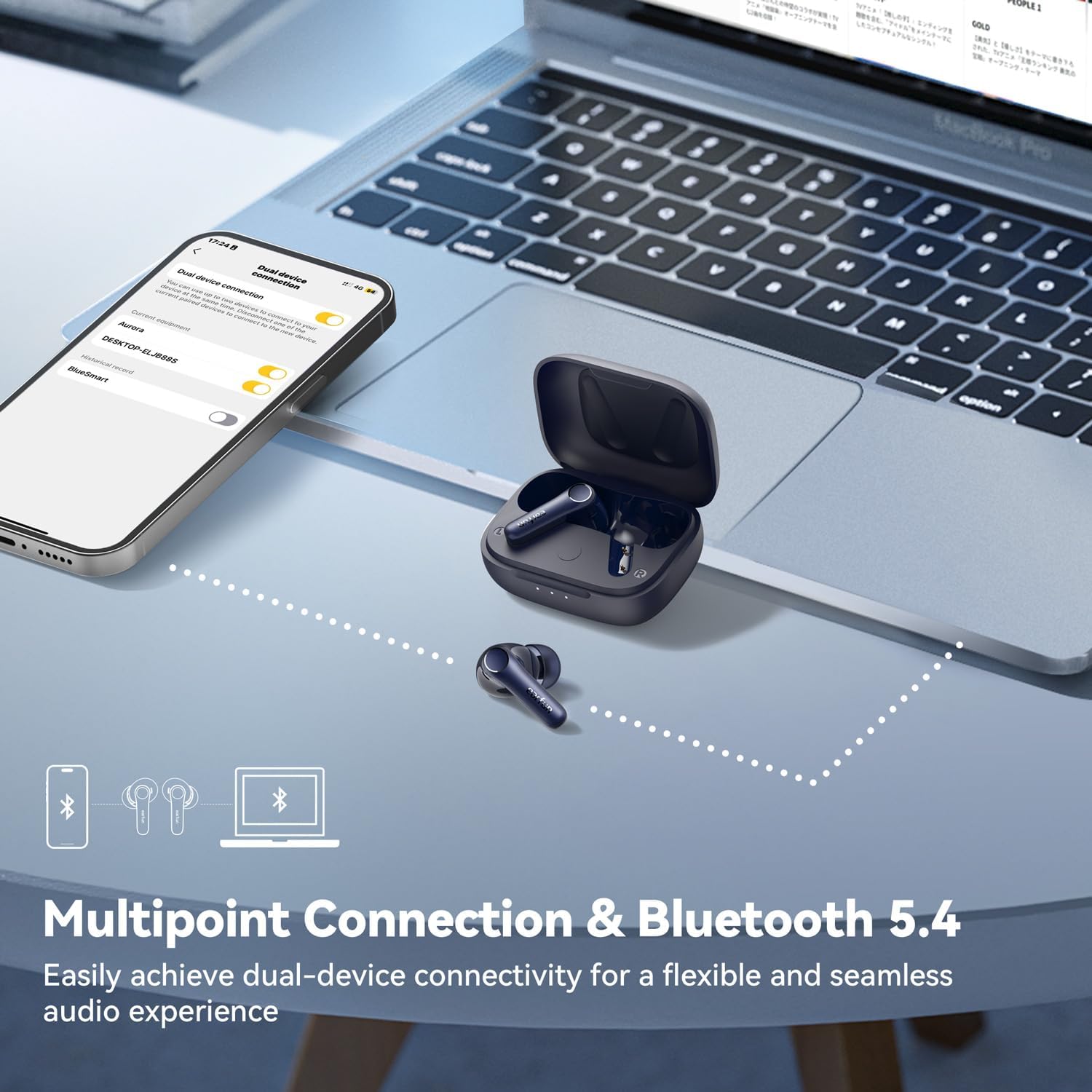
Image: The EarFun Air Pro 4 earbuds shown connected to both a smartphone and a laptop, demonstrating the multipoint connection feature for flexible audio use.
2.5 Auracast Broadcast Audio
With Auracast Broadcast Audio (available via updated firmware), you can share your audio with others or tune into public broadcasts and assistive listening systems. This feature allows for a shared listening experience.

Image: Two individuals, one wearing royal blue and the other white EarFun Air Pro 4 earbuds, positioned back-to-back, illustrating the audio sharing capability via Auracast.
2.6 ٽچ ڪنٽرول
The EarFun Air Pro 4 earbuds feature intuitive touch controls for managing playback, calls, and noise control modes. Refer to the quick start guide or the EarFun Audio App for a detailed mapping of touch gestures.
2.7 ڪن ۾ چڪاس
The earbuds are equipped with in-ear detection. Music playback will automatically pause when you remove an earbud and resume when you put it back in.

Image: A visual demonstration of the in-ear detection feature, showing music playing when earbuds are worn and pausing when removed.
3. سار سنڀال
3.1 صفائي
Regular cleaning helps maintain sound quality and hygiene. Use a soft, dry, lint-free cloth to wipe the earbuds and charging case. For earwax buildup on the eartips or speaker mesh, gently use a small, soft brush or cotton swab. Do not use abrasive cleaners or submerge the earbuds in liquid.
3.2 اسٽوريج
When not in use, store the earbuds in their charging case to protect them and keep them charged. Store the case in a cool, dry place, away from extreme temperatures and direct sunlight.
4. مسئلا حل ڪرڻ
4.1 عام مسئلا ۽ حل
- آواز ناهي: Ensure earbuds are charged, connected to your device, and volume is up. Check if the earbuds are properly seated in your ears.
- جوڙڻ جا مسئلا:
- پڪ ڪريو ته توهان جي ڊوائيس تي بلوٽوٿ فعال آهي ۽ ائربڊس پيئرنگ موڊ ۾ آهن.
- Forget "EarFun Air Pro 4" from your device's Bluetooth list and try pairing again.
- ائربڊس کي ڪيس ۾ واپس رکو، بند ڪريو، پوءِ پيئرنگ موڊ کي ري سيٽ ڪرڻ لاءِ ٻيهر کوليو.
- هڪ ائربڊ ڪم نه ڪري رهيو آهي: Place both earbuds back in the charging case, close the lid for a few seconds, then open them again. This often re-syncs them.
- ناقص ڪال معيار: Ensure microphones are clean. Try disabling ANC temporarily to see if it improves clarity in certain environments.
- چارج ڪرڻ جا مسئلا: Ensure the USB-C cable is securely connected and the power source is active. Clean the charging contacts on both the earbuds and the case.
4.2 ائربڊس کي ري سيٽ ڪرڻ
If you experience persistent issues, a factory reset may resolve them. Refer to the EarFun Audio App or the official EarFun support webتوهان جي ماڊل لاءِ مخصوص ري سيٽ هدايتن لاءِ سائيٽ.
وڌيڪ مدد لاءِ، مھرباني ڪري سرڪاري ويب سائيٽ ڏانھن رجوع ڪريو يوزر مينوئل (PDF) or contact EarFun customer support.
5. وضاحتون
| ماڊل نالو | ايئر فن ايئر پرو 4 |
| ماڊل نمبر | TW600E |
| شور ڪنٽرول | موافق شور منسوخي (50dB تائين) |
| رابطي ٽيڪنالاجي | وائرليس (بلوٽوٿ 5.4) |
| آڊيو ڪوڊيڪس سپورٽ | aptX Lossless, LDAC, LE Audio, LC3 |
| مائڪروفون | 6 Mics with AI Algorithm & cVc 8.0 ENC |
| راند جو وقت (سنگل چارج) | 11 ڪلاڪ تائين |
| ڪُل راند جو وقت (چارجنگ ڪيس سان) | 52 ڪلاڪ تائين |
| چارج ڪرڻ وقت | Approx. 2 Hours (Earbuds + Case) |
| تعدد جواب | 20 هرٽز - 20 ڪلو هرٽز |
| ڊرائيور جو قسم | متحرڪ ڊرائيور |
| ڪنٽرول قسم | ٽچ ڪنٽرول، ايپ ڪنٽرول |
| وزن | 56 گرام (ڪل) / 1.98 آونس |
| طول و عرض | 2.36 x 1.97 x 1.22 انچ |
| پاڻي جي مزاحمت جي سطح | نه پاڻي مزاحمتي |
6. وارنٽي ۽ سپورٽ
EarFun products typically come with a standard manufacturer's warranty. Please refer to the warranty card included in your product packaging or visit the official EarFun webتوهان جي علائقي لاءِ مخصوص تفصيلي وارنٽي شرطن ۽ ضابطن لاءِ سائيٽ.
For technical support, frequently asked questions, or to register your product, please visit the EarFun official webسائيٽ يا انهن جو ايميزون برانڊ اسٽور:
- EarFun Official Amazon Brand Store
- EarFun آفيشل Webسائيٽ (for general support and contact information)