1. تعارف
This manual provides essential information for the installation, operation, and maintenance of the Cisco IE-3400-8T2S-E Catalyst IE3400 Rugged Series Network Essential Switch. This device is designed for industrial environments, offering robust network connectivity. Please read this manual thoroughly before operating the device.
2. حفاظت جي ڄاڻ
سامان کي نقصان ۽ زخم کان بچڻ لاءِ هيٺ ڏنل حفاظتي احتياطن تي عمل ڪريو:
- ڊوائيس جي مناسب گرائونڊ کي يقيني بڻايو وڃي.
- ڪنهن به سار سنڀال يا تنصيب جي طريقيڪار کي انجام ڏيڻ کان اڳ بجلي بند ڪريو.
- Operate the switch within the specified environmental conditions (temperature, humidity).
- صرف قابل عملدار کي ئي هن سامان کي نصب ڪرڻ ۽ ان جي خدمت ڪرڻ گهرجي.
- ڊوائيس کي نمي يا انتهائي گرمي پد تي ظاهر ڪرڻ کان بچاء.
3. پيڪيج مواد
تصديق ڪريو ته توھان جي پيڪيج ۾ ھيٺيون شيون شامل آھن:
- Cisco IE-3400-8T2S-E Catalyst IE3400 Rugged Series Network Essential Switch
- دستاويز (جلدي شروعات جي ھدايت، حفاظتي معلومات)
- Mounting hardware (if included with specific model variant)
- Power connector terminal blocks
جيڪڏهن ڪا به شيءِ غائب يا خراب آهي، ته فوري طور تي پنهنجي سپلائر سان رابطو ڪريو.
4. جسماني اوورview
The following diagram illustrates the front panel components of the Cisco IE-3400-8T2S-E switch.
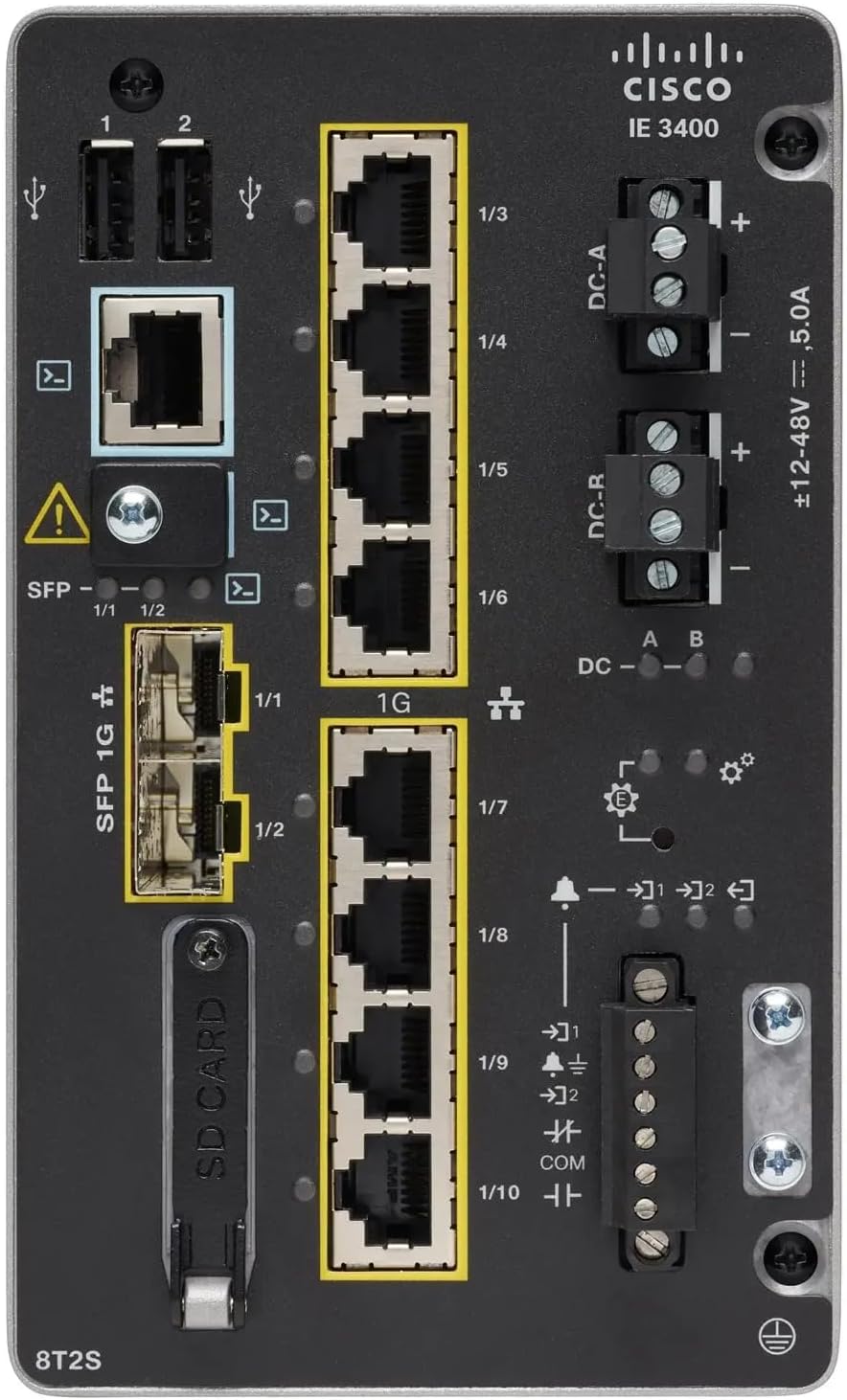
شڪل 1: Front Panel Layout of the Cisco IE-3400-8T2S-E Switch
4.1. Front Panel Components Description
- USB پورٽس (1، 2): Two USB ports for connecting external devices or for configuration.
- ڪنسول پورٽ: An RJ45 console port for local management and initial configuration.
- SFP 1G Ports (1/1, 1/2): Two Small Form-Factor Pluggable (SFP) ports supporting 1 Gigabit Ethernet for fiber optic connections.
- 1G Ethernet Ports (1/3 - 1/10): Eight 1 Gigabit Ethernet RJ45 ports for standard network connections.
- DC Power Inputs (DC-A, DC-R): Redundant DC power input terminals, supporting a voltage range of ±12-48V at 5.0A.
- گرائونڊنگ اسڪرو: Terminal for connecting the chassis to earth ground.
- SD ڪارڊ سلاٽ: Slot for an SD card, typically used for configuration backup or software storage.
- Alarm/Relay Ports (1/9, 1/10): Terminals for connecting external alarm systems or relay controls.
- LED اشارا: Various LEDs indicating power status (DC A/B), system status, link/activity for ports, and alarm status.
5. سيٽ اپ
5.1. سوئچ لڳائڻ
The IE3400 series switches are designed for industrial environments and typically support DIN rail or wall mounting. Refer to the specific mounting instructions provided with your mounting kit for detailed steps.
5.2. ڳنڍڻ واري طاقت
- Ensure the power source is off before connecting.
- Connect the DC power cables to the DC-A and/or DC-R terminal blocks, observing polarity (+ and -). The switch supports redundant power inputs.
- Connect the grounding wire to the grounding screw on the front panel.
- Once all connections are secure, apply power to the switch. The DC-A and/or DC-B LEDs should illuminate.
5.3. نيٽ ورڪ ڪنيڪشن
- Ethernet بندرگاهن: Connect standard RJ45 Ethernet cables from your network devices to the 1G Ethernet ports (1/3 - 1/10).
- SFP بندرگاهن: Insert compatible SFP transceivers into the SFP 1G ports (1/1, 1/2) and connect fiber optic cables as required.
- ڪنسول پورٽ: For initial configuration, connect a console cable from your management workstation to the RJ45 console port.
6. آپريٽنگ هدايتون
6.1. شروعاتي پاور اپ
Upon applying power, the switch will perform a power-on self-test (POST). The system LED will indicate the boot status. Once the boot process is complete, the switch will be ready for configuration.
6.2. Configuration Access
The switch can be configured via the console port using a terminal emulator or remotely via Telnet/SSH once an IP address is assigned. Refer to the Cisco IOS documentation for detailed configuration commands and procedures.
6.3. ايل ايم ڊي اشارا
Monitor the LED indicators on the front panel to understand the switch's operational status:
- DC-A/DC-B LEDs: Indicate the status of the primary and redundant DC power inputs.
- سسٽم LED: Indicates the overall operational status of the switch (e.g., green for normal operation, amber for warning, red for fault).
- لنڪ/سرگرمي LEDs (في پورٽ): Indicate network link status and data activity on each Ethernet and SFP port.
- الارم LED: Illuminates when a critical system alarm is triggered.
7. سار سنڀال
7.1. صفائي
وقت بوقت سوئچ جي ٻاهرين حصي کي نرم، سڪل ڪپڙي سان صاف ڪريو. مائع يا ايروسول ڪلينر استعمال نه ڪريو. پڪ ڪريو ته وينٽيليشن جا سوراخ مٽي ۽ ملبي کان پاڪ آهن.
7.2. فرمائيندڙ تازه ڪاريون
سسڪو سپورٽ کي باقاعدي طور تي چيڪ ڪريو website for the latest firmware updates. Applying updates can improve performance, add features, and address security vulnerabilities. Follow Cisco's official procedures for firmware upgrades.
7.3. ماحولياتي خيالات
Ensure the switch operates within its specified temperature and humidity ranges. Proper airflow around the device is crucial for heat dissipation.
8. مسئلا حل ڪرڻ
هي حصو عام مسئلن لاءِ بنيادي مسئلا حل ڪرڻ جا قدم فراهم ڪري ٿو.
8.1. ڪابه طاقت
- Verify that the power source is active and the power cables are securely connected to the DC-A/DC-R terminals.
- Check the DC-A/DC-B LEDs. If they are off, there is no power or a power supply issue.
8.2. No Network Link
- Ensure Ethernet or fiber optic cables are properly connected to both the switch port and the connected device.
- Check the Link/Activity LED for the specific port. If it is off, there is no link.
- تصديق ڪريو ته ڳنڍيل ڊوائيس آن آهي ۽ صحيح طريقي سان ڪم ڪري رهيو آهي.
8.3. System Alarm
- If the Alarm LED is illuminated, consult the Cisco IOS documentation for specific alarm codes and their meanings.
- Check system logs via the console or network management interface for detailed error messages.
9. وضاحتون
| خاصيت | تفصيل |
|---|---|
| ماڊل | IE-3400-8T2S-E |
| ٺاهيندڙ | سِسڪو |
| Ethernet بندرگاهن | 8 x 1 Gigabit RJ45 |
| SFP بندرگاهن | 2 x 1 Gigabit SFP |
| انٽرفيس جو قسم | RJ45, SFP, PoE, PoE+ (model dependent) |
| پاور ان پٽ | ±12-48V DC, 5.0A (Redundant) |
| پيداوار جي ماپ | 36 x 9 x 55 سينٽي |
| شيءِ جو وزن | 2.28 ڪلوگرام |
| مطابقت رکندڙ ڊوائيسز | ڊيسڪ ٽاپ، ليپ ٽاپ، پرنٽر |
| يو پي سي | 703670760433 |
10. وارنٽي ۽ سپورٽ
This product is offered as an Amazon Renewed item. Warranty and return policies are typically managed by the reseller (Amazon Renewed) for a specified period. Please refer to your purchase documentation or contact Amazon Renewed support for details regarding your specific warranty coverage.
For technical documentation, software downloads, and advanced support for the Cisco IE-3400-8T2S-E switch, please visit the official Cisco support website and search for your specific model.


