تعارف
The HMD Pulse Pro is an advanced unlocked smartphone designed for global use, featuring a powerful 50 MP dual rear camera and an equally impressive 50 MP front camera. It runs on Android 14, offers extended battery life, and boasts a repair-at-home design for user convenience. This manual provides essential information for setting up, operating, maintaining, and troubleshooting your device.
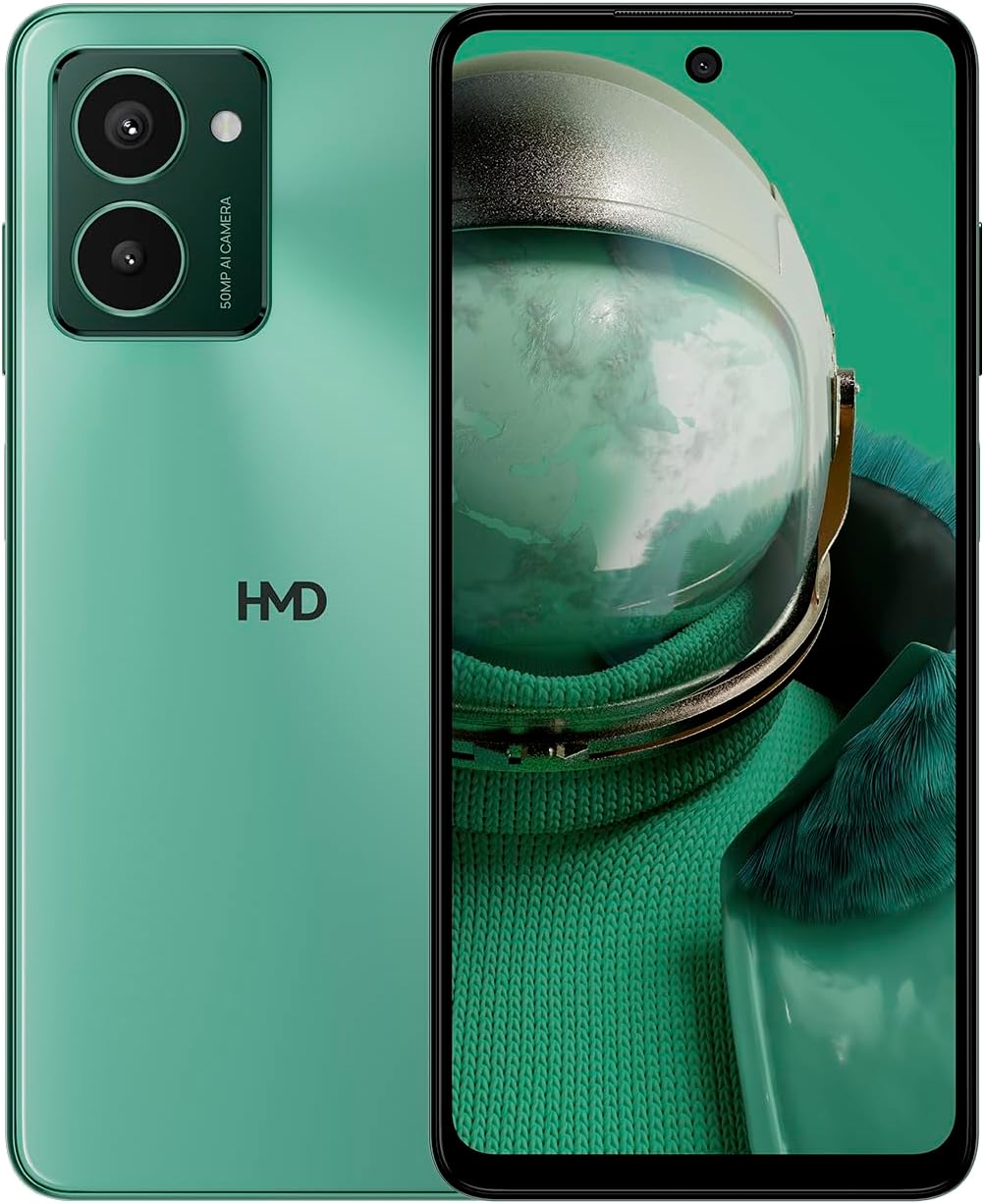
The HMD Pulse Pro smartphone in Glacier Green, showcasing its sleek design and dual camera system on the rear, alongside its vibrant display.
اهم خاصيتون:
- Striking design with refined lines and a cutting-edge aesthetic.
- Equipped with 50 MP rear and 50 MP front cameras for balanced and high-quality photography.
- Innovative selfie gesture function for easier and more dynamic self-portraits.
- Extended battery life providing up to 59 hours of usage on a single charge.
- International version, unlocked for compatibility with various carriers worldwide.
دٻي ۾ ڇا آهي
Upon unboxing your HMD Pulse Pro, please ensure all the following items are present:
- HMD پلس پرو اسمارٽ فون
- USB ڪيبل
- سم ٽري ايجيڪٽر ٽول
- تڪڙي شروعات جي ھدايت (الڳ يا ضم ٿي سگھي ٿي)
سيٽ اپ ڪريو
1. شروعاتي چارجنگ
Before first use, it is recommended to fully charge your HMD Pulse Pro. Connect the provided USB cable to the phone's charging port and the other end to a compatible USB power adapter (not always included) or a computer USB port. The device supports fast charging.
2. سم ڪارڊ ۽ مائڪرو ايس ڊي ڪارڊ داخل ڪرڻ
The HMD Pulse Pro supports dual SIM cards and expandable memory via a microSD card.
- پنهنجي فون جي پاسي تي سم ٽري ڳوليو.
- سم ٽري ايجيڪٽر ٽول کي ٽري جي ڀرسان ننڍڙي سوراخ ۾ داخل ڪريو ۽ نرميءَ سان دٻايو جيستائين ٽري ٻاهر نه اچي.
- پنهنجا نانو-سم ڪارڊ مقرر ڪيل سلاٽ ۾ رکو. پڪ ڪريو ته سون جا رابطا هيٺان مُنهن ڪري رهيا آهن.
- If using a microSD card for additional storage, place it into its dedicated slot on the tray.
- احتياط سان ٽري کي فون ۾ واپس دٻايو جيستائين اهو جاءِ تي ڪلڪ نه ڪري.
3. پاورنگ آن ۽ شروعاتي ترتيب
Press and hold the Power button until the HMD logo appears. Follow the on-screen instructions to complete the initial setup, including language selection, Wi-Fi connection, Google account setup, and security settings.
آپريٽنگ هدايتون
بنيادي نيويگيشن
- ٽچ اسڪرين: 6.65 انچ ڊسپلي تي ٽيپ ڪرڻ، سوائپ ڪرڻ، پنچ ڪرڻ ۽ اسپريڊ ڪندي نيويگيٽ ڪريو.
- پاور بٽڻ: اسڪرين کي جاڳائڻ/سليپ ڪرڻ لاءِ دٻايو. پاور آف ڪرڻ يا ٻيهر شروع ڪرڻ لاءِ دٻايو ۽ رکو.
- حجم بٽڻ: ميڊيا جي مقدار، ڪال جي مقدار، ۽ نوٽيفڪيشن جي مقدار کي ترتيب ڏيو.
ڪئميرا جو استعمال
The HMD Pulse Pro features a 50 MP dual rear camera and a 50 MP front camera, enhanced with AI capabilities.

A user demonstrating the innovative selfie gesture feature of the HMD Pulse Pro, allowing for hands-free photo capture.

هڪ بند اپ view of the HMD Pulse Pro's 50 MP front-facing camera, highlighting its AI-powered capabilities for enhanced selfies.
- لانچنگ ڪيمرا: Tap the Camera app icon or use a quick gesture (if enabled in settings).
- تصويرون وٺڻ Tap the shutter button. Use pinch-to-zoom for optical or digital zoom.
- Selfie Gestures: Utilize pre-defined hand gestures to trigger the front camera shutter without touching the screen. Refer to the in-app camera settings for available gestures.
- طريقا: Switch between various modes like Portrait, Night, Panorama, and Video.
بيٽري جو انتظام
The HMD Pulse Pro is equipped with a 5000 mAh battery, offering up to 59 hours of usage.

Two HMD Pulse Pro smartphones standing upright, with text emphasizing the impressive battery life of up to 59 hours.
- چارج ڪرڻ: Use the provided USB cable. A full charge takes approximately 2.5 hours.
- بيٽري سيور: Enable Battery Saver mode in Settings > Battery to extend usage time.
- Optimizing Usage: Reduce screen brightness, disable unused connectivity (Bluetooth, Wi-Fi, GPS), and close background apps to conserve battery.
سار سنڀال
پنھنجي ڊوائيس کي صاف ڪريو
To keep your HMD Pulse Pro in optimal condition:
- اسڪرين ۽ جسم کي صاف ڪرڻ لاءِ نرم، لِنٽ کان پاڪ ڪپڙو استعمال ڪريو.
- سخت ڪيميڪل، رگڙيندڙ صاف ڪندڙ، يا ايروسول اسپري استعمال ڪرڻ کان پاسو ڪريو.
- The device is water resistant; however, avoid submerging it in water.
سافٽ ويئر اپڊيٽس
باقاعدي طور تي سافٽ ويئر اپڊيٽس جي جانچ ڪريو ۽ انسٽال ڪريو ته جيئن پڪ ڪري سگهجي ته توهان جي ڊوائيس ۾ جديد خاصيتون، سيڪيورٽي پيچ، ۽ ڪارڪردگي بهتري آهي. سيٽنگون > سسٽم > سسٽم اپڊيٽ ڏانهن وڃو.
اسٽوريج جو انتظام
With 256 GB of internal storage, you have ample space. However, regularly manage your files and apps to maintain performance. You can also expand storage using a microSD card.
مشڪلاتون
This section addresses common issues you might encounter with your HMD Pulse Pro.
| مسئلو | ممڪن حل |
|---|---|
| ڊوائيس آن نه ٿيندي | Ensure the battery is charged. Connect to a charger for at least 30 minutes. Try holding the Power button for 10-15 seconds. |
| ايپس ڪريش ٿي رهيون آهن يا منجمد ٿي رهيون آهن | Clear the app's cache (Settings > Apps > [App Name] > Storage > Clear cache). Restart the phone. Update the app or the phone's software. |
| غريب بيٽري جي زندگي | Check background app usage (Settings > Battery). Reduce screen brightness. Disable unused connectivity features (Wi-Fi, Bluetooth, GPS, NFC). Enable Battery Saver mode. |
| وائي فائي/بلوٽوٿ سان ڳنڍي نٿو سگهجي | Toggle Wi-Fi/Bluetooth off and on. Restart your phone and the router/device. Forget the network/device and reconnect. |
| سم ڪارڊ نه مليو | Ensure the SIM card is correctly inserted in the tray. Restart the phone. Check with your carrier for network issues. |
فيڪٽري ري سيٽ
جيڪڏهن مسلسل مسئلا ٿين ٿا، ته فيڪٽري ري سيٽ ضروري ٿي سگهي ٿو. خبردار: اهو توهان جي فون تي سڀ ڊيٽا ختم ڪري ڇڏيندو. اڳتي وڌڻ کان اڳ اهم ڊيٽا جو بيڪ اپ وٺو.
- سيٽنگون > سسٽم > ري سيٽ آپشنز ڏانهن وڃو.
- "سڀ ڊيٽا ختم ڪريو (فيڪٽري ري سيٽ)" چونڊيو.
- پنهنجي فيصلي جي تصديق ڪريو ۽ جيڪڏهن چيو وڃي ته پنهنجو پن/نمون/پاسورڊ داخل ڪريو.
- فون ٻيهر شروع ٿيندو ۽ ري سيٽ جو عمل شروع ٿيندو.
وضاحتون
Detailed technical specifications for the HMD Pulse Pro smartphone:

The HMD Pulse Pro highlighting its stylish and cutting-edge design, dual SIM support, and 6.56" HD+ HID display with a 90Hz refresh rate. Note: While the image mentions 8GB/128GB, this specific model features 8GB RAM and 256GB internal storage.
| خاصيت | تفصيل |
|---|---|
| ماڊل نالو | Pulse Pro (TA-1606) |
| آپريٽنگ سسٽم | Android 14 |
| ڊسپلي سائيز | 6.65 انچ |
| قرارداد | 720 x 1612 |
| ريفريش جي شرح | 90 هز |
| رام ياداشت | 8 جي بي |
| رکڻ جي گنجائش | 256 GB (Expandable) |
| پوئين ڪئميرا | 50 ايم پي ڊبل ڪيمرا |
| سامهون ڪئميرا | 50 ايم پي |
| بيٽري جي گنجائش | 5000 mAh |
| چارج ڪرڻ وقت | لڳ ڀڳ. 2.5 ڪلاڪ |
| سي پي يو اسپيڊ | 1.6 GHz |
| رابطي | بلوٽوٿ، وائي فائي، يو ايس بي، اين ايف سي |
| خاص خاصيتون | Fast Charging Support, Dual SIM, Expandable Memory, Built-In GPS, Water Resistant |
| طول و عرض | 6.43 x 2.95 x 0.34 انچ |
| شيءِ جو وزن | 0.249 آونس (7.06 گرام) |
| آڊيو جيڪ | 3.5 ملي ميٽر |
| رنگ | Glacier Green |
وارنٽي ۽ سپورٽ
ٺاهيندڙ وارنٽي
Your HMD Pulse Pro smartphone is covered by a manufacturer's warranty against defects in materials and workmanship. The specific terms and duration of the warranty may vary by region. Please refer to the warranty card included with your product or visit the official HMD webتفصيلي وارنٽي معلومات لاءِ سائيٽ.
ڪسٽمر سپورٽ
For technical assistance, troubleshooting beyond this manual, or warranty claims, please contact HMD customer support. You can typically find contact information (phone numbers, email, support portals) on the official HMD webسائيٽ تي يا توهان جي ڊوائيس جي سيٽنگن جي سپورٽ سيڪشن ذريعي.
آن لائين وسيلا: For the latest FAQs, software downloads, and support articles, visit the official HMD support page. (Specific URL not provided in input, so a generic statement is used).


