1. تعارف
This manual provides detailed instructions for the proper use, setup, and maintenance of your Pard NV009-850nm Digital Night Vision Monocular. Please read this manual thoroughly before operating the device to ensure optimal performance and longevity. This device is designed for wildlife observation, hunting, and general outdoor viewمختلف روشني جي حالتن ۾.

Image 1.1: The Pard NV009-850nm Digital Night Vision Monocular. This image displays the compact and ergonomic design of the monocular, highlighting its main body, objective lens, and eyepiece.
2. پراڊڪٽ ختمview
2.1 پيڪيج مواد
انباڪسنگ ڪرڻ تي، تصديق ڪريو ته هيٺ ڏنل سڀئي شيون موجود آهن:
- Pard NV009-850nm Digital Night Vision Monocular
- حفاظتي سامان کڻڻ وارو ڪيس
- USB چارجنگ ڪيبل
- Wrist Strap / Neck Strap
- استعمال ڪندڙ جو دستياب (ھي دستاويز)

Image 2.1: Contents of the Pard NV009-850nm package. This image shows the monocular, its carrying case, charging cable, straps, and the user manual, all neatly arranged.
2.2 اهم خاصيتون
- Daytime and Nighttime Operation: Seamless transition between full-color daytime viewing and monochrome night vision mode.
- هاء ريزوليوشن تصويري: Features a 1920x1080 FHD CMOS image sensor and a 1024x768 OLED display for clear, detailed visuals.
- Adjustable IR Illuminator: Integrated 850nm IR illuminator with three intensity levels, providing effective illumination up to 200 meters.
- فوٽو ۽ وڊيو رڪارڊنگ: Capture 2608x1944 resolution photos and 1920x1080 Full HD videos directly to a Micro SD card.
- بصري ۽ ڊجيٽل زوم: Offers 4.7x optical magnification and 1.5x-3.0x digital zoom for precise target observation.
- وائي فائي ڪنيڪشن: Connects to smart mobile devices via the "PardVision" app for remote viewing and data transfer.
- Picture-in-Picture (PIP) Mode: Provides a magnified inset view of the central area for enhanced detail without losing the wider field of view.
- پائيدار ڊيزائن: IP67 waterproof rating ensures reliability in various outdoor conditions.

Image 2.2: Comparison of day and night vision modes. This image illustrates the monocular's capability to provide full-color images during the day and clear monochrome images at night, featuring a fox in both scenarios.

Image 2.3: Nighttime viewing range illustration. This graphic demonstrates the monocular's effective viewing distance of up to 200 meters (656 feet) in low-light conditions, showing a wild boar as an example target.

Image 2.4: Enhanced image quality demonstration. This image compares a blurred, lower-quality image with a sharp, enhanced image, illustrating the effectiveness of the PARD Visual Light Enhancement Algorithm (VLEA) and OLED display.
3. سيٽ اپ
3.1 بيٽري لڳائڻ
- Locate the battery compartment cover, typically on the underside or side of the monocular.
- اشاري جي مطابق ڍڪ کي موڙي يا سلائڊ ڪري کوليو.
- Insert a fully charged 18650 type battery (not included) with the correct polarity (+/-) as indicated inside the compartment.
- بيٽري ٽوڪريءَ کي compڪڻ سان محفوظ سان بند ڪريو.
3.2 مائڪرو ايس ڊي ڪارڊ داخل ڪرڻ
The device supports Micro SD cards for storing photos and videos.
- Locate the Micro SD card slot, usually protected by a rubber cover.
- مائڪرو ايس ڊي ڪارڊ کي سلاٽ ۾ نرميءَ سان داخل ڪريو جيستائين اهو جاءِ تي ڪلڪ نه ڪري. پڪ ڪريو ته ڪارڊ صحيح طرح سان ترتيب ڏنل آهي.
- Close the rubber cover to protect the slot from dust and moisture.
3.3 شروعاتي پاور آن ۽ فوڪس ايڊجسٽمينٽ
- ڊوائيس کي چالو ڪرڻ لاء پاور بٽڻ کي دٻايو ۽ دٻايو.
- Adjust the diopter ring on the eyepiece until the on-screen display (OSD) text appears sharp and clear to your eye.
- Rotate the objective lens focus ring to bring the observed image into sharp focus.
4. آپريٽنگ هدايتون
4.1 پاور آن/آف
- پاور آن: پاور بٽڻ کي تقريباً 3 سيڪنڊن لاءِ دٻايو ۽ رکو.
- بجلي بند: Press and hold the Power button for approximately 3 seconds until the device shuts down.
4.2 Mode Selection (Day/Night)
The NV009-850nm automatically adjusts to ambient light, but you can manually switch modes:
- مکيه ۾ viewing interface, short press the Mode button to toggle between Day (color) and Night (monochrome) vision modes.
4.3 IR Illuminator Adjustment
The integrated IR illuminator enhances visibility in complete darkness.
- Activate the IR illuminator by pressing its dedicated button (if available) or through the menu.
- Short press the IR button to cycle through the three intensity levels (Low, Medium, High) or to turn it off.

Image 4.1: IR Illuminator functionality. This graphic illustrates the 200m adjustable beam IR illuminator with its three intensity levels, showing how it illuminates a target in darkness.
4.4 زوم آپريشن
- Use the designated zoom buttons (often '+' and '-') to adjust the digital magnification. The optical magnification is fixed at 4.7x.
4.5 فوٽو ۽ وڊيو ڪيپچر
- ڦوٽو: In viewing mode, short press the Photo button to capture an image.
- وڊيو: Short press the Video button to start recording. Press again to stop recording.

Image 4.2: Video recording and playback function. This image shows the monocular's ability to capture and play back high-definition video, with a simulated screen displaying a recorded scene of a fox.
4.6 پلے بیک
- Enter the Playback menu via the main menu.
- Navigate through your recorded photos and videos using the directional buttons.
- Select an item to view it on the OLED display.
4.7 Wi-Fi Connectivity (PardVision App)
- Download the "PardVision" app from your device's app store (Apple App Store or Google Play Store).
- On the monocular, enable Wi-Fi through the system settings. The device will broadcast a Wi-Fi network.
- Connect your smartphone or tablet to the monocular's Wi-Fi network.
- Open the PardVision app to view a live feed, control settings, and transfer files.
4.8 تصوير ۾ تصوير (PIP) موڊ
- Activate PIP mode through the quick menu or system settings.
- A magnified window will appear on the main display, showing a zoomed-in view of the central area.
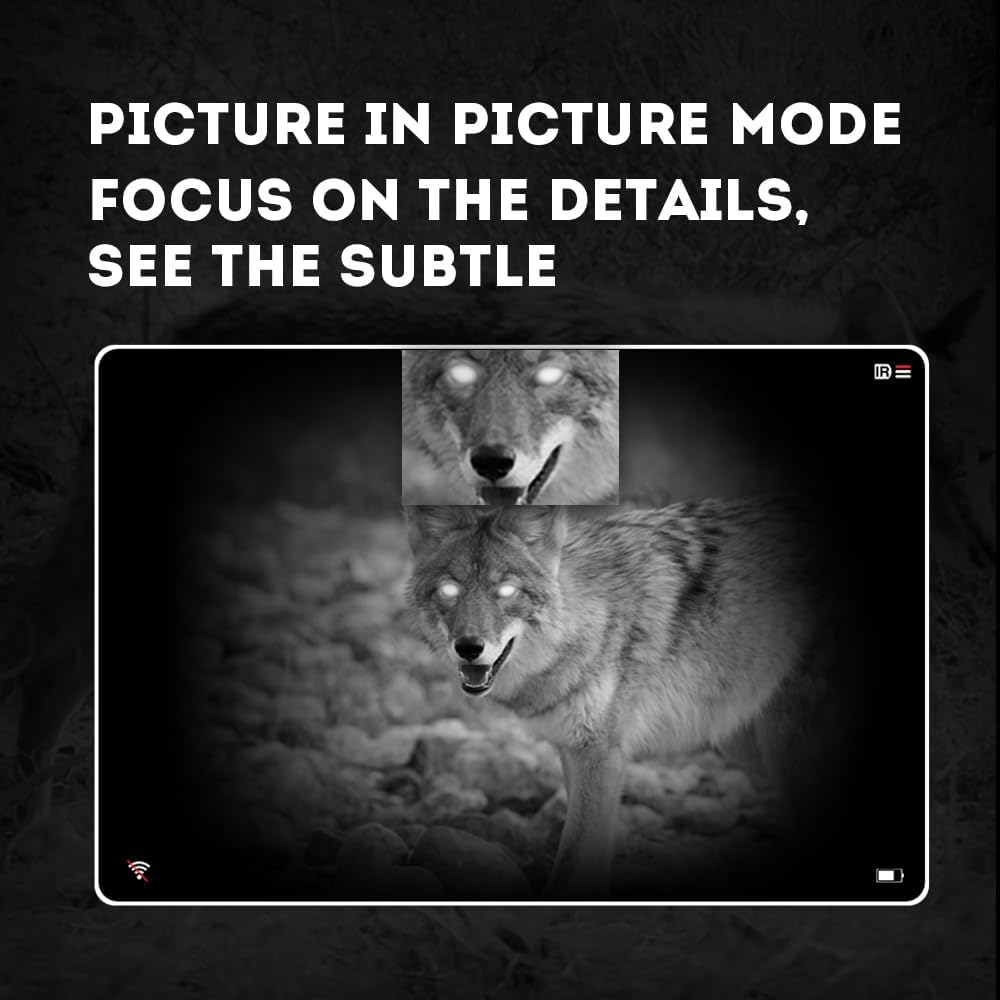
Image 4.3: Picture-in-Picture (PIP) mode. This image demonstrates how PIP mode allows users to focus on specific details within the main view, showing a magnified inset of a coyote's face.
5. سار سنڀال
5.1 ڊوائيس کي صاف ڪرڻ
- لينس: Use a soft, lint-free cloth specifically designed for optical lenses. For stubborn smudges, use a small amount of lens cleaning solution. Avoid abrasive materials.
- جسم: Wipe the monocular's body with a soft, damp ڪپڙو. سخت ڪيميائي يا محلول استعمال نه ڪريو.
5.2 بيٽري جي سنڀال
- Always use high-quality, rechargeable 18650 batteries.
- جيڪڏهن ڊوائيس گهڻي عرصي تائين استعمال نه ٿيندي ته بيٽري ڪڍي ڇڏيو.
- بيٽرين کي ٿڌي، سڪل جاءِ ۾ ذخيرو ڪريو.
5.3 اسٽوريج
- Store the monocular in its protective carrying case when not in use.
- ڊوائيس کي خشڪ ماحول ۾ رکو، سڌي سج جي روشني ۽ انتهائي گرمي پد کان پري.
6. مسئلا حل ڪرڻ
If you encounter issues with your Pard NV009-850nm, refer to the following common problems and solutions:
| مسئلو | ممڪن سبب | حل |
|---|---|---|
| ڊوائيس تي طاقت نه آهي | گهٽ يا ختم ٿيل بيٽري؛ بيٽري جي غلط انسٽاليشن | Charge or replace the battery; Reinstall battery with correct polarity. |
| تصوير urري آهي | Improper focus adjustment; Dirty lens | Adjust the diopter and objective lens focus rings; Clean the lenses. |
| No image in night mode | IR illuminator is off or set too low | Turn on the IR illuminator and adjust its intensity. |
| وائي فائي ڪنيڪشن جا مسئلا | Wi-Fi not enabled on device; Incorrect app settings | Ensure Wi-Fi is enabled on the monocular; Check app permissions and settings. |
| Cannot record photos/videos | No Micro SD card; SD card full or corrupted | Insert a Micro SD card; Delete old fileيا ڪارڊ کي فارميٽ ڪريو (پهرين اهم ڊيٽا جو بيڪ اپ وٺو). |
If the problem persists after attempting these solutions, please contact Pard customer support.
7. وضاحتون
| خاصيت | تفصيل |
|---|---|
| برانڊ | Pard |
| ماڊل نالو | PARD Night Vision Monocular |
| ماڊل نمبر | NV009-850nm |
| رنگ | ڪارو |
| پيداوار جي ماپ (LxWxH) | 7.16" x 2.24" x 2.79" (18.19 سينٽي ميٽر x 5.69 سينٽي ميٽر x 7.09 سينٽي ميٽر) |
| شيءِ جو وزن | 340 گرام |
| مواد | المونيم |
| مقصد لينس قطر | 25 ملي ميٽر |
| اکين جو آرام | 25 ملي ميٽر |
| رات جي ڏسڻ جي صلاحيت | ها |
| IR Illuminator Wavelength | 850nm (with 940nm option available in other variants) |
| CMOS Sensor Resolution | 1920x1080 پڪسل |
| ڊسپلي اسڪرين | 1024x768 OLED |
| آپٽيڪل ميگنيفيڪيشن | 4.7x |
| ڊجيٽل زوم | 1.5x-3.0x |
| فوٽو حل | 2608x1944 پڪسل |
| وڊيو قرارداد | 1920x1080 پڪسل |
| پنروڪ درجه بندي | IP67 |
| مطابقت رکندڙ ڊوائيسز | Camera (for recording) |
| چڙهڻ جو قسم | Rail Mount (if applicable for accessories) |
8. وارنٽي ۽ سپورٽ
8.1 وارنٽي ڄاڻ
The Pard NV009-850nm Digital Night Vision Monocular comes with a 1 سال وارنٽي خريداري جي تاريخ کان. هي وارنٽي عام استعمال هيٺ پيداوار جي خرابين ۽ خرابين کي ڍڪيندي آهي. اهو غلط استعمال، حادثن، غير مجاز ترميمن، يا نامناسب سار سنڀال جي ڪري ٿيندڙ نقصان کي ڍڪي نه ٿو ڏئي.
مھرباني ڪري وارنٽي دعوائن لاءِ خريد ڪرڻ جو پنھنجو ثبوت رکو.
8.2 ڪسٽمر سپورٽ
For technical assistance, warranty claims, or any questions regarding your device, please contact Pard customer support through the official Pard website or your retailer. When contacting support, please have your model number (NV009-850nm) and purchase date available.


