تعارف
This manual provides essential information for setting up, operating, maintaining, and troubleshooting your Acer TravelLite TL14-42M Business Laptop. Please read this guide thoroughly to ensure proper use and to maximize the lifespan of your device.
سامهون view of the Acer TravelLite TL14-42M laptop, showcasing ان جي سهڻي ڊيزائن ۽ ڊسپلي.
سيٽ اپ ڪريو
1. انباڪسنگ ۽ ابتدائي معائنو
Carefully remove the laptop and all accessories from the packaging. Verify that the following items are included:
- Acer TravelLite TL14-42M Laptop
- پاور اڊاپٽر
- پاور ڪنڊ
- استعمال ڪندڙ جو دستياب (ھي دستاويز)
Inspect the laptop for any physical damage. If any damage is found, contact your retailer immediately.
2. پاور اڊاپٽر کي ڳنڍڻ
Connect the power adapter to the laptop's charging port and then plug the power cord into an electrical outlet. It is recommended to fully charge the battery before initial use.
3. شروعاتي پاور آن ۽ ونڊوز 11 سيٽ اپ
Press the power button located on the keyboard deck to turn on the laptop. Follow the on-screen instructions to complete the Windows 11 Home setup process. This includes selecting your region, language, connecting to a Wi-Fi network, and creating a user account.
4. پردي کي ڳنڍڻ
Utilize the available ports to connect external devices such as a mouse, external display, or USB drives.

پاسي view of the laptop, illustrating the various connectivity ports including USB, HDMI, and LAN.
آپريٽنگ هدايتون
1. پاور مئنيجمينٽ
- پاور آن: پاور بٽڻ کي دٻايو.
- سمهڻ جو طريقو: ڍڪ بند ڪريو يا پاور بٽڻ کي مختصر طور تي دٻايو.
- بند ڪريو: شروع بٽڻ تي ڪلڪ ڪريو، پوءِ پاور > شٽ ڊائون.
- ٻيهر شروع ڪريو: شروع بٽڻ تي ڪلڪ ڪريو، پوءِ پاور > ٻيهر شروع ڪريو.
2. ڪي بورڊ ۽ ٽچ پيڊ
The laptop features a multi-language A4 size isolated spill-resistant keyboard and an extra-large touchpad. Use the touchpad for navigation and gestures. Refer to Windows 11 settings for touchpad customization.
3. ڊسپلي خاصيتون
The 14-inch Full HD (1920 x 1080) anti-glare TFT LCD provides clear visuals. Adjust display settings via Windows 11 for brightness and resolution preferences.

The laptop's 14-inch Full HD display offers vivid clarity for various tasks.
4. ڪنيڪشن
The laptop supports 802.11ac and 802.11ax wireless standards for Wi-Fi connectivity. It also includes a Gigabit LAN port for wired network connections.
5. پورٽ اوورview
Your TravelLite laptop is equipped with the following ports:
- 1 X HDMI پورٽ
- 1 x ايس ڊي ڪارڊ سلاٽ
- 1 x گيگابٽ لين پورٽ
- 1 x USB 3.2 Gen 2 Type-C (Full function, supports display over Type-C & charging)
- 2 x USB 3.2 Type-A (1 with power-off charging)
6. رازداري جون خاصيتون
The laptop includes a built-in camera shutter for enhanced privacy and enterprise-level security with TPM 2.0.

The laptop emphasizes privacy with a built-in camera shutter and TPM 2.0 security.
سار سنڀال
1. ليپ ٽاپ کي صاف ڪرڻ
نرم، لِنٽ کان خالي ڪپڙو استعمال ڪريو ٿورڙو ڊيampڊسپلي کي صاف ڪرڻ لاءِ پاڻي يا خاص اسڪرين ڪلينر سان صاف ڪريو. ڪيبورڊ ۽ چيسس لاءِ، نرم، سڪل ڪپڙو استعمال ڪريو. سخت ڪيميڪلز يا رگڙيندڙ مواد کان پاسو ڪريو.
2. بيٽري جي سنڀال
To prolong battery life, avoid extreme temperatures. It is recommended to fully discharge and recharge the battery periodically. If storing the laptop for an extended period, ensure the battery is charged to approximately 50%.
3. سافٽ ويئر اپڊيٽ
Regularly update your Windows 11 operating system and drivers to ensure optimal performance and security. Windows 11 Home includes automatic updates.
4. اسٽوريج جو انتظام
وقتي طور تي غير ضروري صاف ڪريو files and applications to maintain sufficient storage space on the 512GB SSD. Utilize cloud storage or external drives for large files.
مشڪلاتون
هي سيڪشن عام مسئلن کي حل ڪري ٿو جيڪي توهان کي پنهنجي ليپ ٽاپ سان منهن ڏيڻا پوندا.
1. ليپ ٽاپ آن نٿو ٿئي
- پڪ ڪريو ته پاور اڊاپٽر ليپ ٽاپ ۽ ڪم ڪندڙ بجلي جي آئوٽليٽ ٻنهي سان محفوظ طور تي ڳنڍيل آهي.
- ٻئي ڊوائيس ۾ پلگ ان ڪندي پڪ ڪريو ته پاور آئوٽليٽ ڪم ڪري رهيو آهي.
- جيڪڏهن بيٽري مڪمل طور تي ختم ٿي وئي آهي، ته ان کي پاور آن ڪرڻ جي ڪوشش ڪرڻ کان پهريان گهٽ ۾ گهٽ 30 منٽن تائين چارج ٿيڻ ڏيو.
2. ڊسپلي جا مسئلا
- If the screen is blank, try adjusting the brightness settings using the function keys.
- Connect an external monitor to determine if the issue is with the laptop's display or the graphics output.
3. وائي فائي ڪنيڪشن جا مسئلا
- پڪ ڪريو ته ونڊوز سيٽنگز ۾ وائي فائي فعال آهي.
- پنهنجو روٽر ۽ موڊيم ٻيهر شروع ڪريو.
- چيڪ ڪريو ته ڇا ٻيا ڊوائيس ساڳئي وائي فائي نيٽ ورڪ سان ڳنڍجي سگهن ٿا.
4. سست ڪارڪردگي
- پس منظر ۾ هلندڙ غير ضروري ايپليڪيشنون بند ڪريو.
- Run a disk cleanup and defragmentation (for HDD, though SSDs manage this differently).
- پڪ ڪريو ته ونڊوز ۽ ڊرائيور اپ ٽو ڊيٽ آهن.
وڌيڪ پيچيده مسئلن لاءِ، ايسر سپورٽ جو حوالو ڏيو webسائيٽ يا ڪسٽمر سروس سان رابطو ڪريو.
وضاحتون
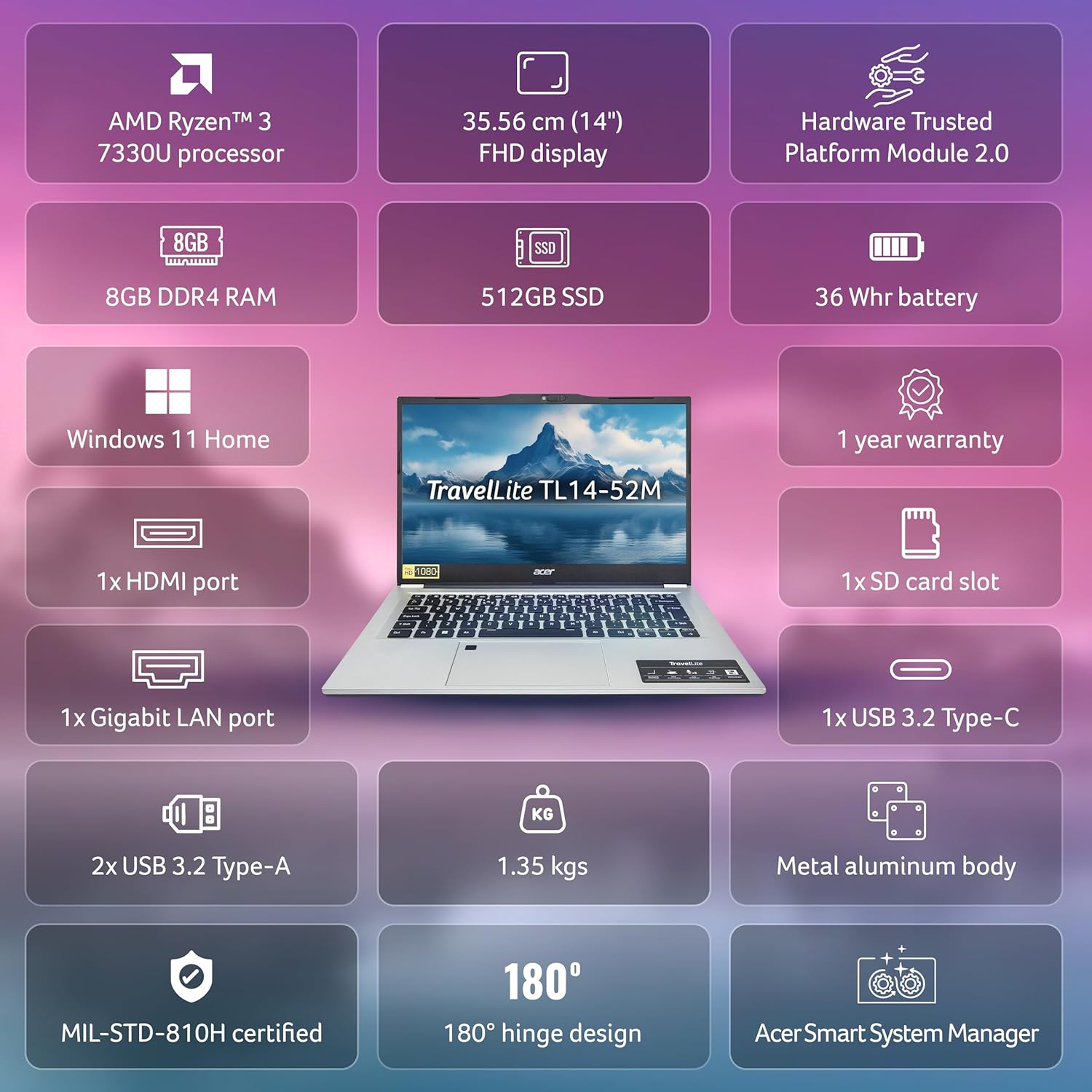
Below are the detailed technical specifications for the Acer TravelLite TL14-42M Business Laptop:

هڪ اوورview of the Acer TravelLite TL14-42M's key features and specifications.
| خاصيت | تفصيل |
|---|---|
| ماڊل نمبر | TL14-42M وضاحتون |
| پروسيسر | AMD R3 7330U with AMD Radeon Graphics |
| آپريٽنگ سسٽم | ونڊوز 11 گهر |
| ڏيکاريو | 14-inch Full HD (1920 x 1080) Anti-glare TFT LCD |
| رام | 8 GB DDR4 |
| ذخيرو | 512 GB SSD |
| گرافڪس | Integrated AMD Radeon R3 |
| بندرگاهن | 1x HDMI, 1x SD Card Slot, 1x Gigabit LAN, 1x USB 3.2 Gen 2 Type-C, 2x USB 3.2 Type-A |
| وائرليس ڪنيڪشن | 802.11ac، 802.11ax |
| بيٽري | 36 Watt Hours, 3-cell Lithium Ion (Approx. 4 hours average battery life) |
| طول و عرض (LxWxH) | 22 x 32.5 x 1.9 سينٽي |
| وزن | 1.34 ڪلو |
| شامل اجزاء | Laptop, Power cord, Adapter, User Manual |
وارنٽي ۽ سپورٽ
Your Acer TravelLite TL14-42M laptop comes with a 1-year manufacturer's warranty. For detailed warranty terms and conditions, please refer to the warranty card included with your product or visit the official Acer support webسائيٽ.
For technical assistance, driver downloads, or service inquiries, please visit the Acer support portal or contact their customer service department. Keep your product's serial number and proof of purchase readily available when seeking support.


