SmallRig Focus Control Dual Grip User Manual (Model 4327)
For DJI RS 2, RS 3 Pro, RS 4 Pro Gimbal Stabilizers
برانڊ: SMALLRIG
1. تعارف
This manual provides comprehensive instructions for the installation, operation, and maintenance of your SmallRig Focus Control Dual Grip, Model 4327. This accessory is designed to enhance the functionality and handling of DJI RS 2, RS 3 Pro, and RS 4 Pro gimbal stabilizers, offering improved control and versatility for professional video production.
Note: This dual grip is not compatible with the DJI RS 4.
2. دٻي ۾ ڇا آهي
- Dual Handles with Focus Control (1 unit)
- يوزر مينوئل (1 يونٽ)

Image: The package contents, including the two dual handles and the instruction manual.
3. سيٽ اپ ۽ تنصيب
The SmallRig Focus Control Dual Grip is designed for quick and efficient attachment to your DJI RS series gimbal. Follow these steps for proper installation:
- Attach the Central Mounting Clamp: Secure the central mounting clamp of the dual grip to the NATO rail on your DJI RS 2, RS 3 Pro, or RS 4 Pro gimbal. Ensure the clamp is fully engaged and tightened to prevent movement.
- Connect the Handles: Slide each handle onto the NATO rails extending from the central clamp. The handles can be adjusted along these rails to achieve your preferred width and balance.
- Secure the Handles: Tighten the locking mechanisms on each handle to firmly secure them in place. Verify that both handles are stable and do not wobble.
- Cable Connection (if applicable): If using the focus control features, connect the necessary control cables from the grip to your gimbal and camera as per your gimbal's instructions.

Image: Detail of the quick-release clamp mechanism for attaching the dual grip to the gimbal's NATO rail.

Image: The SmallRig Focus Control Dual Grip mounted on a DJI RS series gimbal, ready for operation.
4. آپريٽنگ هدايتون
The dual grip provides enhanced control over your gimbal and camera functions. Familiarize yourself with the controls for optimal use.
4.1. مربوط ڪنٽرول
The right handle integrates several key controls for efficient operation:
- شٽر ڪنٽرول: Initiate photo capture or video recording.
- رڪارڊنگ: شروع ڪريو ۽ وڊيو رڪارڊنگ بند ڪريو.
- جوائس اسٽڪ آپريشن: Control gimbal pan and tilt movements.
- موڊ مٽائڻ: Cycle through different gimbal operating modes (e.g., Pan Follow, Tilt Lock).
- Centering/Locking: Quickly re-center the gimbal or lock its orientation.
- Power/Sleep Mode: Manage the gimbal's power state.

تصوير: تفصيلي view of the integrated controls on the right handle, including joystick, mode button, power button, and focus scroll wheel.
4.2. Focus Control Dial
The ergonomic focus dial allows for precise adjustment of the gimbal's 3-axis system, focus, and various camera parameters. Rotate the dial to achieve desired focus or camera settings.
4.3. Inverted Use and Flexible Angles
The dual grip supports inverted operation, enabling low-angle shots and diverse camera perspectives. The handles can be adjusted to various angles for comfortable and stable shooting in different scenarios.

Image: Demonstrating the inverted use capability of the dual grip for flexible shooting angles.
5. گھڻا ماؤنٽنگ پوائنٽس
The dual grip features a variety of mounting options for attaching additional accessories, expanding your rigging possibilities:
- 1/4"-20 ڌاڳو وارا سوراخ: Standard mounting points for small accessories like monitors, microphones, or lights.
- 3/8"-16 سوراخ ڳولڻ: Anti-twist mounting points for more secure attachment of heavier accessories.
- ٿڌي جوتا جبل: For attaching shoe-mount accessories.
- نيٽو ريل: Provides quick-release and adjustable mounting for compatible accessories.
- QD ساکٽ: Quick Detach socket for attaching QD sling swivels or straps.
- پٽي سلاٽ: For securing wrist or neck straps.
These mounting points allow for integration with accessories such as V-mount battery plates (e.g., SmallRig ID 2801B, 2988) to provide extended power for both the stabilizer and camera.

Image: Illustration detailing the multiple accessory mounting points available on the dual grip.
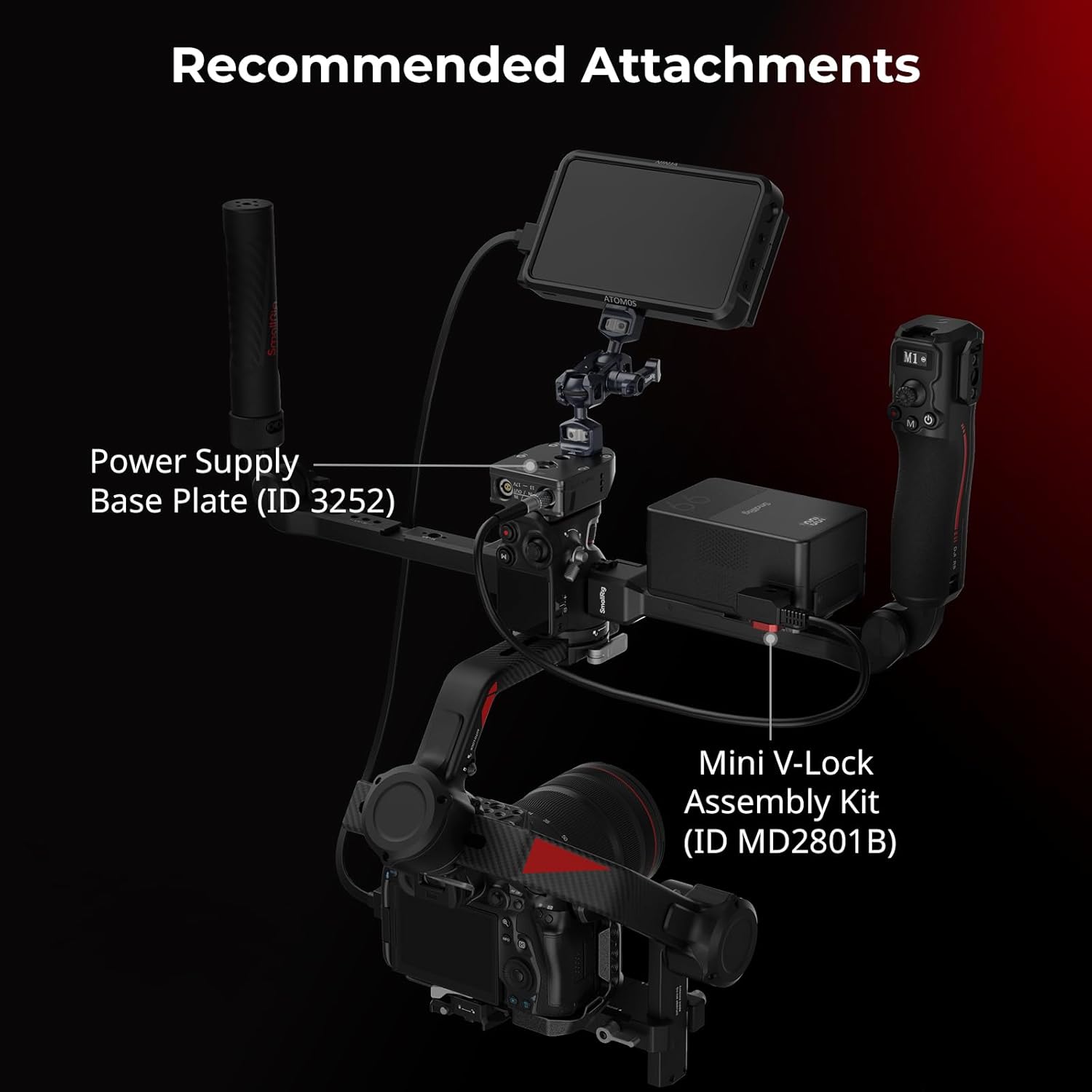
تصوير: Example of recommended attachments, demonstrating how accessories like a power supply base plate and V-lock assembly kit can be integrated.
6. Quick Setup and Storage
The SmallRig Focus Control Dual Grip is designed for rapid assembly and disassembly, facilitating efficient shooting workflows and convenient storage. The modular design allows for quick attachment and detachment from the gimbal, and the handles can be folded or separated for compact transport.

Image: Demonstrating the compact storage of the handles and their quick attachment to the gimbal.
7. وضاحتون
| ماڊل نمبر | 4327 |
| مطابقت | DJI RS 2 / RS 3 Pro / RS 4 Pro (Not for RS 4) |
| مواد | Aluminium Alloy, Plastic, Silicone |
| پيداوار جي ماپ | 520.0 × 66.5 × 209.0 ملي ميٽر (20.5 × 2.6 × 8.2 انچ) |
| شيءِ جو وزن | 851 گرام (1.88 پائونڊ) |
| وڌ ۾ وڌ لوڊ گنجائش | 8.0kg / 17.6lb |
| چڙهڻ جون پوائنٽون | 1/4"-20 threaded holes, 3/8"-16 locating holes, Cold Shoe, NATO Rail, QD Socket, Strap Slots |
8. سار سنڀال
To ensure the longevity and optimal performance of your SmallRig Focus Control Dual Grip, follow these maintenance guidelines:
- صفائي: Wipe the grip with a soft, dry cloth after each use to remove dust and debris. For stubborn dirt, use a slightly damp ڪپڙو ۽ هلڪو صابڻ سان صاف ڪريو، پوءِ چڱيءَ طرح سڪايو. سخت ڪيميڪلز يا رگڙيندڙ مواد کان پاسو ڪريو.
- اسٽوريج: Store the dual grip in a clean, dry environment, away from extreme temperatures and direct sunlight. Utilize the quick disassembly feature for compact and protected storage in a gear bag.
- چڪاس: Periodically inspect all screws, clamps, and moving parts for tightness and wear. Tighten any loose screws and replace worn components as necessary.
- لوڻ: Moving joints and locking mechanisms may benefit from a small amount of silicone-based lubricant if they become stiff. Apply sparingly and wipe off any excess.
9. مسئلا حل ڪرڻ
If you encounter issues with your SmallRig Focus Control Dual Grip, consider the following common solutions:
- Grip feels loose: Ensure all NATO clamps and locking screws are fully tightened. Re-check the connection to the gimbal's NATO rail.
- ڪنٽرول جواب نه ڏئي رهيا آهن: Verify that all control cables are securely connected between the grip, gimbal, and camera. Check the gimbal's power status and ensure it is properly paired with any control accessories.
- لوازمات ڳنڍڻ ۾ ڏکيائي: Confirm that the accessory's mounting interface (e.g., 1/4"-20 screw, cold shoe) matches the corresponding mounting point on the dual grip. Ensure no debris is obstructing the threads or slots.
- Ergonomic discomfort: Adjust the position of the handles along the NATO rails to find a more comfortable and balanced grip for your shooting style.
For further assistance, please refer to the official SmallRig support channels.
10. وارنٽي ۽ سپورٽ
SmallRig products are designed for durability and performance. For information regarding warranty coverage, product registration, or technical support, please visit the official SmallRig webسائيٽ يا انهن جي ڪسٽمر سروس کاتي سان رابطو ڪريو.
سرڪاري سمال رِگ Webسائيٽ: www.smallrig.com
مھرباني ڪري ڪنھن به وارنٽي دعوائن لاءِ خريداري جو ثبوت رکو.


